
We may receive a commission from our partners if you click on a link to review or purchase a product or service. Click to Learn More
Spiceworks is a no-frills, free asset management system that tracks software and hardware devices through an IP scanning system. The system offers four free forever plans with support included and no user or asset limits, which makes it ideal for larger teams with fairly basic asset tracking demands.
The platform offers reliable asset management, alerts, and reporting features, making it suitable for businesses managing low-cost requirements. However, if businesses invest heavily in assets like machinery or vehicles, they should opt for alternative providers with granular tracking and additional alert options instead. The system is littered with adverts too, which adds to the menu’s already clunky user experience.
There is lots more to explore, so read on to learn about Spiceworks’ features, functionality, and how it stacks up to the competition. Alternatively, if it’s quick quotes you’re after, use our free comparison tool for pricing estimates from the best asset tracking providers on the market.
- Spiceworks is a perfectly serviceable free asset management system that offers unlimited users and assets, so it’s great for larger teams with basic demands.
- The system is best for tracking low-cost IT hardware and software assets rather than high-value equipment like vehicles or machinery, due to its lack of granular tracking features.
- Asset tracking is conducted via IP scanning, which is a less precise method than GPS tracking for non-office-based assets.
- The platform does not include advanced features such as geofencing or usage alerts for tracked assets.
- Support is restricted to email and community forums, as there are no live chat or phone support options.
- The platform is funded by ads, which does impact the user experience. Alternatively, there’s an ad-free version available for $45 per month.
Spiceworks

In Short
-
Pros
- Tracks and manages licenses
- Has automated email alerts
- Integrates with help desk tools
-
Cons
- Supports manual entry, not GPS or barcodes
- Some plugins incompatible with newest version
Images

Spiceworks Review: Quick Fact File
If you’re unsure if Spiceworks is right for your business, take a look at its main deciding features below:
- Spiceworks is totally free for teams of any size, making it a safe bet for businesses looking to keep costs down.
- Spiceworks tracks assets using IP address scanning, making its system less accurate than providers that use GPS scanning, like Samsara.
- Spiceworks has no limit on assets, devices, agents, or users, so it’s great for large teams with basic asset tracking needs.
- Spiceworks uses targeted advertising to keep its product free. If you want a clean, ad-free interface, we’d recommend software like Freshservice or Verizon instead.
- Spiceworks is supported on web and mobile, but its mobile app isn’t as user-friendly as the alternatives offered by Asset Tiger or Samsara.
- Unlike leading systems like Samsara, Spiceworks lacks advanced features like geofencing and usage alerts, so we wouldn’t recommend it for businesses managing high-value assets.
- Spiceworks offers premium support on all of its free plans, which includes access to user forums, email support channels, and a knowledge centre.
All Spiceworks plans place no limits on tickets, users, devices, agents, or technicians, and all of its packages offer free premium support as well.

Pricing: Is Spiceworks Right for Your Business?
Spiceworks offers four completely free packages: Individual, Team, Enterprise, and Custom.
While the four plans are designed for businesses of different sizes, all of Spiceworks’ plans allow for an unlimited amount of users, assets, technicians, and agents, while other providers, like Asset Tiger, place heavy user and asset limits on their complementary plans. This makes Spiceworks an excellent value for large and growing teams that manage a large amounts of IT assets.
However, Spiceworks’ always-free pricing model does come with a slight catch. Instead of monthly fees, the asset tracking software generates revenue through ads. These ads clutter up Spiceworks’ already crowded interface, hindering the overall user experience and this makes the platform less suitable for users in need of a simple solution.
Users can go ad-free with Spiceworks’ My Way plan, which costs $45 per month or $495 per year. My Plan users can also upload their company logo in the ad space and add a logo to PDF reports.
Does Spiceworks have a free plan?
Yes, all of Spiceworks’ plans are free forever. This includes limitless asset tracking for a limitless number of users. However, if users prefer to invest in an ad-free experience, they can purchase the provider’s My Way plan for $45 a month.
Spiceworks Review: Key Features
Spiceworks isn’t renowned for its vast feature package. However, the provider offers more than enough capabilities for businesses with simple asset tracking needs.
Asset Tracking
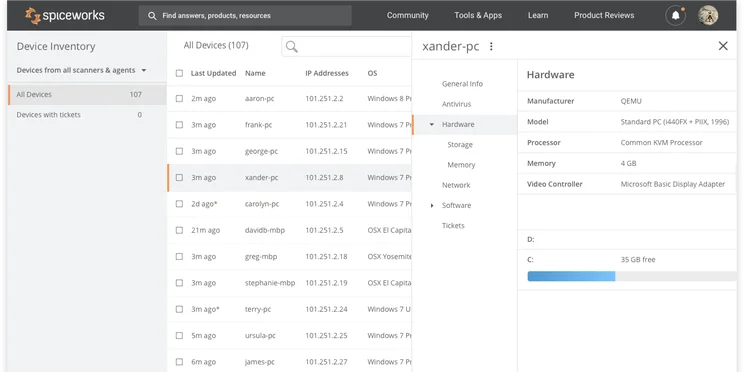
Spiceworks lets businesses track their assets and devices using a network inventory. Businesses can add items to the system by installing an agent application onto the hardware or software devices. Then, a Spiceworks IP scanner tool lets users discover and monitor devices on the network.
In addition to tracking devices and documents, Spiceworks’s asset management system lets admins access device purchasing records and assign new devices to users.
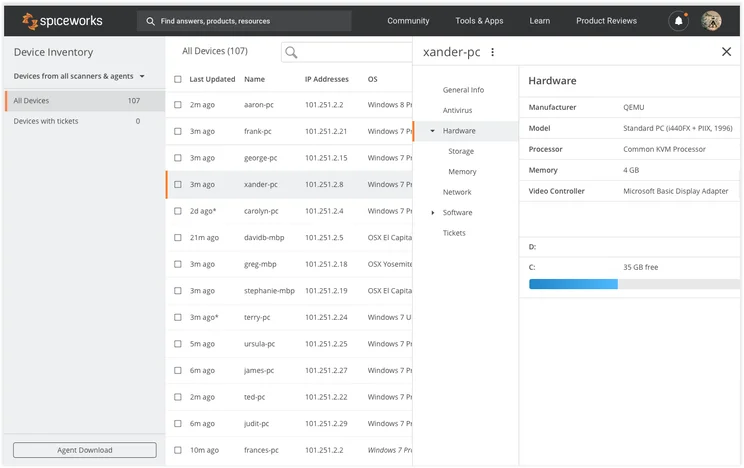
Spiceworks’ device inventory menu. Source: Spiceworks
However, when compared to GPS tracking, which relies on a network of satellites to provide precise location information, IP scanning is considered old-fashioned and provides less detailed updates for businesses. This makes Spiceworks less suitable for businesses managing high-value, mobile devices than alternatives like Tenna and Samsara.
System alerts
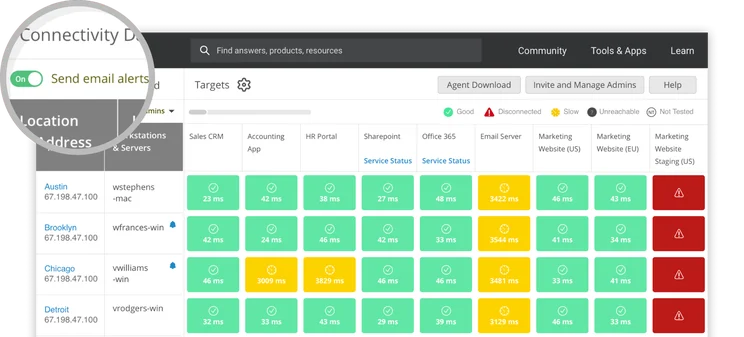
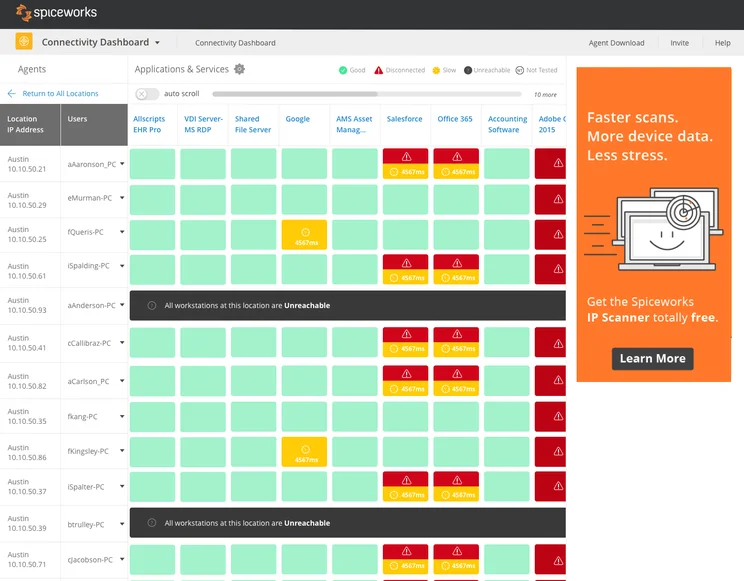
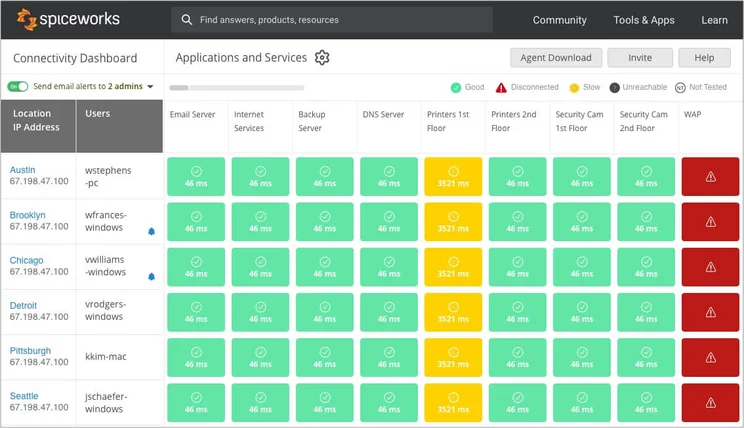
Spiceworks issues a number of useful updates and notifications, including real-time email alerts when resources are unreachable from remote sites, and expiry date alerts for documents and compliance certificates. This said, Spiceworks doesn’t offer geofencing or maintenance scheduling alerts, which are offered by comprehensive asset management systems like Verizon and Samsara.
Reporting
Spiceworks offers two reporting options to help businesses maintain a clear overview of their asset portfolio. The provider features a built-in report tab in the navigation bar. This gives users insights into tickets, labor data, and an advanced reporting integration that allows users to build customizable reports with Microsoft Power BI (pictured below).
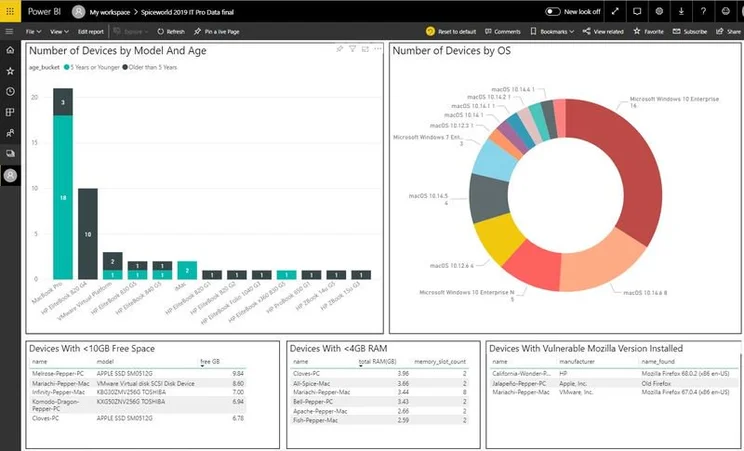
Spiceworks’ reporting features are easy to use and are fairly robust for a free version. However, a popular complaint among user forums is that these reporting options lack clarity, and prioritize data quantity over quality insights. If asset reporting is a high priority for your business, we’d recommend alternatives like Azunga because it offers advanced reporting functions like historical activity reporting.
Security
As free asset-tracking software, Spiceworks’ commitment to network security is commendable. The provider offers a number of mechanisms to keep data safe, including a Secure Sockets Layer (SSL) certificate checker, a subnet calculator, and an internet protocol (IP) lookup.
When compared with other free asset-tracking solutions like Snipe-IT (which offers no security features at all), Spiceworks is a good contender for businesses that don’t want a trade-off between value and system safety.
Help & support
Spiceworks provides helpdesk and community support to its users at no cost at all.
Users can email queries to the platform directly, or submit questions via the support forum. Alternatively, Spiceworks’ expansive knowledge base and University issue free help articles, video tutorials, and webinars for guidance. Spiceworks’ user forums showcase common customer queries and insights from the provider’s help team, which are referred to as ‘SpiceTrainers’.
However, with Spiceworks lacking live chat and telephone options, the platform may not be ideal for users new to asset tracking software and need to resolve issues quickly.
How Does Spiceworks Compare With Other Providers?
Spiceworks’ no-frills approach to asset management will undoubtedly work for many businesses, but it’s definitely not the best software of its kind.
For those in need of a sophisticated toolkit, Samsara is our overall choice for best asset tracking software. The platform features just about every trick in the book, from continual real-time GPS tracking to historical data reporting. However, with prices for Samsara only available on request, the software doesn’t touch Spiceworks when it comes to value.
If you’re committed to keeping costs low, Asset Tiger is a feature-rich, user-friendly asset tracker that’s free for businesses managing under 250 assets, while Snipe-IT is another strong contender with open-source software and no asset or user limit. Unlike Spiceworks, however, Snipe-IT requires you to pay more for hosting and customer service options though, making it less suitable for beginners to the software.
Learn more about Snipe-IT in our Snipe-IT review here.
There are tons of great alternatives available, though. See how our favorites size up in our comparison table below:

Want to know if Snipe-IT is a good deal?
Compare it to other asset tracking software right now
|
Free version
|
Paid version
|
Best for
|
Pros
|
Cons
|
|||
|---|---|---|---|---|---|---|---|
 |
BEST RATED
 |
 |
 |
 |
 |
 |
 |
|
Spiceworks |
Samsara |
Tenna |
Verizon Connect |
AssetCloud by Wasp |
AssetTiger |
Azuga |
ATTI |
|
Yes |
No |
Demo |
Free demo |
Demo |
Yes |
Demo available |
Demo |
|
N/A |
Price on request |
Starts at: $108/user/month |
$20/500 assets/month |
Price on request |
Price on request |
||
|
Tracking documents alongside assets |
Features |
Diverse operations |
Larger companies |
Small companies with fixed assets |
Best overall |
Moveable assets |
Companies with heavy equipment |
|
|
|
|
|
|
|
|
|
|
|
|
|
|
|
|
Our Methodology
In order to rate asset tracking providers and enable you to make the best decision for your business, here at Tech.co we take a hands-on approach. We are confident telling you which provider is best for you, because we’ve done the research.
We compare providers across multiple criteria, including the features that the software provides, how easy it is to use, and the customer service experience.
Here are just a few areas we look at in our in-depth research:
- Price: While price isn’t everything, we know that it’s important to many businesses. We rate the pricing of each provider, as well as telling you if there is a free tier, or even a free trial, so you can try it before you commit.
- Types of asset trackers: What sort of tools does the provider offer? Different types of asset tracker tags offer various levels of trackability. Barcodes might be a cheap option, and suitable for smaller businesses, but businesses operating across multiple sites will want something that can offer real-time tracking, like GPS or RFID tags.
- Alerts: When tracking assets, you want to be sure that you know where they are at all times. Some platforms can tell you when an asset leaves a certain location, or is being used outside of work hours. We factor these features into our research when rating each provider.
- Mobile apps: A good mobile app can make or break a platform. A good one makes every process seamless, while a bad one can render the whole platform nothing more than a headache. We look at the quality of the apps on offer, take into account user reviews, and rate them accordingly.
If you want to learn more about the process by which we rate and rank business software providers, take a look at our in-depth research guide for more information.
Spiceworks provides excellent value asset tracking software for businesses that can make do without advanced capabilities. It has no user or asset limit, and includes complimentary helpdesk support, making it more beginner-friendly than free alternatives, like Snipe-IT.
However, Spiceworks’ user experience is quite clunky and hard to navigate, and its system alerts and reporting features are not very comprehensive. This lack of regular, in-depth insights makes the platform less desirable for businesses managing high volumes of valuable assets.
If you’re still undecided on your ideal asset tracking solution, there are many great contenders to choose from. You can use our free asset tracking comparison tool to compare quotes from the top providers in minutes.
Spiceworks Review FAQs
Spiceworks’ asset tracking system takes data security seriously. The provider adheres to the US-EU Safe Harbor Framework guidelines, and it also offers a range of security mechanisms from SSL certificates to an IP lookup tool.
Spiceworks keeps its asset management software free by generating revenue through ads. However, if users would prefer an ad-free experience, they can upgrade to the provider’s My Way plan for $45 per month, or $495 per year.
Spiceworks helpdesk is available on all free plans, enabling users to track, prioritize, and manage their daily projects and user requests at no additional cost.
If you click on, sign up to a service through, or make a purchase through the links on our site, or use our quotes tool to receive custom pricing for your business needs, we may earn a referral fee from the supplier(s) of the technology you’re interested in. This helps Tech.co to provide free information and reviews, and carries no additional cost to you. Most importantly, it doesn’t affect our editorial impartiality. Ratings and rankings on Tech.co cannot be bought. Our reviews are based on objective research analysis. Rare exceptions to this will be marked clearly as a ‘sponsored’ table column, or explained by a full advertising disclosure on the page, in place of this one. Click to return to top of page


