
We may receive a commission from our partners if you click on a link to review or purchase a product or service. Click to Learn More
QuickBooks Online costs between $38 and $340 per month across four pricing plans: Simple Start ($38), Essentials ($85), Plus ($140), and Advanced ($340). Currently, a deal means that all of these plans are half price for the first three months.
QuickBooks Online is one of the best options on the market for businesses because it offers plenty of options to automate accounting tasks, such as through Intuit Intelligence AI, as well as over 800 third-party integrations.
Read on for a breakdown of QuickBooks Online plans and costs, as well as specific guidance on which plan is best for your business. We also outline any additional and hidden fees businesses should be aware of, and compare QuickBooks with other top accounting providers.
- QuickBooks Online pricing starts at $38 per month with the Simple Start plan and can reach up to $340 per month on the Advanced plan.
- Retail and restaurant operations should opt for the Plus plan to access essential inventory tracking and profitability analysis tools.
- Solo entrepreneurs can use a limited Free plan to help organize professional invoices and expenses.
- Users should factor in additional monthly costs for Payroll, starting at $50 per month, plus $7 per employee, per month. Time tracking starts at $20 per month, plus $10 per employee, per month.
- Businesses will also pay 1% for ACH transfers and 2.99% for standard card payments when using QuickBooks’ built-in payment processor.
- QuickBooks is a great choice because of its deep automation capabilities, including the AI Intuit Intelligence and a library of over 800 third-party integrations.
QuickBooks Online is currently offering 50% off for three months on all of its pricing plans, including the Payroll and Time Tracking add-ons.
Bear in mind users won’t be able to take advantage of QuickBooks Online’s standard free trial, and these prices are paid monthly. Additional sales tax may be applied where applicable and this offer is for new customers only.
QuickBooks Online: Pricing Plans
QuickBooks has four plans on offer for businesses, with prices starting at $38 per month for the Simple Start plan. The QuickBooks Online price is the same whether users want to pay annually or monthly.
Here’s how prices line up, and you can click on each plan to see what it offers:
QuickBooks Online Simple Start: $38 per month
QuickBooks Online’s Simple Start plan is ideal for small businesses getting started because of features like automated bookkeeping and bill paying that can save time for smaller companies starting with a small team. You’ll also get access to Intuit Intelligence AI, the provider’s AI assistant, which can help further streamline and speed up operations.
- Access for one user and two accountants
- Intuit Intelligence AI
- Automated bookkeeping
- Basic business reports
- Invoice and get paid
- Five ACH payments per month
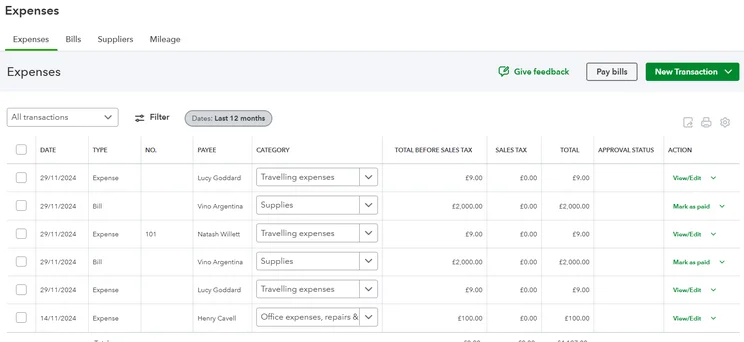
QuickBooks Online offers a simple dashboard where owners can monitor and manage expenses. Source: Tech.co testing
QuickBooks Online Essentials: $85 per month
QuickBooks Online’s Essentials plan is ideal for businesses looking for growth opportunities because it offers more automated AI services that, when in progress, can free up teams to expand their line of work. For example, teams won’t have to waste time cleaning up books thanks to AccountingAI.
- Everything in Simple Start
- Access for three users and two accountants
- Faster payments with Payments AI
- Customer referrals, feedback, work requests, and testimonials
- Add employee time to invoices
- Appointment scheduling
QuickBooks Online Plus: $140 per month
QuickBooks Online’s Plus plan is ideal for businesses looking to build with automated insights, because its features can highlight potential bottlenecks within your operations and allow your business to address them. This can be done through features such as AI that surfaces profit & loss insights and error fixes.
- Everything in Essentials
- Access for five users and two accountants
- Sales Tax AI and Customer AI
- Comprehensive reporting
- Plan budgets
- Automatically track project profitability
- Track classes and locations
QuickBooks Online Advanced: $340 per month
QuickBooks Online’s Advanced plan is ideal for large businesses handling complex operations because it offers a complete set of automation tools (Project Management AI, Finance AI, etc.) that can effectively run several processes at once. Plus, you’ll get access to priority support and training, ensuring you can get the most out of the service.
- Everything in Plus
- Access for 25 users and three accountants
- Personalized AI business intelligence metrics
- Project Management AI and Finance AI
- Customize user permissions and access control
- Automate workflows
- Forecast cash flow and profit
- Priority support and training
See how QuickBooks compares with a key rival in QuickBooks versus FreshBooks.
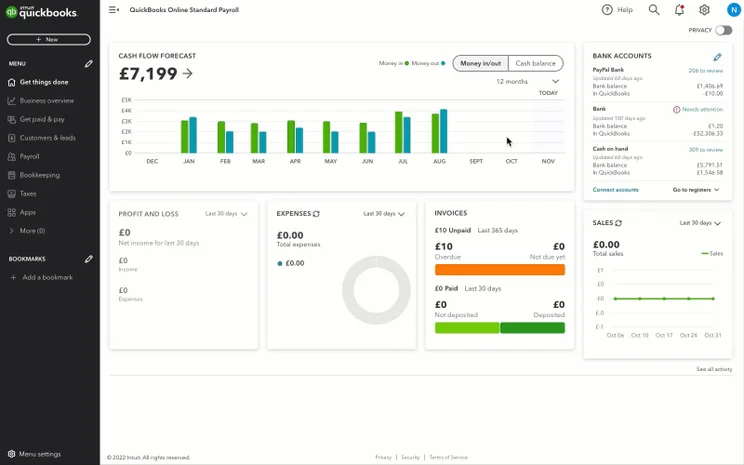
QuickBooks Online provides in-depth payroll data, helping businesses stay on top of the numbers. Source: Tech.co testing
Can you get QuickBooks Online for free?
You can use QuickBooks Online for free with the provider’s Free plan. Only one user at a time can use the service and you won’t be able to give access to your accountant, but the plan is a good opportunity for solo entrepreneurs to begin to organize their finances.
QuickBooks Online also offers a free 30-day trial of all available plans, but you won’t be able to opt for the trial and make use of the offer currently live, that sees each plan at 50% for the first three months.
Which QuickBooks Online Plan is Best For Your Business Type?
As a result of our research, we concluded that QuickBooks Online was one of the best accounting platforms for businesses of all sizes. It offers solid core accounting and operational efficiency features at a moderately competitive price, with AI Intuitive Intelligence providing key time-saving tools for businesses.
QuickBooks is a good fit for multi-location, full-service restaurants. This includes automatic inventory tracking for monitoring and replacing stock, and reporting capabilities to help owners understand how menu changes or operations impact their bottom line. For restaurants, I’d recommend the Plus plan, due to the inclusion of inventory management tools and profitability analysis.
QuickBooks goes hand-in-hand with retail operations, allowing owners to manage multiple vendors and get accurate inventory valuation to help make informed decisions. Likewise, auto-calculated sales tax ensures rates are accurate on invoices and businesses can utilize automated tools to help track expenses. For retailers, I’d recommend the Plus plan, because it allows businesses to connect all of their sales channels and track inventory.
QuickBooks Online: Additional Fees
QuickBooks Online offers a further range of integrations and add-ons that will up the monthly price businesses are spending on its services. However, these will no doubt add further value to your offering. There are also some hidden fees to be aware of, which I outline below.
QuickBooks Payroll
When signing up for QuickBooks Online, users are also given the option to add QuickBooks Payroll, for an additional monthly fee. Here’s how the payroll plans line up:
- Workforce Payroll ($50 per month, plus $7 per employee, per month): Runs payroll, files payroll taxes, and offers employee services, like health benefits and workers’ comp. You’ll also get Payroll AI as part of Intuit Intelligence.
- Workforce Payroll and Simple Start ($88 per month, plus $7 per employee, per month): This plan adds same-day direct deposit, time tracking, 24/7 expert product support, and a HR support center. Intuit Intelligence can also review your payroll setup.
- Workforce Payroll and Plus ($190 per month, plus $7 per employee, per month): Adds tax penalty protection, premium team management tools, expert setup, and a personal HR advisor. Intuit Intelligence will also set up your payroll for you.
To find out more about QuickBooks Payroll pricing, check out our dedicated guide.
QuickBooks Time Tracking
Users can add time tracking functionality to their QuickBooks Online plan. These come in two plans:
- Time Premium ($20 per month, plus $10 per user, per month): Create schedules, customize reports, manage time off, workforce app, and unlimited online support.
- Time Elite ($40 per month, plus $12 per user, per month): Adds project estimates versus actuals, project activity feed, track mileage, timesheet signatures, and geofencing.
You can also bundle these plans with payroll plans:
- Workforce Premium: $88 per month, plus $13 per employee, per month
- Workforce Elite: $134 per month, plus $17 per employee, per month
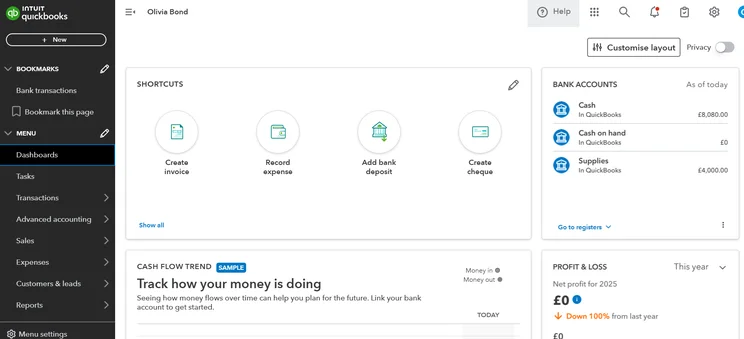
QuickBooks Online includes easy access tools so businesses can navigate its interface smoothly and find the features they need quickly. Source: Tech.co’s testing process
QuickBooks Live Bookkeeping
QuickBooks Live Bookkeeping costs between $200 and $600 monthly, on a custom basis, connecting businesses with certified experts.
You can have a one-off call with an expert or opt for one of the bookkeeping plans: Priority, Expert Assisted, or Full-Service Bookkeeping.
Does QuickBooks Online offer business loans?
QuickBooks offers a lending service to eligible small businesses and QuickBooks customers with strong accounting history. It can directly underwrite loans or provide a marketplace for your business to connect with curated lenders.
QuickBooks Online Integrations
QuickBooks integrates with more than 800 third-party applications, including Shopify and Mailchimp. Here are a few others we’ve picked out:
- Fathom Pro Starter (starting at $53 per month): Adds extra analysis tools and metrics to monitor business performance.
- Gusto Simple (starting at $49 per month, plus $6 per employee, per month): Adds payroll automation tool with automatic federal, state, and local tax filings.
- Housecall Pro (starting at $59 per month): Adds scheduling, dispatch, CRM, and automatic estimates and invoices.
Check out our guide to the best CRM with QuickBooks integration.
QuickBooks supports 25 payment processors, including PayPal, Square, and Stripe. Businesses can use QuickBooks Payments instead of a third party, with the following transaction fees:
- 1% charge for ACH transfers, up to a maximum of $10
- 2.99% for cards and digital wallets
- 2.5% for card reader
- 3.5% for keyed-in cards
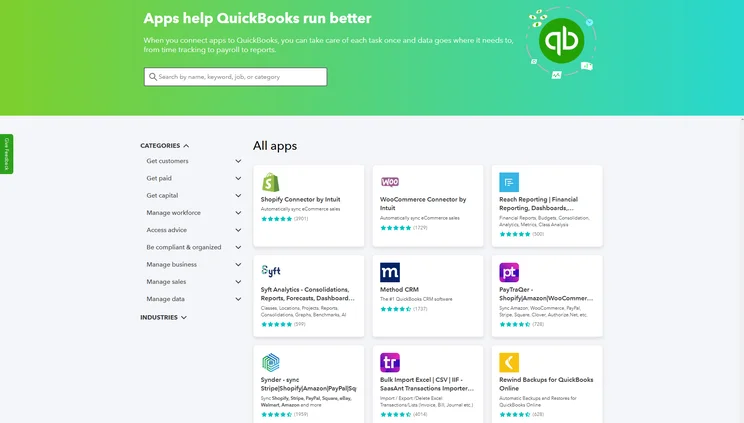
QuickBooks Online offers over 800 third-party integrations for businesses, making it perfect for businesses wanting to connect all of their tools. Source: Tech.co testing
What are the hidden and additional fees for QuickBooks Online?
Here are some other fees users should be aware of when choosing QuickBooks Online:
- Setup fee: QuickBooks Live Bookkeeping will set you up with an expert for one session if you need help setting up your account. The price is no longer publicly listed, but was last reported costing $50.
- Tax forms: You can buy tax forms and kits directly from QuickBooks, including W-2 kits, 1099 kits, W-3 forms, and 1096 forms. Some Payroll plans include printed forms at no additional cost.
- Checks: You can buy physical checks from QuickBooks. Secure Plus Standard Business Checks start at $65.25 for 50, Secure Premier Standard Business Checks start at $70.97 for 50, and Basic Standard Business Checks start at $154.49 for 250. While they are far pricier than many other vendors, the “secure” brand of checks offers in-depth fraud protection measures that may justify the price for some businesses.
How Does QuickBooks Online Pricing Compare With Other Providers?
QuickBooks Online offers solid core accounting and operational efficiency features at a moderately competitive price, compared to alternatives such as FreshBooks (starts at $20.70/month) and Zoho Books (starts at $15/month).
Likewise, it provides some of the best help and support options out of all the providers we tested, with 24/7 chatbot assistance and regularly available human representatives.
Despite this, it doesn’t have a free plan, as Zoho Books does. Plus, in the long run, Zoho can end up cheaper for businesses that want to keep expanding. Zoho’s highest-priced plan, for example, is only $70/month, whereas QuickBooks Online’s is $340/month.
Here’s how QuickBooks Online pricing compares with that of its competitors.
|
Best for
|
Cheapest paid plan
Prices both annually and monthly
|
Highest paid plan
Prices both annually and monthly
|
Additional fees
Any other fees owners can expect to pay
|
||
|---|---|---|---|---|---|
|
Sponsored Provider
 |
 |
 |
 |
 |
|
|
Sage 50 |
QuickBooks |
FreshBooks |
Xero |
Zoho Books |
|
|
A user-friendly interface |
All-round accounting functionality |
New businesses wanting a dependable solution |
Online businesses |
Accounting automations |
|
|
Pro: $113.50/month (paid annually) |
Simple Start: |
Lite: $20.70/month (paid annually) |
Early: |
Standard: $15/month (paid annually) |
|
|
Quantum: $253.42/month (paid monthly) |
Advanced: |
Select: Custom pricing |
Established: |
Premium: $70/month (paid monthly) |
|
|
Several options including payroll, HR, and time tracking |
Payroll, live bookkeeping, setup fee |
Extra team members, advanced payments add-on, payroll |
Transaction fees through third-party payment processors |
Extra users, extra locations, advanced auto-scans, expense management, BillPay |
How We Evaluate Accounting Software
We identified the six most relevant and established accounting tools in the market, and pitted them against each other. We did this against six main categories and 25 subcategories — with a total of 1,512 areas of investigation being considered altogether.
We also put the platforms through their paces with hands-on testing to understand their average user experience. We dedicated 57 hours to carrying out 37 user tests, with a total of 555 tasks being completed.
Our main testing categories for accounting software are:
We check how adept a platform will be at managing accounting tasks, focusing on key bookkeeping features like invoicing, tax preparation, journal entry, time tracking, financial transactions, and payment support.
We determine how capable a system is at ensuring day-to-day processes run seamlessly, paying close attention to third-party integrations, collaboration tools, AI automation, and customization options.
We assess how capable a system will be at measuring income, profits, and losses. Specifically, we check for the presence and quality of forecasting and budgeting, inventory management, reporting, and compliance tools.
We assess how useful and reliable a platform’s support system is, focusing on support options, whether it’s 24/7 support or knowledge center accuracy, as well as cloud backup, and security safeguards.
We compare the overall cost of each platform, taking factors like monthly costs, set-up fees, hidden fees, and free plans into account. We also measure how strict contracts are and how much it would cost for a business to terminate them early.
An overall judgment of how easily users can interact with the platform. We tested each accounting platform and got our team to report how easy they were to use, how they felt when they were using them, and how likely they were to recommend the platform to another business.
Not all testing areas are weighted evenly, with factors like “core accounting features” and “operational efficiency” being prioritized for small businesses, while sector-specific features are valued more highly for businesses across different industries.
Learn more about our research here.
QuickBooks Online offers a solid number of accounting features for the price that it charges, especially if you take advantage of the current offer of 50% off all plans for the first three months.
Key features include core accounting tools such as automatic and recurring invoicing and tax calculations, as well as financial planning tools like custom reports and budget-planning for customers.
FAQs
QuickBooks Online has a free plan for solo entrepreneurs and freelancers. With this plan, users can connect a single bank account to automatically sync real-time transactions, send up to two custom invoices per month, and create and send one estimate per month.
FreeAgent is another top choice for solo entrepreneurs. It starts at $27 per month, slightly more expensive than QuickBooks Online, and offers features such as sales tax reporting and multi-currency invoicing. QuickBooks Online has a cheaper starting price than FreeAgent. However, FreeAgent has features such as time tracking built into its interface, whereas QuickBooks offers this as an add-on. Freelancers should consider their budget and core needs before making a decision.
No. Choosing the 30-day free trial waives eligibility for the 3-month half-price promotion. Therefore, you must choose between trying QuickBooks free for one month or taking 50% off for three months.
No. Accountant seats are provided in addition to regular team seats. For example, the Essentials plan allows up to three regular users plus two separate accountant access slots.
Yes. While QuickBooks allows integration with over 800 apps, any monthly subscription fees charged by third-party services (like Gusto starting at $49/mo + $6/employee) are billed separately by those respective platforms.
No. The listed processing fees (1% ACH, 2.99% card) apply specifically to QuickBooks Payments. If you connect external processors like Stripe or Square, you pay those platforms’ standard processing rates instead.


