
We may receive a commission from our partners if you click on a link to review or purchase a product or service. Click to Learn More
Clear Books pricing starts at £6 (approx $7.97) per month for the first three months, before reverting to the standard £12 (approx $15.93) per month thereafter. It goes up to £16.40 (approx $21.77) per month for the first three months, which then reverts to £32.80 (approx $43.54) per month.
It should be noted that these prices are only applicable to customers who opt for a two-year contract. You can also pay for Clear Books on a monthly or yearly basis, which I’ll discuss later on.
It should also be noted that the prices given on this page are listed in pounds sterling rather than dollars. This is because Clear Books is a UK-based company. However, the platform does offer multi-currency functionality, so if you’re keen to use it overseas, you will still be able to. I’ll provide approximate figures for the pricing equivalent in dollars, which are accurate at the time of writing.
In this guide, I’ll unpack everything you need to know about Clear Books pricing, including plans, add-ons, hidden fees, and whether or not the accounting software is worth your time and money.
Clear Books Pricing Plans: At a Glance
In this section, I’ll take you through the three Clear Books plans in detail, including pricing, features, and any additional fees. For a quick overview of each plan, check out the table below.
|
Price
|
Users
|
||
|---|---|---|---|

|
|
|
|
|
Sole Trader Free |
Sole Trader |
Sole Trader Plus |
|
|
£0/month |
£5/month + VAT |
£15/month + VAT |
|
|
One (plus one accountant) |
Unlimited |
Unlimited |
Clear Books has three plans on offer, known as Small, Medium, and Large. Like their names suggest, the plans are geared towards businesses of different sizes.
Customers can also get a 30-day free trial when they register with Clear Books. On top of this, all paid plans come with a 30-day free trial of Payroll, the company’s dedicated payroll add-on. Below, you’ll find a breakdown of each of the plans.
- Small plan – £6 (approx $8) per month for the first three months, then reverts to £12 (approx $16.01) per month
- Medium plan – £12.40 (approx $16.54) per month for the first three months, then reverts to £24.80 (approx $33.09) per month
- Large plan – £16.40 (approx $21.89) per month for the first three months, then reverts to £32.80 (approx $43.77) per month
Clear Books Small plan
The Small plan starts at just £6 (approx $8) per month for the first three months, after which point it reverts to the full-price £12 (approx $16.01) per month. Please note that this price point is only accessible to customers who opt for a two-year subscription.
If you opt to pay yearly, the price increases to £6.75 (approx $9.02) per month for the first three months, after which it reverts to £13.50 (approx $18.05) per month.
If you choose to pay on a monthly basis, the price shoots up to £7.50 (approx $10.03) for the first three months, and £15 (approx $20.05) per month after that.
At this tier, you’ll get access to all Clear Books core accounting functionality, including an invoice creator, bill and receipt tracking, bank feeds and uploads, a tool for dividends, and account reconciliation. It also offers unlimited users at no additional cost, meaning that it isn’t just intended for individuals or microbusinesses.
One key feature that is omitted from this plan is the ability to create and manage expenses. In fact, this is only offered on the Large plan, so if you have employees who regularly file expense claims, neither of the first two tiers will be suitable for you.
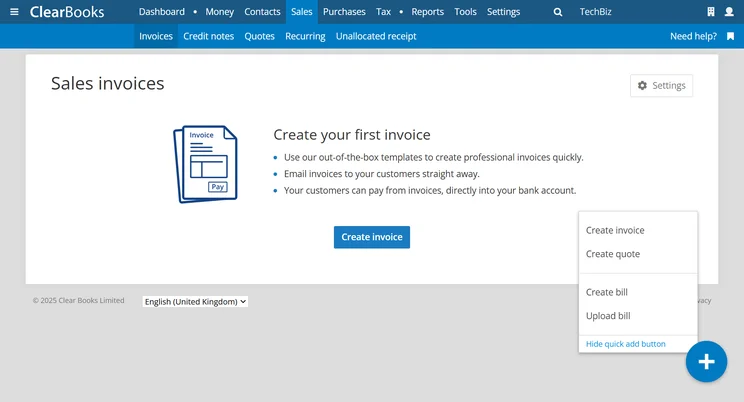
Clear Books has a “quick add” button for fast sales invoice creation. Source: Tech.co testing
Clear Books Medium plan
This plan starts at £12.40 (approx $16.58) per month for the first three months, and £24.80 (approx $33.16) per month after that, if you commit to a two-year subscription. If you opt to pay on a yearly basis, the price goes up to £13.95 (approx $18.65) per month for the first three months, followed by £27.90 (approx $37.30) per month for the remainder of the contract.
Opt to pay monthly and you’re looking at £15.50 (approx $20.72) per month for the first three months, and £31 (approx $41.45) per month thereafter.
At this tier, you’ll unlock a handful of features specifically geared towards VAT reporting, as well as the ability to create and issue purchase orders and create, monitor, and adjust budgets.
Clear Books Large plan
The final Clear Books plan starts at £16.40 (approx $21.93) per month for the first three months, before reverting to £32.80 (approx $43.85) per month, with a two-year subscription. If you want to pay on a yearly basis, the plan is available for £18.45 (approx $24.67) per month for the first three months, and then £36.90 (approx $49.33) after that.
Finally, if you want to pay monthly, you’re looking at £20.50 (approx $27.40) per month for the first three months, and £41 (approx $54.81) per month after that.
There’s quite a big step up between the second and third Clear Books plans. At this level, you’ll unlock expense management tools, the opportunity to categorize income and expenditure into projects or departments, insights into your business’s “cash health,” and multi-currency functionality.
You’ll also be able to track the cost and depreciation of your assets, time tracking, and the ability to apply for over 100 lenders through a scheme known as Capitalize.
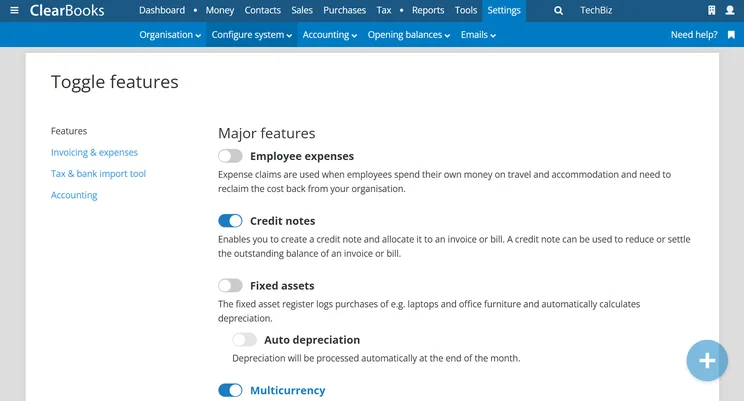
Major features, including asset depreciation and multi-currency, can be toggled on or off through the Clear Books interface. Source: Tech.co testing
Clear Books Add-Ons and Hidden Costs
Alongside its three main plans, Clear Books offers a number of paid add-ons that you can bolt on to your accounting plan of choice. In this section, I’ll take you through the available options in question.
Clear Books Payroll
Payroll is Clear Books’ designated solution for processing employee payroll. It’s available as an optional extra with two pricing points – for up to two employees and for three or more employees. The former costs £2.70 (approx $3.61) per month for the first three months, before reverting to £5.40 (approx $7.21) per month going forward.
For three or more employees, meanwhile, the add-on costs £1.35 (approx $1.80) per month, per employee, for the first three months, before reverting to £2.70 (approx $3.61) per month, per employee, going forward.
Payroll is an attractive option for businesses that want to streamline their financial processes. What’s more, it can save your business money in the long run by helping you to monitor labor costs and stay compliant with any relevant regulations.
For this reason, it will be particularly useful for companies that employ a lot of contractors and don’t want to use either an employer of record (EOR) or a professional employer organization (PEO).
Instant Bank Payments
Instant Bank Payments is another optional add-on that you may want to consider. It’s available at no extra cost; however, you will be charged a small fee per transaction – totaling 1.3% + 20p (+VAT) – which is collected at the end of the billing month.
With this feature, users can get paid by their end customers directly via bank transfer. This makes it easier for your customers to pay you, and also means that you get your money more quickly.
Auto Bills
Auto Bills is an optional add-on that won’t cost you a dime, but you do need to specifically register for it. It allows you to take pictures of your receipts and bills and upload them, rather than having to manually input them into the platform.
In this way, it saves time and cuts down on the margin for human error. Honestly, we can’t see any reason why you wouldn’t enable this particular feature.
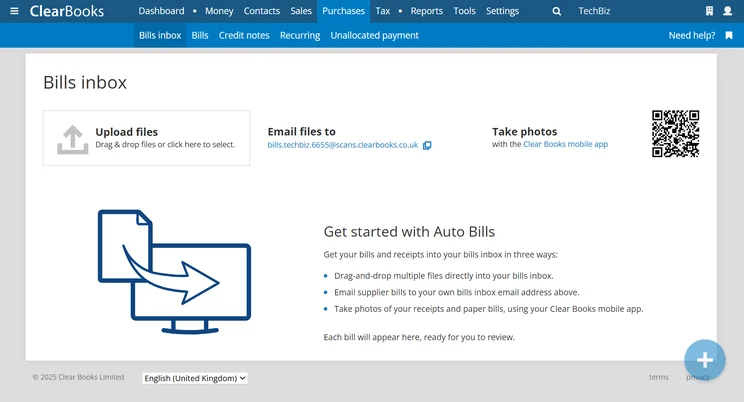
Clear Books has a bills inbox for tracking all bills in a central location. Source: Tech.co testing
Clear Books Pricing vs Competitor Pricing
According to our latest round of research, Clear Books is second only to FreeAgent in terms of accounting software pricing. It has to be said, both providers offer outstanding value for money, but FreeAgent edges it. The company offers one plan, which can either be billed on a monthly or yearly basis. What’s more, you can currently get 50% for the first six months or for the first year, meaning that it costs either $13.50 per month or $135 per year.
Other options on the market simply don’t provide the same value for money. But we understand that your business needs are your own, and therefore, you can check out a breakdown of competitors in the table below.
And if you’d rather not spend a dime, there are some free accounting software options out there. A word of warning, however: they’re pretty basic.
|
Starting price
|
Free trial
|
Best for
|
Pros
|
Cons
|
Try now
|
||
|---|---|---|---|---|---|---|---|
|
|
 |
 |
 |
 |
 |
||
|
Clear Books |
Zoho Books |
Xero |
QuickBooks |
FreeAgent |
FreshBooks |
||
|
Free |
Free |
|
|
|
|
||
|
30 days |
14 days |
30 days |
30 days |
30 days |
30 days |
||
|
Professionals requiring comprehensive tax preparation tools |
Integrations |
Experienced accountants and established businesses with complex financial needs |
Businesses needing advanced financial insights and customization |
Budget-conscious businesses |
New businesses |
||
|
|
|
|
|
|
||
|
|
|
|
|
|
||
| Get Quotes | Try Zoho Books | Try Xero now | Try QuickBooks | Get Quotes | Try FreshBooks |
How We Evaluate Accounting Software
At Tech.co, we take our impartial research and analysis seriously, so you can have complete confidence that we’re giving you the clearest, most useful recommendations.
After conducting an initial investigation to identify the most relevant, popular, and established accounting tools in the market, we conducted further research, including testing six major accounting software platforms.
Based on years of market and user needs research, we’ve established an accounting software testing methodology that scores these platforms against six main categories, and 25 subcategories — with a total of 1,512 areas of investigation being considered overall.
We also put the platforms through their paces with hands-on testing to gain a deeper grasp of their average user experience. We dedicated 57 hours to carrying out 37 user tests, with a total of 555 tasks being completed in total.
Our main testing categories for accounting software are:
- Core accounting features: We check how adept a platform will be at managing accounting tasks, focusing on key bookkeeping features like invoicing, tax preparation, journal entry, time tracking, financial transactions, and payment support.
- Operational efficiency: We determine how capable a system is at ensuring day-to-day processes run seamlessly, paying close attention to third-party integrations, collaboration tools, AI automation, and customization options.
- Financial planning: We assess how capable a system will be at measuring income, profits, and losses. Specifically, we check for the presence and quality of forecasting and budgeting, inventory management, reporting, and compliance tools.
- Help and support: We assess how useful and reliable a platform’s support system is, focusing on support options, whether it’s 24/7 support or knowledge center accuracy, as well as cloud backup, and security safeguards.
- Pricing: We compare the overall cost of each platform, taking factors like monthly costs, set-up fees, hidden fees, and free plans into account. We also measure how strict contracts are, and how much it would cost for a business to terminate them early.
- User experience: An overall judgment of how easily users can interact with the platform. We tested each accounting platform and got our team to report how easy they were to use, how they felt when they were using them, and how likely they were to recommend the platform to another business.
When it comes to calculating a product’s final score, not all testing areas are weighted evenly, with factors like “core accounting features” and “operational efficiency” being prioritized for small businesses, while sector-specific features are valued more highly for businesses across different industries.
We understand that accounting software is always evolving. That’s why at Tech.co, we have full-time product researchers to re-run this testing process regularly. It’s the only way to ensure our results remain reflective of the present day.
Learn more about our research.
Yes, Clear Books is a very good value for money. As a matter of fact, the provider scored very highly for pricing during our most recent round of product testing. If you go for a two-year subscription, plans start at just £6 (approx $8) per month for the first three months, before reverting to full price (£12 per month, approx $16.01 per month) for the remainder of your contract.
By contrast, if you opt to pay on a monthly basis, plans start at £7.50 (approx $10.03) per month for the first three months and revert to £15 (approx $20.05) per month after that.
There are three plans to choose from, and you can pay for them in three possible ways – monthly, yearly, or biannually. This grants you a good level of flexibility, which is perfect for businesses of different shapes, sizes, and situations. What’s more, you can upgrade any time, so if your circumstances change, so can your Clear Books plan.
As I’ve mentioned, Clear Books did finish second to FreeAgent in terms of pricing. That provider has plans that start at $13.50 per month for the first six months, which is very good value.
To find the right accounting solution for you, make sure to use our free accounting comparison page.
If you click on, sign up to a service through, or make a purchase through the links on our site, or use our quotes tool to receive custom pricing for your business needs, we may earn a referral fee from the supplier(s) of the technology you’re interested in. This helps Tech.co to provide free information and reviews, and carries no additional cost to you. Most importantly, it doesn’t affect our editorial impartiality. Ratings and rankings on Tech.co cannot be bought. Our reviews are based on objective research analysis. Rare exceptions to this will be marked clearly as a ‘sponsored’ table column, or explained by a full advertising disclosure on the page, in place of this one. Click to return to top of page


