
We may receive a commission from our partners if you click on a link to review or purchase a product or service. Click to Learn More
The most customizable website builder is Squarespace, offering a drag-and-drop editor that works well with its selection of beautiful templates, which are intuitive, consistent, and well-organized. On top of that, the AI website builder available with Squarespace allows for the most input across our research, so you can get a site that looks good and aligns with your brand quickly.
Most top website builders are quite customizable, though, and our research found that you’ve got plenty of options when it comes to creating the site you’re after. Platforms like Wix, Shopify, Hostinger, and GoDaddy all provide customizable interfaces that can help you sculpt and craft your page exactly how you want it.
In this guide, you’ll learn about some of the most customizable websites on the market, including how they work, how much they cost, and what to look for when it comes to your business’s specific needs.
|
Cheapest price
|
Special deal
|
Free plan
|
Free trial
|
Pros
|
Cons
|
App store
Is there an app store available to utilize third-party integrations?
|
Templates
How many templates are available?
|
||
|---|---|---|---|---|---|---|---|---|---|
|
MOST CUSTOMIZABLE
 |
 |
 |
 |
 |
|||||
|
Squarespace |
Shopify |
Wix |
Hostinger |
GoDaddy |
|||||
|
$17.10/month with code TC10 |
$1/month for first 3 months |
$15.30/month with code TAKE10 |
$2.69/month with code TECH |
Save 54% with annual contract |
|||||
|
|
|
|
|
|
|||||
|
14-day free trial |
3-day free trial |
14-day free trial |
14-day free trial |
7-day free trial |
|||||
|
|
|
|
|
|||||
|
|
|
|
|
|||||
|
|
|
|
|
|
|||||
|
180+ |
900+ |
2,000+ |
400+ |
200+ |
What Is the Most Customizable Website Builder?
If you want to build a website that’s as unique as your business, you’re in the right place. Click the links below for in-depth reviews of the most customizable website builders on the market.
- Squarespace – Most customizable website builder overall
- Shopify – Most customizable ecommerce website builder
- Wix – Largest variety of templates
- Hostinger – Most affordable customization
- GoDaddy – Best customizable builder for a fast set-up
1. Squarespace – Most customizable website builder overall
- Starting price: $19 per month
When it comes to design, you really can’t beat Squarespace. For one, our research found Squarespace to be the easiest website for beginners, due to its intuitive interface and simple drag-and-drop editor. More importantly, Squarespace offers some of the best-looking templates in the industry, with clear, organized, and easy-to-use components for building your site how you want it.
Arguably, the biggest perk of Squarespace when it comes to customizability is the AI site builder, which allows users more design control over the finished product than any other AI website builder in our research.
Squarespace

In Short
-
Pros
- AI site builder with flexible design controls
- Easiest to use interface for beginners across research
- Customizable checkout page with branding and guest checkout
- Some of the most stylish templates in the industry
-
Cons
- POS system is currently exclusive to the US
- Sorting and filtering of products requires add-on
- Not ideal for larger ecommerce stores
- No inventory reports available
Pricing
- Basic: $19/month
- Core: $29/month
- Plus: $49/month
- Advanced: $99/month
- No transaction fees
- 14-day Free Trial
Images




How customizable is Squarespace?
Let’s start with the templates, which are one of the best parts of Squarespace. All of its professionally designed templates are fully responsive and can be customized to align with your specific needs and preferences. On top of that, they are very aesthetically pleasing, with modern appearances and intuitive features that are designed to make a good impression on site visitors.
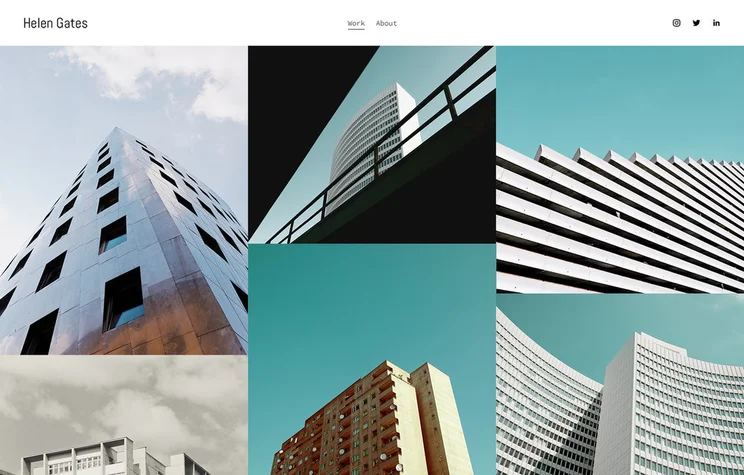
Squarespace offers some of the best-designed templates in the industry, including this Graphic Design Website Template. Source: Tech.co user testing
The provider’s drag-and-drop editor — Fluid Engine — uses a 24-column grid system that lets users precisely position content anywhere on the page. Users can also resize content blocks within sections, allowing them to make more granular changes than they would be able to with other website builders on this list.
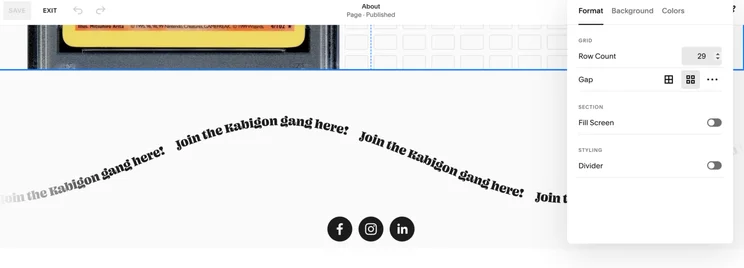
Squarespace’s Fluid Engine lets me customize my website to the pixel, using its drag-and-drop capability. Source: Tech.co user testing
If you want to save time, the provider’s AI builder Squarespace Blueprint is capable of building a highly unique site, too. Just enter a simple site brief that describes what you want for your website and wait for Squarespace to work its magic.
After a template site is created based on your specific preferences, you can use additional input prompts to personalize every detail of your website, including its layout, content, and images.
Squarespace Pricing
Squarespace has changed up its pricing options a few times in the last few years, but not it offers four straightforward pricing plans that can get you started with your website building needs. Here’s how these pricing plans match up:
- Basic – $19 per month
- Core – $29 per month
- Plus – $49 per month
- Advanced – $99 per month
Squarespace does not provide a free plan for users, but it does offer a 14-day free trial, so you can test it out before you make a financial commitment. The prices listed above are only available if you sign up for a one-year contract, and they will increase if you decide to go monthly instead.
|
Plan
|
Special deal
|
Price (1-year contract)
The price per month you'll pay if you choose to be billed annually
|
Price (1-month contract)
The price per month you'll pay if you choose to be billed monthly
|
Ecommerce
|
|---|---|---|---|---|
|
Basic |
Core |
Plus |
Advanced |
|
|
$17.10/month with code TC10 |
$26.10/month with code TC10 |
$44.10/month with code TC10 |
$89.10/month with code TC10 |
|
|
$19/month |
$29/month |
$49/month |
$99/month |
|
|
$25/month |
$39/month |
$65/month |
$139/month |
|
|
Limited |
|
|
|
2. Shopify – Most customizable ecommerce website builder
- Starting price: $29 per month
Shopify is a popular ecommerce website builder stacked with just about every sales and marketing feature imaginable. It topped our list of the best ecommerce website builders due to its stand-out features like social media selling and global delivery, native POS integration, and slick usability
According to our research and first-hand testing, it’s fully capable of creating a highly unique website too, with the ecommerce builder offering tons of customization options for themes, products, and checkouts. Most notably, it was the only website builder in our research that allowed us to optimize our site for desktop, mobile, and tablet interfaces, as well as the only option that didn’t need reformatting after switching between templates.
Shopify

In Short
-
Pros
- Add unlimited products with your own CSV
- Customizable member areas
- Intuitive product-adding experience for beginners
- AI site builder can have you live in seconds
-
Cons
- Monthly fees for POS system integration
- Scheduling and booking requires add-on
- No tutorials for setup, so tough for beginners
- Limited SEO settings available
Pricing
- Starter plan: $5/month
- Basic plan: $29/month
- Grow plan: $79/month
- Advanced plan: $299/month
- Plus plan: $2,300/month
Images


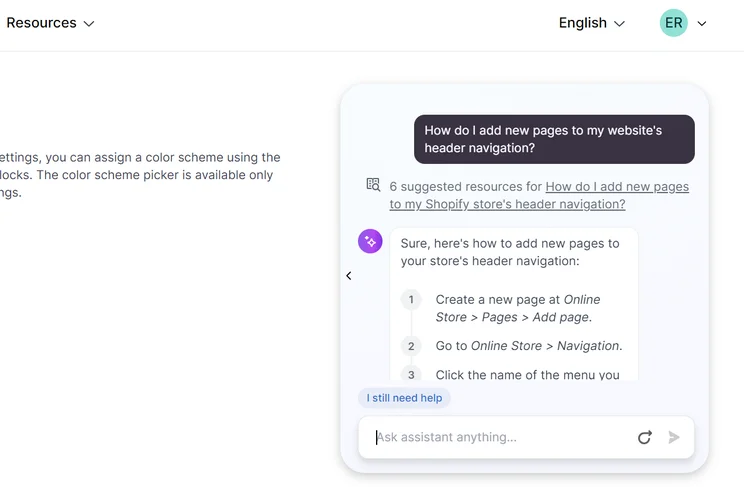
How customizable is Shopify?
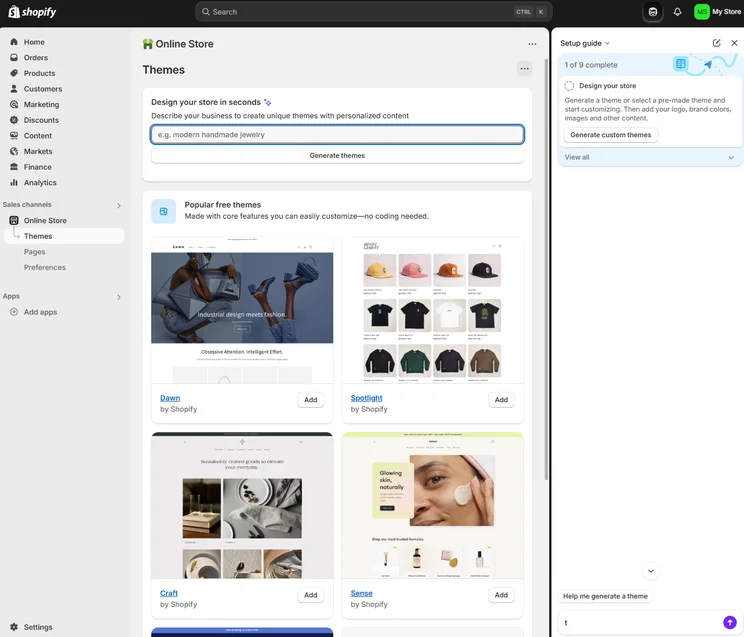
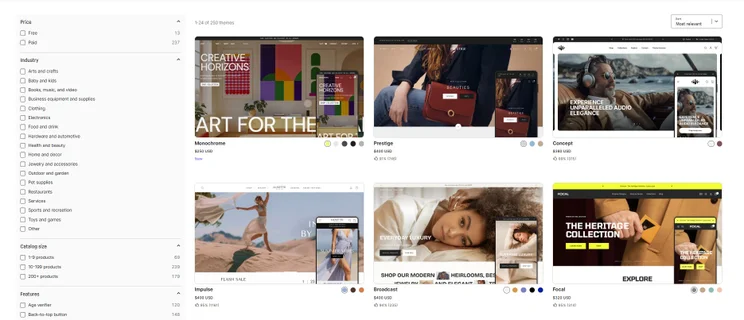
Shopify’s Theme Store is home to over 100 free and premium ecommerce website themes. Users are able to customize most aspects of the templates, including their color, layout, and fonts. What’s more, Advanced plan users are able to make custom code edits to their themes, if you’re technically savvy enough to do so. While this requires a little bit of technical expertise, it enables users to make enhanced tweaks like adding animations and interactive maps, and displaying different content based on user preferences.
Shopify also offers a wealth of product customization options. You’re able to edit products by size, color, and style, and you can also create variations based on these choices, up to a limit of 100 variants per product. Unlike other website builders on this list, Shopify also lets you edit the appearance of your checkout by adding logos or editing its fonts and colors.
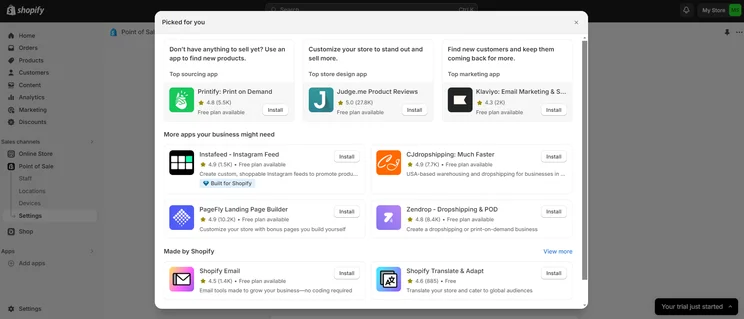
Shopify’s expansive app store lets me integrate my POS with a wide range of apps. Source: Tech.co user testing
If you want to make more sophisticated customizations to your site, you can use a variety of Shopify add-ons to take it a step further. For example, Shopify’s PageFly integration lets you create custom landing pages, homepages, and product pages using an intuitive drag-and-drop builder, while Bold Product Options allows you to add features like custom fields to your items.
Shopify definitely has a leg up over other ecommerce builders in this domain, with the builder letting users augment the platform with over 8,000 apps, with competitors like BigCommerce offering around 100 in comparison.

Customization is even available when adding products, as we could easily decide if it was available in the online store, in-person shop, or both. Source: Tech.co user testing
Shopify pricing
Shopify is on the more expensive end of the spectrum when it comes to website builders, which makes sense given its vast selection of ecommerce-focused features. Still, the high prices could turn some businesses off if there isn’t room in the budget. Here are the Shopify pricing options:
- Basic – $29 per month
- Grow – $79 per month
- Advanced – $299 per month
While those prices are a bit intimidating, Shopify has a special deal that allows you to get access to any of these plans — yes, even the Advanced plan — for only $1 per month for the first three months. After that, though, you’ll be back to the standard rate.
Check out our in-depth Shopify pricing guide for more information
|
Plan
|
Price (1-year contract)
The price per month you'll pay if you choose to be billed annually
|
Price (1-month contract)
The price per month you'll pay if you choose to be billed monthly
|
Ecommerce
|
|---|---|---|---|
|
Basic |
Grow |
Advanced |
|
|
$29/month |
$79/month |
$299/month |
|
|
$39/month |
$105/month |
$399/month |
|
|
|
|
|
3. Wix – Largest variety of templates
- Starting price: $17 per month
Wix is an industry-leading website builder that performed incredibly well in our independent user testing and testing, due to its impressive stack of features and its wide selection of more than 2000 customizable templates. In fact, Wix is the best website builder we reviewed overall, and will be a reliable option for most small businesses – especially those who want full control over the look of their website.
The only reason Wix fell out of the top spot for customization is because of its inflexibility with templates. Once your site is live, you can’t change templates at all without starting completely from scratch, which can be a dealbreaker if you want to experiment after you’ve published your results.
Check out our Wix website builder review for more information
Wix

In Short
-
Pros
- Unrivaled selection of website features across design, sales, and support
- AI features can create a site in 60 seconds
- Quality free forever plan available
-
Cons
- No template switching once published
- Number of features can be overwhelming for some beginners
- Steep price increase for scaling businesses
Pricing
-
 Light: $17/month
-
Core: $29/month
-
Business: $39/month
-
Business Elite: $159/month
-
10% off any plan with code TAKE10
-
Free plan
Images
How customizable is Wix?
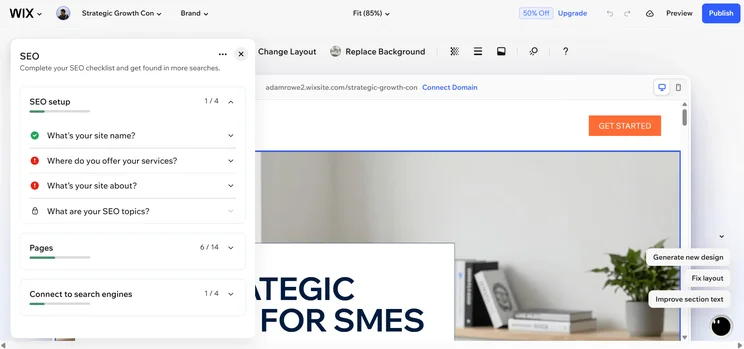
If you want your website to stand out from the search engine results page (SERPs), Wix’s extensive template library gives you a great jump-off point. The website builder currently lets you choose between over 2000 website templates – more than any other provider on this list. Wix offers more themes for niche industries like electronics and music & entertainment, too, which can’t be said for alternatives like Squarespace and Shopify.
Furthermore, even if you choose a popular template, you can heavily customize the layout of your website using Wix’s drag-and-drop builder. Wix’s intuitive editor lets you add, move, and edit elements easily, and its grid system helps you ensure everything is in alignment. If you don’t want to use one of Wix’s pre-selected color palettes, the provider even gives you the chance to customize the colors in your theme by using your cursor or entering the exact color in HEX, RGB, or HSB values.
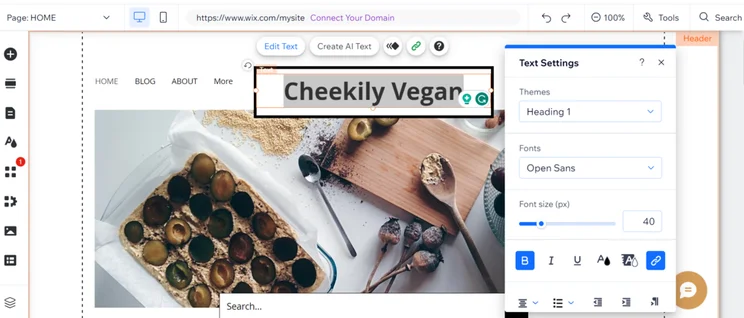
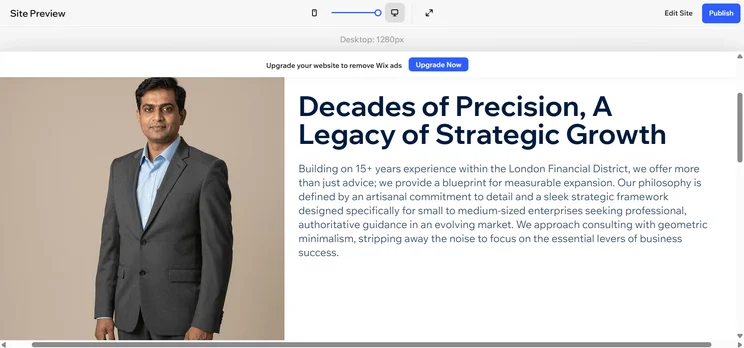
We found the text editor in Wix easy to use. Source: Tech.co’s user testing
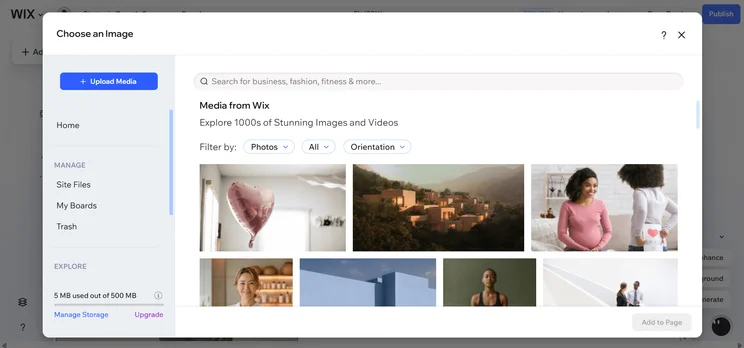
In addition to choosing from Wix’s vast gallery of stock images, the provider even lets you create visual content using its AI-powered image generator. I was really impressed with this capability when we were building a test site. All I had to do was enter a descriptive prompt, and Wix’s tool created an image that matched what I was looking for.
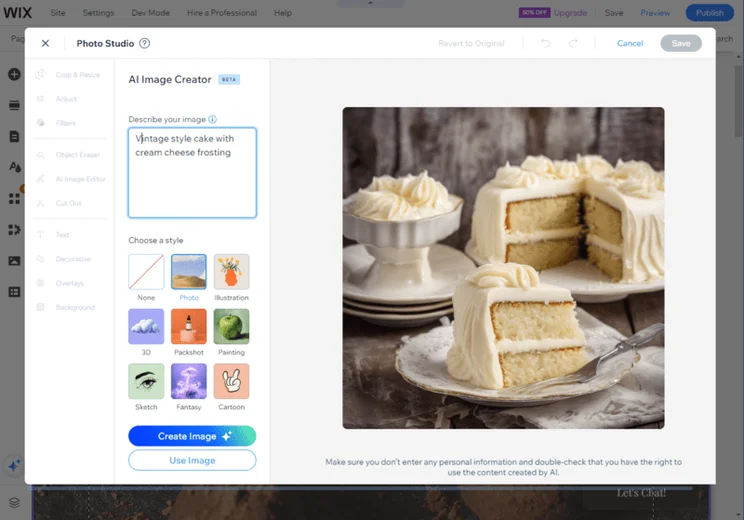
Wix AI image generator lets me create a one-of-a-kind image to use on my website. Source: Tech.co user testing
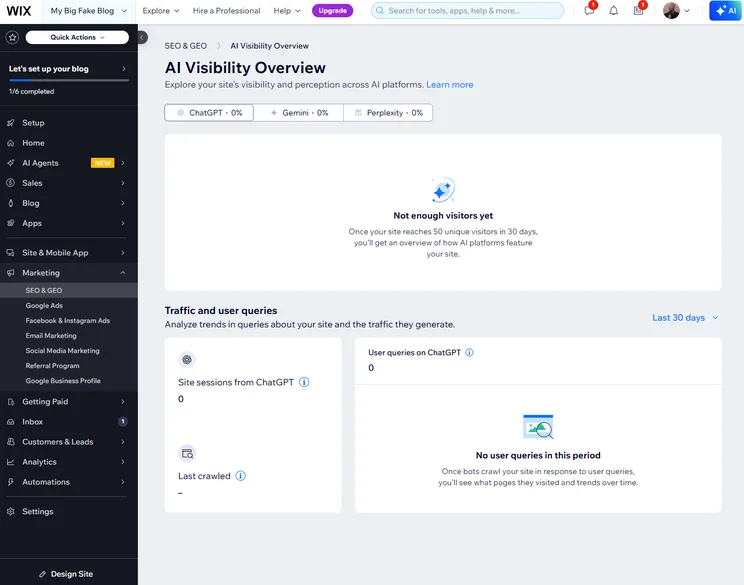
Whether you’re creating a blog or an online store, Wix’s built-in solutions ensure that your one-of-a-kind website is highly functional as well. For example, the platform seamlessly integrates with scheduling and booking features, as well as ecommerce tools to ensure your website fulfills its purpose. Even if Wix’s in-house toolkit falls short, Wix’s App Market lets you integrate with over 800 third-party apps, boosting its potential even further.
However, for all of Wix’s strengths, the builder doesn’t let you edit your website after it’s live. Due to its wealth of features, its interface isn’t as easy to navigate as design-focused builders like Squarespace either. As a result, if you’re looking for an ultra-low learning curve and want to regularly switch up the look of your website, we’d recommend using Squarespace instead.
Learn more about how the providers compare in our Wix vs Squarespace guide.
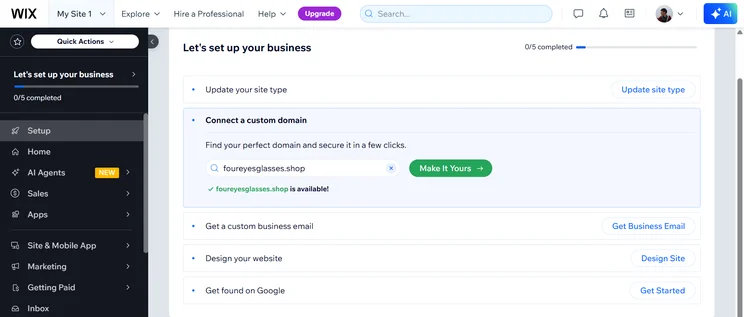
Getting started with Wix was quite straightforward thanks to its useful step-by-step guide. The platform asked me what kind of website I was building, and provided me with relevant templates so which cut down a few steps for me, which I appreciated. The platform offers every website feature under the sun, too, which makes it more capable of creating a highly unique website.
However, even though Wix’s set-up guide was useful, its cluttered software slowed down the process and made me feel a bit overwhelmed at first. I feel like I would need to navigate the software for hours before I understood it fully, which could be off-putting to users who are just looking to make a simple website.
Wix Pricing
Wix offers four different pricing plans that allow you to build a website. Each plan adds more and more features, like advanced analytics, additional storage, and the ability to create an online store. Here are the pricing plans:
- Light – $17 per month
- Core – $29 per month
- Business – $36 per month
- Business Elite – $159 per month
On top of that, Wix does offer a free forever plan that will allow you to get a site live at no cost to your business, but it will come with some caveats, like no custom URL and Wix ads all over your site.
Take a look at how Wix’s pricing plans weigh up in our comparison table below, or check out our guide to Wix pricing for more information.
|
Plan
|
Special deal
|
Price (1-year contract)
The price per month you'll pay if you choose to be billed annually
|
Price (1-month contract)
The price per month you'll pay if you choose to be billed monthly
|
Ecommerce
|
|---|---|---|---|---|
|
Free |
Light |
Core |
Business |
Business Elite |
|
$0 |
$15.30/month with code TAKE10 |
$26.10/month with code TAKE10 |
$35.10/month with code TAKE10 |
$143.10/month with code TAKE10 |
|
$0 |
$17/month |
$29/month |
$39/month |
$159/month |
|
$0 |
$24/month |
$36/month |
$46/month |
$172/month |
|
|
|
|
|
|
Finding a website builder with solid customization options is critical if you want to build a unique online presence that accurately represents your brand identity. By tailoring every aspect of your website and avoiding generic-looking layouts and templates, it is easier to differentiate your page from competitors and create a memorable impression for visitors.
Website builders with high levels of customization are better equipped to meet the specific needs of businesses, too. By finding a builder that lets you add all the necessary visual elements and integrations you need – from scheduling software to delivery services – you can ensure your website is highly functional and satisfies your demands. On the contrary, failing to customize a website to fit your needs could damage your brand’s reputation or result in missed revenue opportunities.
4. Hostinger – Most affordable customization
- Starting price: $2.49 per month with a special deal
Hostinger is a user-friendly website builder with an ever-evolving raft of AI features. The website builder lets you choose between over 150 professionally designed templates. While this selection might not be as vast as Wix’s, all of its themes are fully customizable, so you don’t have to worry about your website looking generic.
The biggest draw for Hostinger, however, is the price. With a starting price of only $2.69 per month, this website builder is one of the cheapest website builders out there as well, making it a great choice for small businesses creating a site for the first time.
Hostinger

In Short
-
Pros
- AI generated site in three steps (60 seconds)
- Built-in heatmap for advanced site analytics
- Language translations capabilities
-
Cons
- No app market for third-party integrations
- No email marketing in any paid plans
- No free trial or free plan for users
Pricing
- Premium: $2.99/month
- Business: $3.99/month
Images
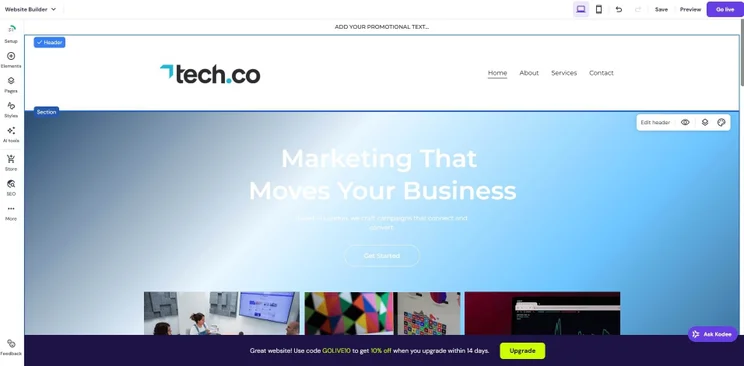
How customizable is Hostinger?
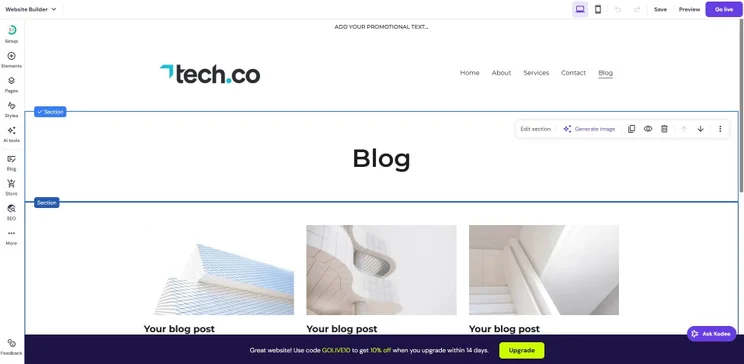
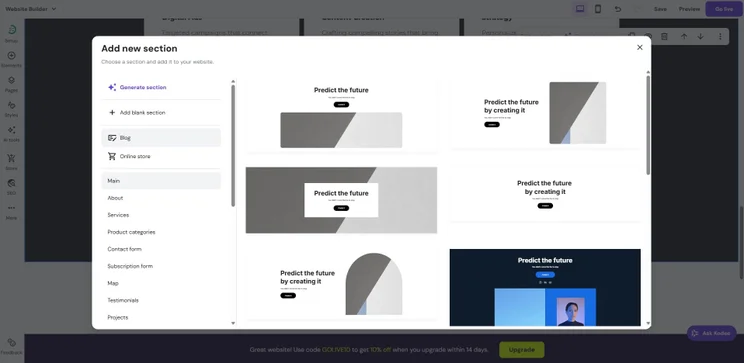
Just like with Wix, all of Hostinger’s templates are able to be extensively edited using the provider’s drag-and-drop builder. Specifically, users are able to move around content blocks to suit their preferences and rearrange elements with a couple of clicks.
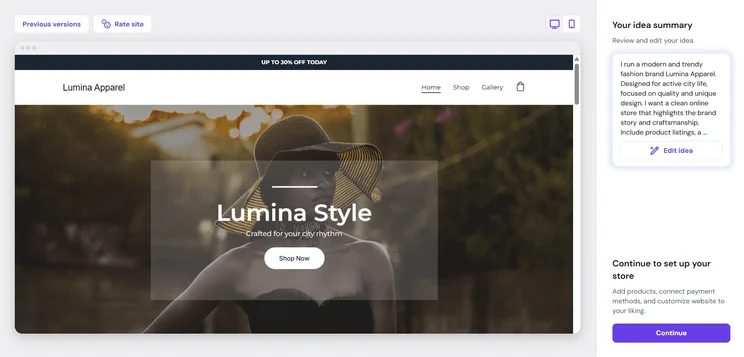
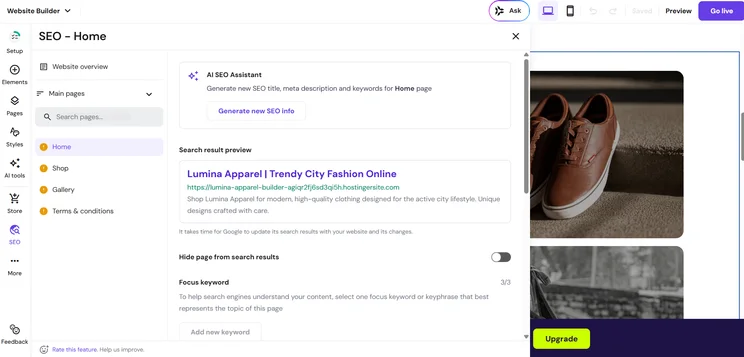
Even at this low price, Hostinger has comparable AI features to the more premium builders like Squarespace and Wix. The platform asks you just a couple of questions and can have a site built for you in less than 30 seconds. The design is lacking a bit compared to the more expensive options, but overall, it’s more than enough to get you started, particularly if you’re on a stricter budget.
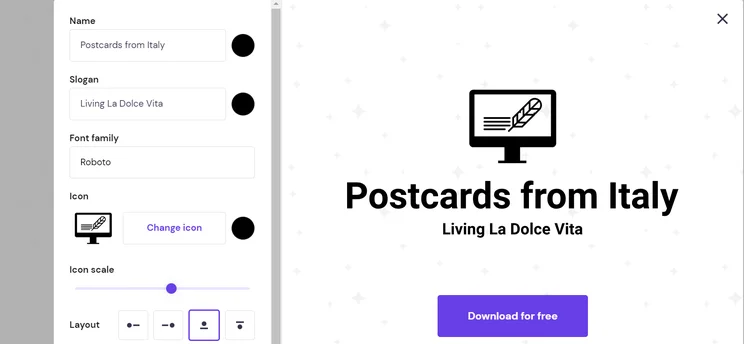
Hostinger’s AI website builder allows you to download an AI-generated logo for free. Source: Tech.co user testing
While Hostinger offers businesses a low-cost way to make a unique-looking site, it’s not perfect. Unlike every other provider on this list, Hostinger doesn’t have an app marketplace. This means that if the builder doesn’t offer the capability you need, there’s no option for you to access the tool externally.
While this shouldn’t be an issue for those building a simple business site, users looking for specific functions like chatbot integrations and advanced SEO tools will probably be best going for Wix or Squarespace, which, all things considered, are marginally more customizable and expansive.
Hostinger pricing
Hostinger keeps it pretty simple when it comes to pricing plans for its website builder, offering only two options, one for a basic website and one for an online store. Here’s how the two pricing plans match up on price:
- Premium – $2.69 per month with a special deal
- Business – $3.59 per month with a special deal
We have a special deal with Hostinger that will allow Tech.co readers to get access to either plan at a discount. Check out how these two plans compare on features and pricing in our table below:
|
Plan
|
Special deal
|
Price (4-year contract)
The price per month you'll pay if you choose to be billed for 48 months
|
Price (1-year contract)
The price per month you'll pay if you choose to be billed annually
|
Price (1-month contract)
The price per month you'll pay if you choose to be billed monthly
|
Ecommerce
|
|---|---|---|---|---|---|
|
Premium |
Unlimited |
Cloud Startup |
|||
|
$2.69/month with code TECH |
$3.59/month with code TECH |
$7.19/month with code TECH |
|||
|
$2.99/month |
$3.99/month |
$7.99/month |
|||
|
$3.99/month |
$4.99/month |
$9.99/month |
|||
|
$11.99/month |
$18.99/month |
$27.99/month |
|||
|
|
|
|
5. GoDaddy – Best customizable builder for a fast set-up
- Starting price: $9.99 per month
GoDaddy is a simple yet effective website builder that helps you set up a website in under 30 seconds. While it doesn’t boast as many advanced features as Wix and Squarespace, the builder is perfectly capable of building a unique website, due to its flexible templates and suite of useful AI features.
Additionally, GoDaddy is one of the few website builders on this list that allows users to not only switch between templates, but also to not worry about formatting afterwards. In our research, we were able to easily swap in and out of templates with minimal web design to make it work on different options.
GoDaddy

In Short
-
Pros
- AI generated websites in two steps (30 seconds)
- 24/7 phone support available for all plans
- Free forever plan can publish site
-
Cons
- No mobile website editor to modify pages on the go
- Overly generic website design with fewer templates than other builders
- No app market to branch out functionality across your site
Pricing
-
Basic: $9.99/month
-
Premium: $14.99/month
-
Commerce: $20.99/month
Images
How customizable is GoDaddy?
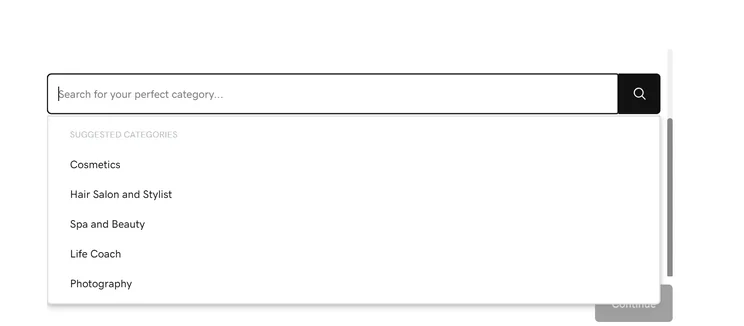
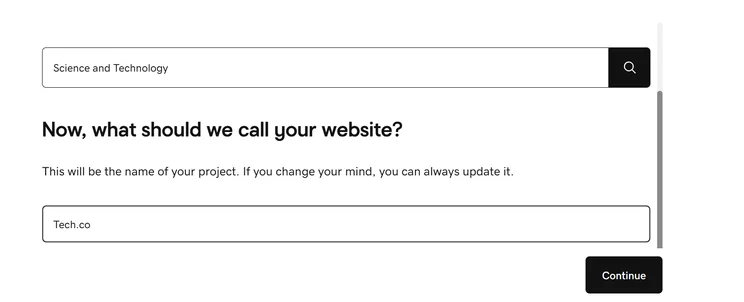
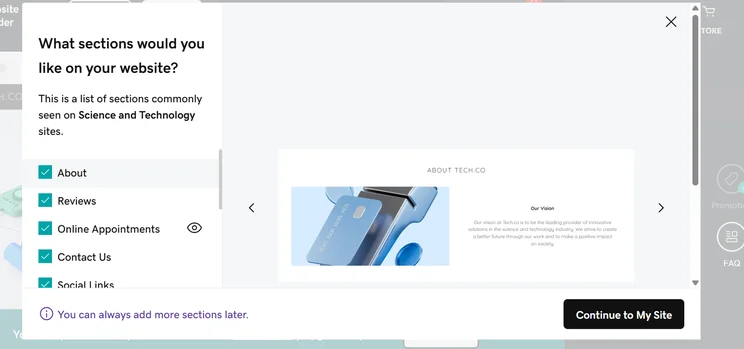
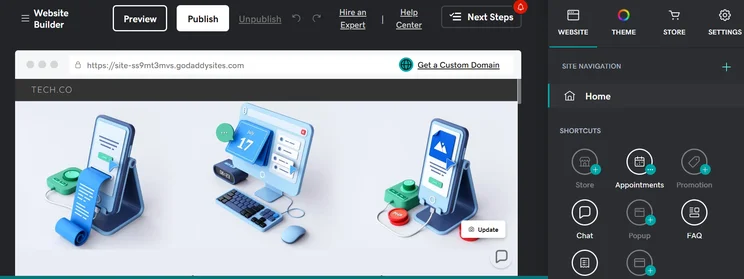
GoDaddy’s AI builder – GoDaddy Airo™ – lets you set up a fully customizable website in a few short steps. All you need to do is enter some key site details, including your business name, category, and purpose, and GoDaddy does the hard work for you.
You can then personalize the content, layout, and design to fit your vision. What’s more, if you’re an advanced user, you’re able to take it one step further by editing the website’s code. This custom code feature gives you the option to add custom forms, maps, and special-function buttons, and incorporate third-party widgets using CSS, HTML, or JavaScript code.
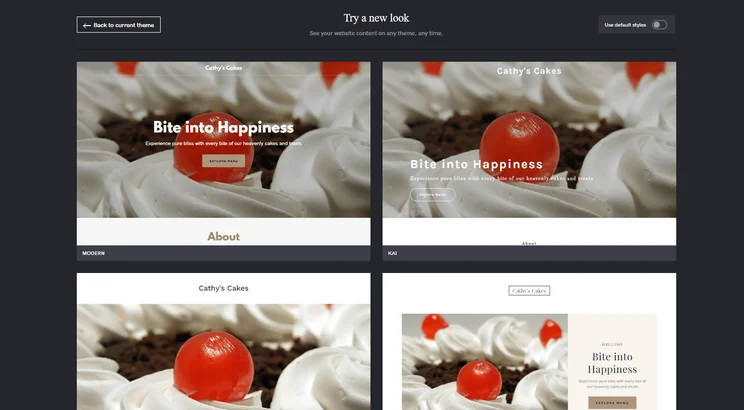
After I created my website using AI, I could choose between different themes to have control over the look of my site. Source: Tech.co user testing
While GoDaddy’s simple platform will be ideal for some businesses, it has a number of number of limitations that prevent it from appearing any higher on this list. Specifically, its drag-and-drop editor is much less intuitive than the ones provided by other website builders. For instance, when I tested GoDaddy, I found it quite hard to edit the size of large headers and images. There were also certain restrictions in place when I tried to change the placement of elements.
This, and GoDaddy’s limited third-party app store, makes the builder a lot less capable than Wix and Squarespace at producing one-of-a-kind sites. However, if you’re looking to build a relatively simple site, like a landing page or business profile, GoDaddy’s customization options should be able to meet your needs.
Learn more about the provider in our GoDaddy website builder review
GoDaddy pricing
GoDaddy offers four different pricing plans, all of which are moderately competitive, particularly compared to the expensive plans from options like Wix and Shopify. Here’s how the GoDaddy pricing plans shake out:
- Essential – $9.99 per month
- Standard – $11.99 per month
- Premium – $14.99 per month
- Commerce – $20.99 per month
GoDaddy doesn’t offer a free plan, and its free trial is a lot shorter than other options on this list. You’ll only get a week-long free trial, but that should be plenty of time to see if the website builder is a good fit.
|
Plan
|
Price (1-year contract)
The price per month you'll pay if you choose to be billed annually
|
Price (1-month contract)
The price per month you'll pay if you choose to be billed monthly
|
|
|---|---|---|---|
|
Free |
Starter |
Professional |
Ultimate |
|
$0 |
$9.99/month |
$24.99/month |
$99.99/month |
|
$0 |
$19.99/month |
$49.99/month |
$199.99/month |
What to Look For in a Customizable Website Builder
Finding a website builder that prioritizes customizability isn’t always smooth sailing. If you want to create a highly distinctive website without outsourcing the job to a professional, keep an eye out for the following attributes when shopping for a website builder:
- Range of templates – Templates give you an excellent jump-off point to build a unique site. While themes can always be personalized, we’d recommend prioritizing builders with a wide selection of templates in the first place so it’s even easier to differentiate your site from competitors.
- Intuitive drag-and-drop editors – Most website builders rely on drag-and-drop editors, but some allow you to make much more precise modifications than others. If you have a really specific vision in mind when it comes to your site layout, we’d recommend prioritizing builders like Squarespace that let you control your site’s design down to the pixel.
- App stores – If you want your website to carry out specific purposes, it’s likely that builders won’t have the features you need in their in-house software. To make sure that your needs will always be met, even if your business evolves over time, we recommend choosing a builder with a large selection of third-party integrations.
- Custom code edits – If you have a little coding experience, it is also worth considering website builders that give you the option to add your own code to a page you are editing. Using this capability will help you take site customization to the next level, by enabling you to add custom elements and make granular changes to the design of your pages.
- AI features – If you want to get your site live fast without a lot of effort, AI website builders can help you design your site by answering only a few questions. Some also offer generative AI features that can write content, generate images, and product copy for your site.
Check out our guide to what makes a good website for more information
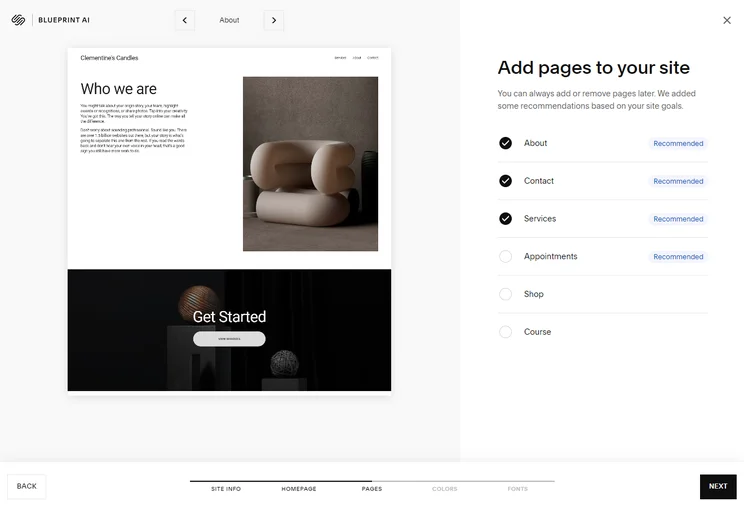
AI features like Squarespace Blueprint asked us questions before creating an AI site, including what pages to add to the site. Source: Tech.co testing
How Customizable Are AI Website Builders?
Building a website is almost too easy given the evolution of generative AI tools. With many builders, you just have to answer a few simple questions, and you’ll have a fully functional site online in just a few seconds. Others offer generative AI tools that can speed up the process, allowing you to create content and generate images with the touch of a button.
But how customizable are these AI website builders? Well, as you can imagine, it all depends on the provider. Squarespace, for example, offers an exemplary AI website-building experience that is very easy to get started, while providing a lot of design control in the process. The step-by-step process allows you to provide key insights into what you want your site to look like, while the AI website builder takes care of the specifics.
Wix, on the other hand, doesn’t have as customizable an AI experience, with a full-on chatbot experience to get you started. While it is an easy-to-use system, you don’t get a lot of design control along the way, with Wix generating a site based on what you say and not much else. Once your site is built, though, you will get access to the same customization features as a website not created with AI, so there’s that.
All that to say, building a website with AI still gives you the same customizability as the website builder in question, but it depends on how much control you have over what gets generated in the first place.
Check out our guide to the best AI website builders for more information

Like today’s AI chatbots, we just had a simple conversation with the Wix AI website builder about what we wanted in our website. Source: Tech.co testing
Should You Use a Website Builder or Hire a Web Developer?
Website builders have come a very long way in recent years. Websites built with DIY builders are able to be highly unique, and practically indistinguishable from those crafted by professional designers. Moreover, thanks to the affordable price of code-free platforms, and the rise of AI website builders, it’s much quicker and cheaper to use a website builder than ever before, particularly if you only need a one-page website.
However, while website builders let you customize your site to a high degree, web designers build your website from scratch – ensuring it will be completely one-of-a-kind and designed to match your brief perfectly. Therefore, for businesses with very unique site requirements, standard website builders may not be able to cut the mustard. To help you decide which course of action is best for you, we’ve outlined some additional pointers below:
You should use a website builder if…
- You’re building a standard website or ecommerce store
- You have the time to build a website yourself
- You don’t have a big budget to invest in site design
- You want to get a site live quickly
You should hire a web designer if…
- You have complex or highly specific site requirements
- You run an enterprise-level business and need a site to match
- You lack technical experience or don’t have the time to build a website
How Did We Rate the Best Website Builder?
We take our impartial research and analysis seriously, so you can have complete confidence that we’re giving you the clearest, most useful product recommendations.
After conducting an initial exploration to identify the most relevant, popular, and established tools in the market, we put them through their paces with hands-on testing to see their real strengths and weaknesses. In this case, we put 16 website builder products to the test across 398 areas of investigation.
Based on years of market and user needs research, we’ve established a website builder testing methodology that scores each product in six core categories of investigation and 33 subcategories. This covers everything, from customer feedback to design, ease of use, and more.
Our main testing categories for website builders are:
- Website features: The capabilities and functionalities offered by a website builder, e.g. blog functionality, SEO capability, and marketing capacity.
- Design functionality: The aesthetic appeal and visual layout of a website created using a website builder. It encompasses aspects such as page templates and customizable themes.
- Customer satisfaction: External customer opinion. This is the feedback and ratings given by customers who have used a particular website builder — the market position and reputation a website builder holds.
- User experience: How user-friendly and intuitive a website builder is for people with varying levels of technical expertise.
- Value for money: The balance between the cost of a website builder and the benefits it provides. It considers factors such as pricing plans, subscription models, and available features.
- Help and support: The assistance and resources available to users when they encounter issues or need guidance while using a website builder.
When it comes to calculating a product’s final score, not all testing areas are weighted evenly, as we know some aspects matter more to our readers than others, which are simply “nice to have”. After hundreds of hours, our process is complete, and the results should ensure you can find the best solution for your needs.
At Tech.co, we have a number of full-time in-house researchers, who re-run this testing process regularly, to ensure our results remain reflective of the present day.
After putting the best website builders through their paces, we concluded that Wix is capable of building the most unique website. Not only does it offer a far greater selection of templates, but its AI website builder is also capable of creating more individual sites than a lot of its rivals.
Squarespace comes in close second, though, largely due to the unmatched precision of its drag-and-drop builder, Fluid Engine. Like Wix, the design-focused builder also offers a custom code editor that lets users with a little tech literacy make additional tweaks to their website. If you’re building an online store, Shopify is another builder with great customization features, while Hostinger offers the best AI creation capabilities.
If you click on, sign up to a service through, or make a purchase through the links on our site, or use our quotes tool to receive custom pricing for your business needs, we may earn a referral fee from the supplier(s) of the technology you’re interested in. This helps Tech.co to provide free information and reviews, and carries no additional cost to you. Most importantly, it doesn’t affect our editorial impartiality. Ratings and rankings on Tech.co cannot be bought. Our reviews are based on objective research analysis. Rare exceptions to this will be marked clearly as a ‘sponsored’ table column, or explained by a full advertising disclosure on the page, in place of this one. Click to return to top of page


