






We may receive a commission from our partners if you click on a link to review or purchase a product or service. Click to Learn More
Wave Invoicing offers a great free plan for small business invoicing, but it comes with a few catches. First, there’s a processing fee for each transaction: 1% for bank payments, and 2.9% + 60 cents for most credit card payments. Second, you’ll need to pay extra for additional services: Receipt scanning is $8 per month under the free plan; payroll is $40 per month; and bookkeeping services start at $149 per month.
Wave also includes a Pro plan that costs $19 per month and adds helpful features like bank transaction auto-importing, the ability to add multiple users to your account, and no fees for your first ten transactions each month.
Our research team recommends Wave, no matter which plan is right for you: The platform offers strong invoicing functionality and great customer service options, even if a few features are limited. It’s not just for invoices, either, offering general finance management tools as well.
Read on for our complete breakdown of all those Wave Invoicing costs, as well as more info on how the paid add-ons work.
How Much Does Wave Invoicing Cost?
Wave offers two plans: Starter, which has no monthly fee, and Pro, which costs $19 per month. Both plans offer similar per-transaction fees as well, although Pro offers the first ten transactions of each month for free.
Depending on what payment service you use, you’ll pay one of three types of transaction fees:
- 2.9% plus 60 cents per transaction for Visa, Mastercard, and Discover
- 3.4% plus 60 cents per transaction for American Express
- Either $1 or 1% for ACH bank payments (whichever’s more)
Wave offers three main paid add-ons as well, although one of them, receipt scanning, is bundled into Pro at no extra cost. Here are the optional add-ons:
- Digitally capture unlimited receipts: $8 per month or $72 per year for Starter users; Free for Pro users
- Run payroll: From $40 per month for both Starter and Pro users
- Hire a bookkeeper: From $149 per month for both Starter and Pro users
Here’s a table that breaks down the features you’ll get from both of Wave’s plans:
|
Price
|
Client Limit
|
User Limit
|
Invoice Limit
|
Estimate Limit
|
Notable Features
|
Multi-currency transactions
|
||
|---|---|---|---|---|---|---|---|---|
 |
|
|||||||
|
Wave Starter |
Wave Pro |
|||||||
|
Free (with transaction fees) |
$16/month (plus per-transaction fees) |
|||||||
|
Unlimited |
Unlimited |
|||||||
|
One |
Unlimited |
|||||||
|
Unlimited |
Unlimited |
|||||||
|
Unlimited |
Unlimited |
|||||||
|
|
|||||||
|
|
|
You can also try out Wave Payroll, a paid service Wave offers for those who want to provide employee payroll through the platform as well. We’ll cover that service in our section on Wave Payroll.
Wave Invoicing Features
Wave offers some of the strongest functionality of all the best invoicing services for small business. According to our research, it’s second only to Freshbooks for features, though QuickBooks matches Wave.
That doesn’t mean it’s perfect. Here’s what it has to offer.
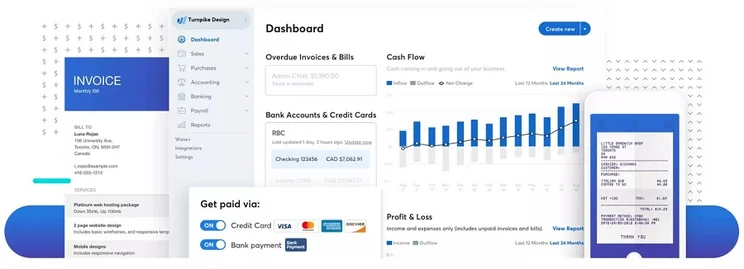
Wave’s software is accessible via an online browser or through its mobile app. Source: Wave
Invoice creation
Wave offers a decent range of invoice creation tools and abilities. While the number of core templates is a little low at just three, you’ll be able to add a company logo, customize colors, and include customer notes. The invoices can calculate taxes and create estimates, while offering multi-currency support – all useful features for a versatile invoicing service.
Missing features? An invoice by Wave won’t add tracked hours, won’t display discounts, and doesn’t allow file attachments. This makes Wave ultimately a middle-of-the-road service for invoice creation specifically. It’s not bad at all, but several services are better, with Zoho Invoice in particular coming out ahead – in fact, it supports every feature mentioned here.
Invoice delivery
Wave fully delivers on its invoicing delivery tools: The service lets you easily set up recurring invoices (a key time-saving feature), supports payment reminders, and tracks invoices so you’ll know when they’ve been opened. It also allows you to send and receive invoices through the Wave mobile app, so it’s easy to use while on the go.
Scheduling and accepting payments
Wave supports its own first-party payment processing, but won’t allow any third-party integrations to process payments through the Wave platform. This makes sense – after all, Wave wants to guide all its free users toward its own payment processing fees – but it’s a restriction that will annoy any small business that’s already happy with another payment service.
Wave includes a billing portal, so you can easily keep track of your revenue.
Reports & analytics
Wave supports and tracks sales taxes and receivables, including those grouped by customer and aged receivables. It also provides a range of reports in two categories: Business Purchases and Accounting.
However, Wave doesn’t support additional report customization beyond these abilities. This is a bit of an oversight that puts Wave solidly below a handful of the top services – including FreshBooks, QuickBooks Online, Xero Invoice, and Square Invoices – when it comes to analytics. That said, Wave is aimed at small businesses, which have less to gain from breaking their revenue down on an incremental scale – so this point is moot for anyone who isn’t planning to spend a lot of time processing reports in the first place.
Accounting & expense management
Wave’s features extend beyond invoicing. The platform offers accounting and expense management as well, letting you manage your finances within the platform. We rank Wave fourth in our guide to the best small business accounting software, below only QuickBooks and Xero.
With Wave, you can use dashboards to view cash balances and invoice statuses, or export your accounting reports covering profits and losses, sales tax, cash flow, and more. Exchange rate calculations can be made automatically – a must-have feature for those working with multiple currencies – and it’s also a double-entry bookkeeping program, ensuring credit and debit are properly recorded.
Integrations
Wave offers a handful of integrations with other types of services that small businesses are likely to need.
These include ecommerce integrations with Shopify and Square; CRM integrations with Hubspot, Pipedrive, and Harvest; and email marketing integrations with Mailchimp, Automational, and SendPulse.
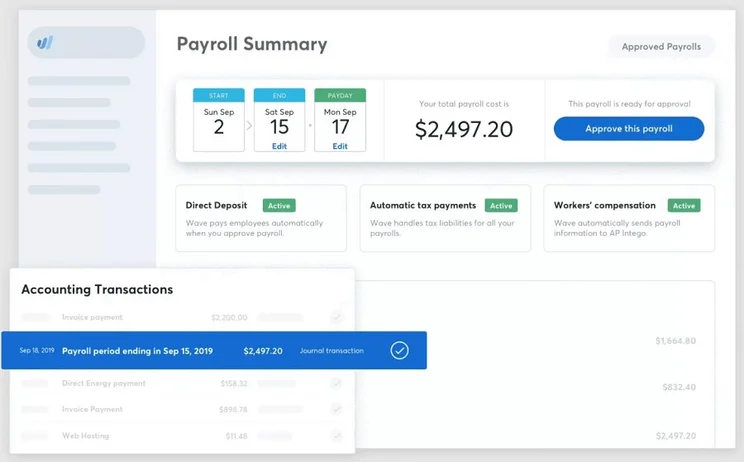
Wave’s payroll add-on handles direct deposits, worker’s comp, and taxes. Source: Wave
Wave Payroll
Wave’s payroll service functionality is defined by whether you live in a state that allows a third-party service to file for you, or if you need to do it yourself.
As of April 2, 2025, all 50 states allow third-party involvement (tax filing), meaning Wave Payroll can automatically pay your taxes and file the needed paperwork with state tax offices and the IRS.
For tax service states, Wave Payroll costs a $40 monthly base fee, plus $6 per active employee or independent contractor. For self service states, Wave Payroll costs a $40 monthly base fee, plus $6 per employee or contractor. A 30-day free trial is available for both options.
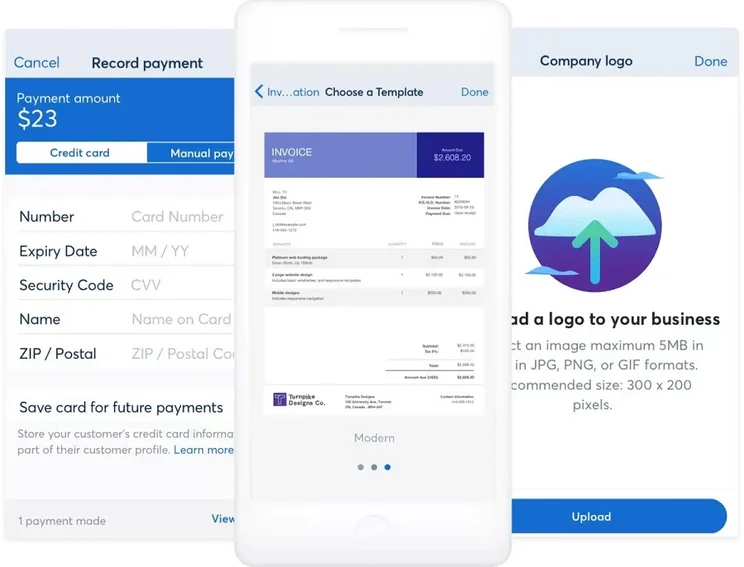
Many core functions are available on Wave’s mobile app. Source: Wave
Wave App
The core Wave software service is entirely web-based: You will need an internet connection and a browser window to use it, with no need to download an application. There’s an additional mobile app, though – you’ll be able to find it for download and installation from both iOS and Android app stores.
You must input your login information to connect the Wave invoice app to your online account. Once connected, you’ll be able to use the app for sending and duplicating receipts as well as mobile invoicing, which lets you create, customize, and send invoices straight from your mobile device. It also sends automatic notifications, letting you know immediately when an invoice is viewed, past due, or has just been paid.
User experience
The app has a good-not-great ranking – 4.6 stars out of 5 on the Google Play Store and 4.4 stars out of 5 on the Apple App Store, with thousands of reviews for each. This is a significant improvement from before, as its previous rating on Google Play last year was 3.4 stars.
Help & support
Wave’s support options include a Help Center, with resources that can be browsed by categories including Accounting, Invoices & Estimates, and Payments, among many more. A community forum is also available.
The customer support team is available to users through email and live chat, but not by phone.
Wave offers a high quality customer service team. Our researchers gathered strongly positive customer feedback: Of the top nine invoicing services that we’ve reviewed, Wave Invoicing is just slightly behind our top pick for support (Square Invoices), although it is just about equal with two other services (Zoho and Xero).
Invoicing Software Alternatives
Wave is a solid option for invoicing, standing out for its low pricing, great range of software functionality, and good customer service. But it’s not the only option, and quite a few others offer more complex invoice creation abilities, or more comprehensive reporting and analytics. One of Wave’s competitors, FreshBooks, offers loads of features at very low pricing.
Check out our guide comparing FreshBooks vs Wave.
Here’s a table listing the top invoicing services on the market today, complete with their pricing and the restrictions they come with, which can include caps on clients, invoices, and estimates.
|
Price from
Each software platform charges an additional 2.9% of every invoice processed, as well as a 25-30 cent fee
|
Minimum clients
The client limit on the lowest tier
|
Minimum invoices
The monthly invoice limit on the lowest tier
|
Minimum estimates
The monthly estimate limit on the lowest tier
|
||||
|---|---|---|---|---|---|---|---|

|
 |
 |
 |
 |
 |
 |
 |
|
Wave |
FreshBooks Invoice |
Zoho Invoice |
Xero Invoicing |
QuickBooks Invoice |
Square Invoices |
Invoice2Go |
Sage Invoice |
|
Free (with transaction fees) |
$23 per month |
Free |
$25 per month |
$20 per month |
No monthly fee |
$5.99 per month |
$12 per month |
|
Unlimited clients |
5 clients |
5 clients |
Unlimited clients |
Unlimited clients |
Unlimited clients |
5 clients |
Unlimited clients |
|
Unlimited invoices |
Unlimited invoices |
1,000 invoices |
20 invoices |
Unlimited invoices |
Unlimited invoices |
50 invoices |
Unlimited invoices |
|
Unlimited estimates |
Unlimited estimates |
Unlimited estimates |
Unlimited estimates |
Unlimited estimates |
Unlimited invoices |
No estimates on lowest tier |
Unlimited estimates |
Methodology: How We Researched Wave
To compare features and pricing for all the best invoicing software, the Tech.co research team broke its assessment into seven categories:
- Software functionalities: This includes integrations, ease of deployment, and non-invoicing tools.
- Invoice creation: Tools like estimates, templates, tax calculations, and much more.
- Invoice delivery: This includes tracking, reminders, and recurring invoices.
- Pricing factors: Includes the costs and feature limitations for each plan.
- Payments: Tools such as first-party and third-party payment processing, as well as billing portals.
- Reporting and analytics: This includes receivables, sales tax, and custom reports.
- Help and support: Is support 24/7, and what form is it in (live chat, phone, email, or online database)?
Once each brand was ranked in each category, the Tech.co team compiled the scores into a single 5-point rating for each software, allowing them to be directly compared. Wave Invoicing earned a healthy 4.3/5 score overall, making it a worthwhile pick.
Wave offers the best free invoicing software we’ve researched. It’s great for creating and delivering invoices, though the analytics leave a little to be desired, as they don’t support custom reports. Plus, you’ll have to upgrade to the paid plan to access some key functions, including automatic transaction imports.
Wave also handles general finance management, and with the right third-party integrations, it can support CRM, ecommerce, and email marketing as well.
If you’re willing to pay for the best invoicing software on the market, we’d recommend FreshBooks overall. But Wave is an inexpensive solution that handles the basics with aplomb, and is well worth considering.
FAQs
Wave really offers entirely free accounting and invoicing software. Some functions are only available from it’s Pro plan, however, and you’ll be charged per-transaction fees across both plans if you accept payments: 1% for bank payments, 2.9% + $0.60 for credit cards, and 3.4% + $0.60 for American Express. Also, add-ons are extra: Wave Payroll costs $40 plus $6 per employee.
Thanks to the lack of a monthly fee, Wave Starter is a good option for freelancers on a tight budget: They’ll be able to send invoices and collect bills, though they’ll be charged a processing fee. Wave offers a few freelancer-centric invoice templates to help them get started with the service.
No, you won’t need to enter any credit card information in order to use a Wave Starter account. But if you want to accept payments or buy a paid add-on service, you will have to provide your credit card details.
No – Wave has no limits or hidden fees on any of its invoicing services, from the number of invoices and receipts to the number of clients or estimates.
Wave Invoicing and Square Invoices are the only top invoicing services to offer a permanent free plan. One other service, Zoho Invoice, offers a limited free tier, but it likely won’t have enough functionality for a small business. Both Wave and Square charge a processing fee for those who use their services to collect money as well as invoice it. Read our full free accounting software guide for more info.
If you click on, sign up to a service through, or make a purchase through the links on our site, or use our quotes tool to receive custom pricing for your business needs, we may earn a referral fee from the supplier(s) of the technology you’re interested in. This helps Tech.co to provide free information and reviews, and carries no additional cost to you. Most importantly, it doesn’t affect our editorial impartiality. Ratings and rankings on Tech.co cannot be bought. Our reviews are based on objective research analysis. Rare exceptions to this will be marked clearly as a ‘sponsored’ table column, or explained by a full advertising disclosure on the page, in place of this one. Click to return to top of page


