
We may receive a commission from our partners if you click on a link to review or purchase a product or service. Click to Learn More
It’s a turbulent time for restaurant owners at the moment, with customers cautious about dining out in the current climate. A POS can be a huge help to your business in these times, but we’d suggest that if you’re looking for the best restaurant POS system, we’d recommend Toast instead, as the provider offers a free plan like Aldelo, with powerful hospitality features and complimentary hardware options.
Before you do anything, though, it’s worth checking out the competition through our quick and easy comparison tool. It only takes a minute and you’ll get tailored, obligation-free quotes from all the leading POS suppliers.
Aldelo POS

In Short
-
We’ll give it to you straight: You’ll likely want to pass on Aldelo as a POS service. While it does offer a good range of features and abilities, customers complain that the system’s interface and backend malfunction frequently, its business plans are costly, and the customer service team has been reported to offer poor response times and inadequate help. You’re better off going for another POS provider, especially if you’re a restaurant owner/manager.
-
Cons
Reporting on lower pricing tiers can lack detail
30 Second Facts
- Established: 2005
- HQ: Pleasanton, CA
- Costly price plans
- Poor support service
- Good feature range
Images
Aldelo POS: At a Glance
Aldelo’s main POS offering is the Aldelo Express POS, a cloud-based iPad app most useful for table service and quick-serve restaurants, though it can be used for retail stores as well.
It is billed as a free downloadable service, and it is – with one catch. If you want to use the free version, you’ll need to use Aldelo Pay, a merchant service that charges you a percentage of each sale made through the POS. This is similar to Square’s free POS plan. It will work well for many small business owners but will add up for more established companies.
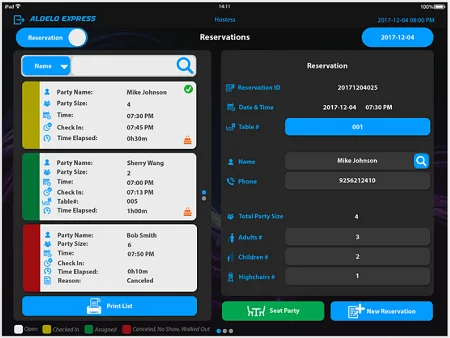
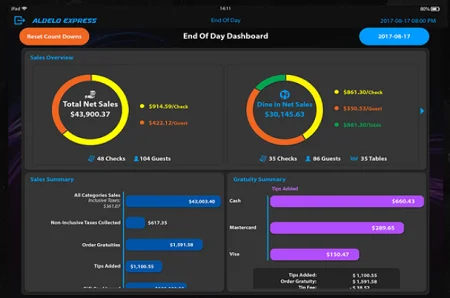
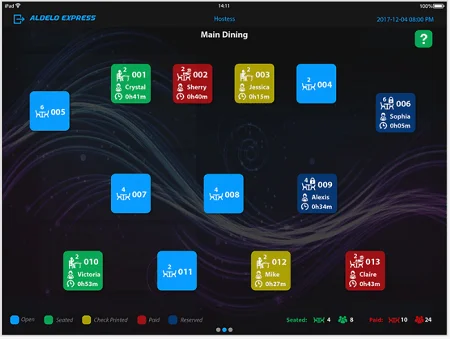
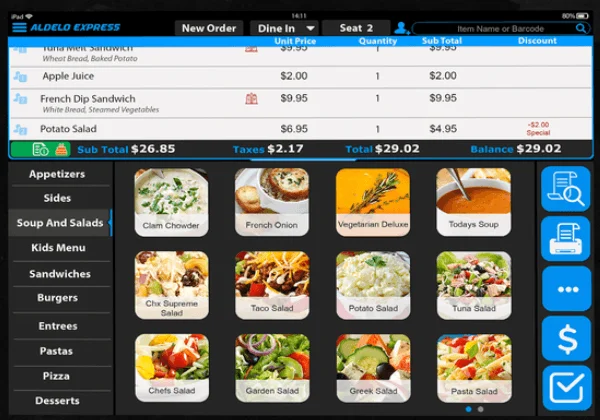
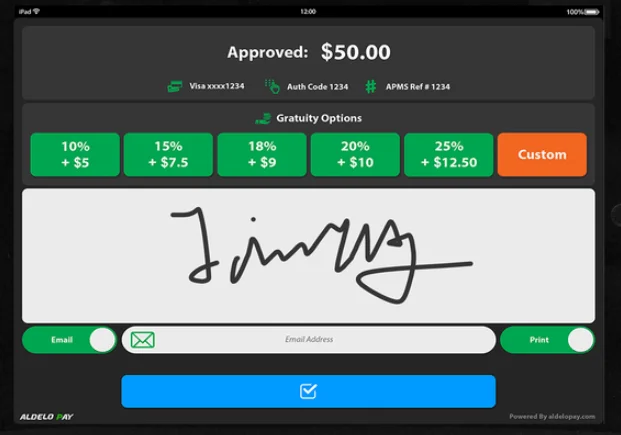
Screenshots of Aldelo POS software in action. Source: Aldelo Express
If you skip Aldelo Pay, your only option is to pay $99 per month per device, with a device access limit preventing you from adding additional iPads.
The Aldelo Express POS is available on desktop as well as mobile. Users can use their existing POS hardware, provided it meets Aldelo’s system requirements.
Our full review below covers the main features that Aldelo POS has to offer, before going on to address what to expect from the technical support options available along with more background details on Aldelo’s price plans.Who should use Aldelo?
- Businesses after a free POS solution
- Users after an iPad or Windows PC-based system
- Small businesses with relatively simple operations
Who shouldn’t use Aldelo?
- Businesses with large or complex inventories
- Users who want a physical POS terminal
- Businesses that require multiple POS stations
Aldelo POS: Core Features
The features aren’t the issue when it comes to the Aldelo POS: It’s the software that is supposed to make the features work. Various users have reported a “slow” response time due to software that crashes “a lot” and may qualify as “incomplete.” With that grain of salt, here are the (honestly, pretty comprehensive) features that you can expect from the software.
Tableside Ordering
The interface supports visual floor plans and table management, all with a blocky interface and plenty of primary colors. Additional restaurant features include guest reservations, wait lists, bill splitting, discounts, surcharges and gratuity.
Delivery Management
Aldelo Express also supports delivery service operations, which not all restaurant POS services do. It offers an integration with Caller ID and includes a feature that enables driver dispatches from the app.
Employee Management
A built-in time clock measures when employees check in and check out of their shifts, ensuring managers can track their hours, and a scheduling feature lets managers prepare a shift schedule to plan for the weeks ahead.
Offline Ability
The Aldelo Express POS functions offline, allowing you to keep your business in operation even during quick power outages or if someone trips over your internet router. It’s an essential POS functionality for any serious business, and Aldelo delivers.
Stats and Reporting
Aldelo’s End of Day dashboard offers sales overviews that tell managers at a glance what their total net sales were, breaking down the results by checks, guests, and tables. It can also break out the taxes, gratuities, and additional tips earned during a set period.
AI Menu Builder
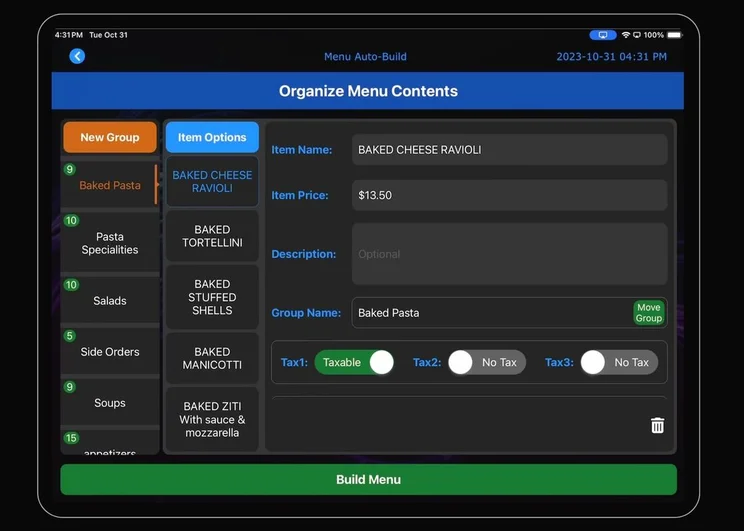
Aldelo Express now offers an AI Menu Builder that speeds up the menu creation process by automatically detecting words being typed, before presenting users with several naming options to choose from. The AI-powered features prevent users from needing to type out from scratch, saving them time and effort as a result.
Aldelo uses AI to predict what item you’re typing, to save you time. Source: Aldelo
Video Highlight: Aldelo Express Items Screen
Here’s a quick tutorial that gives you a look at the Aldelo Express iPad app in action. The interface’s wide ticket area and meals buttons are visible, giving servers the data they need to place orders with a minimum of finger taps, all from an iPad.
Aldelo Express – What Hardware Will You Need?
If you want to get started with Aldelo you might be wondering whether you’ll need any hardware. Fortunately, as its a cloud-based POS, Aldelo doesn’t need bespoke hardware to function. Instead, you can use an iPad or Windows PCs to run Aldelo Express.
One of the big advantages of a cloud-based system is that your workforce will likely be familiar with the hardware provided — all you have to do is to train them on the software. Of course, iPads can be expensive, and not all PCs are cut out for this kind of work, so it’s worth making sure you’ve got the right hardware before taking the plunge with Aldelo Express.
Find out more – Which iPad Should I Buy?
Get started with the best cloud-based POS for your company today.
Aldelo POS Set Up and Customer Support
Aldelo’s support options include a phone line and an email, both of which are available for response 24/7 according to their website. According to a number of user complaints, however, the support isn’t as responsive or helpful as advertised. “It sometimes crashes and meanwhile tech support is 24/7 and good, when it comes to networks or OS issues they stay clear and you have to look for additional tech help,” said one restaurant owner on a POS user reviews site.
In addition, Aldelo offers a number of Software User Manuals available for free download from their website, as well as video tutorials for the POS and for set-up, which by all reports seems to be a pretty painless process.

Support options
- Email: support@aldelo.com
- Phone: 925-215-5634
- Support hours: 24/7

Training options
- Online guides
- Online videos
Aldelo POS Plans and Pricing
The Aldelo Express POS can be downloaded and used for free if you use Aldelo Pay Merchant Services, which charges you a set percentage of each sale you make using the software. However, this “free” version does include unlimited users and devices.
If you don’t want to use Aldelo Pay merchant services, Aldelo will charge you $99 per month per device to use Aldelo Express. That’s a pretty pricey starting point: For comparison, industry leaders like Lightspeed and Square start at $69/month and $60/month, respectively, and many plans are available for less.
Don’t just take our word for it, though. If you’re interested in seeing for yourself how well Aldelo compares to quotes from across the POS industry, you should check out Tech.co’s comparison tool, which offers a fast way to collect and compare custom quotes from the best POS vendors around.
| Without Aldelo Pay Merchant Services | With Aldelo Pay Merchant Services | |
|---|---|---|
| Price per month | $99 | $0 |
| No. of iPad Devices | 1 | Unlimited |
(Pricing last updated September 2024)
How Does Aldelo Express Compare To Its Competition?
Aldelo Express isn’t the only POS system in town, far from it, and we would actually recommend you try out some of its competitors instead. If you’re committed to finding a free hospitality system, Toast POS offers a great free plan with advanced inventory management features and complimentary hardware packages.
Square is another excellent free option, and is our top recommendation for small businesses because of its scalable packages and iPad-friendly set-up. There are lots of other commendable options on the market, so take a look at how they all weigh up below.
|
Price
The typical lowest starting price. The lowest price available for your business will depend on your needs
|
Free plan
|
Best for
Tech.co's verdict to help you identify the most suitable choice for your restaurant
|
Lowest transaction fee
The lowest possible fee that will be incurred with each transaction
|
Hardware packages
|
|||
|---|---|---|---|---|---|---|---|
|
BEST OVERALL
 |
FREE PLAN
 |
 |
 |
 |
|||
|
Toast |
Square POS |
Clover POS |
SpotOn |
SumUp |
|||
|
$0/month |
$0/month |
$135/month |
$0/month |
$0/month |
|||
|
|
|
|
|
|
|||
|
Complex restaurant operations |
Scaling and growing your business |
Professional restaurant hardware |
Simplifying staff communications |
Providing a quick and efficient service |
|||
|
2.49% + 15¢ |
2.4% + 15¢ |
2.3% + 10¢ |
2.79% + $0.20 |
1.5% + 10¢ |
|||
|
Offers a full hardware suite for $1,024 but custom pricing is available on more expensive software tiers |
Options include: Square Stand Kit for $689 and Square Stand Kit for Restaurants at $1,199 |
Sells a range of proprietary hardware devices, from handheld tableside tablets to full POS terminals |
Offers several hardware options for businesses, including touchscreen monitors and payment terminals |
Sells a range of in-house hardware, including iPad stands, card readers, and kitchen display systems |
|||
| Visit Toast | Visit Square | Compare Quotes | Compare Quotes | Try SumUp |
Aldelo POS Review – Verdict
Aldelo is not a recommended POS vendor. The service offers a good range of features, but can’t overcome a buggy interface or lackluster customer support when it comes to justifying its premium price tag. If Aldelo undergoes some major overhauls, we’ll update this review to let you know, but for now, you should probably pass.
As you’ll likely need to start looking at other POS options, we’d recommend taking a moment to fill out our quick and easy quotes form. You’ll receive obligation-free quotes from leading POS suppliers tailored specifically to your business’ needs. It’ll only take a minute and you could save a small fortune.
If you click on, sign up to a service through, or make a purchase through the links on our site, or use our quotes tool to receive custom pricing for your business needs, we may earn a referral fee from the supplier(s) of the technology you’re interested in. This helps Tech.co to provide free information and reviews, and carries no additional cost to you. Most importantly, it doesn’t affect our editorial impartiality. Ratings and rankings on Tech.co cannot be bought. Our reviews are based on objective research analysis. Rare exceptions to this will be marked clearly as a ‘sponsored’ table column, or explained by a full advertising disclosure on the page, in place of this one. Click to return to top of page


