
We may receive a commission from our partners if you click on a link to review or purchase a product or service. Click to Learn More
Verizon Connect is the best route planning and optimization software for long-haul truckers and final-mile deliveries alike. Thanks to core benefits, like reports, custom locations, 30-second refresh rates, and 24/7 support, you’ll always know where your trucks are, while reducing fleet management costs.
Tech.co’s extensive research on over 20 brands has found even more top route planning solutions: Omnitracs (best for reliability), Samsara (best for transportation fleets), and Teletrac Navman (best for data-hungry companies).
These are all the route optimization tools that made the cut.
- Verizon Connect Reveal – Best overall
- Omnitracs – Best for reliability
- Samsara – Best for the transportation industry
- Teletrac Navman – Best for data-hungry companies
- Azuga – Best for the retail industry
- Verizon Connect is the best route planning software for long-haul trucks and final-mile deliveries, due to its comprehensive feature set and 24/7 customer service.
- The best solution for you will depend on a few factors, including the size of your fleet, your business case, and pricing factors.
- Key features to look out for include automatic route optimization, real-time live map refreshing, driver messaging capabilities, and the ability to define sales territories.
- Pricing varies significantly based on features, with the best providers costing between $20 and $35 per vehicle, per month.
- Route optimization software is a top industry priority: Tech.co’s March 2026 industry survey found 55% of fleet pros are looking to adopt this software, a big jump up from 45% a month before.
|
Price from
The typical lowest starting price. The lowest price available for your business will depend on your needs
|
Best for
Who is this route planning provider most suitable for?
|
Pros
|
Cons
|
Free trial or demo
|
Try now
|
||||
|---|---|---|---|---|---|---|---|---|---|
|
SPONSORED
 |
BEST OVERALL
 |
 |
 |
 |
 |
 |
 |
 |
 |
|
Motive (formerly KeepTruckin) |
Verizon Connect Reveal |
Omnitracs |
Samsara |
Teletrac Navman TN360 |
Azuga |
NexTraq |
Lytx |
Geotab |
Spireon |
|
Custom |
Custom (typically from $23.50/vehicle/month) |
Custom |
Custom (typically from $27/vehicle/month) |
Custom (typically from $25/vehicle/month) |
$25/vehicle/month |
$99/vehicle/month |
Custom |
Custom |
Custom |
|
Best for fast refresh rates |
Best overall |
Reliability |
The transportation industry |
Data-hungry companies |
The retail industry |
Avoiding contracts |
Monitoring drivers |
Flexibility |
Vehicle maintenance |
|
|
|
|
|
|
|
|
|
|
|
|
|
|
|
|
|
|
|
|
|
Free demo |
Free demo |
Free online demo |
30-day free trial — hardware and software |
Free online demo |
Free trials for 30+ vehicle fleets |
Demo |
Free trial |
Free demo |
Free demo |
| Visit Motive | Try Verizon | Compare Quotes | Try Samsara | Compare Quotes | Try Azuga | Compare Quotes | Compare Quotes | Compare Quotes | Compare Quotes |
Verizon Connect Reveal Route Planning Software: Best Overall
Price from: Custom (typically from $23.50 per vehicle, per month)
Who it’s for: Truckers that need full optimization
Verizon Connect Reveal

In Short
-
Pros
- Full functionality for both long-haul and last-mile trips
- Many Verizon product integrations built in
- International coverage for multinational companies
-
Cons
- 3 year minimum for contracts
- Expensive compared with similar services
- Learning curve can be steep
30-Second Facts
- Phone support 24/7
- Fast 30-second data refresh
- Great driver management tools
- Free demo
- 3-year contract length minimum
- No free installation
Images
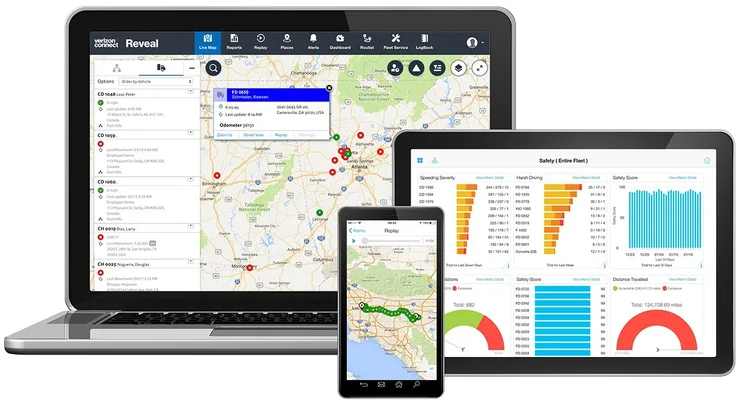
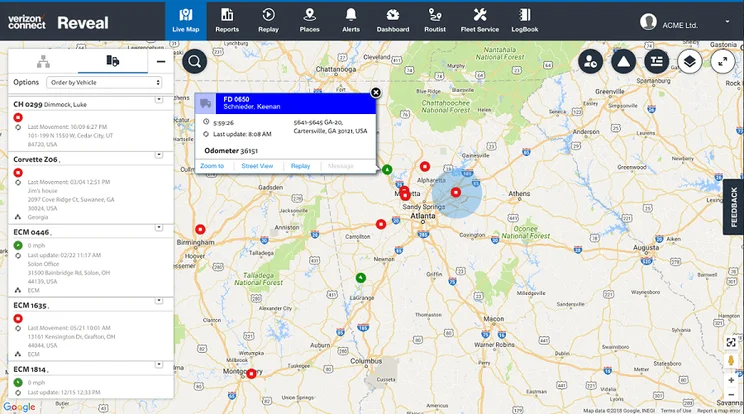
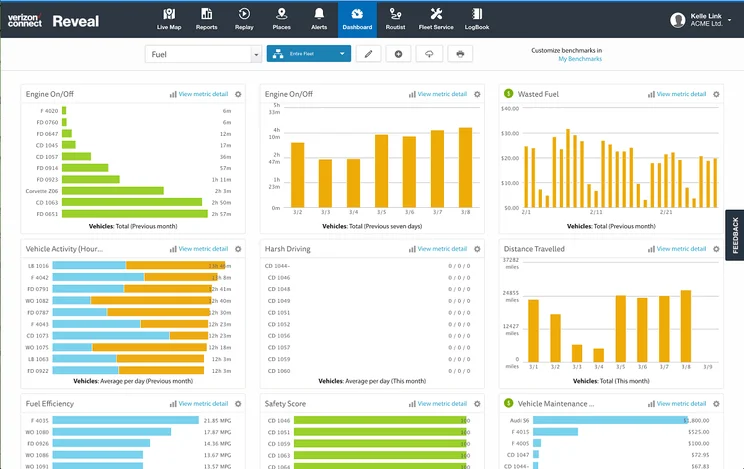
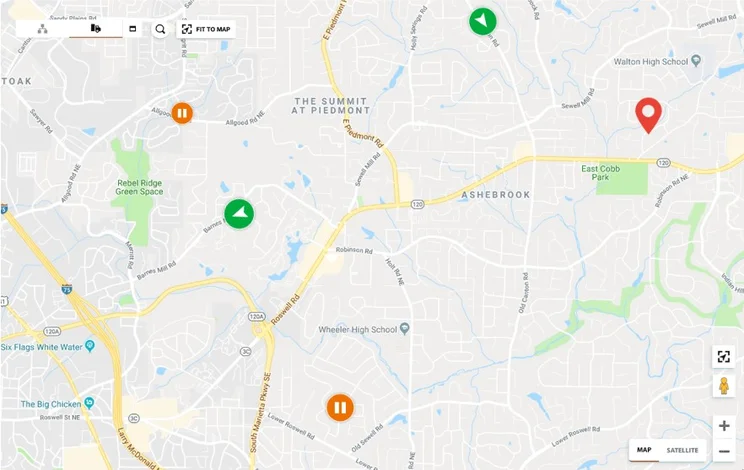
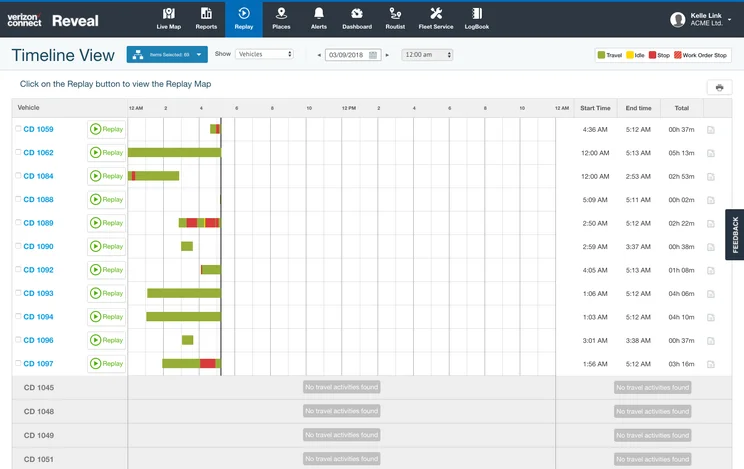
Verizon Connect Reveal offers all the tracking tools any fleet will need, standing out in particular for its fast 30-second refresh rate. This 30-second rate beats competitor Samsara, as it offers rates that can be as fast as 30 seconds, but does not guarantee them.
Verizon’s other core tracking tools include in-depth summary reports, customizable routes, intricate scheduling, geofencing, mileage tracking, and alerts for weather and traffic.
We particularly loved the timetable scheduler, which shows driver progress with a color-coded system: orange for in-progress routes, green for completed ones, and blue for jobs that have just started.
Verizon features
The brand is great for large fleets, since it offers a full-stack fleet management system and field service software. Used properly, all these tools will add up to huge savings for journey optimization versus money spent. Features include:
- Fleet summary reports (templates: daily, detailed, distance travelled, and geofence)
- Custom locations
- Alerts
- Scheduling and dispatch
- Automatic route optimization
- Mileage
- Traffic alerts
- Geofencing
- 24/7 support
Route planning features include the ability to adapt to changes in traffic in real-time, as well as automatically planning out the best route for each vehicle in advance.
For fleet managers, the tool streamlines their daily managing duties hugely. For clients, it ensures extra visibility and reliable delivery times. Pre-set alerts help as well, covering warnings for speeding, idling, and geofences.
Managers can also use a “replay” feature to track recently completed routes, seeing driver details and time stamps for each vehicle.
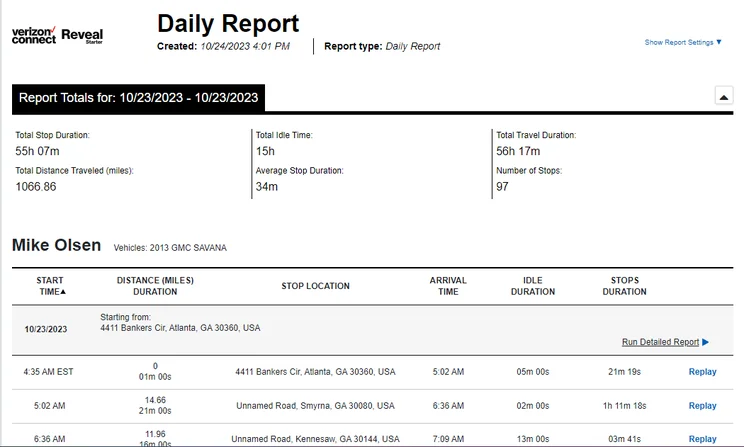
A daily report within the Verizon Connect Reveal software, viewed on a desktop. Source: Tech.co
Fright demand fell by 7.2% month-over-month, as of December 2025, marking the lowest amount since April 2020. Fleets are responding with a shift towards adopting new technology to streamline their operations.
It’s a change from their initial response of monetary belt-tightening: Tech.co survey data shows a drop in those who say “managing financial pressure” is their top concern (from 20% in November to 15% in December) while at the same time, fleets increased intent to adopt new technology (from 16% to 18% during the same period).

Pricing
The main Verizon Reveal fleet management software pricing can vary, depending on the features offered, with the typical licensing fee starting at $23.50 per vehicle, per month, but rising into the hundreds of dollars depending on the features needed.
The high end is certainly expensive compared with the industry average, but Verizon Connect is a great route planning option for a growing fleet that needs all the bells and whistles.
It can ultimately save a fleet more money by reducing expenses and speeding up routes. The Verizon brand also offers related applications that include field service software, dash cams, and asset tracking.
If you already have Verizon Connect, however, and you find the features are too excessive, there are plenty of other options — keep reading.
Omnitracs Route Planning Software: Best for Reliability
Pricing from: Custom
Who it’s for: Fleet managers that need a comprehensive, durable route planning software
Omnitracs Fleet Management

In Short
-
Pros
- Fuel tracking features built into platform
- 24/7 support to solve your problems at any hour
- Offers driver IDs
-
Cons
- No crash reporting
- No engine temperature tracking
- Prices aren’t public
30-Second Facts
- Established: 2005
- HQ: Dallas, Texas
- ELD Compliant
- Online support 24/7
- Quick installation
- Favorited by food service distribution fleets
Images
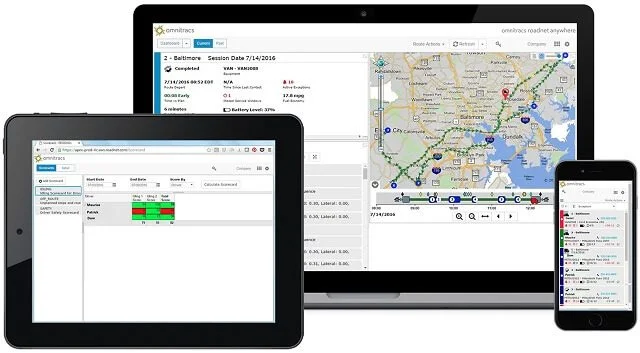
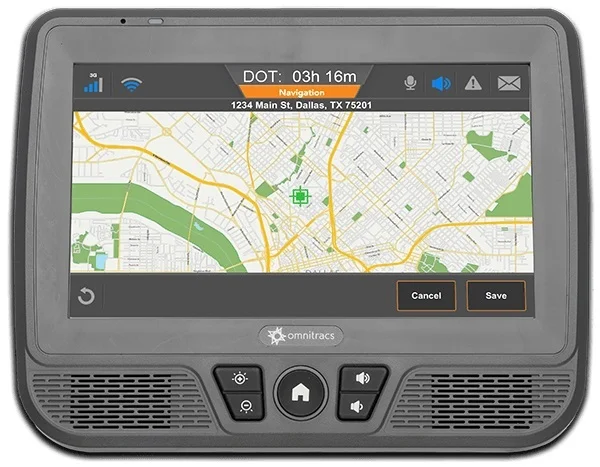
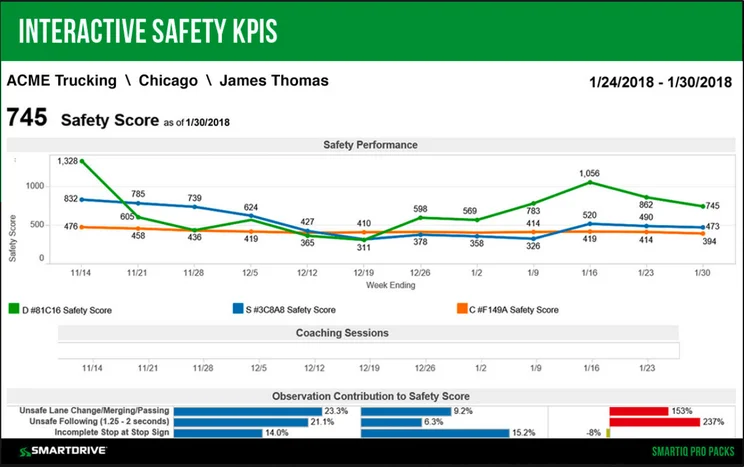
Another trustworthy software provider for route planning is Omnitracs, since it offers every important tracking tool a fleet will need. It isn’t the absolute fastest or packed with an entire range of fleet management features, but it fully delivers on the tracking functions any long haul or last-mile delivery fleet will need.
The software’s core route planning tools include fleet summary reports, custom locations, real-time refresh rates, automatic route optimization, mileage tracking, traffic alerts, and geofencing.
With the software, you can view the locations of your tractors, trailers, and custom landmarks with a single glance. This lets you spot wrong turns or traffic jams as they happen. You can quickly communicate to a driver how to adjust so that the route stays on track.
Why do we rate Omnitracs second in this guide, if it has all the same tracking tools that Verizon offers? Two reasons. First, Omnitracs doesn’t say exactly how fast its data refresh rates are: they’re “real-time,” but that term can refer to anything from five seconds to five minutes in the world of fleet tracking.
Second, Verizon offers better additional fleet management tools beyond just tracking, which makes it a more efficient system for large or growing fleets.
Omnitracs features
We found Omnitracs offers many great fleet management tools, including ELD compliance, two-way messaging, proof of delivery, and IFTA fuel tracking. Here’s the full list of core route planning features:
- Fleet summary reports
- Custom locations
- Alerts
- Scheduling and dispatch
- Automatic route optimization
- Mileage
- Traffic alerts
- Geofencing
- 24/7 support
The software will update itself occasionally, which will disrupt service for a few minutes and can be annoying to fleets that operate 24/7 and don’t have downtime.
Pricing
Omnitracs offers a solid all-around service, but does not make its pricing public, so you’ll need to get in touch directly for a custom quote. The software remains dependable, offers a decent range of abilities, and gives 24/7 online support to its users — which earns it a place on our list.
Samsara Route Planning Software: Best for the Transportation Industry
Price from: Custom (typically from $27 per vehicle, per month)
Who it’s for: Truckers that make frequent long-haul transportation trips
Samsara

In Short
-
Pros
- Great for optimizing routes
- Great for vehicle tracking
- Customizable driver management tools
-
Cons
- 3 year minimum for contracts
- No free installation and no public pricing
30-Second Facts
- Compliance: DVIR, IFTA, ELD
- Best for large fleets
- Great routing and dispatch features
- 24/7 support
- Free 30-day trial
Images
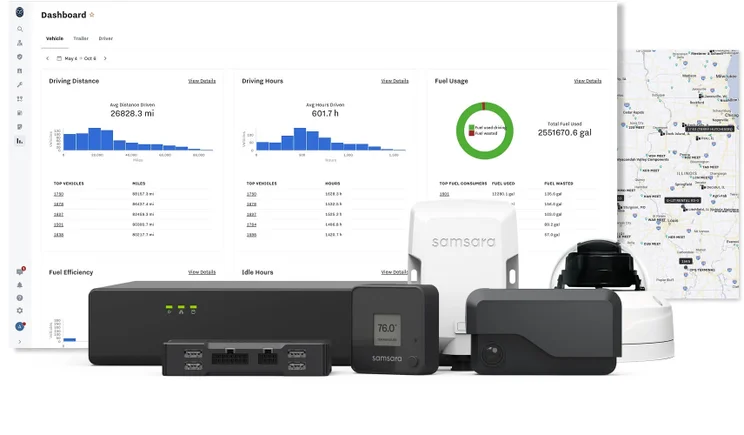
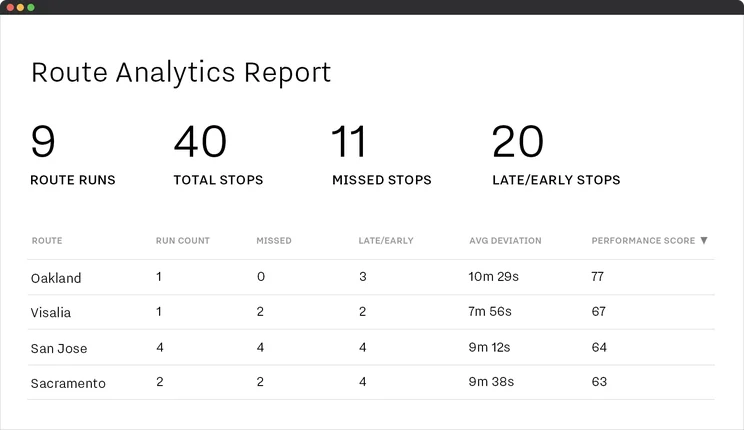
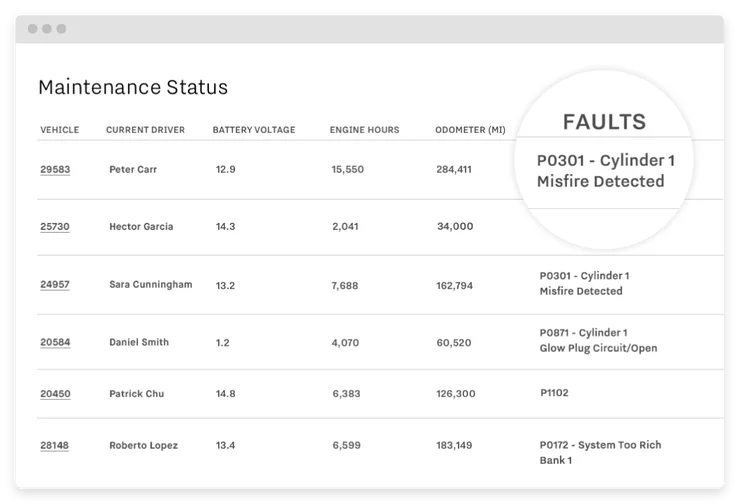
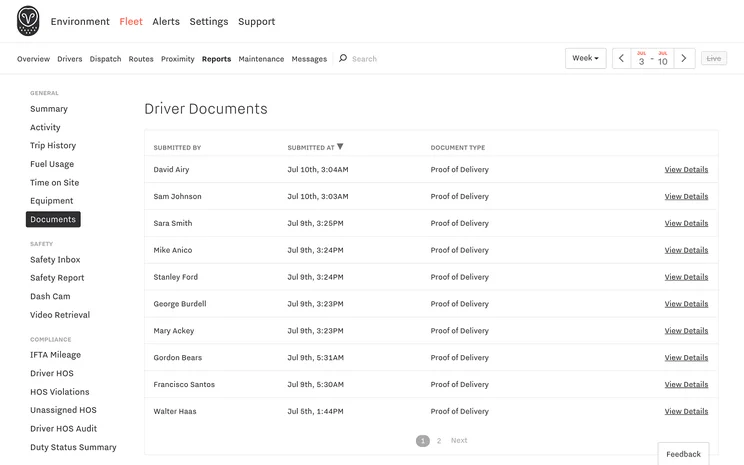
Samsara’s route planning is a central feature found in its top-quality fleet management system. The system also offers dash cam integrations that are useful for long-haul truckers and transportation fleets in particular.
Samsara’s core tracking tools include a driver record for real-time driver insights, custom locations that help managers build the best routes, scheduling tools, and historical performance tracking. Routes can be automatically optimized for up to 20 stops at a time, and AI-powered custom alerts (including for traffic and weather) can be set for SMS and email.
You’ll also get mileage tracking and geofencing, as well as a heat map of driver locations. Together, these tools help managers retain visibility of their drivers, even from across the country.
Samsara also offers additional hardware add-ons, most notably the CM32 Dual-facing Dash Cam, which is one of the best dash cams for truckers and built to be fully operated with Samsara’s fleet management software.
Samsara features
All of its abilities and add-ons make Samsara a great system for long-haul transportation, and one of the most switched-to services for fleet operations unhappy with their previous route planning software. Features include:
- Fleet summary reports
- Custom locations
- Alerts
- Scheduling and dispatch
- Automatic route optimization
- Mileage
- Traffic alerts
- Geofencing
- 24/7 support
While the route planning software automatically compiles routes, it also collects data that highlights the differences between each planned route and the actual path/travel times that the vehicle took in reality.
This allows managers to use the data to manually optimize future routes and improve them even further. In 2025, with fuel costs rising amid a labor shortage, these small tweaks can quickly add up to big savings.
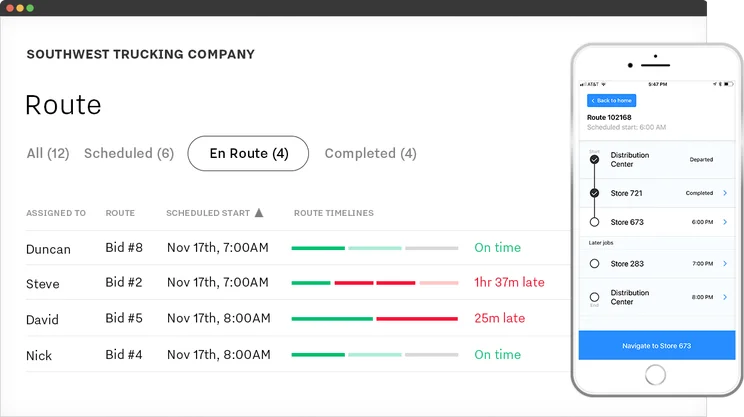
With Samsara, managers can easily track route progress across an entire fleet with a glance. Source: Samsara
Samsara has launched a new in-vehicle sensor device, the “Vehicle Gateway,” to unlock data collection and remote diagnostics across a wider range of customizable reports, alerts, and mobile apps.
Pricing
Pricing is custom, but the service typically starts at $27 per vehicle, per month, around the industry average. The Samsara fleet management system is popular, and for good reason: all these useful features come in an easy-to-use interface, with 360 degree support and training options.
See our full Samsara fleet management review here.
Teletrac Navman Route Planning Software: Best for Data-Hungry Companies
Price from: Custom (typically from $25 per vehicle, per month)
Who it’s for: Fleet managers that need data analytics insights
Teletrac Navman TN360

In Short
-
Pros
- Large catalog of features with lots of functionality
- Great for diver safety with built in features
- Fair prices compared with other options
-
Cons
- Features are more limited under cheaper plans
- 30-day notice needed to prevent annual contract autorenewal
- No engine temperature monitoring option
30-Second Facts
- Pricing (custom): From around $25/vehicle/month
- Compliance: DVIR, IFTA, ELD
- 24/7 phone support
- Great vehicle tracking
- 1 year contracts
- Free demo
Images
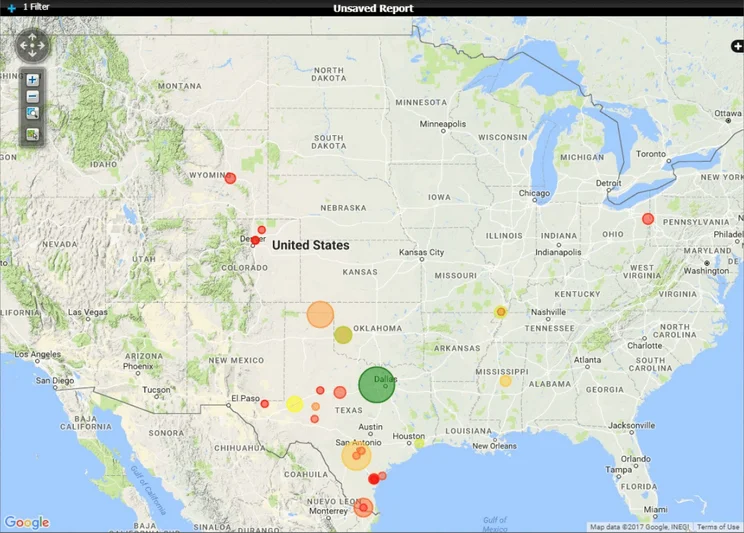
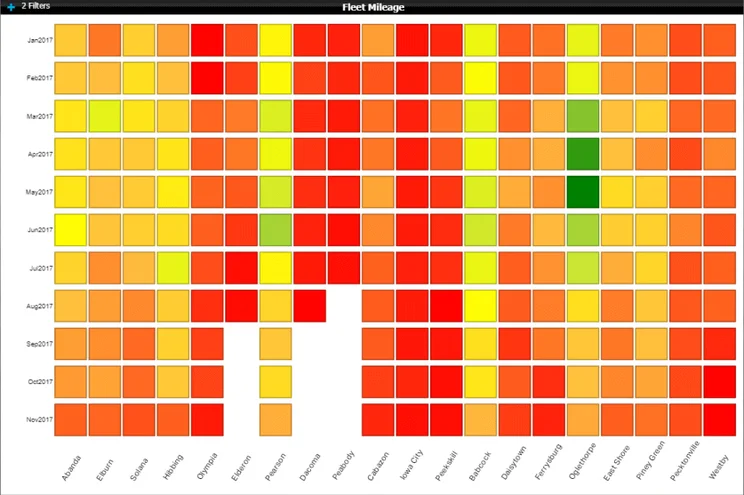
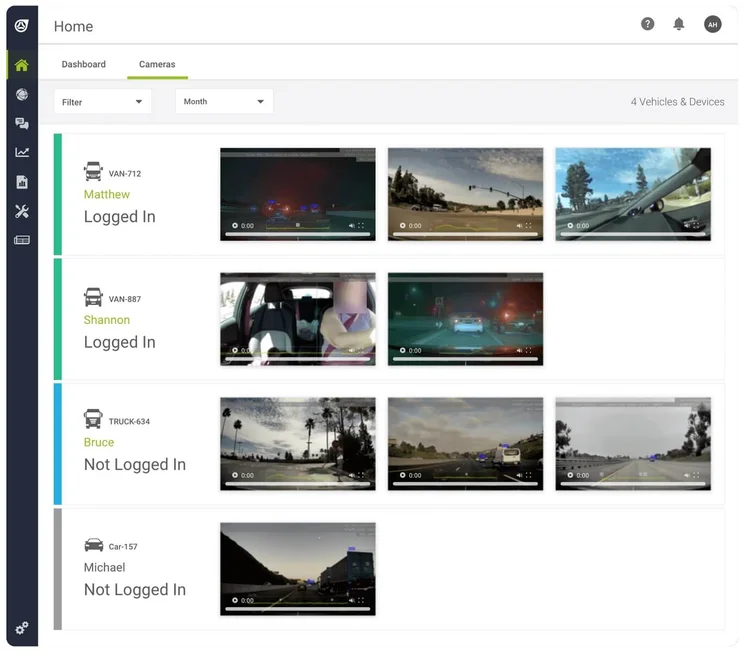
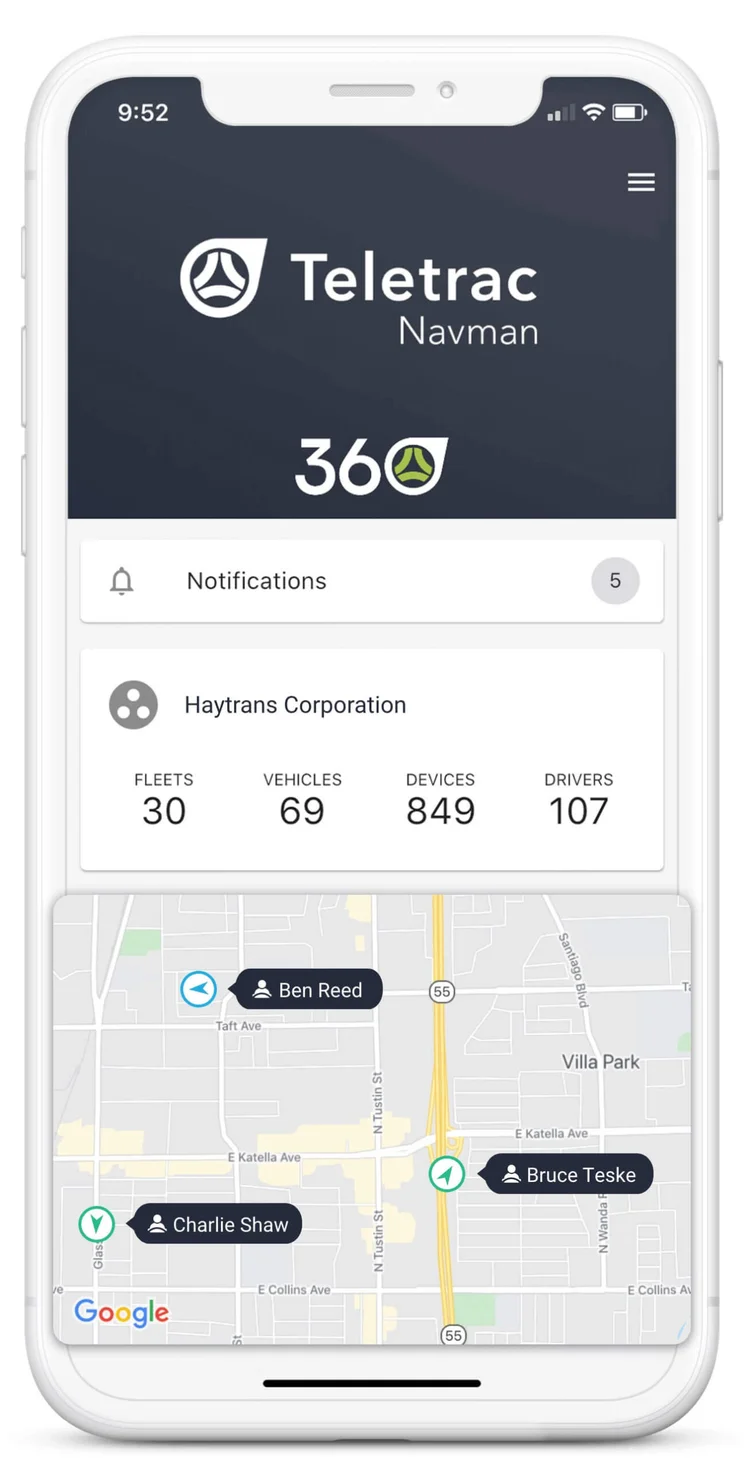
Teletrac Navman’s TN360 route planning software holds plenty of useful features for data-hungry fleet managers.
Some standout tools include automatic alerts, two-way communication to allow managers to get real-time information directly from drivers, robust reporting and analytics, and a “proof of delivery” notification, which is triggered upon arrival. All these tools make Teletrac a stellar option for companies that want as much data as quickly as possible.
Teletrac’s easy-to-use tools include scheduling and dispatch. Reports and charts can be autogenerated from prompts (“show me fuel consumption by vehicle for the past seven days” is one example).
You’ll also get traffic updates, mileage tracking, and the ability to set custom locations and custom alerts. You’ll automatically receive email alerts in the event of a driver compliance violation. Finally, the driver can quickly send a proof of delivery notification upon arrival at a destination.
Teletrac Navman features
Teletrac Navman TN360 has robust data reporting and offers proof of delivery alerts, but its refresh rate is not as precisely defined as Verizon’s 30-second standard. The speediest fleet systems can refresh every 15 seconds (Geotab) or even every three-second period (Motive), although once-a-minute updates will be fast enough for the needs of most trucking operations.
Here’s the full list of core features Teletrac Navman offers:
- Fleet summary reports
- Custom locations
- Alerts
- Scheduling and dispatch
- Mileage
- Traffic alerts
- Geofencing
- 24/7 support
Teletrac does not itself offer automatic route optimization, but does have integrations with third-party services for the feature. The service’s customizability and ability to create great data reports makes it stand out, although its great customer support doesn’t hurt, either.
Tech.co’s recent monthly fleet survey revealed a new top concern: 20% of fleet pros named “rising diesel prices” as their top source of operational pressure in March 2026, up significantly from the 13% who said the same in February.
International conflict is the likely cause, so it’s largely an unavoidable problem for US fleets. However, granular fuel tracking and fuel card integrations can help monitor fuel use and quickly locate inexpensive gas stations near a driver with an empty tank, helping to keep costs as low as possible.
Pricing
Teletrac Navman does not make its plan pricing public, although research indicates starting costs of around $25 per vehicle, per month. Contact the company for a custom quote that takes your fleet size and required features into account.
The broad feature range and 24/7 client support make Teletrac Navman a good all-around fleet management system for fleets that are looking for more than just route planning solutions.
Azuga Route Planning Software: Best for the Retail Industry
Price from: $25 per vehicle, per month
Who it’s for: Fleet managers who plan to boost margins by reducing fuel consumption
Azuga

In Short
-
Pros
- Good data reporting functionality
- Streamlined communication
- Strong support for when you have an issue
-
Cons
- 36-month contract periods
- ELD compliance costs extra, through eLogs add-on
- No free trials unless fleet has 30+ vehicles
30-Second Facts
- Pricing: $25-35/vehicle/month
- Compliance: DVIR, ELD, IFTA
- HQ: San Jose, CA
- Strong safety features
- Phone support 24/7
- Customizable data refresh time
Images
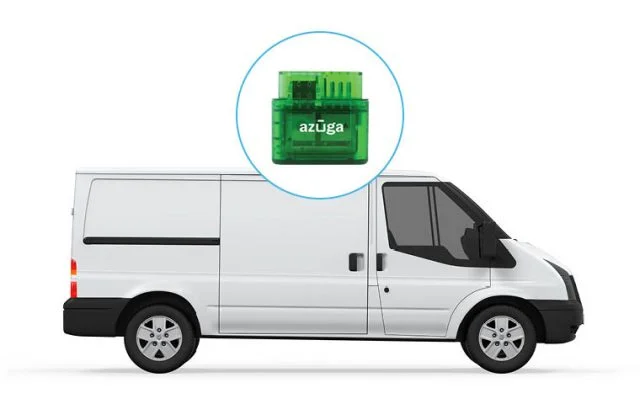
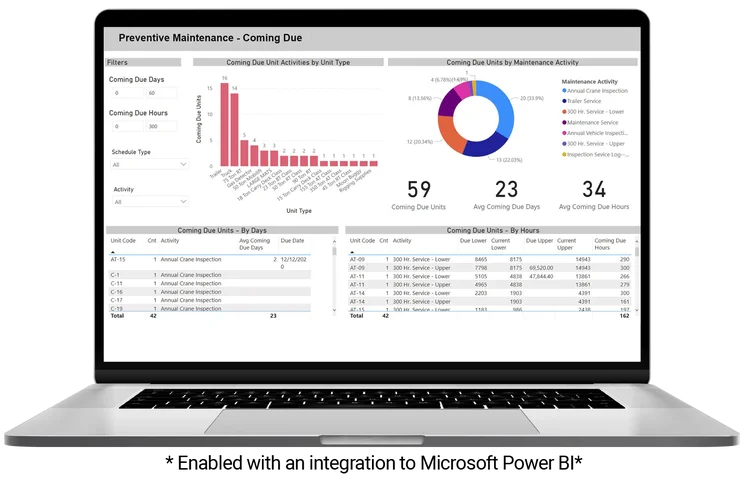
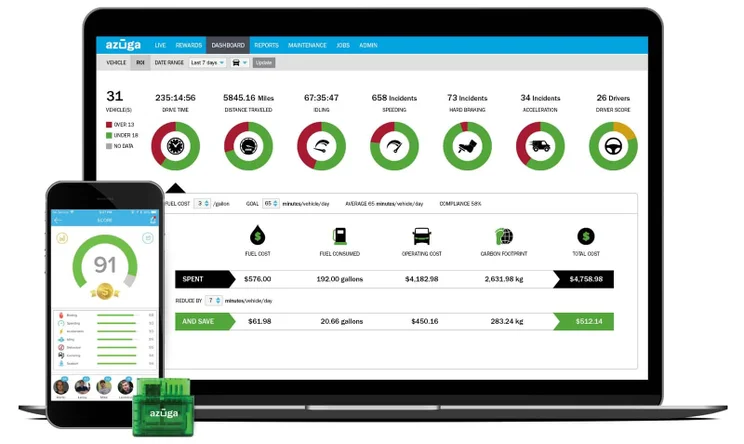
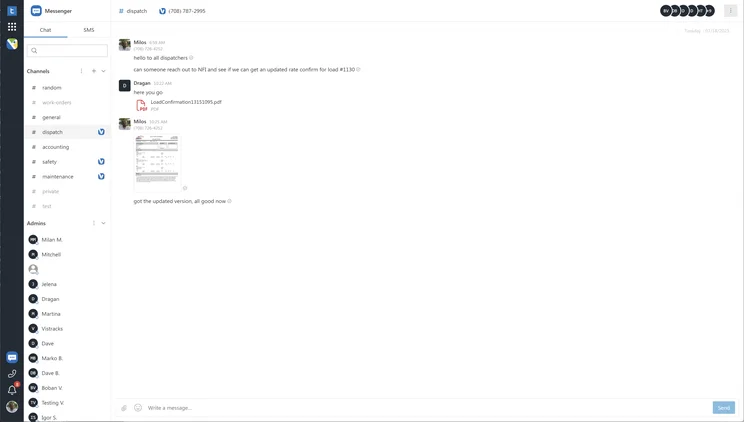
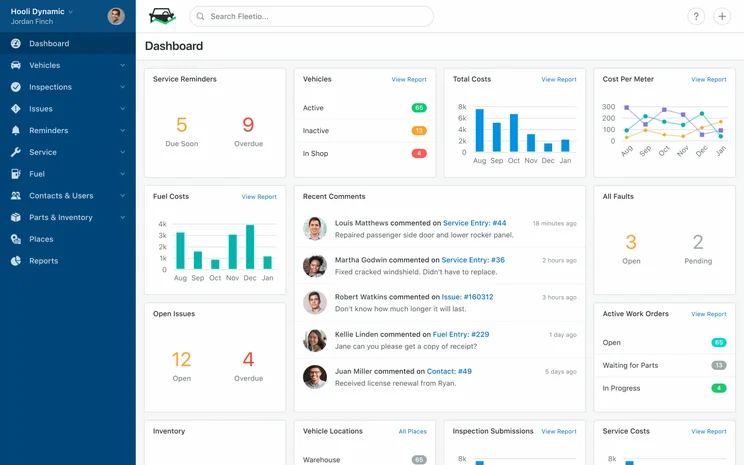
Azuga stands out for its benefits to retail fleets in particular, since thin margins in the industry mean that a little savings will go a long way. With Azuga, you’ll be able to reduce fuel use both through time-saving alerts and optimization features, as well as analytics, such as fuel consumption trends in reports.
Drivers can even be alerted automatically when near the cheapest gas station in the vicinity. Better tracking and reduced fuel spend are some of the biggest issues facing retail fleets today, making Azuga the attractive route planning option.
Azuga’s features include active tracking through Google Earth GPS mapping, traffic and weather alerts, and an admittedly wide refresh rate of between 30 seconds and 59 minutes. Custom locations are supported, and the software calls them “landmarks.”
Azuga features
Azuga offers the automatic route optimization that Teletrac foregoes. You’ll be able to choose how to optimize a route, from time duration to distance travelled to the weight of the cargo delivery. Route planning features include:
- Fleet summary reports
- Custom locations
- Alerts
- Scheduling and dispatch
- Automatic route optimization
- Mileage
- Traffic alerts
- Geofencing
- 24/7 support
Pricing
Unlike many fleet management systems, Azuga makes the prices for all three of its plans available to the public, with no need to contact them for a quote. The lowest priced plan is $25 per vehicle, per month, the second plan is $30, and the highest plan is $35. These are great prices, making the service even more attractive.
You can read more about the other tools to expect from Azuga in our full Azuga review.
Route Planning vs Google Maps, Waze or Other Navigational Apps
Route planning software designed for commercial vehicle use stands apart from consumer-grade navigational apps like Google Maps or Waze. Navigational apps are a great free resource for a single vehicle that needs to travel to more than one destination.
In contrast, the right route planning software will be able to figure out the most efficient route every time, taking into account the physical location of every stop and matching it against speed limits, high-traffic times, and real-time weather conditions.
They also have two-way messaging, proof-of-delivery receipts, ELD compliance, maintenance alerts, reporting, and IFTA fuel tracking to help with taxes.
Buyer’s Guide To Route Planning Software
If you’re new to purchasing route planning software, there are a few more questions you must address before investing in a program for your fleet.
What are the different kinds of route planning software?
Simple route planning software just includes GPS tracking and basic route optimization, perhaps with safety alerts and ELD compliance included. More advanced offerings will include a full fleet management system, which offers fleet benefits such as maintenance alerts and fuel purchase tracking.
There are also field service systems, which are designed to allow customer updates, and driver monitoring systems, which focus entirely on safety and habit tracking.
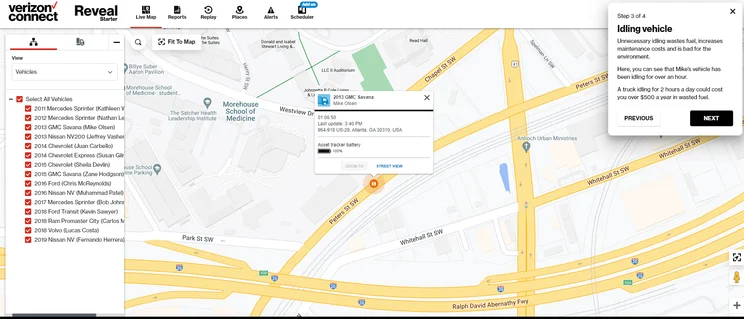
Verizon Connect Reveal’s map view, with vehicle info visible. Source: Tech.co
How does route planning software work?
Route planning software uses hardware units to track the location of every vehicle in a fleet. This location data is sent to the central dashboard used by the manager.
How much does route planning software cost?
The best route planning software will cost around $20 to $35 per vehicle, per month, although some services start as low as $5 a month, while costs can climb as high as $80 to $90 a month.
Paying annually instead of monthly will often help you save money, as will a longer contract. Top services like Verizon and Samsara require a three-year contract, but many only require one year, while a few offer a monthly rolling contract.
What are the most common features of route planning software?
The top features of high-quality route planning software include:
- Route optimization
- Two-way messaging
- Proof-of-delivery receipts
- ELD compliance (check out our guide to the best ELD devices here)
- Reporting and analytics
- Mobile driver app
Fairly common additional features beyond the basics include:
- Traffic awareness
- Maintenance alerts
- IFTA fuel tracking
- Asset tracking
- Customer Updates (common in field service software)
The most feature-rich options are Verizon Connect Reveal (the best dispatch provider for truckers), Samsara, and Teletrac Navman. On the other end of the scale, try Motive for a stripped-down, inexpensive alternative.
Check out our guide to Samsara versus Motive for a direct comparison of the two options.
Is there a route planning software option for free?
No trustworthy route planning software is permanently available at no cost. Free alternative apps (Google Maps and Waze) are better termed “navigational apps,” since they won’t optimize your routes for you. For everything else, you’ll have to pay.
Methodology: Rating the Best Route Planning Software
Our hands-on research ensures each route planning software on this list focuses on the three core fleet manager needs: a high value-to-price ratio, a wide range of useful features, and a strong support team.
Tech.co’s impartial researchers scored each service on a five-star scale across these six categories:
- Price: How much bang for your buck?
- Tracking: How well does the service track vehicles?
- Driver management: What features log driver activity?
- Vehicle management: How are the fuel, maintenance, and diagnostic features?
- Product features: What integrations or hardware are offered?
- Help and support: What support options are included?
Our team invested hundreds of hours into testing out 20 different fleet software available in the US and Canada. For this guide, we emphasized the “tracking” category, which covers core route planning tools, including custom locations, alerts, and optimization.
Read our full guide to the best fleet management services or our complete guide to fleet management costs.
Our top pick for route planning is the Verizon Connect Reveal software, for its pricing, 24/7 customer service, and advanced tracking tools, including custom locations and weather alerts.
Omnitracs and Samsara remain great software picks as well, as both offer the range of features, fast refresh rates, and round-the-clock support needed to plan the optimal routes for your fleet on a daily basis.
In the end, there’s only one way to know which route planning option is the best fit for you: connect directly with the companies and ask for a quote.
FAQs
If you don’t care about optimizing the route, you can enter each stop into Google Maps. But planning the optimal route with more than one stop gets complicated fast. You’ll have to adjust for factors including distance, speed limits, priority customers, traffic times, and even weather. To plan a commercial vehicle’s optimal route in order to reach multiple destinations, you’ll need a software capable of figuring all this out. Since route optimization is such an essential feature, all the top paid route planning software options will include it.
The best free route planning software is Google Maps. However, you’ll be limited to 10 stops per route, and it doesn’t come with the core features useful to an entire fleet of vehicles, like two-way messaging or proof-of-delivery receipts.
Google Maps isn’t just for getting to one destination. Once you have set one destination, you can tap the “…” symbol to open a dropdown menu and tap “Add stop.” However, Maps only lets you add up to 10 stops and none are optimized for traffic or total driving time: they appear in the order that you enter them. This lack of route optimization is a major downside to the free app and puts it below the 10 paid options on our list above. As always, you get what you pay for.
If you click on, sign up to a service through, or make a purchase through the links on our site, or use our quotes tool to receive custom pricing for your business needs, we may earn a referral fee from the supplier(s) of the technology you’re interested in. This helps Tech.co to provide free information and reviews, and carries no additional cost to you. Most importantly, it doesn’t affect our editorial impartiality. Ratings and rankings on Tech.co cannot be bought. Our reviews are based on objective research analysis. Rare exceptions to this will be marked clearly as a ‘sponsored’ table column, or explained by a full advertising disclosure on the page, in place of this one. Click to return to top of page


