

We may receive a commission from our partners if you click on a link to review or purchase a product or service. Click to Learn More
Azuga is one of the best fleet management systems on the market today and a particularly good pick for retail fleets, due to its great vehicle tracking features and stellar fuel saving tools.
Our research team loved Azuga‘s good driver tools, great vehicle tools, and okay-enough support and pricing. In fact, it’s better than nearly all the other fleet management systems (FMS) we reviewed, although three systems still beat it: Verizon, Samsara, and Omnitracs.
Azuga‘s weak spots include pricing, due to long 36-month contracts and the fact it withholds active tracking for its highest-priced $35-per-vehicle-per-month plan. Azuga has impressive 24/7 phone support, although it doesn’t offer installation aid.
Check out the top fleet management competition with Tech.co’s custom fleet tracking quotes form to find which is best for you.

Azuga: Some of the best fleet tracking tools around
Strong vehicle tracking features, stellar fuel saving functions
Try Azuga now
- Azuga GPS Fleet Tracking excels when it comes to vehicle tracking, fuel management, and safety features like its unique seat belt alert system.
- Azuga’s main downsides include its mandatory 36-month contract length and its active tracking feature only being available on the highest-priced plan, which might put off businesses on a budget.
- Azuga’s fleet management plans range from $25 to $35 per vehicle, per month, which is roughly the same price as competitors like Samsara and Teletrac Navman.
- Businesses looking for fuel savings and robust tracking tools for their fleet will appreciate Azuga’s range of built-in processes designed to help users deal with maintenance, diagnostics, and theft prevention.
- Azuga’s help and support options aren’t as strong as rivals like Verizon, Samsara, and Omnitracs, despite its other capabilities. You’ll have to invest in the CompleteFleet plan for a customer success manager, for example.
Azuga Pricing and Value
Azuga offers three price plans. BasicFleet costs $25 per vehicle, per month; SafeFleet costs $30 per vehicle, per month; and CompleteFleet costs $35 per vehicle, per month. These prices meet the industry standard and are comparable with two even more feature-packed services, Verizon (starts at $23.50 per vehicle, per month) and Samsara (starts at $27 per vehicle, per month).
The higher costs come with additional features: SafeFleet adds safety and efficiency tools, while CompleteFleet adds fuel records, custom reports, and a dedicated Customer Success Manager. All plans come with 24/7 phone and email support.
Azuga comes with lifetime warranties but offers no contracts shorter than 36 months. Verizon and Samsara’s contract minimum is also three years, so this isn’t unusually high, but many fleet management systems come with one-year contracts, including the slightly higher-rated overall Omnitracs.
The service can be demoed for free, but will only offer free trials to fleets with 30 or more vehicles.

Do you currently have a fleet management system?
Compare quotes from top vehicle tracking providers to find a fit for you.
Azuga Driver and Vehicle Management
Azuga’s features are its strongest quality, as they remain impressive across all three categories our researchers tested — driver management, vehicle management, and tracking.
That doesn’t mean Azuga’s features are the absolute best, but they don’t fall down in any area, and beat out the large majority of systems we’ve reviewed. Fleets using Azuga will be well equipped to handle nearly anything.

Interested in Azuga?
Find out today how its prices compare to the other top fleet management vendors:
Azuga GPS Fleet Tracking

In Short
-
Pros
- Great safety tools, including unique seat belt alert
- Geofencing and weather alerts
- 30-second refresh rates for live tracking
-
Cons
- No third-party GPS integration
- No free trials unless fleet has 30+ vehicles
- No crash reporting
30 Second Facts
- Pricing: $25-35/vehicle/month
- Compliance: DVIR, ELD, IFTA
- HQ: San Jose, CA
- Strong safety features
- Phone support 24/7
- Customizable data refresh time
Images
Vehicle Maintenance and Security
Azuga is great for vehicle management, with diagnostics in the form of Diagnostic Trouble Codes (DTCs), which can be viewed and tracked by vehicle.
Two other great tools? A maintenance system that tracks fleet service records, and, as a paid add-on, scheduled maintenance tools complete with alerts.DVIR reporting is supported and engine temperature tracking — a less common fleet system perk — is included as well, though Azuga has no support for cargo temperature tracking.
Finally, theft prevention is available through alerts, which can be set up to be triggered when the system is plugged in or unplugged during a specific time span, or when the vehicle is used out of hours.
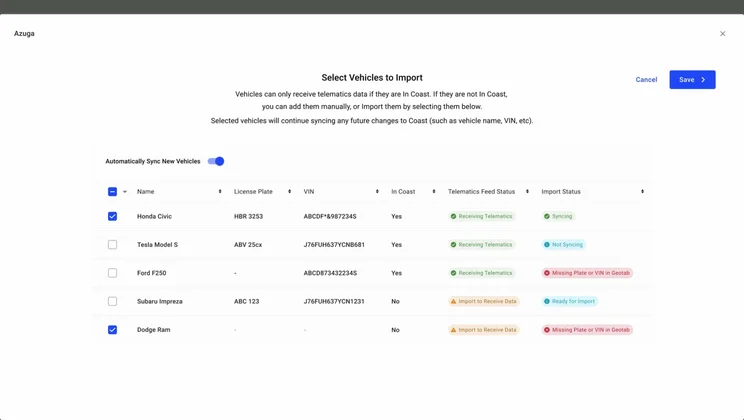
Azuga integrates with Coast, a fleet card that manages employee and business expenses in addition to fuel costs. Source: Azuga
Fuel Management
Fuel is one of the biggest costs for today’s fleets, but Azuga is here to help. The system offers an array of fuel-focused tools: fuel reports, a low fuel alert, data on fuel consumption trends in trip reports, and real-time alerts on the nearest or cheapest gas stations in the vicinity. Fuel card integrations are supported.
Idling management is also granular, tracking not just idling durations, but also location, including any idling near a known landmark.
Verizon and Samsara are the only two highly-rated systems to offer better fuel tools (they both have a wider range of fuel report types, such as Verizon’s overfill tracking), but Azuga stands out from the rest of the pack as one of the most fuel-conscious fleet systems on the market.
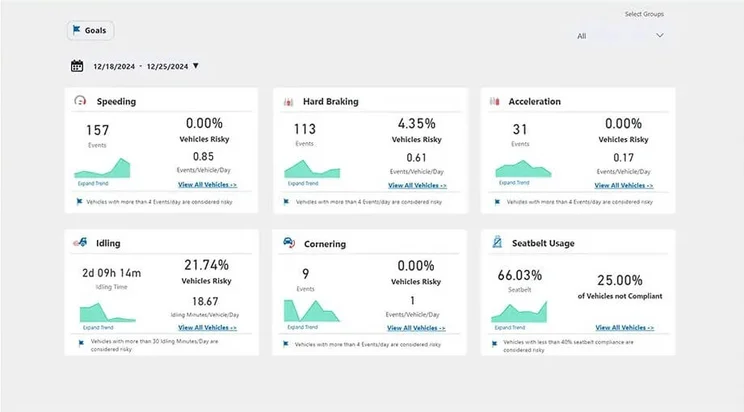
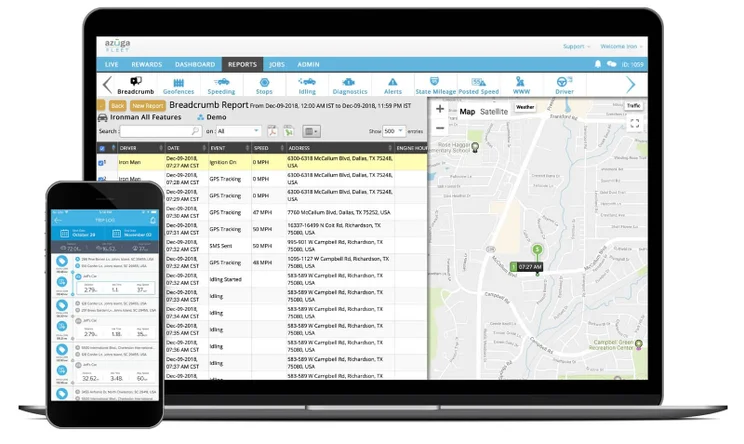
Azuga’s Fleet Reports track typical safety needs, including speeding, harsh braking, and rapid accelerations. Source: Azuga
Safety Features
Azuga does not offer a driver ID function to track individual drivers rather than the vehicles they use. Drivers can be identified by personal name, and reports can be created for them, but they can’t be tracked through Azuga’s software with tokens. Competitors like Verizon and Samsara do offer this ability, although they charge extra for its use.
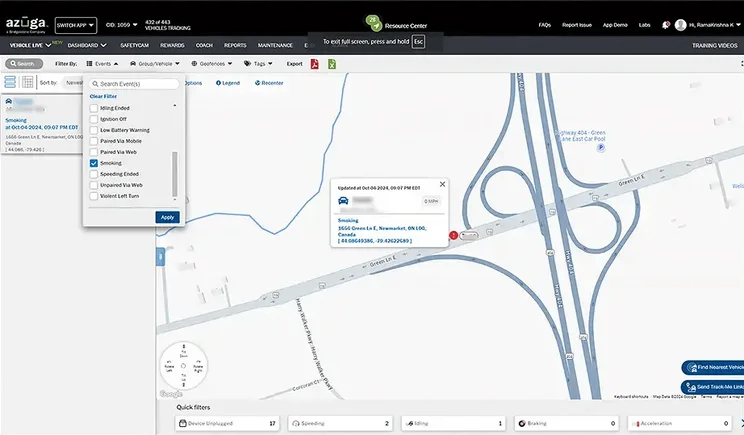
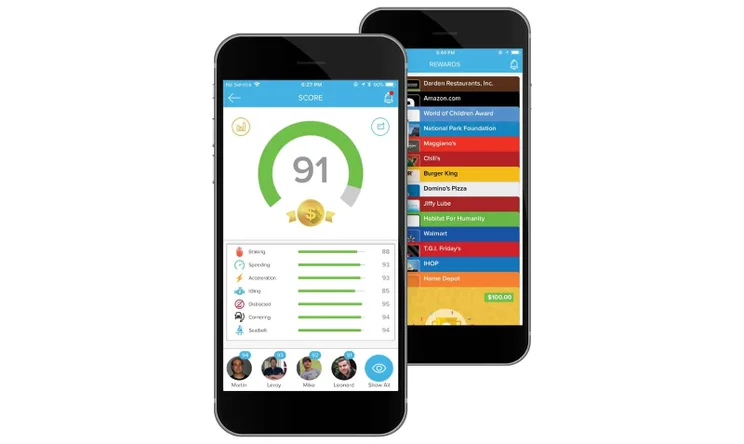
A leaderboard tracks drivers’ safety scores, updating their rankings in near-real time, provided you have the active tracking that’s available with the CompleteFleet plan. Managers will be able to view driver safety histories and averages, and will receive alert notifications triggered by events including speeding, hard braking, hard acceleration, idling, and other safety indicators. Azuga even has seat belt alerts, and it is the only top FMS to include this function.
Another FMS safety feature completely unique to Azuga is the ability to reward the highest performing drivers with gift cards to locations like Amazon, Walmart, and Domino’s pizza. Crash reporting is not included in Azuga’s otherwise impressive safety features. Messaging and a panic button are available through Azuga’s driver mobile app.
Azuga’s updates aren’t frequent, but this summer the platform rolled out a new AI dash cam feature for its SafetyCam Pro and Plus models.
With the Advanced Driver Assistance System (ADAS), the dash cam can detect events as subtle as rolling stops or tailgating, and can warn the driver in the moment, rather than forcing managers to tell them after the fact.
The Driver Monitoring System (DMS) is a separate AI dash cam tool that’s built for a driver-facing camera. It can detect in-cab concerns, from fatigue to phone use or a lack of a seatbelt.
Azuga Vehicle Tracking
You won’t lack for much when it comes to helping your fleet vehicles reach their destination with Azuga, since it offers nearly every core FMS tracking feature.
The system lets managers schedule calls, assign team members, and verify status, duration, drive time, and miles travelled for every call.
Users also get automatic route optimization and automatic notifications, two time-saving features that aren’t hugely rare but aren’t common for fleet systems, either. Azuga lets users pick from a big list of ways to optimize a route with multiple stops, from duration to distance, or even the weight of the load being delivered.
The software integrates Google Earth mapping into its live active tracking, and includes that service’s traffic and weather alerts. The refresh rate is between 30 seconds and 59 minutes, and that minimum rate puts Azuga alongside Verizon and Samsara, although it’s still below Motive‘s one-to-three second refresh rates
Azuga also supports another useful fleet tool, custom locations, which it calls “landmarks.” Assigning frequently traveled locations like work sites and gas stations as landmarks make them easier to incorporate into routes. State mileage reports can be auto-generated, helping with fuel taxes.
How Does Azuga Compare With Competitors?
As we’ve mentioned already in this guide, the best fleet management systems are Verizon and Samsara. The two are neck-and-neck as our favorite picks, thanks to fast 30-second refresh rates, 24/7 phone support, and a great selection of basic and advanced features.
However, there are well over a dozen other options worth considering. This can be overwhelming, so we’ve put together this table of the best systems, along with the key specifications that make each one stand out.
Interested in Azuga?
Find out today how its prices compare to the other top fleet management vendors:
|
Price from
The typical lowest starting price. The lowest price available for your business will depend on your needs
|
Rating
Based on price, tracking features, driver management, vehicle management, product features, and help and support
|
Price rating
|
Contract length
|
Warranty
|
Free trial
|
Free demo
|
|||||||||||||
|---|---|---|---|---|---|---|---|---|---|---|---|---|---|---|---|---|---|---|---|
 |
 |
 |
 |
 |
 |
 |
 |

|
 |
 |

|
 |

|

|
 |
 |

|

|
 |
|
Azuga |
Verizon Connect Reveal |
Samsara |
Teletrac Navman TN360 |
Omnitracs |
NexTraq |
Lytx |
Motive (formerly KeepTruckin) |
Geotab |
Spireon |
GPS Trackit |
Quartix |
US Fleet Tracking |
Fleetio |
||||||
|
$25/vehicle/month |
Custom (typically from $23.50/vehicle/month) |
Custom (typically from $27/vehicle/month) |
About $25/vehicle/month |
Custom |
$99/vehicle/month |
Custom |
Custom |
Custom |
Custom |
$24.99/vehicle/month |
$14.90/vehicle/month |
$24.95/vehicle/month |
$4/vehicle/month |
||||||
|
4.3
|
4.7
|
4.7
|
4.6
|
4.5
|
4.3
|
4.3
|
4.2
|
4.1
|
4.1
|
3.9
|
3.9
|
3.7
|
3.6
|
3.5
|
3.4
|
3.1
|
3.0
|
2.3
|
1.9
|
|
2.5
|
2.5
|
2.5
|
3.4
|
3.3
|
2.5
|
3.7
|
3.9
|
3.2
|
2.0
|
2.5
|
4.6
|
3.9
|
3.8
|
3.2
|
4.4
|
3.6
|
4.1
|
4.1
|
4.8
|
|
3 years |
3-year minimum (initial) |
3-year minimum |
12-60 months |
1 year |
Monthly |
Monthly |
1 year or monthly |
6 months initial |
1 year |
3 years |
12-60 months |
No contracts |
Monthly or higher |
1-3 years |
12 months |
Monthly |
1 year |
Monthly or 1 year |
Monthly |
|
Lifetime |
Factory warranty for US; none for CA |
5 years for most hardware |
First 12 months |
1-3 years |
Lifetime |
1 year |
5 years |
1 year |
1 year – lifetime |
1 year |
Lifetime |
Lifetime |
Up to 3 years |
1 year |
Lifetime |
1 year |
None |
6 month – lifetime |
1 year |
|
|
|
|
|
|
|
|
|
|
|
|
|
|
|
|
|
|
|
|
|
|
|
|
|
|
|
|
|
|
|
|
|
|
|
|
|
|
|
|
|
|
“Today’s freight companies are doing all they can to fight rising cost pressures… The biggest impact? A deeper integration of technology into fleet operations.” –Managing Costs in Logistics
Azuga vs Verizon Connect
Verizon Connect is one of the biggest brands in fleet management, offering a wide range of custom packages to support any feature you might need.
It has Azuga beat when it comes to variety of functions. Unlike Azuga, Verizon offers third-party GPS integrations, cargo temperature tracking in the US (though not Canada), a panic button security feature, automatic crash reporting, and the ability to hardwire devices to vehicles rather than just plug them into OBD-II ports.
It also offers more specialized Driver ID tools, including physical ID tokens as a paid add-on. Verizon starts at $23.50 per vehicle, per month, putting it a little under Azuga’s $25 per vehicle, per month cost, although the specialized features we’ve mentioned here will boost Verizon’s custom package fees.
Azuga vs Samsara
Samsara has fewer data reporting functions than Verizon, but it still offers more features than Azuga, including hardwired devices, GPS integrations, crash reporting, and a panic button. It even tracks cargo temperatures in Canada as well as the US, one-upping Verizon.
Its pricing is a slightly higher on average than Azuga, with our researchers estimating that Samsara packages tend to start at around $27 to $33 per vehicle, per month, compared to Azuga’s $25 starting price.
Azuga, Samsara, and even Verizon all share the same three-year contract minimums. If a long-haul committment isn’t for you, look into Fleetio, which offers a monthly rolling contract.
Azuga Help and Support
Azuga offers 24/7 phone and email support for its customers, along with a chatbot and an online knowledge center.
These hours are not rare for fleet management systems, even though they aren’t guaranteed, either. Quality around-the-clock support is important for any fleet that operates at odd hours, and Azuga delivers.
You won’t get any installation support, but the plug-and-play Azuga hardware is designed to be easy to set up by customers.
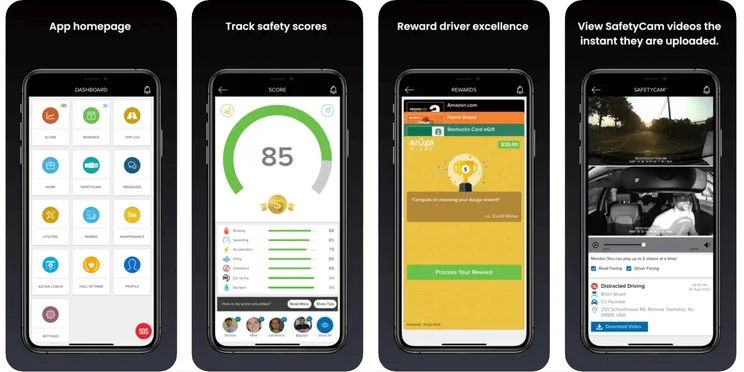
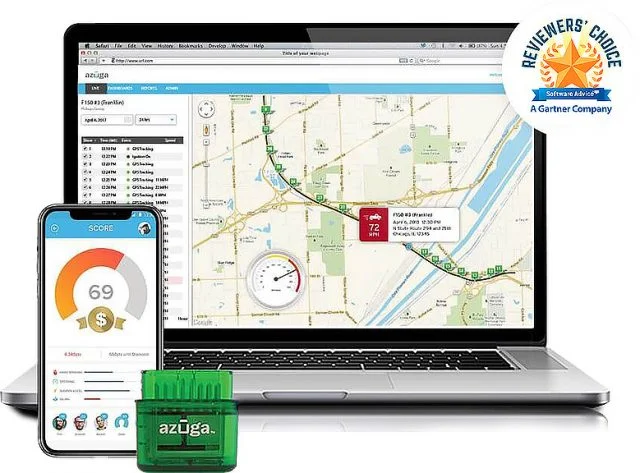
The Azuga mobile app tracks safety scores, dash cam views, and more. Source: Azuga
Azuga Installation and Other Features
Technically, Azuga doesn’t offer free installation, but this is just because the service offers plug-and-play units (not hardwired units), which can be hooked up in minutes. Azuga will provide aid in setting up the software or migrating from another service.
Azuga has one mobile app for drivers and managers. It’s available on iOS and Android, with an above-average rating of 3.9 stars out of 5 on each platform. Anyone can download it, although you’ll need an active subscription in order to log in.
The service integrates with three fuel card providers (WEX, PAPCO, and EFS), and the main software can log miles driven by state, a key metric for paying IFTA taxes. GPS map integrations are not available, although this is common with fleet management systems, since they offer built-in GPS tracking.
Azuga Asset Tracking
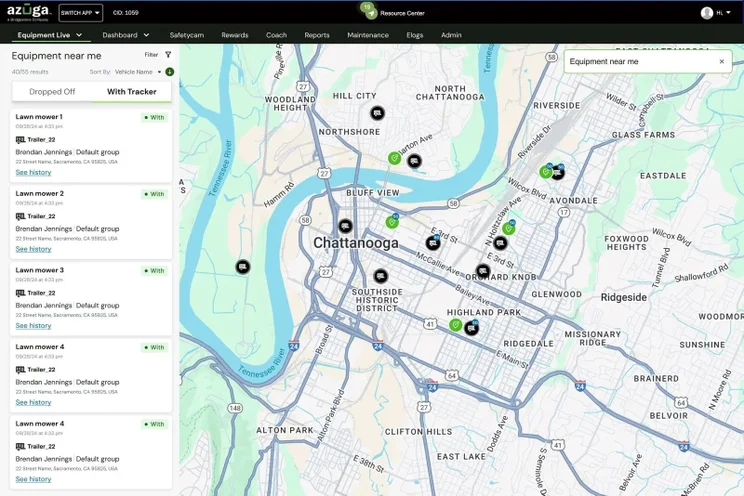
Azuga offers an additional service to track a business’s powered and unpowered assets, and it integrates with the main fleet system to keep all your equipment management centralized. The hardware unit for unpowered assets uses a battery with a life of up to five years, while the powered asset tracker uses a rechargeable battery that will go up to six months between charges.
Azuga recommends its asset tracking system for logging everything from containers and trailers to cranes, bulldozers, generators, and roadside signage.
Methodology: How We Rated Azuga
We take our impartial research and analysis seriously, so you can have complete confidence that we’re giving you the clearest, most useful recommendations.
After conducting an initial exploration to identify the most relevant, popular, and established tools in the market, we put them through their paces with a research framework designed in-house to see their real strengths and weaknesses. In this case, we analyzed 20 fleet management products across 51 different areas of investigation.
Based on years of market and user needs research, we’ve established a fleet management testing methodology that scores each product in six core assessment areas and six additional subcategories, covering everything, from the driver management features to value for money, customer support, and much more.
Our main testing categories for fleet management systems are:
- Price: The cost associated with using the fleet management software, including upfront costs, subscription fees, hardware costs (if applicable), and any additional charges for advanced features or add-ons.
- Tracking: The core functionality of the fleet management software, which involves monitoring and tracking the location and movements of vehicles in real-time, including features such as GPS tracking, route optimization, and geofencing.
- Driver management: The features and tools provided by the fleet management software to manage and monitor driver activities. This can include driver behavior monitoring, driver performance reports, and driver identification.
- Vehicle management: The functionalities that allow for the efficient management and maintenance of vehicles, such as vehicle health monitoring and maintenance scheduling.
- Product features: The additional functionalities and capabilities offered by the fleet management software, beyond basic tracking and management, such as real-time alerts and notifications, or driver routing and dispatching.
- Support: The resources, assistance, and guidance provided by the fleet management software company to users, including phone support, email or chat support, and online forums.
When it comes to calculating a product’s final score, not all testing and research categories are weighted evenly, as we know some aspects matter more to our readers than others, which are merely “nice to have”. After hundreds of hours, our process is complete, and the results should ensure you can find the best solution for your needs.
At Tech.co, we have a number of full-time in-house researchers, who re-run testing and research processes regularly to ensure our results remain reflective of the present day.
Azuga Customer Reviews
Azuga has built up a solid reputation over the years, and is often recommended by most businesses that use it. One way to help decide whether Azuga is the right fleet tracking software for you is by reading customer reviews, so you can better understand what Azuga Fleet Tracking is like in practice.
Azuga is a fine fleet management system that stands out for its wide range of fuel tracking tools, that even includes fuel consumption data analysis and automated low fuel alerts.
Fuel is a major cost for fleets. With economic uncertainties set to tighten profit margins in 2026 and beyond, fuel management tools are one of the easiest ways for any type of transportation company to eliminate wasteful spending.
Other top benefits of Azuga include extensive vehicle tracking functions, a support team that offers around-the-clock phone hours, and helpful vehicle management reporting tools.
Verizon and Samsara remain well worth considering as alternatives, but if fuel and vehicle tracking are key concerns, Azuga may be for you. Once you’ve made up your mind, there’s one step left: take a minute to fill out our quotes form today.


