

We may receive a commission from our partners if you click on a link to review or purchase a product or service. Click to Learn More
Teletrac Navman’s TN360 is great for vehicle tracking as well as driver management and safety. It also comes with short one-year contracts, which makes it one of the best fleet management software providers for fleets that need clear, in-depth data analysis without a long-term commitment.
Fleets in the construction industry might appreciate Teletrac Navman TN360 the most, since it addresses two of their biggest needs: Locating vehicles in real time and improving driver behavior. The system has a few limits to hardware functions (there’s no engine temperature tracking, for instance), but it beats nearly all the other system we’ve tested. In short, the TN360 a great fit for any fleet.
Our testing and research team has combed through 20 top fleet management systems across six different research sub-categories to arrive at our reviews, addressing core concerns from price to features to support hours.
You can read on for the full scoop, or you can just start gathering custom provider quotes through our handy online form.
Teletrac Navman Director vs TN360
Teletrac has two main fleet management systems: “Director” is the provider’s older model, while “TN360” is a modern version. The two solutions come with many of the same reporting and function tools and are aimed at the same audience (commercial fleets), but we ultimately consider TN360 to be the better solution, since it is more user-friendly and offers more features.
First, TN360 is easier to use than Director because it offers an intuitive interface that guides users as they interact with it, and it has short help guides to further explain its processes. Second, TN360 simply has more features: TN360 functions with all the same hardware as Director and more, while giving manager more software tools to streamline efficiency such as driver fatigue tracking and custom alerts.
That said, Director isn’t bad, and does perform better in a few areas. It offers weather alerts that TN360 does not have, for instance, and remains more widely used. Our researchers focused on TN360 for this review, but we’ll include data on what Director offers as well as other competitors’ systems, so you can make an informed decision.
Teletrac Navman TN360

In Short
-
Teletrac Navman offers two main fleet management systems, Director and TN360. Both are dependable cloud-based GPS fleet tracking software, but TN360 is easier to use than Director due to a modern interface and help guides. Missing features include auto route optimization, a panic button, and engine temperature tracking. Still, with fair pricing and good support, TN360 is a great pick for fleets that need strong vehicle location and data analysis tools, but don’t want to be locked into a long contract.
30 Second Facts
- Pricing (estimated): $25/vehicle/mo
- Compliance: DVIR, ELD, IFTA
- 24/7 Phone support
- Great vehicle tracking
- 1 year contracts
- Free demo
Images
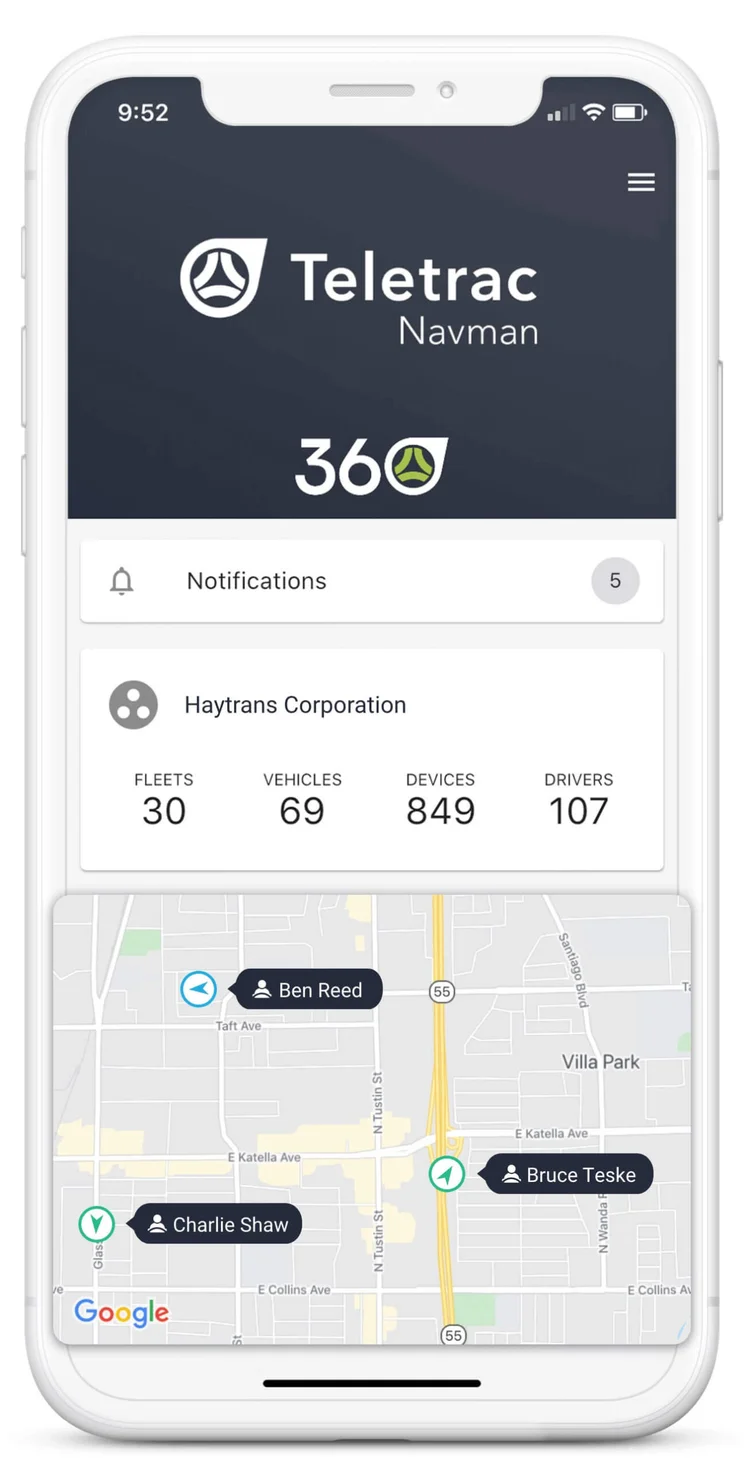
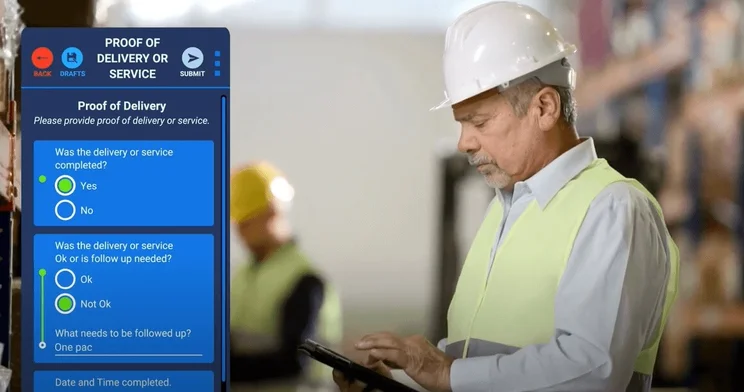


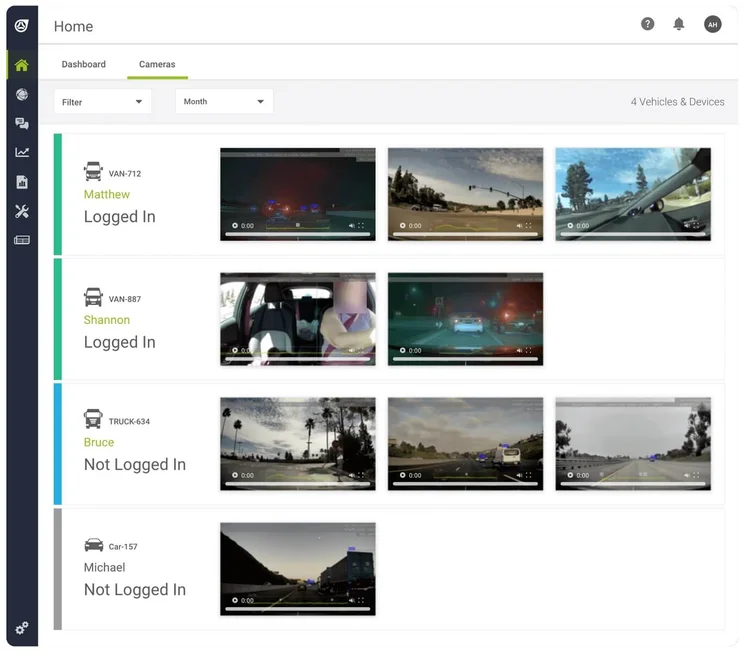
Teletrac Navman TN360 Driver and Vehicle Management
Teletrac offers first-class driver management, while offering good vehicle management as well. In particular, the provider stands out when it comes to tools for keeping vehicles maintained and tracking hardware diagnostics. Fleets operating in industries that need to keep heavy vehicles purring will definitely be content with what TN360 delivers.
Vehicle Maintenance and Security
Director and TN360 both offer theft prevention tools, with alerts triggered by drivers entering vehicles they aren’t assigned to, as well as the reporting tools needed for daily DVIR checks. Neither service tracks cargo or engine temperature, which is an example of Teletrac’s limited hardware features.
But many software abilities help both Teletrac systems offer great diagnostic and maintenance tools: Vehicle-specific diagnostic reports will be generated automatically, not manually, giving users full visibility on issues like faulty lights. Dynamic maintenance scheduling lets users track upcoming maintance needs while factoring total engine runtimes and mileage.
TN360 includes custom maintenance records, too, so managers can track anything from tires to regular service needs.

Is Teletrac for you?
Find out today how its prices compare to the other top fleet management vendors:
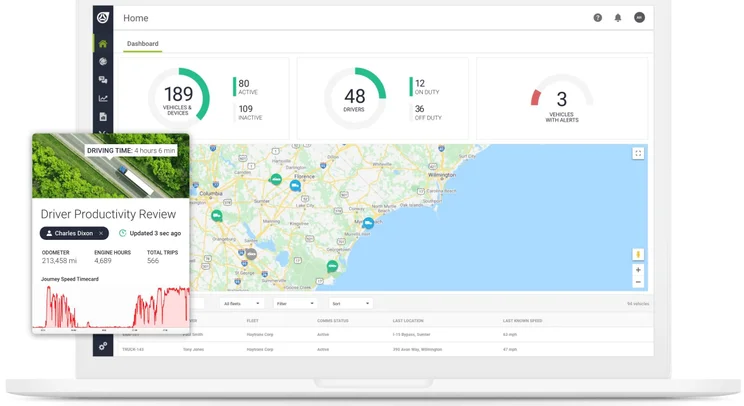
Teletrac Navman’s reporting functions include driver-specific productivity reports. Source: Teletrac Navman
Fuel Management
Drivers using Director and TN360 can track mileage for IFTA tax preparation, can automatically monitor fuel spend, and will be able to integrate the system with fuel cards for more third-party support. Other tools also help reduce fuel use, such as alerts for lengthy idling or overspeeding events as well as reports on how adjusting these metrics can reduce fuel consumption.
Teletrac’s systems come with automatic route optimization, which cuts down on drive time to save more fuel, and their overall fuel tracking ability is more than respectable.
That said, Teletrac lists just six fuel-related integrations on its website according as of our October 2024 update (this is up from just four of them a year earlier), so it doesn’t offer the broadest range of fuel cards. If you need more options, we recommend Nextraq and its 25 fuel card integrations. Still, we rate Teletrac as the better system than Nextraq overall.
Safety Features
TN360’s top-tier driving management tools include complex historical data: Users can generate trip summaries broken down by driver, vehicle, distance, time, or events like speeding and harsh breaking. Manager can even see how the entire journey went down by replaying it with an interactive map. Both Director and TN360 offer driver ID, a solution for assigning jobs to drivers who operate multiple vehicles, and they both support scorecards, which could be used to rate driver performance in order to drive (no pun intended) better results.
Safety alerts can let managers know about driving events (harsh braking, cornering, and acceleration), geofencing violations, idling, or stolen vehicles. TN360 also lets custom alerts serve for crash reporting, letting managers know when, where, and the speed at which a detected collision happens, but Director does not offer this function. The TN360 platform also has a whole tool just for managing driver fatigue, a unique fleet system perk that will be attractive for any fleet that has problems ensuring its drivers are remaining alert.
Both Teletrac systems have no panic button. Instead, you’ll need to rely on driver messaging and automated alerts for safety communication, two safety tools that will work well in most cases but may not work at all times.
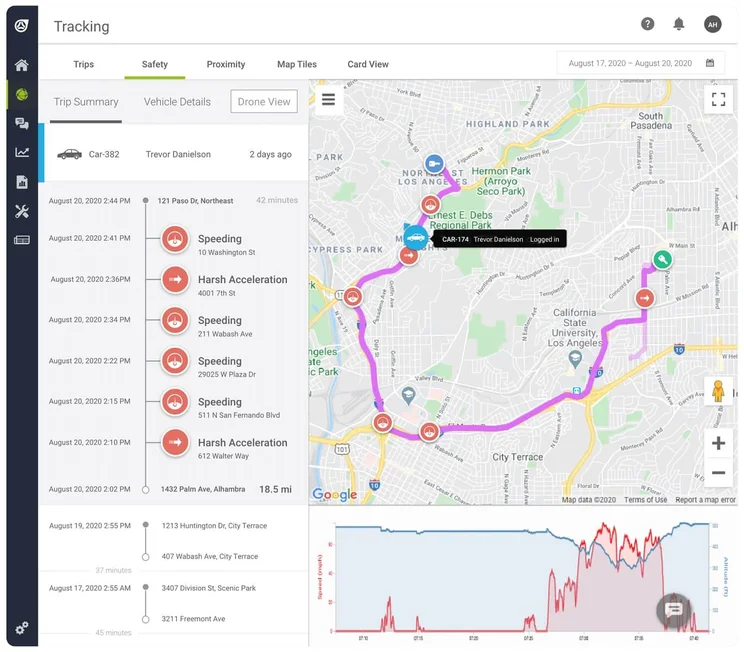
The system’s interface matches each safety incident to its location on a map, for easier reference. Source: Teletrac Navman
Teletrac Navman TN360 Vehicle Tracking
Teletrac’s Director and TN360 both deliver good tracking tools, and TN360 packages them in a simple-to-use way. Although they have below-average refresh rates, the services offer useful and advanced functions including custom locations and easy route assignments.
Teletrac Navman’s TN360 offers more user-friendly scheduling, routing and dispatch tools than Director. With TN360, users can write in search terms like “Show me fuel consumption by vehicle for the past 7 days,” and the system will automatically generate a report with a chart graphic. Director does offer customizable reports, though, and both services let users schedule jobs and view individual drivers’ workloads.
Director and TN360 both offer custom locations (called landmarks by the systems), automated route optimizing, and custom alerts that can on-screen, emailed, or texted. Managers will be warned about upcoming or overdue maintenance needs. Director has weather updates, while TN360 does not, though both offer traffic updates and track milage for IFTA requirements. Both systems lack GPS map integrations, but this isn’t a problem, since they come with built-in navigation.
Finally, Director comes with refresh rates of between one and five minutes. While TN360 doesn’t clarify how quickly it refreshes beyond saying it offers “real-time” tracking, it seems likely to be similar to Director’s speed. This once-a-minute update rate is perfectly fine for most fleets, but the speediest fleet systems can refresh every 15 seconds (Geotab) or even every 3-second period (Motive).
20% of logistics professionals say they need to invest in better data analytics for forecasting and planning, according to an October 2025 survey by Tech.co. As one of the best fleet management systems for data analysis, Teletrac Navman should keep those pros happy.
Teletrac Navman TN360 Pricing and Value
Teletrac Navman does not have public pricing, but our estimate puts starting costs at around $25 per vehicle per month, which is around the industry standard. Teletrac has no installation fee and offers a free demo to potential customers, though there’s no free trial.
Contracts are between 12 and 60 months, and will auto-renew for a 12-month period. Warranties are for 12 months, with a 30-day cancellation notice minimum (Businesses must pay outstanding fees at a 3% discount if they choose to terminate contract early). These time spans are typical for the fleet system industry, although some providers offer longer warranties or shorter contracts. Our two favorite systems overall, Verizon and Samsara, both have lengthy 3-year contract minimums.
The system’s software packages are determined on a case-by-case basis, so regardless of whether you’re interested in Teletrac Navman Director or our recommended system, TN360, you’ll need to gather a custom quote.

Do you currently have a fleet management system?
Compare quotes from top vehicle tracking providers to find a fit for you.
|
Price from
The typical lowest starting price. The lowest price available for your business will depend on your needs
|
Rating
Based on price, tracking features, driver management, vehicle management, product features, and help and support
|
Price rating
|
Contract length
|
Warranty
|
Free trial
|
Free demo
|
|||||||||||||
|---|---|---|---|---|---|---|---|---|---|---|---|---|---|---|---|---|---|---|---|
 |
 |
 |
 |
 |
 |
 |
 |
|
 |
 |

|
 |

|

|
 |
 |

|

|
 |
|
Teletrac Navman TN360 |
Verizon Connect Reveal |
Samsara |
Omnitracs |
Azuga |
NexTraq |
Lytx |
Motive (formerly KeepTruckin) |
Geotab |
Spireon |
GPS Trackit |
Quartix |
US Fleet Tracking |
Fleetio |
||||||
|
About $25/vehicle/month |
Custom (typically from $23.50/vehicle/month) |
Custom (typically from $27/vehicle/month) |
Custom |
$25/vehicle/month |
$99/vehicle/month |
Custom |
Custom |
Custom |
Custom |
$24.99/vehicle/month |
$14.90/vehicle/month |
$24.95/vehicle/month |
$4/vehicle/month |
||||||
|
4.6
|
4.7
|
4.7
|
4.5
|
4.3
|
4.3
|
4.3
|
4.2
|
4.1
|
4.1
|
3.9
|
3.9
|
3.7
|
3.6
|
3.5
|
3.4
|
3.1
|
3.0
|
2.3
|
1.9
|
|
3.4
|
2.5
|
2.5
|
3.3
|
2.5
|
2.5
|
3.7
|
3.9
|
3.2
|
2.0
|
2.5
|
4.6
|
3.9
|
3.8
|
3.2
|
4.4
|
3.6
|
4.1
|
4.1
|
4.8
|
|
12-60 months |
3-year minimum (initial) |
3-year minimum |
1 year |
3 years |
Monthly |
Monthly |
1 year or monthly |
6 months initial |
1 year |
3 years |
12-60 months |
No contracts |
Monthly or higher |
1-3 years |
12 months |
Monthly |
1 year |
Monthly or 1 year |
Monthly |
|
First 12 months |
Factory warranty for US; none for CA |
5 years for most hardware |
1-3 years |
Lifetime |
Lifetime |
1 year |
5 years |
1 year |
1 year – lifetime |
1 year |
Lifetime |
Lifetime |
Up to 3 years |
1 year |
Lifetime |
1 year |
None |
6 month – lifetime |
1 year |
|
|
|
|
|
|
|
|
|
|
|
|
|
|
|
|
|
|
|
|
|
|
|
|
|
|
|
|
|
|
|
|
|
|
|
|
|
|
|
|
|
|
Help and Support
Teletrac offers installation services for large fleets, but not small ones. If you have a fleet with ten or more vehicles, contact them at installations@teletracNavman.com for more information, but if you have fewer vehicles, they instead recommend video tutorials.
Teletrac’s support options are healthy. All fleets will get email support as well as 24/7 phone support. Plus, TN360 offers customers support documents in a uniquely hands-on way with interface signposting: Users can click help boxes to get the answers to the most relevant questions at any given time. There’s no chatbot support, however.
Around-the-clock phone service isn’t always guaranteed with fleet management, although many services from Verizon to Linxup will match Teletrac’s hours. Overall, Teletrac has better support than most fleets, due in large part to the free installation available for fleets of ten or more vehicles.
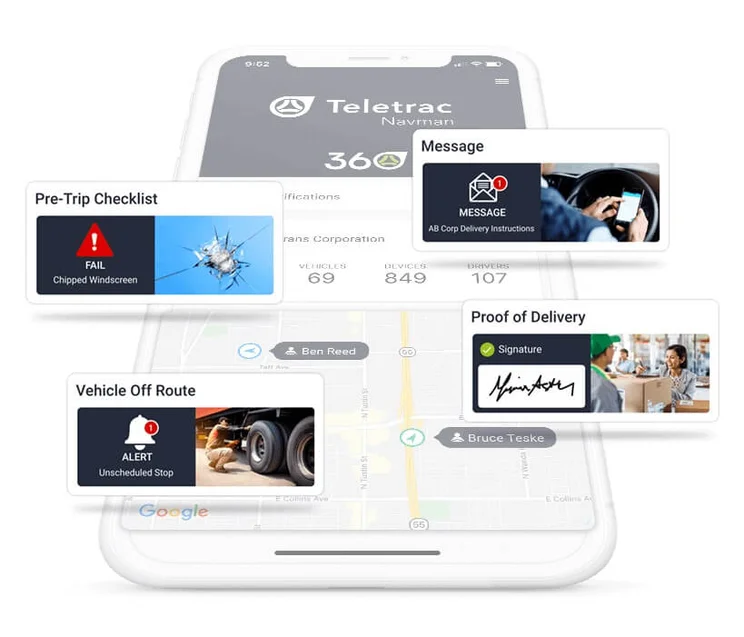
The TN360 mobile app covers all of a driver’s HOS compliance needs. Source: Teletrac Navman
Installation and Other Features
TN360 offers hardware installable in both of the ways fleet systems are installed: Hardwired in or simply plugged into an OBD-II port. Installation help is available, although fleets with fewer than ten vehicles will need to stick to video tutorials.
In addition to the cloud-based desktop software, TN360 has a mobile app for drivers that lets them follow routes, message managers, and log HOS to stay in compliance. They can also track mileage by state for IFTA reporting.
The service would have scored better, but it does not offer a few useful fleet management functions: The mobile app has no panic button, while the system itself lacks weather updates and GPS map integrations. These three tools are all available from feature-rich offerings like Verizon or Samsara, among other competitors (although GPS integrations are admittedly rare on the whole, since fleet management systems come with their own GPS functions).
Teletrac also lacks additional advanced hardware features, including cargo temperature and engine temperature tracking. In the end, despite a good mobile app, our research team found the limited hardware features earned it a so-so 3.8/5 product features score.
Teletrac Navman Asset Tracking
Teletrac also sells asset tracking systems that will allow businesses to maintain visibility into all their powered and unpowered assets’ locations, performance and use. Constantly tracking assets in real time allows a manager to make sure no assets are wasted, hoarded, or misplaced. And since historical location data is tracked, reports can be generated that allow managers to learn and make data-driven decisions to minimize downtime in the future.
Teletrac’s asset tracking service works best for heavy equipment used in industries like construction, mining, paving, or plant and equipment hire. Fill out our quick quotes form for a look at other top asset tracking solutions.
Methodology: How We Rated Teletrac Navman Director and TN360
Tech.co’s research and testing team reviewed a total of 20 fleet management systems in the US and Canada. They created six categories in order to track key qualities of all the best systems:
- Price: Cost factors including all plans, contract lengths, and warranties.
- Tracking: Routing and dispatch tools, such as custom locations, geofencing, and alerts.
- Driver Management: Driver behavior features, such as messaging, crash reporting, and compliance.
- Vehicle Management: Vehicle features including maintenance, theft prevention, and fuel management.
- Product Features: General software functionality like integrations, apps, and hardware.
- Help & Support: Types of support and installation aid, plus support hours.
All systems were rated in each category and were also given overall scores that covered all categories at once. This allows us to directly compare them, creating guides to the best overall fleet management system, as well as the best solutions for trucking dispatch and route planning.

Some industries need to track both fleets and assets
Teletrac Navman isn't the only option: You can compare all the top asset trackers here.
Teletrac Navman’s TN360 is a great fleet management system, and among the best on the market. It earns a strong 4.6/5 overall score from our research team, thanks to standout driver management and location tracking tools, as well as above-average support.
It has a few limited hardware functions, like a lack of cargo and temperature tracking, but only the two most feature-packed fleet systems (Verizon and Samsara) can beat the TN360 on the whole. The system is particularly useful for construction fleets, given the value this industry places on vehicle visibility and driver behavior.
If you’re interested in a demo, don’t forget to compare TN360 to the competition: Take a minute to fill out our custom quotes form, and allow the best fleet management system providers to come to you.
If you click on, sign up to a service through, or make a purchase through the links on our site, or use our quotes tool to receive custom pricing for your business needs, we may earn a referral fee from the supplier(s) of the technology you’re interested in. This helps Tech.co to provide free information and reviews, and carries no additional cost to you. Most importantly, it doesn’t affect our editorial impartiality. Ratings and rankings on Tech.co cannot be bought. Our reviews are based on objective research analysis. Rare exceptions to this will be marked clearly as a ‘sponsored’ table column, or explained by a full advertising disclosure on the page, in place of this one. Click to return to top of page


