We may receive a commission from our partners if you click on a link to review or purchase a product or service. Click to Learn More
Google AI Studio is a great value vibe coding platform, because of its generous request and token limit system, effective integration with various Google products, and unique capabilities, such as a built-in voice and audio tool. It is a strong option for developers that want to effectively prototype without worrying about hitting credit limits.
Our review is based on dedicated, hands-on testing time with Google AI Studio, as well as a detailed understanding of the platform’s features and pricing options.

Turn ideas into apps in minutes
Build fully-functional apps that work for you, with just your words
No coding needed
- Google AI Studio is a vibe coding platform that provides solid value for users, thanks to a generous free tier and pay-as-you-go tier. It is ideal for businesses that want a liberal environment to test apps without a strict credit limit.
- Businesses should consider upgrading to the pay-as-you-go tier for enterprise-level security options and higher request and token limits on their projects.
- Google AI Studio offers features such as built-in audio and voice functionality, integrations with various Gemini models, and a simplistic, and easy-to-use interface that had a draft ready for us in around three minutes.
- Users will have to migrate their data to another platform for deployment, as Google AI Studio doesn’t handle deployment. Users that want this function built-in should consider Lovable or Base44.
Methodology: Why You Should Trust Us
Our team of researchers started with a list of the top vibe coding platforms currently in the market, which we then put through a series of hands-on testing experiments to see which providers would come up on top. We also paired this with our in-depth research process, to ensure we understand all facets of each platform.
Our team of writers all have experience using vibe coding platforms, and can make recommendations based on the current small business landscape. To read more about our research, head to the bottom of this article.
Google AI Studio: Summary
- Google AI Studio is Google’s integrated development environment (IDE) or vibe coding platform, designed for the creation of apps with Google’s Gemini AI models and product ecosystem.
- You can access Google AI Studio completely for free with a regular Google account, but are subject to request and token limits. There is a pay-as-you-go tier that offers higher limits and enterprise-level security.
- Users have access to all of the Gemini AI models, including AI image generation tools like the Nano Banana series and Google Antigravity, the provider’s full-stack IDE. You are limited to Google’s products, though.
- The platform has a simplistic design similar to other vibe coding platforms, with the AI positioned on the left and the preview on the right. I found the interface easy-to-navigate and use, with descriptive side bars and dashboards.
- Google AI Studio boasts features such as built-in voice and audio capabilities, existing templates for users to build from, and the option to edit code. It doesn’t provide a platform for users to automatically deploy their app, however.
Read our rundown of the best AI app builders.
Google AI Studio works best for businesses and developers that want the freedom to trial and prototype ideas, without worrying about any limits on using the AI, because of the platform’s generous request-based system. Even on the pay-as-you-go plan, large-scale changes most likely won’t be as costly than on platforms like Lovable.
Base44 and Lovable are better choices for beginners than Google AI Studio, because they offer a one-click deployment option that can get projects live very quickly.
While you don’t need extensive coding knowledge to use Google AI Studio, you will face a roadblock when trying to deploy your creations if you don’t have any developer knowledge.

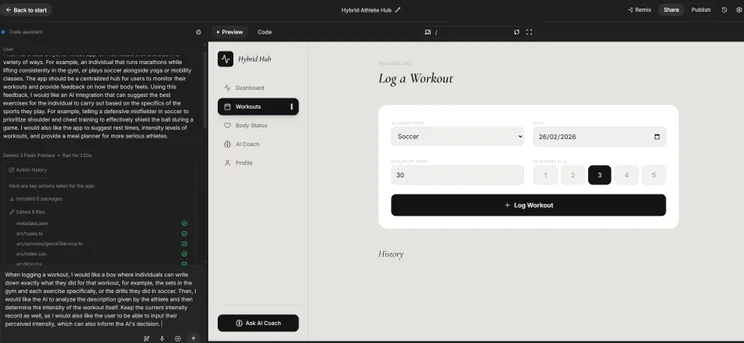
Making changes using Google AI Studio. Source: Tech.co
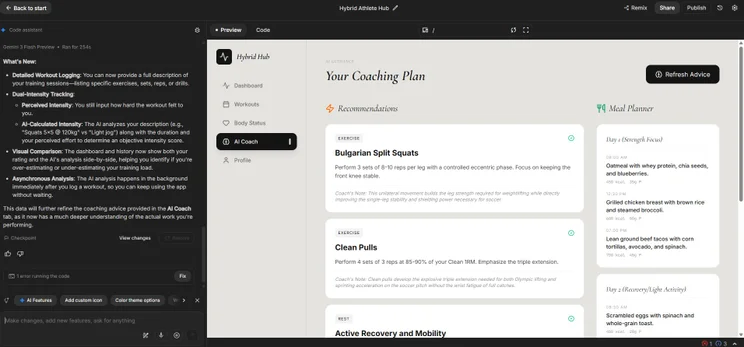
I was able to integrate an AI chatbot into my Google AI Studio app. Source: Tech.co
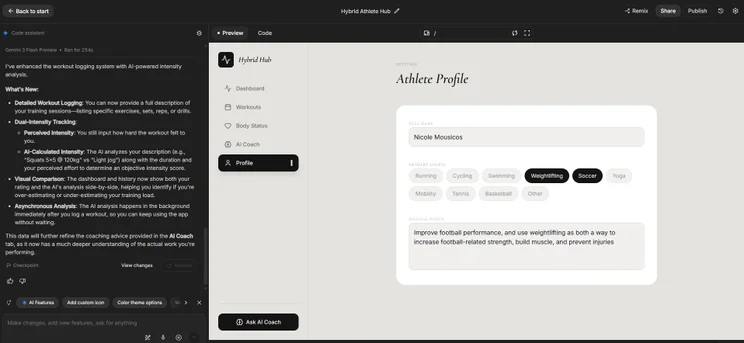
Google AI Studio created an 'Athlete's Profile' section in my app, which I liked. Source: Tech.co
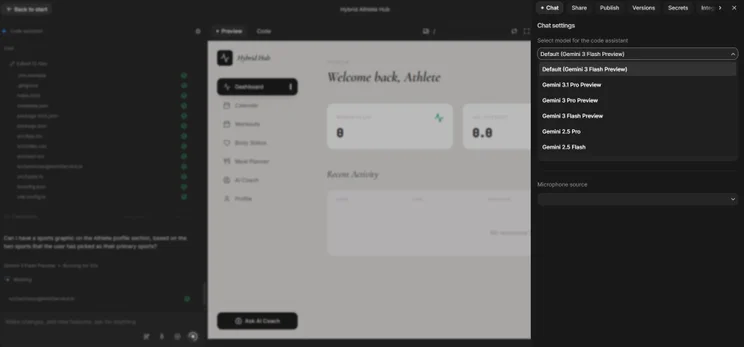
You can change the Gemini model you're using in Google AI Studio on the right hand side bar. Source: Tech.co
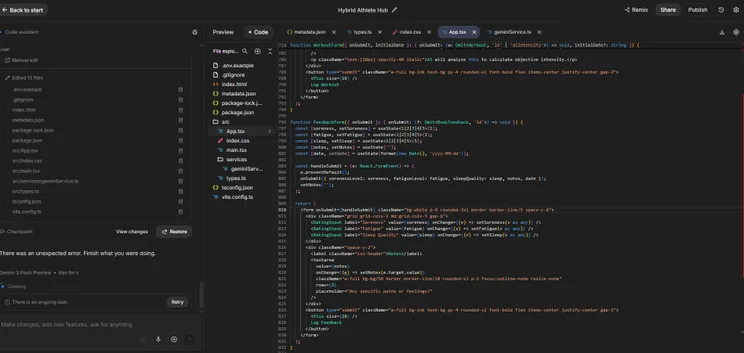
You can toggle the code view in Google AI Studio to directly edit your app's code. Source: Tech.co
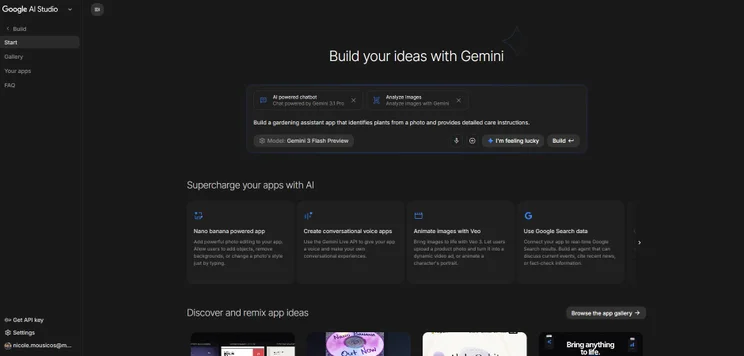
I clicked the I'm feeling lucky button to have an app idea generated for me. Source: Tech.co
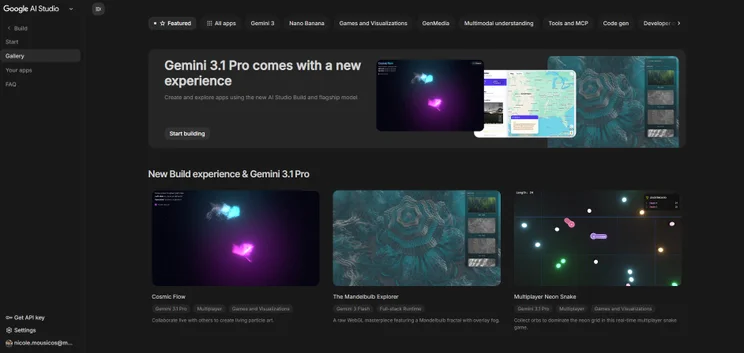
I could look through various different apps in Google AI Studio for inspiration. Source: Tech.co
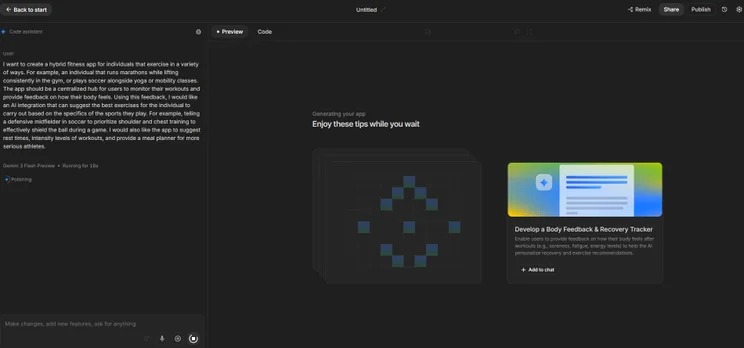
Google AI Studio giving me tips while it generates my app. Source: Tech.co
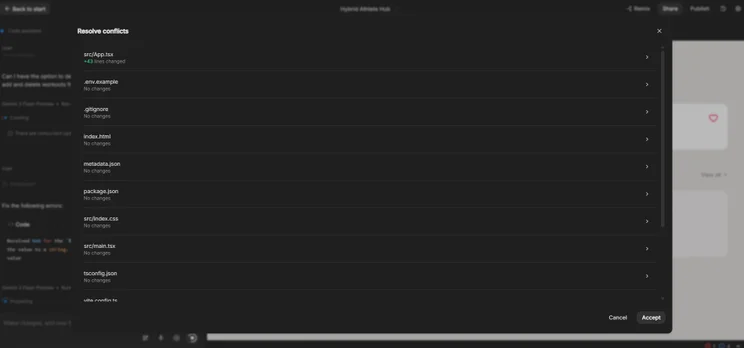
Google AI Studio giving me a technical breakdown of what was wrong with my app. Source: Tech.co
I created an app for hybrid athletes in Google AI Studio, and I was impressed with the results. The result was clean, good-looking prototype that included voice functionality and an AI chatbot. Source: Tech.co testing
How Much Does Google AI Studio Cost?
Google AI Studio is completely free with a traditional Google account, and users only start to pay once their app is deployed and live to users. Google AI Studio also employs a pay-as-you-go tier, which charges users based on their usage of the platform, rather than charging a base fee for a set amount of usage like competitors Base44, Lovable, and Replit.
What are the credit limits on Google AI Studio?
Google AI Studio’s free version uses a daily reset system for the number of AI requests a user can make, with different Gemini models having different request limits:
|
Model
|
Best for
|
Requests per minute
Sending information to the AI, and asking for a response
|
Tokens per minute
A small chunk of text the AI reads and processes as numerical snippets
|
Requests per day
Sending information to the AI, and asking for a response
|
|---|---|---|---|---|
|
Gemini 2.5 Pro |
Gemini 2.5 Flash |
Gemini 2.5 Flash-Lite |
Gemini 3 Pro Series |
Nano Banana 2 |
|
Logic and reasoning abilities |
Speed and efficient results |
Making large scale changes |
N/A as still in preview |
High-quality image generator |
|
5 |
10 |
15 |
5-10 |
2 images |
|
250,000 |
250,000 |
250,000 |
100,000 |
N/A |
|
100 |
250 |
1,000 |
100-250 |
20 images |
Google AI Studio’s request-based system makes it one of the best value vibe coding platforms I’ve tested. The limits on the free plan are incredibly generous, and I didn’t reach any credit limits when I tested it, unlike when I used Lovable.
Other providers like Lovable and Base44 offer users 30 credits and 25 credits per month respectively, and the number of credits a request is worth is based on the complexity of the task for the AI. For Google AI Studio users, however, the complexity of the task doesn’t matter, it simply counts as 1 of your 100 daily actions.
That being said, credits in full-stack platforms like Lovable and Base44 are worth more than in Google AI Studio. This is because a request in Google AI Studio is a request for code, which the user then has to manually deploy themselves. However, a request in Base44 includes an update to the live app, hosting, and database management, on top of a code rewrite.
Overall, though, Google AI Studio is the go-to platform for developers that want to prototype freely without worrying about maxing out their credits.
I was able to change the Gemini model I was using from the right hand settings bar in Google AI Studio. Each model is best for specific functions and comes with their own request and token limits. Source: Tech.co testing
What’s included in Google AI Studio’s pay-as-you-go tier?
The pay-as-you-go tier offers higher request and token limits for Google AI Studio users. For all three Gemini 2.5 models, the number of tokens per minute increases to 1,000,000 and the number of daily requests to 1,500. The requests per minute vary across models and are different for Gemini 3, as this model is currently still rolling out.
How much you’ll pay for each prompt depends on the amount of tokens it uses and the Gemini model you’re using, therefore it varies.
Small changes like fixing a button label would cost approximately $0.001 to $0.005, whereas big changes like adding a dashboard with a chart could cost you $0.17. In short, you’d have to make some pretty hefty changes for Google AI Studio to end up costing the same as Lovable at $21 per month, for example.
However, the biggest change from the free to the pay-as-you-go tier that small businesses should consider is enterprise-level privacy features. On the free tier, Google may use your data to train its Gemini models. However, paying users have the guarantee that their data remains private.
This is an essential feature for businesses that are building applications using sensitive or customer-focused data, as it ensures data can’t be compromised. Plus, it can be a way to ensure enterprise security for your business without paying high flat-rate monthly fees for other providers like Replit ($25 per month).
What Are the Features of Google AI Studio?
Google AI Studio’s main features are its rich integration options with other Google products, built-in voice and audio capabilities, and impressive creation tools. These features, coupled with the platform’s liberal free tier, make it a great option for crafting advanced prototypes.
| Feature | What It Does | How I Tested It |
| Build Mode | Users can create apps by communicating with the AI in plain language, through speech-to-text, text, or by adding files | I created a hybrid athlete app for individuals who play multiple sports. My app was generated in just over three minutes, around the same as Base44 and Lovable, although making changes took longer than competitors. I liked that the platform added an ‘Athlete Profile’, which I hadn’t considered. |
| Built-in voice/audio apps | Adds voice and audio capabilities to apps | I added voice functionality to my hybrid athlete app, allowing users to give a verbal recording of how they felt ahead of their workouts. When I used it to say that my shoulders and chest were sore from the previous day’s workout, the AI replied with suggestions to prioritize rest and try mobility instead of another workout. |
| Templates | Users can view design templates made by other users and build on top of existing projects | I was able to use the ‘Remix’ button to build on top of an existing template. I prompted the AI to change colors and the overall aim of the app, which was to create cosmic rays in the sky. |
| Code editor | Users can toggle the code view and edit their code directly | I was alerted at one point that there was an issue with my code, as I was editing. A pop-up gave a list of all of the wrong elements of my code and asked if I was happy for the AI to make these changes for me. For more advanced users that know how to code, this adds an increased level of customization when it comes to errors. However, it isn’t particularly useful for beginners who don’t understand these errors specifically. |
| Google integrations | Users have access to all Gemini models, as well as other Google products, like Nano Banana and Google Drive | I used Nano Banana to generate an image for my app and added a chatbot functionality using Gemini 2.5 Flash. I was impressed with the visuals of the platform, which were clear and realistic, unlike the visuals of a platform like Lovable, which I found more simplistic. |
| URL deployment | Users can copy and paste a URL link to their app, in order to share with stakeholders and testers. The platform won’t, however, deploy your app for you | I was able to successfully copy a link to my app, but Google AI Studio doesn’t deploy your app. To do this, you’ll have to transfer the code via Google Antigravity or use a GitHub integration. This makes it difficult for beginners that want a platform to handle deployment, as this can be difficult for non-developers. Platforms like Base44 offer one-click deployment and can handle full-stack deployment for the user. |
| Help and support | Offers a strong Google Cloud community, alongside a feedback button and extensive documentation | I was able to directly submit any bugs I had with Google AI Studio through a button on my dashboard. While I did find a Google Cloud community, the platform is lacking the kind of vibe coding-specific support that I’ve seen from providers like Base44. |
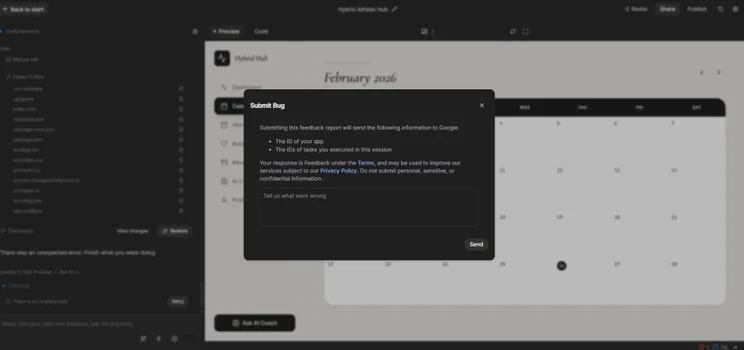
I was able to submit any bugs within Google AI Studio directly to Google. Source: Tech.co testing
What’s New With Google AI Studio? (2026)
- Gemini 3.1 Pro: Google’s new Gemini model is now available on Google AI Studio and excels, particularly at complex-problem solving, which suits businesses looking to create more multi-layered and complex platforms.
- Nano Banana 2: The latest version of Google’s AI image generator is also available and includes advanced text rendering, localization, and gives users greater creative control. This is a great tool for businesses looking to build visually-appealing platforms that properly convey their brand.
How Does Google AI Studio Compare With Competitors?
Here are some alternatives to Google AI Studio you might want to consider:
- Better for beginners: Base44 offers full-stack creation and deployment features, which Google AI Studio doesn’t offer. Beginners may struggle to get their apps live once they have been created in Google AI Studio, whereas in Base44, all users have to do is click ‘Publish’ to get their app live, as the platform handles all deployment processes itself.
- Better for designers: Lovable provides a visual, drag-and-drop editor for businesses wanting to perfect their UI with hands-on designing. Google AI Studio only allows users to make changes by prompting the AI, so individuals wanting to customize their apps themselves may find this limiting.
- Better for varied integrations: Bolt.new integrates with a wide variety of platforms, including GitHub, Figma, Stripe, and more. In Google AI Studio, you are limited to mostly Google products when it comes to integrations, although it does allow a GitHub integration.
|
Brand
|
Price
|
Free plan
|
Full-stack app generation
Does the platform build both the frontend and backend of the app for you?
|
Browser-based platform
Can you access the platform on a browser without downloading an app?
|
GitHub integration
Does the platform integrate with GitHub?
|
Real-time collaboration
Can multiple users collaborate in real-time on the platform?
|
Edit code
Does the platform generate editable code?
|
Plug-ins/extensions
Does the platform offer functionality with plug-ins and extensions?
|
|
|---|---|---|---|---|---|---|---|---|---|
 |
 |
 |
 |
 |
|||||
|
Google AI Studio |
Base44 |
Lovable |
Bolt.new |
Cursor |
|||||
|
Free |
$16/month |
$21/month |
$18/month |
$16/month |
|||||
|
|
|
|
|
|
|||||
|
|
|
|
|
|
|||||
|
|
|
|
|
|
|||||
|
|
|
|
|
|
|||||
|
|
|
|
|
|
|||||
|
|
Paid plans only |
|
|
|
|||||
|
|
|
|
|
|
How Did We Test Google AI Studio?
At Tech.co, research is an integral part of the reviewing and ranking process for business software. After all, how you can trust our judgement when it comes to platform recommendations if we aren’t making a comprehensive effort to evaluate them in a real way?
For vibe coding platforms, our expert team of writers and editors took time with a variety of resources, including online guides, documentation, and pricing pages, to see what was on offer.
On top of that we also made sure to get hands-on experience, in order to get a feel for how the platforms actually operate.
More specifically, we focused on the features and functionalities that are available with particular vibe coding platforms, so we can more effectively compare and contrast what is available. Here are some of the criteria with which we review vibe coding platforms.
- Full-stack capabilities: Full-stack describes a platform’s ability to generate and customize apps on the frontend and backend. Not all platforms can do both, which is why we took this into consideration when evaluating vibe coding options.
- Customization: Platforms have varying levels of customizability, allowing you to change how apps look with specific tools, like drag-and-drop editors, so you can understand what kind of control you have over your generated apps.
- Integrations: Vibe coding platforms, like most business software, can integrate with other services, like GitHub, Stripe, and Slack, so we make sure to evaluate how extensive these kinds of integrations are for each platform.
- Ease of use: Vibe coding platforms can get confusing fast, which is why we analyzed how easy it is to actually use the platform and navigate its features.
- Coding importance: Some of the options reviewed are true no-code platforms, while others are very code-heavy, which is why we look at this metric to understand exactly how technical you need to be to use it.
To learn more about how Tech.co investigates business software like vibe coding platforms, make sure to check out our research and analysis guide to get a peek at our process.
I would recommend Google AI Studio for developers and teams that want extensive prototyping capabilities, because of its liberal request and token limits, and advanced capabilities, including AI chatbot integrations, and built-in voice and audio features.
Beginners may struggle with Google AI Studio once it’s time to deploy their app, however. It will only provide the code for a user’s project, which then has to be deposited onto a platform such as Google Antigravity to go live. Other providers, like Base44, handle deployment for you.
FAQs
Google AI Studio is a safe option for prototyping and experimenting with ideas, however, there are some data privacy risks as Google does use your answers for training its models on the free tier. Overall, the platform shouldn’t be used to input confidential or private customer information.
Google AI Studio is best suited for developers or vibe coding newcomers who want to take advantage of a highly generous free credit system and robust prototyping environment, that includes built-in voice capabilities and integrations with Google products such as Nano Banana and Gemini.
Beginners should be aware, however, that Google AI Studio doesn’t deploy your app for you once it’s been designed. For a provider that does this, I’d recommend Base44.
Base44 and Lovable are stronger options than Google AI Studio because of their built-in deployment capability, that means users can automatically publish their creation once it’s been created. With Google AI Studio, users have to handle the deployment process themselves.
However, Google AI Studio is a stronger option for powerful product prototyping, with high quality visuals through Nano Banana and Gemini integrations and voice and audio capabilities. It also has a more generous free tier than Base44 and Lovable.


