
We may receive a commission from our partners if you click on a link to review or purchase a product or service. Click to Learn More
The best AI app builder for beginning vibe coders is Base44, which starts at a reasonable price and allows users to edit their app directly with a simple drag-and-drop editor.
Lovable is another worthy option, since its simple approach to full-stack app development means users can have an app going in under five minutes. For those who are already confident coders, Cursor is a good bet, as it provides advanced features like inline code suggestions.
Tech.co has hands-on experience testing each of the best AI app builders on the market right now. Read on to learn exactly how to choose one for yourself, and whether you even need AI to build an app at all.
- Beginners should pick Base44. It doesn’t require coding experience, it’s the most affordable, and it lets you edit the app directly and brainstorm your ideas without making changes.
- If you need to move fast, opt for Lovable. It has an easy setup process and simple interface.
- For experienced developers looking for help with a more advanced project, Cursor is a great fit, offering inline coding suggestions and allowing you to prompt the AI directly from your code.
- Key considerations? Your budget, your experience with creating apps, and how advanced you’d like your app to be.
- While you definitely don’t need AI to build an app, it’s great for users who want a head start and to generate something quickly.
- Tech.co’s findings are based on testing each AI platform individually, including assessing their full-stack capabilities, customization tools, integrations, ease of use, and how much coding knowledge you need to use them properly.
|
Brand
|
Price
|
Free plan
|
Full-stack app generation
Does the platform build both the frontend and backend of the app for you?
|
Browser-based platform
Can you access the platform on a browser without downloading an app?
|
GitHub integration
Does the platform integrate with GitHub?
|
Real-time collaboration
Can multiple users collaborate in real-time on the platform?
|
Edit code
Does the platform generate editable code?
|
|
|---|---|---|---|---|---|---|---|---|
 |
 |
 |
 |
 |
||||
|
Base44 |
Lovable |
Bolt.new |
Cursor |
FlutterFlow |
||||
|
$16/month |
$21/month |
$18/month |
$16/month |
$29.25/month |
||||
|
|
|
|
|
|
||||
|
|
|
|
|
|
||||
|
|
|
|
|
|
||||
|
|
|
|
|
|
||||
|
|
|
|
|
Only on higher tiers |
||||
|
Paid plans only |
|
|
|
|
Best AI App Builders in 2026
Base44: Best AI App Builder for Ease of Use
- Price: Free to start (first paid plan: $20 per month)
Base44 is a great choice for complete beginners, since it’s a browser-based platform that gets you an app in under five minutes, easily setting you up with UI, backend, database, authentication, and logic. In other words, it has everything that a fully-fledged software developer needs to test and iterate a new product.
Likewise, the app prioritizes versatility and simple-to-use functions specifically for non-technical users, with automations, dashboards, and a visual interface that allows users to interact directly with their app. If you’re not happy, you can use the drag-and-drop editor for more tweaks, a function that sets it apart from Lovable.
Base44

In Short
-
Pros
- Very easy to use, even for beginners
- Affordable starting price
- Integrations with HubSpot, Slack, X, and more
-
Cons
- Very limited customization options
- No plug-ins or add-ons available
Pricing
- Free plan available
- Starter: $20/month
- Builder: $40/month
- Pro: $80/month
- Elite: $160/month
Images
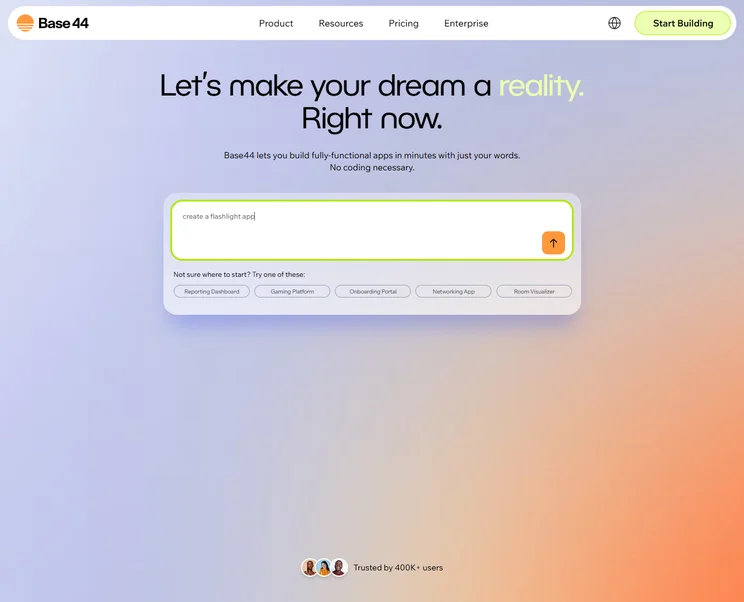
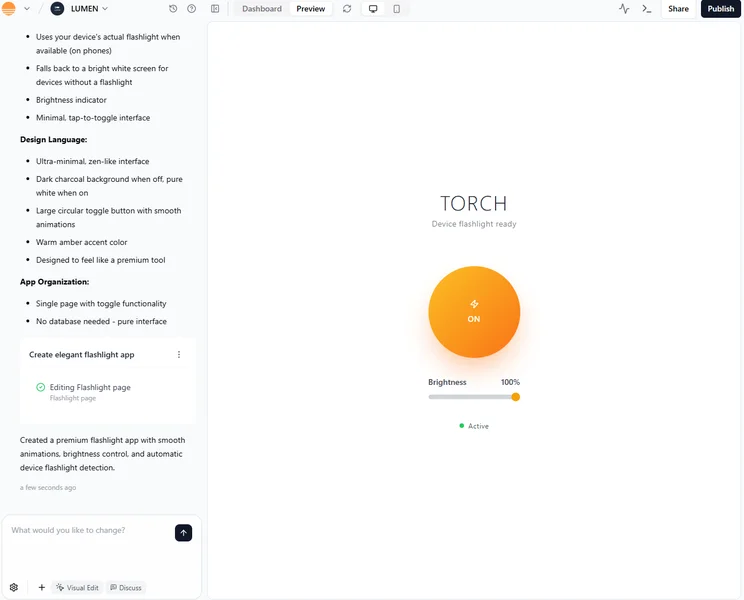
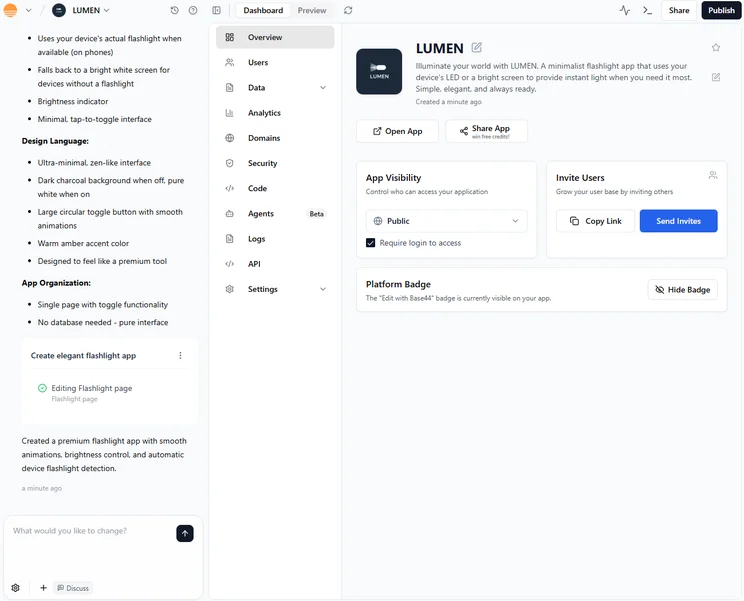
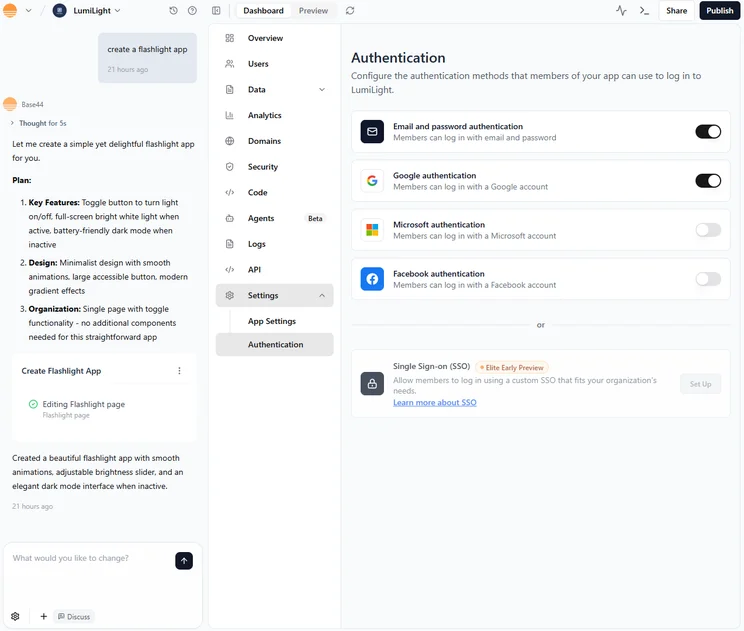
What do we like about Base44?
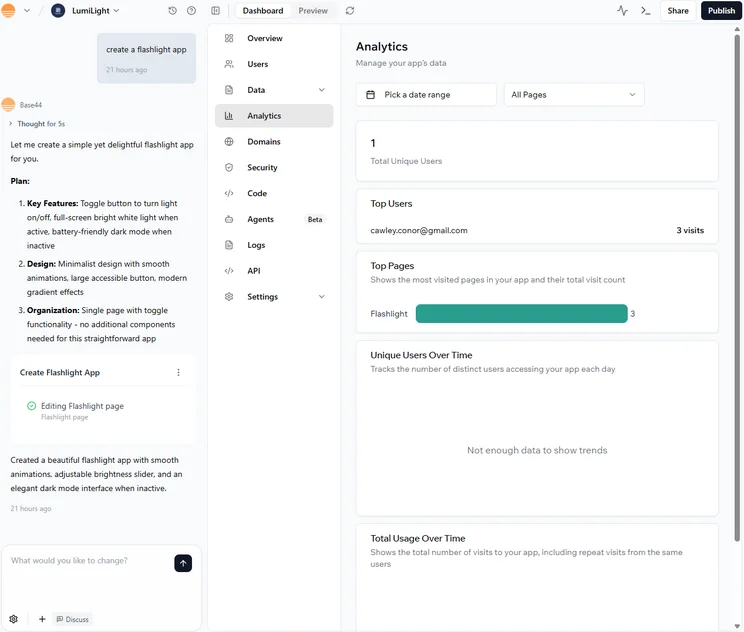
Base44 will generate a suitable initial design in response to a single original prompt and, like Bolt.new, it has a Discuss Mode available to brainstorm and help you work through your ideas, before making any concrete changes.
The platform’s functionality for editing your app directly and intuitively is highly beneficial.
For example, when I wasn’t happy with the font style the AI had come up with, I just had to hover over it to receive the option to select a new one by simply toggling Visual edit mode at the bottom of the chat. This familiar editing style contributes to Base44’s shallow learning curve.
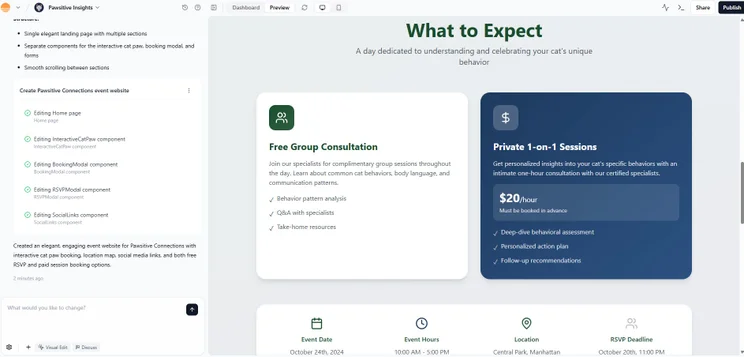
Base44 was given design information and generated this professional and modern-looking events information dashboard. Source: Tech.co testing
Base44 expands on user prompts to create complete applications, including UI and backend logic, based on suggestions. Although the AI will make few mistakes along the way, it can also correct itself after some more prompting.
Similarly, if security is a concern, Base44 covers plenty of bases. Users have full ownership and accessibility of all the apps you create and the data stored within them. Built-in security also includes encryption and role-based permissions.
Our own data shows that 27% of SMB leaders are concerned about the regulatory implications of vibe coding platforms. But Base44 is SOC 2 Type II and ISO 27001 certified, and adheres to the latest governance and GDPR standards.
Base44 is frequently updated. In February 2026, it rolled out the ability to deploy apps on mobile, letting users submit them to both the Apple App Store and Google Play directly from the platform.
One last huge perk: Base44’s built-in hosting removes the need for a deployment process. Once the app is complete, it’s immediately online.
Ultimately, Base44 is the easiest AI app builder to use, intuitively working to understand the needs of the user.
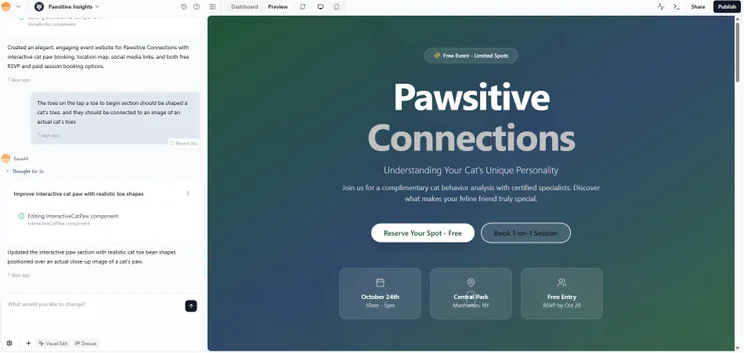
While Base44 did make more minor mistakes compared with Bolt.new and FlutterFlow, it was able to correct itself with some prompting. Source: Tech.co testing
How much does Base44 cost?
Base44 is available with an entirely free plan, giving you access to the platform’s core features.
Like other AI platforms, Base44 allocates credits depending on the paid plan you go for, and these credits can be used for AI integrations and messages during the creation process. I found these free credits are much scarcer than the likes of Lovable and Bolt.new.
Here is a breakdown of its paid plans:
- Starter: $20 per month — all core Base44 features, including authentication, database functionality, and analytics
- Builder: $40 per month — unlimited number of apps and in-app code credits, GitHub integration
- Pro: $80 per month — backend functions, connect a domain, GitHub integration
- Elite: $160 per month — premium support, 1,200 message credits, and 50,000 integration credits
Base44’s entry-level paid plan tier isn’t quite as cheap as Lovable or Cursor, but it’s still pretty good bang for your buck. Things do get a bit more expensive in the higher tiers, particularly when compared with those other two providers.
Users will also have to pay $40 per month before they can integrate GitHub, so this could be something to consider if that is an app you’d need, especially since other providers, such as Bolt.new, offer this on free plans.
Many AI coding apps, Base44 and FlutterFlow included, make it easy to vibe-code a mobile app and submit it to the Google Play or Apple App Store directly from their interfaces. These platforms won’t charge you for the feature, but that doesn’t mean you won’t still have to pay the app stores themselves.
The Apple Developer Program charges $99 per year, while Google charges a one‑time $25 developer registration fee. Without paying these fees, you can’t feature your app in their stores.

Lovable: Best AI App Builder for a Quick Setup
- Price: Free to start (first paid plan: $21 per month across unlimited users)
Lovable is an all-round AI app builder aimed at non-technical users who need to move fast. During testing, I fully created an app in less than five minutes after submitting an initial prompt.
The platform can generate editable source code from your natural-language prompts, which can be both written and spoken aloud. Lovable lacks a visual drag-and-drop editor for generated codebases, making it better suited for rapid prototyping than granular UI iteration.
It’s a perfect option for businesses looking to get up and running quickly, as well as for casual users with zero coding knowledge.
Lovable

In Short
-
Pros
- All-in-one, full-stack app generation
- Customizable with editable code
- Large community for support and inspiration
-
Cons
- No AI assistant to help with coding
- No drag-and-drop functionality
Pricing
- Free plan available
- Pro: $21/month
- Business: $42/month
- Enterprise: Custom pricing
Images
What do we like about Lovable?
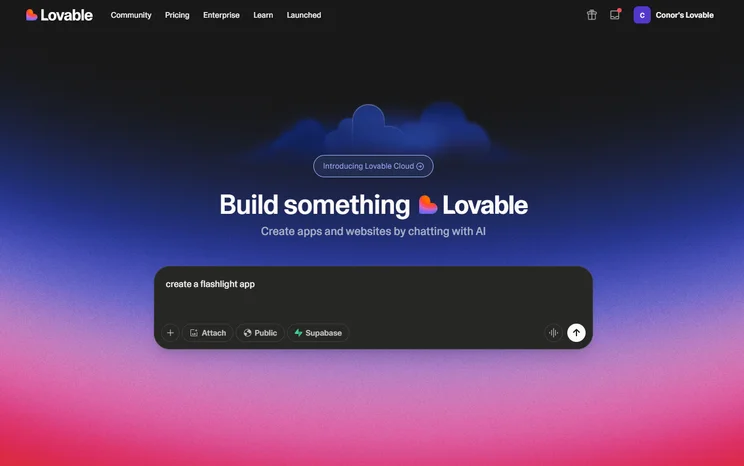
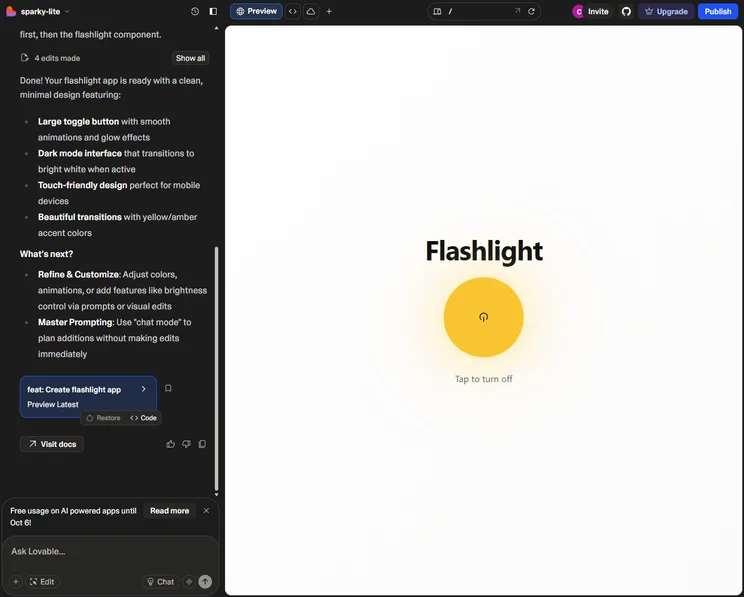
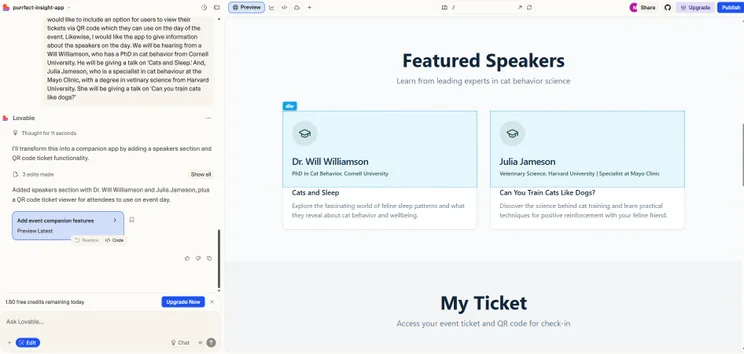
Lovable offers full-stack app generation with plenty of control over the backend and frontend, all from your browser. Once prompted, the platform’s design hub will appear to users, offering an AI assistant to continue to build the app.
You can speak directly and in plain English to the AI, and you can even speak your thoughts aloud if you’d prefer.
It’s easy to toggle between the AI design screen and the app’s code, giving experienced coders the option of getting more hands-on.
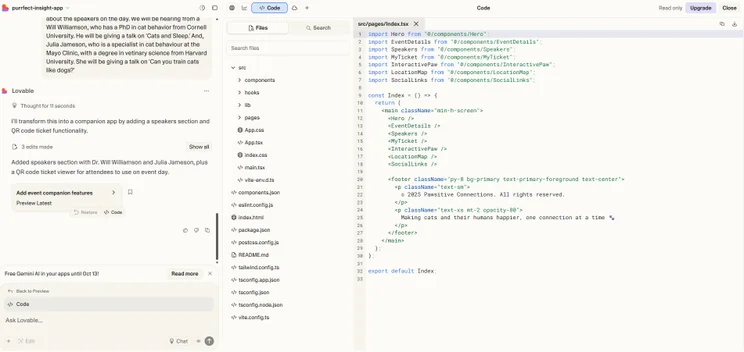
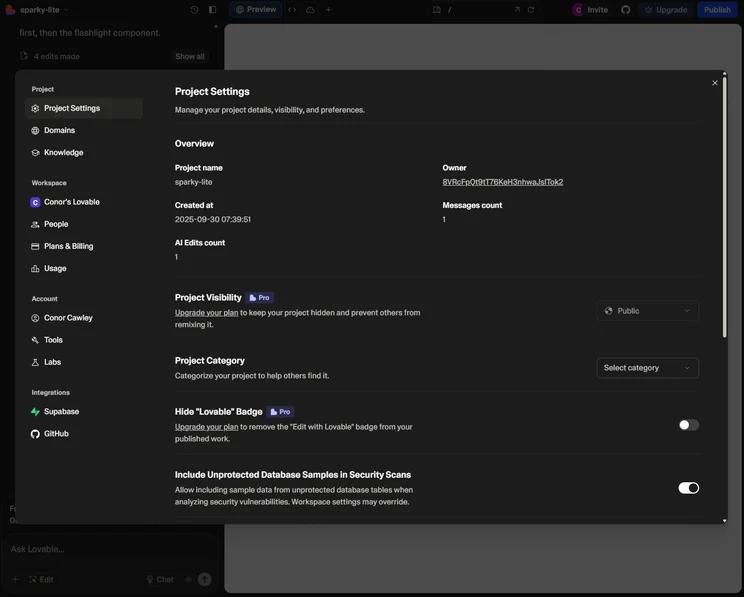
I found it simple to toggle between views of the AI generator and of my app’s code – perfect if you’re a coder who wants to get more hands-on. Source: Tech.co testing
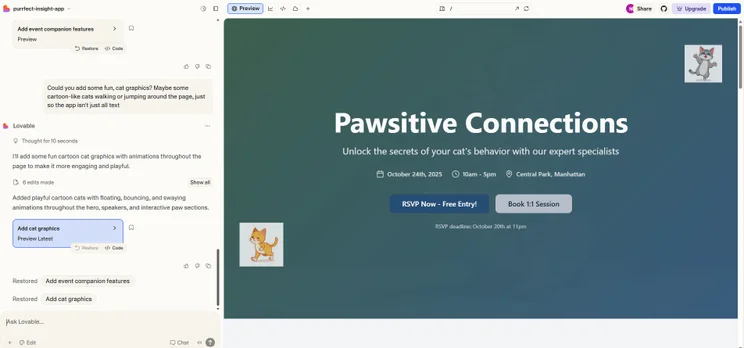
While you don’t need to be an experienced developer in order to make an app using Lovable, you may need some knowledge of code in order to create more complex functions. For example, Lovable struggled to overlay a booking tool on a pair of cat toes when creating my test app for a fictional cat event, and instead used a generic picture of a cat’s paw.
Of course, as these tools are still developing, avoiding difficult prompts is probably best. However, more robust tools, such as Cursor or FlutterFlow, may be better suited if you want to create an app with more complex functionalities.
Lovable offers limited deployments to a live URL with its free plan, but custom domains are only available starting with the paid plans.
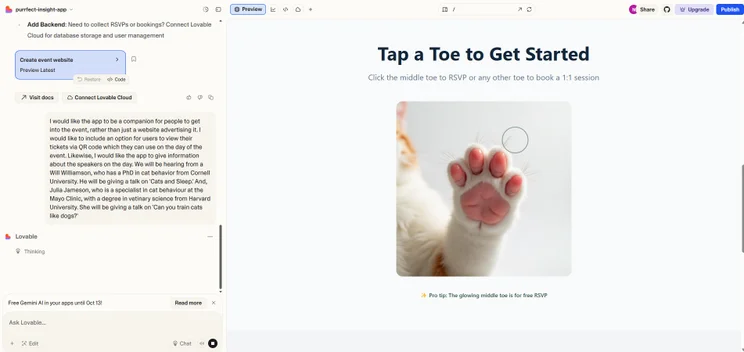
Lovable struggled with my request to overlay a booking tool on an image of a cat’s toes, suggesting it may be more suited to simpler requests. Source: Tech.co testing
Overall, Lovable’s main strength is in its sense of community. The platform encourages you to look at and take inspiration from designs made by other users.
Lovable’s real-time collaboration lets you work on projects alongside colleagues and view changes as they happen. For teams of developers looking to validate a minimum viable product (MVP), this will come in handy.
The platform’s frequent tweaks include a February update that adds a “plan” mode. This lets users suggest changes to Lovable’s approach before implementation even begins.
How much does Lovable cost?
Lovable is free to get started with, and you’ll have a set amount of credits: five daily credits, with up to 30 per month. However, you’ll likely run out pretty quickly, so you’ll need a paid plan for regular use:
- Pro: $21 per month — usage-based cloud and AI, custom domains
- Business: $42 per month — design templates, single sign-on (SSO)
- Enterprise: Custom — dedicated support, custom design systems
Lovable’s first paid tier is slightly more expensive than the cheapest options on this list, Base44 and Cursor, which both start at $20 per month. However, the jump between plans for Cursor is much more expensive. Altogether, Lovable sits around the average.
Bolt.new: Best AI App Builder for Full-Stack Development
- Price: Free to start (first paid plan: $18 per month)
Compared with the other providers on this list, Bolt.new’s a mix between Lovable, which can be used without coding, and Cursor, which requires a degree of coding knowledge.
Like other platforms on this list, users input their prompt to get started, making it good for coding novices who want to play around with app building. At the same time, experienced developers will relish the choice of programming languages, frameworks, and the ability to edit code directly.
Bolt.new is the best option for full-stack development, since it combines the freedom of a high-quality AI generator with the functionality of a coding option.
The GitHub integration enables users to seamlessly export your code for further editing or deployment. The platform offers other deployment options, including native Bolt hosting or third-party Netlify hosting.
It’s the AI app builder with the best features, and all that functionality makes it the best collaborative AI app builder for teams, too.
Bolt.new

In Short
-
Pros
- Browser functionality; no download required
- Can generate both web and mobile apps
- Integrates with GitHub, Stripe, Figma, and more
-
Cons
- Not as customizable as other options
- Requires clear and specific instruction
- Performance limitations on browser
Pricing
- Free plan available
- Pro: $18/month
- Teams: $30/month
Images
What do we like about Bolt.new?
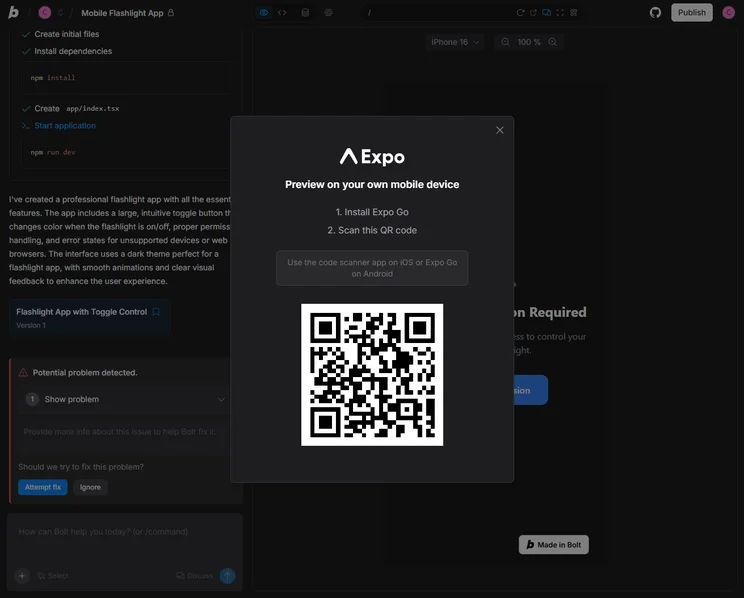
Bolt.new is a browser-based platform and users can prompt the generator in plain English or to import their projects from Figma or GitHub. Users can enable other AI agents, such as Claude AI and V1 Agent, another full-stack coding application, to prompt the chatbot further.
A standout features is the “Plan” option in the prompt bar: as you’re working on your app, you can brainstorm with the AI. Once you submit your plan, the AI will break down in bullet points what elements should be included, along with a helpful summary at the end that justifies its decisions.
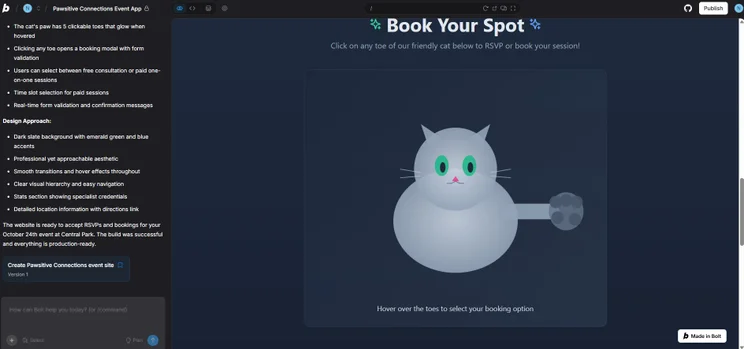
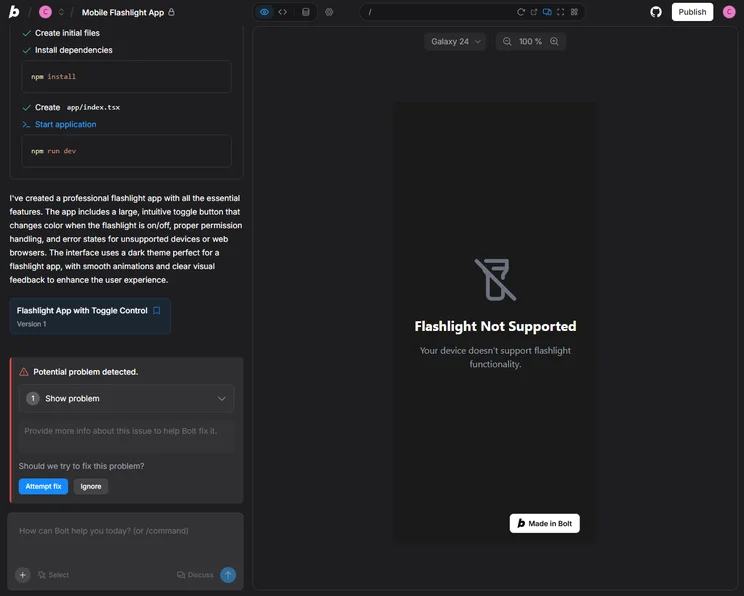
Bolt.new’s design options feel unique and inventive compared with options such as Lovable and Base44. Source: Tech.co testing
The design results look professional and clear: my unique cat booking tool was a bigger success than the same process with Lovable.
Better yet, if you do have some coding experience, you can easily switch screens and take over the design options for yourself, which is great for users who want a bit more originality.
However, compared with alternatives Base44 and Lovable, the app took a lot longer to load in our tests. The platform remains a solid option for those wanting to both utilize AI generation tools and to probe deeper, using code.
Bolt.new updates are just as frequent as the rest of the platforms in this guide, though, with a February 2026 update allowing those with the Teams plan to reuse templates created for past projects.

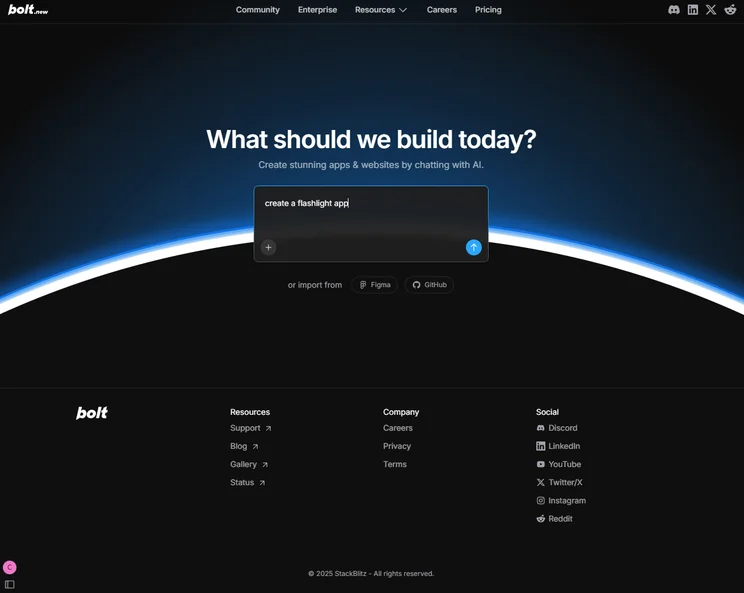
Import options from Bolt.new included GitHub and Figma. Source: Tech.co testing
How much does Bolt.new cost?
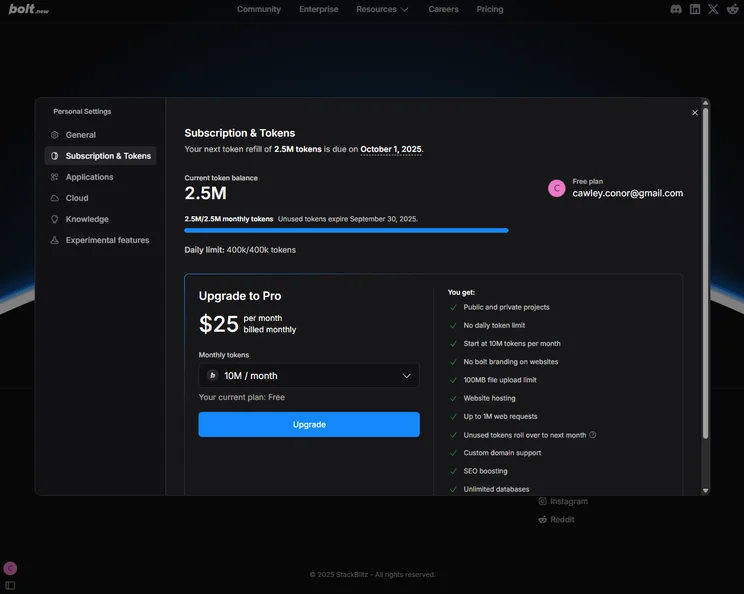
Anyone can start with a free account on Bolt.new. The platform works on the basis of tokens, which you can exchange for using the AI generator. Bolt.new’s free plan provides a daily allowance of 300,000 AI tokens, which is enough to generate a first-draft application (making Bolt.new our pick for the best free AI app builder plan).
If you opt for a paid plan, your price will change depending on the number of tokens you would like per month. You can get between 10 million and 1,200 million per month.
Below, I’ve listed the prices of plans if you choose 10 million tokens:
- Pro: $18 per month — custom domain support, SEO boosting, unused tokens roll over to next month
- Teams: $30 per month — team-level access management, granular admin controls and user provisioning
- Enterprise: Custom pricing — advanced security (SSO, audit logs, compliance support), dedicated account manager and 24/7 priority support
Bolt.new’s entry-level pricing plan is cheaper than Lovable’s and has more features for the cost. And while Lovable’s second lowest plan starts at $42 per month, Bolt.new’s is just $30 per month, a $12 difference from its lowest-priced plan.
Barring only Base44 and Cursor, Bolt.new is one of the more affordable options on this list, and you certainly wouldn’t be sacrificing much in terms of features if you pay less.
Cursor: Best AI App Builder for Coders
- Price: Free to download (first paid plan: $20 per month)
Unlike the other apps listed here, Cursor is an app-based platform that sits alongside your project as a coding assistant, providing help for existing developers and seasoned coders.
Where the likes of Base44 and Lovable spin up an app from a written prompt, Cursor streamlines the coding process by autocompleting your next action, automating rudimentary tasks, and enabling you to make targeted edits or run terminal commands with natural language.
Therefore, while Cursor may not be the best option for beginners, its advanced tools make it perfect for app builders looking for the best intuitive AI app builder.
Cursor

In Short
-
Pros
- Affordable starting price
- Powerful AI coding tools for experts
- Free trial available for paid plan
-
Cons
- No browser functionality; download required
- Coding knowledge required
- No full-stack app generations
Pricing
- Free plan available
- Pro: $16/month
- Teams: $32/user/month
- Pro+: $48/month
- Ultra: $160/month
- Enterprise: Custom pricing
Images
What do we like about Cursor?
Cursor is one of the most notable AI coding tools operating today. It’s recognized by developers as an outstanding tool, due to its great set of features and affordable price point.
It gives experienced developers all the tools they need to write code and ship products at speed.
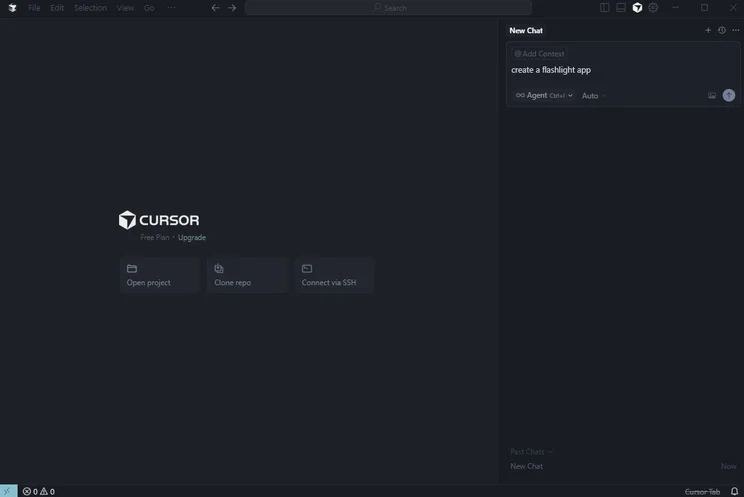
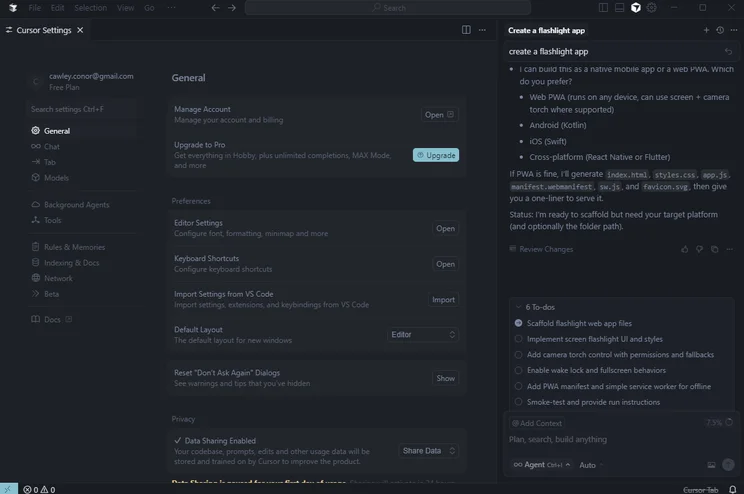
As soon as you download Cursor, you’re able to immediately import all of your existing code settings into the platform. From there, you can build your code with the help of Cursor’s AI assistant on the right-hand side or edit your code as you would with any other coding platform.
Likewise, you can also prompt the AI directly from your code, highlighting features and adding comments where you would like it to make changes. This involved approach allows you to pursue complex projects that would be far more difficult with tools such as Lovable or Base44.
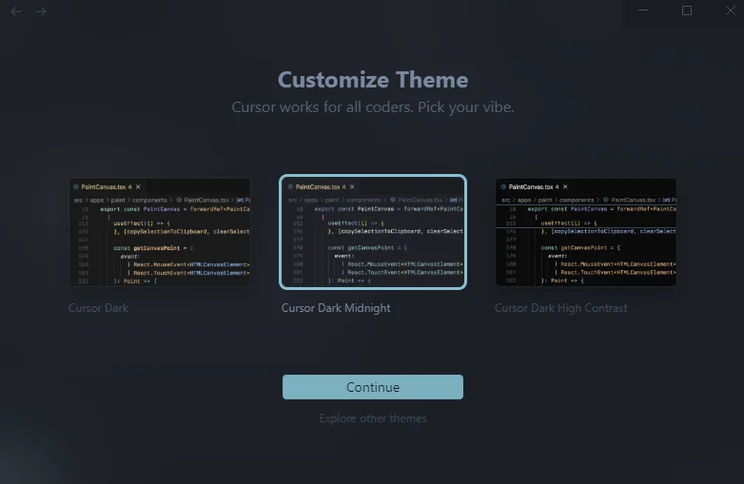
You can customize your view with Cursor, based on your preferred color scheme. Source: Tech.co testing
Users can select certain files or elements while prompting, which compels the AI to use the selected information when writing a piece of code. This is a great tool for businesses working with specific documentation or APIs.
Cursor will also offer inline code suggestions to make your code stronger in the long run. It’s our pick for best AI-powered app builder for designers, since it requires technical skill.
The platform still has some AI-generated errors, but experienced developers can identify and correct them.
Plus, the platform’s regular updates should help stem the tide of mistakes: its February 2026 software tweaks have already improved core functions like subagents and network controls for sandboxed commands.
You’ll have to export your code to GitHub and find a hosting service in order to deploy it (another reason the platform appeals to developers).
How much does Cursor cost?
Cursor is free to download on its site, and anyone can get started today. If you’re thinking about a paid plan but aren’t entirely sure, you can also get access to a two-week free trial of the platform’s lowest paid plan, Pro, as part of the free Hobby plan.
Here are the plans on offer:
- Hobby: Free — one-week trial of Pro, limited Agent requests, limited Tab completions
- Pro: $16 per month annually (or $20 billed monthly)— unlimited Tab completions, Background Agents
- Teams: $32 per month per user annually (or $40 billed monthly)— centralized team billing, usage analytics and reporting, role-based access control
- Pro+: $48 per month per month annually (or $60 billed monthly)— 3x usage on all OpenAI, Claude, and Gemini models
- Ultra: $160 per month annually (or $200 billed monthly)— 20x usage on all OpenAI, Claude, and Gemini models, priority access to new features
- Enterprise: Custom pricing — pooled usage, invoice/PO billing, AI code tracking API, priority support and account management
You can also pay extra for the Bugbot add-on, which catches real bugs and security issues within your coding projects. This varies by plan.
For what it is, Cursor has an affordable price, particularly for small businesses and startups. Its starter paid plan is cheaper than every option on this list, with even more advanced functionality. Although, you should remember that Cursor is an AI tool that can help with building apps, not entirely generate one for you.
FlutterFlow: Best AI App Builder for Customization Options
- Price: Free to start (first paid plan: $29.25 per month)
FlutterFlow has been praised by users for its highly customizable interface, particularly when it comes to designing an app that is unique and original. While it doesn’t have an AI app generator per se, like Base44 or Bolt.new, it does have a host of advanced AI tools that will help you to develop your app.
Technically skilled developers, designers, and product directors will like FlutterFlow, since it can build complex, scalable applications: by leveraging Google’s Flutter framework, the platform generates production-ready code that can be exported with ease, so you won’t suffer vendor lock-in.
FlutterFlow
In Short
-
Pros
- Advanced customization options
- Wide range of user tutorials
- Ability to create AI agents
-
Cons
- Only 5 AI gen requests on the free plan
- Complicated for new users
- Some functions were slow to load
Pricing
- Free plan available
- Basic plan: $29.25/month
- Growth plan: 1st seat $60/month, 2nd seat $41.25/month
- Business plan: 1st seat $112.50/month, seats 2-5 $63.75 each/month
Images


What do we like about FlutterFlow?
Unlike the other options on this list (with the exception of Cursor), FlutterFlow isn’t strictly an AI app generator. It’s a low-code builder that utilizes visual drag-and-drop functionality to allow users to build Flutter apps. Because of this, it provides deep customizability — but a steep learning curve that will likely deter first-time builders.
In contrast with Base44 or Lovable, I wasn’t invited to immediately share my idea with the AI. Instead, I was given an option of many different tutorials to take me around the platform, including a guide on building a new app in 10 minutes, completely from scratch.
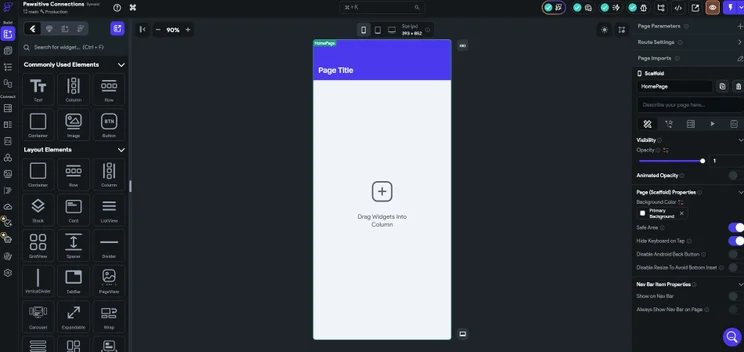
As the platform has so many tools to choose from, the tutorial is a huge help. FlutterFlow offers everything, from adding widgets to customizing the font style, all from its left-hand tool bar. On the left-hand side, users can also alter page parameters, page imports, and route settings.
The platform’s top navigation bar consistently checks for error-fixes or optimizations in apps while you work. I didn’t experience this feature in any other platform.
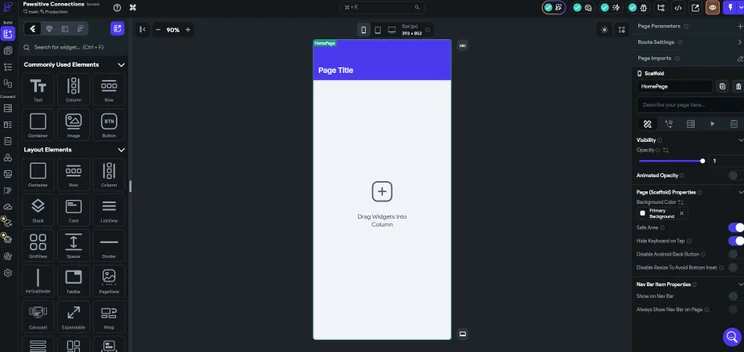
While the number of customization options on FlutterFlow is large, they might be overwhelming for new users. Source: Tech.co testing
FlutterFlow does have AI tools, like the Image to Component tool which analyzes the visual structure of an image of an UI component in order to convert it into a functioning version of that component.
Similarly, the Prompt to Component tool can generate a UI component almost immediately with the platform’s visual editor and additional prompting. These impressive functionalities make FlutterFlow a contender for those in search of the best visual AI app builder for prototypes.
However, I struggled to locate these tools. Plus, the complicated setup of the platform meant I had to Google some queries, particularly when trying to find certain functions.
FlutterFlow’s extensive widget library and page parameter settings create a steeper learning curve than prompt-based builders like Base44. And, with web publishing available on even the free plan, deploying your creation to the web or the App Store is easier than with rivals like Cursor, making FlutterFlow one of the best AI mobile app builders.
How much does FlutterFlow cost?
FlutterFlow is free to get started, and you’ll get 1,000+ prebuilt templates, plus API and data integration, among other features. You can also pay:
- Basic: $29.25 per month — unlimited projects, code download, custom domain web publishing
- Growth: First seat, $60 per month, second seat, $41.25 per month — source repository/GitHub integration, real-time collaboration with up to two users
- Business: First seat, $112.50 per month, seats two to five, $63.75 per month — real-time collaboration with up to five users, up to three automated tests per project
FlutterFlow has one of the highest starter plans on this list. Considering its advanced functionalities for those that need it, it could be well worth the price for some businesses.
What Is an AI App Builder?
An AI app builder is a platform that uses AI to enable users to build their own apps in a matter of seconds. Generally speaking, these programs can be divided into three different subcategories — AI app builders, AI-assisted low-code builders, and AI code assistants.
AI app builders
The majority of vendors on this list fall into this subcategory, including Lovable, Base44, and Bolt.new. They’re built with non-technical users in mind. Simply input a natural language prompt into the chatbot-style interface, and the platform will do the rest, generating a full-stack, exportable program.
AI-assisted low-code builders
These platforms, which count Softr, Glide, and Bubble among them, combine drag-and-drop visual elements with AI-assisted coding. This allows non-technical users to build complex applications, with AI taking care of the backend elements, including coding.
AI code assistants
With examples including Cursor, AI code assistants are a skilled developer’s best friend. The platforms sit alongside your existing projects, streamlining repetitive or mundane parts of the coding process, suggesting improvements, and expediting the overall process.
How Do I Choose the Best AI App Builder for My Project?
Here are some of the questions you can ask yourself before settling on an AI app builder:
- What is your budget? All of the apps on my list have free plans, but you may need to opt for a paid plan for more advanced features. Some tools, such as Agentforce Vibes, are built into preexisting software platforms, in this case Salesforce.
- How much experience do you have with building apps? Most apps will accommodate beginners, particularly in the AI sector. However, apps like Cursor require the user to understand and write code. These will be more popular with the 34% of SMB leaders that would only trust vibe coding tools with a “human-in-the-loop.”
- Do you need an app ready as soon as possible? In this case, you’ll want to go for a platform with a designated AI app generator, such as Lovable or Base44. Options such as Cursor, where you’ll have to build it yourself, are not ideal.
- Would you like your app builder to be app or browser-based? Options like Lovable, Base44, and Bolt.new can be used directly from a browser, but you’ll have to download the app to use Cursor.
- What security features will you need? Fully understand the data you will be using to build your app and the security features you will need to keep its operations safe.
Can You Build an App Without AI?
You can build an app without AI using platforms like Microsoft Power Apps and Adalo. If you are building a particularly complex app, you may need to approach a developer to handle it.
Those with coding experience can build an app without AI from scratch, but it will ultimately be a lot more time consuming. In fact, many experienced developers today are using both AI and their own coding knowledge in order to develop projects.
Your need for AI depends on your skill level and timeframe. If you need an app running as soon as possible, and don’t have the coding knowledge to start from scratch, AI is a great way to get started.
Methodology: How We Tested AI App Builders
At Tech.co, research is an integral part of the reviewing and ranking process for business software. After all, how you can trust our judgement when it comes to platform recommendations if we aren’t making a comprehensive effort to evaluate them in a real way?
For vibe coding platforms, our expert team of writers and editors took time with a variety of resources, including online guides, documentation, and pricing pages, to see what was on offer.
On top of that we also made sure to get hands-on experience, in order to get a feel for how the platforms actually operate.
More specifically, we focused on the features and functionalities that are available with particular vibe coding platforms, so we can more effectively compare and contrast what is available. Here are some of the criteria with which we review vibe coding platforms.
- Full-stack capabilities: Full-stack describes a platform’s ability to generate and customize apps on the frontend and backend. Not all platforms can do both, which is why we took this into consideration when evaluating vibe coding options.
- Customization: Platforms have varying levels of customizability, allowing you to change how apps look with specific tools, like drag-and-drop editors, so you can understand what kind of control you have over your generated apps.
- Integrations: Vibe coding platforms, like most business software, can integrate with other services, like GitHub, Stripe, and Slack, so we make sure to evaluate how extensive these kinds of integrations are for each platform.
- Ease of use: Vibe coding platforms can get confusing fast, which is why we analyzed how easy it is to actually use the platform and navigate its features.
- Coding importance: Some of the options reviewed are true no-code platforms, while others are very code-heavy, which is why we look at this metric to understand exactly how technical you need to be to use it.
To learn more about how Tech.co investigates business software like vibe coding platforms, make sure to check out our research and analysis guide to get a peek at our process.
Lovable is an easy-to-use platform that’ll get you up and running quickly, since it provides full-stack app development from the moment you enter your prompt.
If you’re a complete beginner, Base44 is the way to go. You’ll be able to talk to the platform in plain English and use a planning tool in order to trial elements on your app before making permanent changes.
Base44 also happens to be the cheapest option on my list. In the end, the best AI app builder depends on your business needs and level of experience.
If you click on, sign up to a service through, or make a purchase through the links on our site, or use our quotes tool to receive custom pricing for your business needs, we may earn a referral fee from the supplier(s) of the technology you’re interested in. This helps Tech.co to provide free information and reviews, and carries no additional cost to you. Most importantly, it doesn’t affect our editorial impartiality. Ratings and rankings on Tech.co cannot be bought. Our reviews are based on objective research analysis. Rare exceptions to this will be marked clearly as a ‘sponsored’ table column, or explained by a full advertising disclosure on the page, in place of this one. Click to return to top of page


