

We may receive a commission from our partners if you click on a link to review or purchase a product or service. Click to Learn More
Vibe coding refers to AI tools that let anyone with little to no coding experience get a website live fast.
For today’s businesses in need of a website, vibe coding platforms are a great option. They’re a step up from some of the AI website builders available, providing more personalization options, but still requiring little technical expertise to operate.
Most vibe coding platforms offer free plans. Here, I’ll break down how to vibe code your website with a step-by-step guide, share my top tips, and name which platforms are best.
- Have a goal in mind from the start, so you know what you want going in.
- Talk through your idea with a chatbot before you start.
- Revise your website design based on feedback from humans and AI.
- Consider Base44 if you’re a total beginner and Cursor if you have coding experience.

Turn ideas into apps that work your way
Build fully-functional apps in minutes with just your words
No coding needed
How Do I Vibe Code a Website?
With vibe coding, AI is essentially your coding assistant — bringing your ideas to life.
Despite its undoubted promise as an alternative to other website builders, vibe coding is still relatively unpopular. According to our original data, of the 72% of SMBs that have a website, only 3% built it with vibe coding.
Here’s my six-step outline for vibe coding a website, using the platform Base44 as an example:
- Define your purpose and audience
- Prompt the vibe coding platform
- Provide feedback
- Save to GitHub
- Deploy your website
- User testing and feedback
Step 1. Define your purpose and audience
Ask yourself a few general questions. Who is the website for? What is its purpose? What are your goals for the website?
The purpose and target audience of your website will impact everything from design and functionality to the color scheme and font selection.
For example, if you would like to make a website for your small business that makes handmade gifts, you may want to integrate sales into your website so users can look at your products, or add a booking tool so customers can book one-on-one sessions about the gifts they want made.
Step 2. Prompt the vibe coding platform
In the examples below, I wanted to make a website that advertised an event being held by a cat behavioral specialist offering one-on-one consultations. Here’s everything I tried to include in my prompt.
- The name of the event, as well as the date, time, location, ticket information, and RSVP deadline
- The target audience
- Adjectives that described how I wanted the website to feel
- Design specifications like color scheme, image styles, and font styles
You can add much more: the trick is to be as detailed as possible. Scroll down further for a full set of top prompting tips.
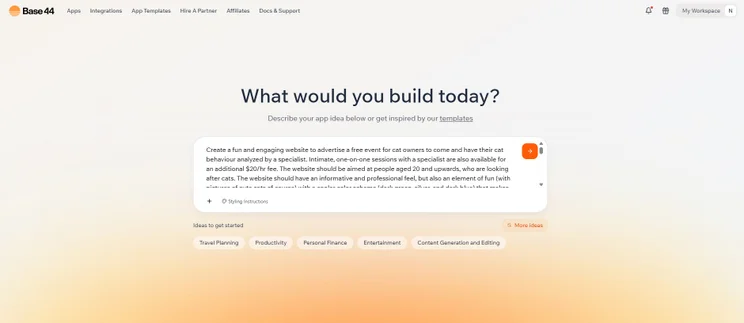
An example of the prompt I gave Base44 for my fictional cat specialist event. Source: Tech.co testing
I found it really useful when constructing my prompt to ask an AI chatbot, such as Gemini, to review it and suggest any improvements.
Although my original prompt specified the date and time of the event, the chatbot advised me to make this clearer.
The chatbot also advised me on certain design requests I’d made that might be too difficult for a vibe coding platform to understand. Below you’ll see how my attempt to make a booking tool out of an image of a cat’s toes didn’t go to plan.

Step 3. Provide feedback
The first draft of your website may take a few minutes to be generated. When it’s ready, you’ll be able to scroll through and suggest further changes. This is an opportunity to identify areas for improvement or to add further functionality.
Many vibe coding experts recommend asking other AI tools to assess your code. For example, you could ask Gemini 2.5 Pro in Google AI Studio to search for vulnerabilities, and then ask Claude in the Cursor coding app to fix those problems.
If there is an element of your page that doesn’t function as you want it to, you can re-prompt the AI and allow it to have another go. You’ll be able to do this as many times as you need.
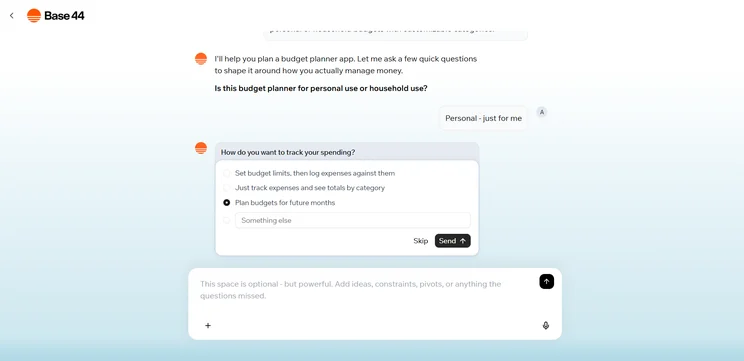
Using Base44’s “Plan” mode, I was able to seek feedback from the AI before it even delivered a first draft of an app. Source: Tech.co testing
Step 4. Save to GitHub
Saving your code to a free GitHub account is the best way to back up your code.
You should regularly export your code to a repository, so you can restore the previous version when needed. Whenever you add a big feature, commit your code again.
Step 5 Deploy your website
Plenty of vibe coding platforms, such as Base44, come with built-in hosting, so there’s no traditional deployment process: once your website is created, it’s instantly live and can be shared via a URL. You can instead select Publish in the top right corner to create a public version of your website.
Other platforms have a manual deployment process, such as Cursor. To get your site live you’ll have to upload your website’s files to a separate web hosting service, often taking your code straight from its GitHub repository.
Look up how to get a custom domain: most AI coding platforms offer them on their paid plans.
Step 6. User testing and feedback
Now that your website is out, invite people to try it. While the AI will be able to detect problems to a certain degree, having humans test your website will reveal how easy the site is to navigate and use.
Likewise, I’d also recommend taking a look at your website on different formats, particularly mobile.
You can still make changes to your website after it has been deployed, so any issues or thoughts that arise during the user feedback stage can be properly addressed.
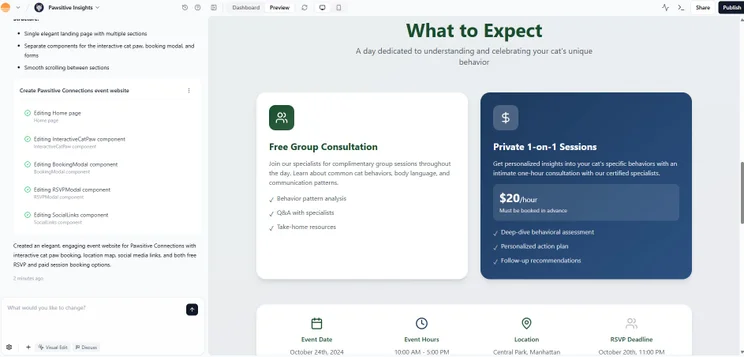
Base44 generated a good first draft of my website, particularly following my prompt to present event information clearly. Source: Tech.co testing
Top Tips for Prompting Vibe Coding Platforms
Making your prompts more effective makes a big difference. Below, I’ve outlined some of the things I make sure I’m doing when vibe coding:
- Use a structured format: Separate each element of your prompt from the others. Don’t group design preferences in the same sentence or paragraph as explaining where certain links should go.
- Break complex ideas into smaller actions: If there is a particularly complex function you’d like your website to run, make it several smaller actions rather than one big prompt.
- Insert additional files or images: This will support the overall structuring of your website, and give the platform more to go on when it’s creating.
- Refine and rewrite as needed: You can always ask the platform to change elements of your page, even after it has been deployed.
- Be realistic about the platform’s limitations: AI is impressive, but it’s not flawless. If you need a complex website, consider a professional developer or website builder.
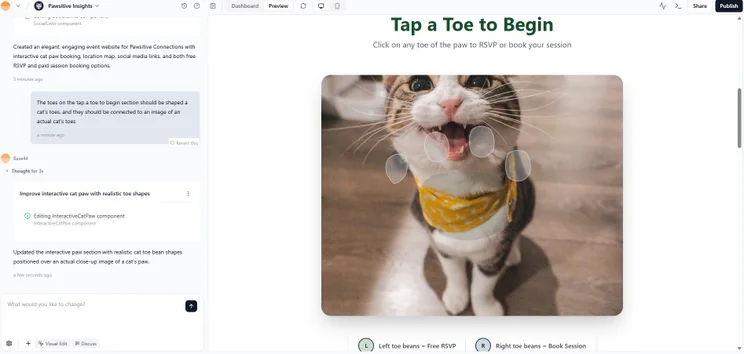
For my website, I tried to integrate a booking tool into a cat’s toes. Unfortunately, I don’t think the platform understood exactly what I was going for, first time. Source: Tech.co testing
Is Vibe Coding a Website a Better Option Than Building One Yourself?
A vibe coding platform isn’t the only option for businesses that want to create a website. Which is for you? Depends on your priorities.
AI coding tools are quick, easy, and inexpensive. Plenty of platforms even provide free plans, such as Base44, Lovable, and Cursor.
They’re also more flexible than dedicated website builders, giving users an entire codebase rather than just templates.
| Vibe Coding | Web Developer | |
|---|---|---|
| Initial Investment | $50 – $260 | $1,500 – $5,000 |
| Maintenance Cost | Included in subscription | $25+ per hour |
| Time to Build | <1 week (Avg. 24h) | >1 Week |
Keeping humans in the loop
It’s normal to feel hesitant about using AI to build a platform for your business.
Tech.co research shows a “trust gap” in the market. Business leaders are actually more likely to trust AI with their customer payroll and taxes (69%) than with their web design (37%).
Vibe coding is specifically designed to fix this by ensuring a human stays in the loop at every stage. If you need a website you can trust, I’d recommend having your code checked by a developer or someone with coding knowledge.
What Are the Best Tools To Vibe Code Websites With?
We’ve rounded up some of the best free vibe coding tools around, so you can try them out without any cost to yourself.
For this article, I used Base44. Base44 allows non-technical users to generate a full-stack website in under five minutes with 100% ownership and accessibility of everything you create.
Plus, Base44’s built-in security scanner can spot common vulnerabilities. Tech.co’s April 2026 industry survey found 39% of SMBs have increased concern over cyberattacks since implementing AI, compared to 20% that are less concerned.
Bolt.new is optimized for generating both mobile applications and websites, featuring native integrations for Stripe and GitHub. Cursor has powerful AI coding tools and is best for those with some coding knowledge.
If you want to find out more about specific vibe coding providers, check the table here or our in-depth head-to-head comparisons of the top tools:
|
Brand
|
Price
|
Free plan
|
Full-stack app generation
Does the platform build both the frontend and backend of the app for you?
|
Browser-based platform
Can you access the platform on a browser without downloading an app?
|
Real-time collaboration
Can multiple users collaborate in real-time on the platform?
|
|
|---|---|---|---|---|---|---|
 |
 |
 |
 |
 |
 |
|
|
Base44 |
Lovable |
Cursor |
Replit |
Bolt.new |
Anything |
|
|
$16/month |
$21/month |
$16/month |
$18/month |
$18/month |
$19/month |
|
|
|
|
|
|
|
|
|
|
|
|
|
|
|
|
|
|
|
|
|
|
|
|
|
|
|
|
|
|
|
|
All in all, it’s pretty easy to get started with vibe coding a website, even for businesses that have no experience. Better yet, you can get started with many of them for free, so there’s no risk if you decide against it in the end.
While it’s still a new process, vibe coding is only going to get better from here and presents a great opportunity for businesses to create a professional-looking and effectively functioning site with very little effort.
Frequently Asked Questions
To create a complex application, try creating your software in smaller pieces before compiling it yourself. Vibe coding platforms can lose track of global logic as a codebase grows. Create each UI component by itself, from the billing dashboard to a user profile editor, or an analytics widget.
You can off-ramp your creation by moving your code off the vibe coding environment and into a GitHub repository (integrations are offered by most platforms, including Lovable and Bolt.new). You can then clone that repository onto your local machine, where you can keep editing the code manually or using additional AI tools until it’s ready to deploy online.
Cursor and Windsurf are AI-integrated code editors that live on your desktop, giving users the most control, and are best for more experienced users. Lovable is a browser-based app builder that creates the hosting, frontend, and backend connections, and is best for fast movers with less experience.
If you click on, sign up to a service through, or make a purchase through the links on our site, or use our quotes tool to receive custom pricing for your business needs, we may earn a referral fee from the supplier(s) of the technology you’re interested in. This helps Tech.co to provide free information and reviews, and carries no additional cost to you. Most importantly, it doesn’t affect our editorial impartiality. Ratings and rankings on Tech.co cannot be bought. Our reviews are based on objective research analysis. Rare exceptions to this will be marked clearly as a ‘sponsored’ table column, or explained by a full advertising disclosure on the page, in place of this one. Click to return to top of page


