
We may receive a commission from our partners if you click on a link to review or purchase a product or service. Click to Learn More
Our research finds that QuickBooks is a much stronger accounting tool than Wave, offering a great set of core accounting features, helpful tools to boost your overall operational efficiency, and unmatched help and support. If you’re in the hospitality sector, however, you might also want to consider the best accounting software for hospitality businesses to ensure the software meets your industry’s unique needs.
However, if you’re just after a simple bookkeeping tool to manage your finances, Wave will do more than meet your needs. The accountancy software is fuss-free, easy to use, and it’s completely free – unlike QuickBooks, which has an entry price of $20 per month (or $2 per month for the first three months with the provider’s current deal). This makes Wave an ideal tool for managing the finances of small businesses and side hustles.
Both QuickBooks and Wave excel in different areas, so scroll down to find out how the two solutions compare when it comes to accounting features, advanced capabilities, affordability, and support. Still open to other options? You can also use our comparison guide to see how the providers fare against their competition, or check out our table below.
QuickBooks vs Wave Financial: At a Glance
After putting the software through its paces, we found QuickBooks was the better accountancy tool overall, while Wave was the more wallet-friendly. Check out the table below for a quick at-a-glance rundown of how these two providers stack up.
|
Starting price
|
Free trial
|
Best for
|
Core Benefit
|
Pros
|
Cons
|
Try now
|
||
|---|---|---|---|---|---|---|---|---|
 |

|
|||||||
|
QuickBooks |
||||||||
|
|
||||||||
|
30 days |
It’s free, no trial needed |
|||||||
|
Businesses needing advanced financial insights and customization |
Overall |
|||||||
|
Excellent help and support features, including dedicated on all plans and 24/7 support and training on Advanced plan |
Basic accounting functionality for free |
|||||||
|
|
|||||||
|
|
|||||||
| Try QuickBooks | Try Wave Starter |
QuickBooks is a comprehensive accountancy tool that can help you out with just about any function imaginable, from batch importing and payroll processing to KPI tracking. This makes it better suited to businesses with complex accountancy requirements. Wave, meanwhile, lacks some basic features like stock tracking and budgeting.
However, if you’re after no-frills accountancy software that can help you handle the basics, Wave will be more than enough. While it lacks the bells and whistles offered by QuickBooks, its feature set is nothing to be sniffed at, and the tool is completely free to use, making it perfect for users who are looking to keep costs low.
- QuickBooks has versatile applications, while Wave is only capable of basic accounting functions.
- Wave is completely free to use, while QuickBooks’ pricing plans start at $20 per month (currently discounted to $2 for the first 3 months).
- QuickBooks offers 24/7 support for its Enterprise users via phone, live chat, and email, whereas Wave’s support team is only available from 9 AM to 4.45 PM Eastern via email and live chat. Its AI chatbot, Mave, is available 24/7.
- QuickBooks offers financial projection tools on all tiers, while Wave completely lacks budgeting and cashflow tools.
- Both Wave and QuickBooks offer receipt scanning apps, but QuickBooks lets you scan other documents as well.
In the following section, we’ll break down how these providers compare across several different areas. Use the links below to navigate to the section that you’re interested in, if you like.
When to Choose Wave vs. QuickBooks
Still stuck on which accounting software to pick? Here’s a breakdown of which type of businesses Wave and QuickBooks are best suited for, side by side:
Who should choose Wave?
- Small businesses
- New businesses
- Budget-conscious businesses
- Freelancers
- People with side gigs
- Businesses with low turnovers
Who should choose QuickBooks?
- Larger businesses
- Businesses that manage stock (retail, food businesses)
- Businesses looking for budget planning and cash flow projection
- Businesses with mid-to-high turnovers
- Businesses that would benefit from custom reports
Best for Core Accounting: QuickBooks
QuickBooks fares better than Wave in terms of core accounting. It has an outstanding set of tools for invoicing and quoting, including the ability to seamlessly convert estimates into invoices and send payment reminders from directly within the “Overdue” section. This made it easy for our researchers to quickly get on top of their incomings and outgoings.
Our team found it really simple to edit and send invoices in general. The interface is clearly laid out, with a combination of drop-down boxes and sections for free typing. With QuickBooks, you’re able to set up invoices manually, set up recurring invoices, and even set up automatic invoice sending.

Get the Best Accounting Software for Your Business
Get started with a free trial today
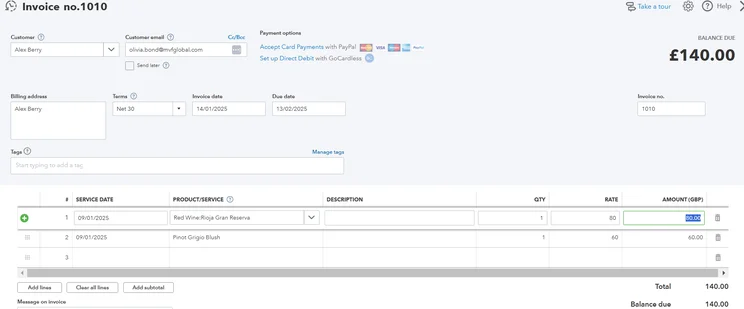
With QuickBooks, you can get paid directly from within your invoice with a selection of different payment processors available. Source: Tech.co testing
QuickBooks also deserves some plaudits for its tax readiness tools. For example, users can share their books directly with their accountant, as well as organize their income and expenses into tax categories.
What’s more, the platform will automatically sort your business expenses into the appropriate tax categories, so that you keep as much of what you own as possible. This will be warmly received by businesses that cater to a lot of clients, such as an investment bank.
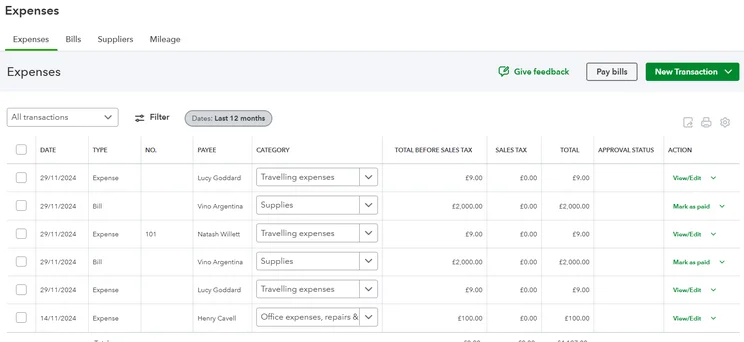
The QuickBooks expenses tool separates your filings into “total before sales tax” and “total,” so you can keep up with how much tax your business is paying. Source: Tech.co testing
Wave, meanwhile, is a pretty rudimentary accounting solution, but it has a decent array of core features. Among them, you’ll be able to create unlimited estimates, invoices, bills, and bookkeeping records, and you’ll have the option to accept online payments. However, this is only available as an add-on on the free plan.
If you opt for the paid plan ($16 per month), you’ll unlock the ability to connect to bank accounts for importing transactions, digitally capture receipts, track expenses, and automate late payment reminders. It’s all perfectly serviceable, but it doesn’t improve on QuickBooks.
Businesses can use both tools to access income statements, balance sheets, and sales reports. But since Wave lacks custom reports, its financial reporting features are slightly less flexible.
Check out the list below to compare the standout features of each provider:
Wave:
- Customizable invoices
- Recurring billing
- Profit and loss reports
- Receipt scanning via iOS mobile app
- Expense tracking
- Journal entries
- Credit card integrations
- Automatic payment reminders
QuickBooks:
- Income and expense tracking
- Tax deductions
- Comprehensive reports
- Receipt capture
- Mileage tracking
- Budgeting tools
- Inventory control
- Bill management
- Project accountant
- Live bookkeeping tools
Best Value: Wave
When it comes to affordability, there really is no contest – Wave offers better value than QuickBooks. Wave is completely free, requires no contract, and doesn’t feature any hidden fees, while QuickBooks starts from $20 per month on its Solopreneur plan, although this is currently discounted to $2 per month for the first three months.
In fact, QuickBooks offers five software packages, with the most expensive plan costing $235 per month (currently discounted to $23.50 per month for the first three months). It doesn’t offer a free plan, although users can get a 30-day free trial on any of its plans (although you will have to waive this if you want to take advantage of the current promotional offer).
Below, you’ll find a quick breakdown of each Wave and QuickBooks plan, so you can see how the two options compare on price.
Wave plans
- Wave Starter – Free
- Wave Pro – $16 per month (or $170 per year billed annually)
QuickBooks plans
- QuickBooks Solopreneur – $20 per month (currently discounted to $2 per month for the first three months)
- QuickBooks Simple Start – $35 per month (currently discounted to $3.50 per month for the first three months)
- QuickBooks Essentials – $65 per month (currently discounted to $6.50 per month for the first three months)
- QuickBooks Plus – $99 per month (currently discounted to $9.90 per month for the first three months)
- QuickBooks Advanced – $235 per month (currently discounted to $23.50 per month for the first three months)
While QuickBooks may be pricier than Wave, all of its tiers include stand-out features, including project accounting and budgeting tools, which provide a decent return on investment to businesses with advanced accountancy needs.
You can learn more about the software’s pricing structure in our QuickBooks Online pricing review.
Best for Operational Efficiency: QuickBooks
When you consider what both platforms are really about – QuickBooks, a comprehensive accounting solution with five plans to suit growing businesses, and Wave, a free, basic bookkeeping tool – there was only going to be one winner here. And, sure enough, it’s QuickBooks that takes the gold when it comes to operational efficiency.
To go alongside its core accounting functionality, QuickBooks is stacked with value-add features that’ll give your day-to-day operations a healthy shot in the arm. To begin with, the platform offers a great selection of available third-party integrations – more than 750, in fact.
Highlights include a series of digital document management apps, such as Clio, Client Hub, and DocuSend, which make it easy for users to digitize, edit, and manage their important documents. Integrated HR and payroll teams will find this particularly useful, as it means you can handle all of your business operations from within one program.
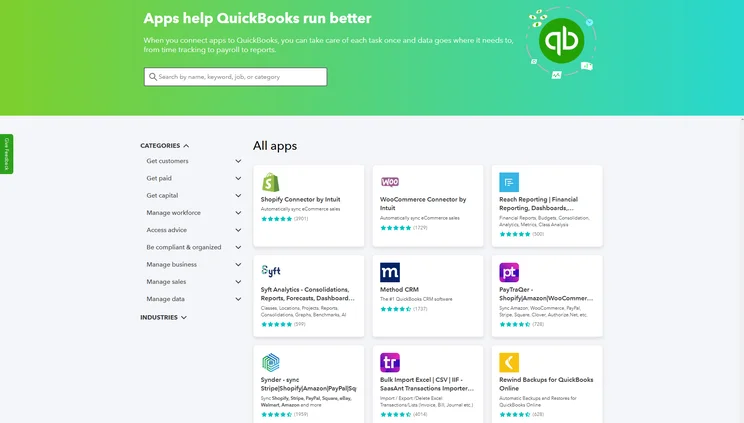
QuickBooks Online offers a library of integrations, so users can connect with useful third-party tools. Source: Tech.co testing
What’s more, QuickBooks is one of the more customizable platforms on the accounting market. Users can create personalized invoices, estimates, and sales receipts, with the ability to change display fields, table contents, colors, fonts, and layouts.
You can also add your company logo and contact info to make your forms look more professional than ever. It’s a neat way of building trust with your end customer, and smaller businesses will find it particularly useful.
On the other hand, Wave places a much smaller emphasis on value-add features. There are no built-in third-party integrations, with any available integrations only accessible by connecting with Zapier. What’s more, as of May 26, 2025, you’ll need a Pro Plan subscription to connect to existing and new API integrations.
In terms of customizability, you will be able to add your logo and brand colors to invoices on the free plan, but you’ll have to pay for the Pro Plan in order to remove Wave branding from invoice footers. This plan starts at a reasonable $16 per month, but as Wave’s free plan is one of its main draws, this will be a source of frustration to customers who want to look professional without breaking the bank.
Best for Help & Support: QuickBooks
QuickBooks beats Wave, hands down. QuickBooks offers support via phone, email, and even live chat, and its Enterprise users even benefit from 24/7 assistance. Conversely, Wave has a Help Center and chatbot called Mave that are available 24/7.
The problem is, Mave’s capabilities are limited, meaning it’s likely you’ll want to be connected to a human support agent. This is an option, but as a lot of users will be having the same problem, you’ll often find yourself waiting in a lengthy queue. In other words, for users who need quick help in a crisis, Wave is not the best option on the market.
QuickBooks vs Wave vs Alternatives
While QuickBooks and Wave fundamentally appeal to different demographics, they still won’t meet the needs of every business. If you manage a hospitality business, for instance, we would recommend using Xero because of its handy budget creator tool and slick POS integrations.
During our latest round of testing, our researchers concluded that Zoho Books is the best accounting platform currently on the market. Not only is it a great low-cost tool for billing clients thanks to its generous invoice limits, but it has the best set of core accounting features out of all the providers that we tested.
Our team was particularly impressed with the invoicing system, which they found to be well-designed and a pleasure to use. They also found the platform to be intuitive and easy to use in general, with logical signposting and site-mapping. What’s more, the dashboard surfaces key insights and an at-a-glance overview of your incomings and outgoings, so that you get a picture of your business finances quickly.
Zoho Books is a great option, but we understand that your business is your business, and therefore, your needs may vary. That’s why we’ve broken down some of QuickBooks and Wave’s biggest competitors in the table below. And make sure to check out our full guide to the best QuickBooks alternatives for more information.
|
Starting price
|
Free trial
|
Core Benefit
|
Try now
|
||
|---|---|---|---|---|---|
|
|
|
 |
 |
 |
|
|
QuickBooks |
Xero |
Zoho Books |
FreshBooks |
||
|
|
|
Free |
|
||
|
30 days |
It’s free, no trial needed |
30 days |
14 days |
30 days |
|
|
Excellent help and support features, including dedicated on all plans and 24/7 support and training on Advanced plan |
Basic accounting functionality for free |
Online integrations |
Strong automation features |
Inventory tools at a low price, plus a great 60% discount for the first 6 months |
|
| Try QuickBooks | Try Wave Starter | Try Xero now | Try Zoho Books | Try FreshBooks |
Our Research and Testing: How We Scored Wave & QuickBooks
At Tech.co, we take our impartial research and analysis seriously, so you can have complete confidence that we’re giving you the clearest, most useful recommendations.
After conducting an initial investigation to identify the most relevant, popular, and established accounting tools in the market, we conducted further research, including testing six major accounting software platforms.
Based on years of market and user needs research, we’ve established an accounting software testing methodology that scores these platforms against six main categories, and 25 subcategories — with a total of 1,512 areas of investigation being considered overall.
We also put the platforms through their paces with hands-on testing to gain a deeper grasp of their average user experience. We dedicated 57 hours to carrying out 37 user tests, with a total of 555 tasks being completed in total.
Our main testing categories for accounting software are:
- Core accounting features: We check how adept a platform will be at managing accounting tasks, focusing on key bookkeeping features like invoicing, tax preparation, journal entry, time tracking, financial transactions, and payment support.
- Operational efficiency: We determine how capable a system is at ensuring day-to-day processes run seamlessly, paying close attention to third-party integrations, collaboration tools, AI automation, and customization options.
- Financial planning: We assess how capable a system will be at measuring income, profits, and losses. Specifically, we check for the presence and quality of forecasting and budgeting, inventory management, reporting, and compliance tools.
- Help and support: We assess how useful and reliable a platform’s support system is, focusing on support options, whether it’s 24/7 support or knowledge center accuracy, as well as cloud backup, and security safeguards.
- Pricing: We compare the overall cost of each platform, taking factors like monthly costs, set-up fees, hidden fees, and free plans into account. We also measure how strict contracts are, and how much it would cost for a business to terminate them early.
- User experience: An overall judgment of how easily users can interact with the platform. We tested each accounting platform and got our team to report how easy they were to use, how they felt when they were using them, and how likely they were to recommend the platform to another business.
When it comes to calculating a product’s final score, not all testing areas are weighted evenly, with factors like “core accounting features” and “operational efficiency” being prioritized for small businesses, while sector-specific features are valued more highly for businesses across different industries.
We understand that accounting software is always evolving. That’s why at Tech.co, we have full-time product researchers to re-run this testing process regularly. It’s the only way to ensure our results remain reflective of the present day.
Learn more about our research.
QuickBooks is a better, more versatile accounting tool than Wave, boasting a robust core feature set, a good range of tools to boost your overall operational efficiency, and significantly better help and support options. While QuickBooks will undoubtedly prove an excellent choice for a number of different business use cases, Wave shouldn’t be discounted entirely.
While QuickBooks can cost as much as $235 per month for its Advanced Plan, Wave is completely free to use, making it perfect for smaller businesses looking to keep expenses low. And while it doesn’t offer much in the way of advanced accounting features, it has everything you need to get started, including quality invoicing integrations.
But QuickBooks and Wave aren’t the only options available. If you’re still open to other solutions, our handy comparison table will help you whittle down the competition in minutes. And, just like Wave, it’s completely free to use.
If you click on, sign up to a service through, or make a purchase through the links on our site, or use our quotes tool to receive custom pricing for your business needs, we may earn a referral fee from the supplier(s) of the technology you’re interested in. This helps Tech.co to provide free information and reviews, and carries no additional cost to you. Most importantly, it doesn’t affect our editorial impartiality. Ratings and rankings on Tech.co cannot be bought. Our reviews are based on objective research analysis. Rare exceptions to this will be marked clearly as a ‘sponsored’ table column, or explained by a full advertising disclosure on the page, in place of this one. Click to return to top of page


