
We may receive a commission from our partners if you click on a link to review or purchase a product or service. Click to Learn More
Squarespace is one of the top website builders across our in-depth research, providing an intuitive interface that is great for beginners, beautiful templates to showcase creative work, and robust booking and scheduling tools for service-based businesses. And with a starting price of only $19 per month, it’s competitively priced for small businesses.
There are some small downsides, though, which kept Squarespace from taking our top spot, including slower site speeds than competitors like Wix and a lack of phone support options for users. If these issues aren’t dealbreakers, Squarespace remains a top choice, especially for creative businesses and beginners who need an easy-to-use website builder.
In this review, we’ll cover all the features, pricing, and competitors of Squarespace, so you can make the right decision for your business when it comes to building a website.
Squarespace

In Short
-
Pros
- Easiest website builder to use across our research
- Plenty of content-focused features for blogging
- Integrates with Acuity for booking and appointments
-
Cons
- Limited language support for international businesses
- AI site builder creates fairly generic output
- No autosave feature for website editor
Pricing
-
 Basic: $19/month
-
Core: $29/month
-
Plus: $49/month
-
Advanced: $99/month
-
10% off with code TC10
-
14-day free trial
Images
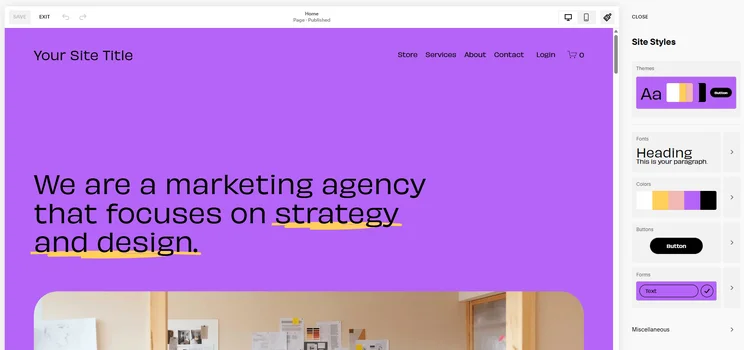
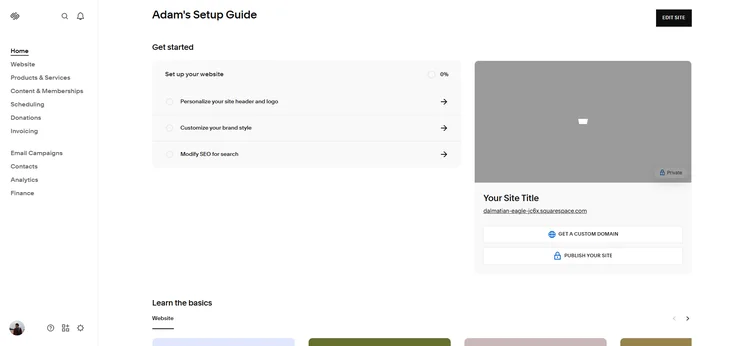
Squarespace: Quick Fact File
Before we get to the specifics about what makes Squarespace a great website, let’s take a quick look at some of the basics about the website builder, so you know what you’re in for before we get too deep.
- Pricing: Squarespace is slightly more expensive than the industry average, with pricing plans ranging from $19 to $99 per month.
- Free plan: Squarespace does not offer a free plan, but there is a 14-day free trial to test it out before you buy.
- Ease of use: Squarespace is the easiest to use website builder across our research, with an intuitive interface and customizable AI website building process.
- Features: Squarespace offers a lot of website functionality for users, including a robust set of scheduling and booking tools.
- Design: Squarespace provides users with 180 professional, beautiful templates that are very customizable and intuitive to edit.
- Customer support: Squarespace offers 24/7 email support and live chat during business hours, but it provides no phone support options.
Is Squarespace Right For You?
Squarespace is one of the best website builders we’ve tested, but its toolkit and interface definitely make it more suited to certain users than others. See who Squarespace will benefit the most below:
Who should use Squarespace?
- Creative businesses with blogs and portfolios, because of Squarespace’s beautifully designed templates
- Website builder beginners, because of Squarespace’s excellent user experience and smooth backend
- Content-focused businesses, because of Squarespace’s useful blogging tools
- Professional and creative service businesses, because of Squarespace’s booking integration with Acuity
- Students building a website on the side, because of Squarespace’s generous 50% discount for verified students
Who shouldn’t use Squarespace?
- Multinational businesses that need websites in multiple languages, because many languages need to be translated manually
- Users looking to get started for free, because Squarespace doesn’t offer a free plan
- Businesses that need to set up a site in minutes, because Squarespace AI site builder isn’t as capable as rivals like Wix
- Businesses requiring large and complex sites, as Squarespace’s site loading speeds are already lower than many alternatives
Squarespace Review: Key Website Builder Features
Squarespace may specialize in sleek design, but the website builder offers a wide range of features designed to help users build high-performing sites. Below, we cover some of Squarespace’s stand-out features.
Design templates
If you’re looking for stunning, professional site templates, look no further than Squarespace. The website builder offers over 180 custom website themes created by world-class designers. While this may seem like very few compared to Wix’s 800+ templates, it’s definitely a case of quality over quantity, as all of Squarespace’s themes are highly customizable and have been designed to accentuate visual elements.
If creating a highly unique website is important to you, check out our guide to the most customizable website builders.
You’re also able to filter results by website types such as online store, portfolio, and services, as well as topics like photography, professional services, and restaurants, to whittle down the options. I found this useful when searching for templates myself because it helped me quickly disregard the themes that weren’t aligned with my needs.
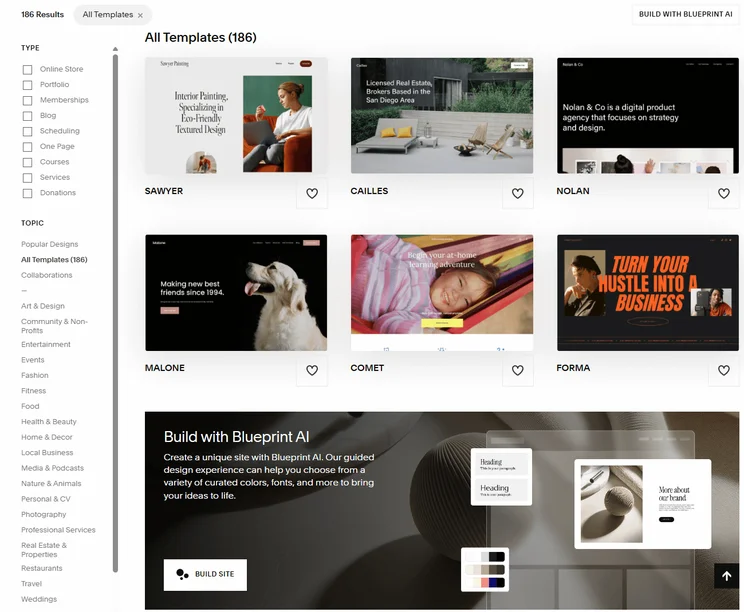
Squarespace offers some of the most professional, beautiful templates across our research. Source: Tech.co testing

Get your online store up and running with Squarespace
Squarespace has an unrivalled set of features for online stores. Get 10% off with code 'TC10'.
If you don’t find a template to your liking, you also have the choice to build your own template, giving you full control over its colors and fonts, and allowing you to add all the pages you need.
Squarespace Extensions
Squarespace offers a dedicated app store that lets users extend their use of its service with dozens of useful integrations. Squarespace offers integrations specializing in shipping and fulfillment, inventory and products, and sales and marketing. Some of our favorites include Acuity by Squarespace – an online booking and scheduling software – and Google Analytics – Google’s in-house web analytics service.
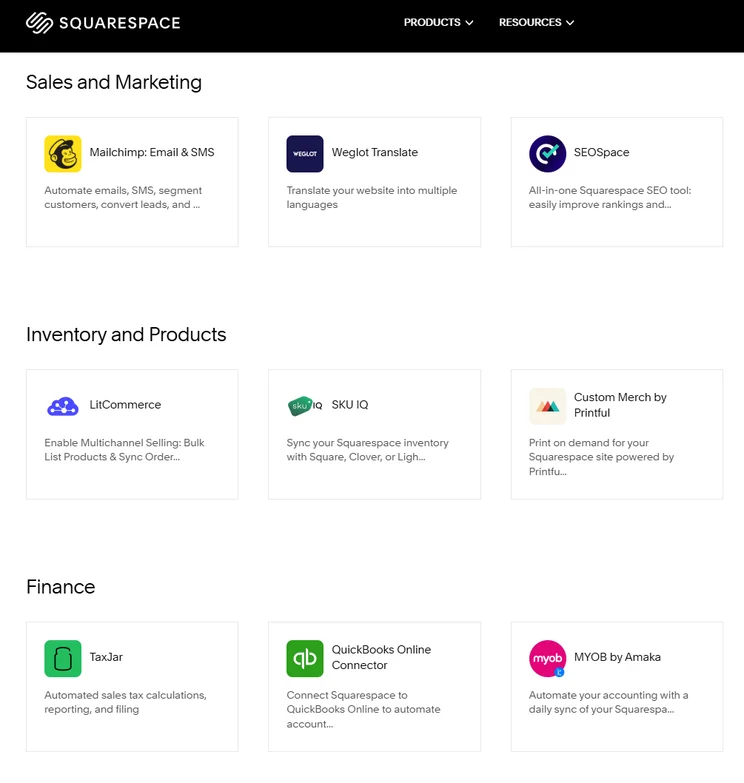
Squarespace provided us with a lot of third-party integrations to make our site more functional. Source: Tech.co testing
Fluid Engine editor
Squarespace’s Fluid Engine drag-and-drop editor gives users a granular level of control over their site’s layout. The editor lets you add, move, and adjust site elements, and also offers a variety of design options for desktop and mobile. Unlike Squarespace’s classic editor, Fluid Engine relies on a grid system and focuses on block arrangement and content optimization.
Fluid Engine’s intuitive nature and design focus make it very hard for users to create a site that isn’t aesthetically pleasing, either. This makes the editor great for beginners and those with heaps of design experience, but it’s a particularly useful tool for users with very distinct visions for their sites.
SEO tools
Squarespace offers a host of built-in SEO features to help small businesses increase their reach. From basic features like an SEO checklist and SEO mobile optimization to more advanced capabilities like SEO-friendly translations, the builder is definitely capable enough to cover your core search optimization needs.
Squarespace was also the first website builder to integrate directly with Google Search Console, giving users the chance to view what keywords customers are using to find your site.
However, while Squarespace’s search optimization features are more than enough for a personal or local site, if you’re running a big site and require more advanced SEO features, like integration with keyword-tracking software, you’d be better off going with Wix instead.
Blueprint AI
As developments in AI continue to streamline core processes, Squarespace has improved its offering with a range of AI-focused features. For instance, Squarespace has streamlined content creation with AI email campaigns, image block captions, text blocks, and product descriptions.
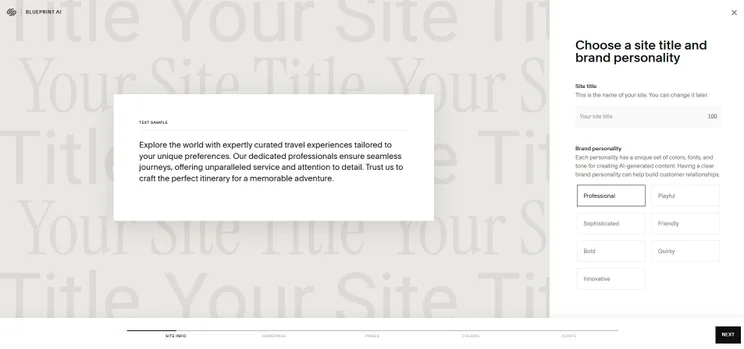
The provider also offers its very own AI site builder, Squarespace Blueprint, which lets users build their own template and generate text using artificial intelligence. All you need to do is answer five questions, and the builder uses advanced algorithms to create a unique website with custom copy, layouts, and color schemes.
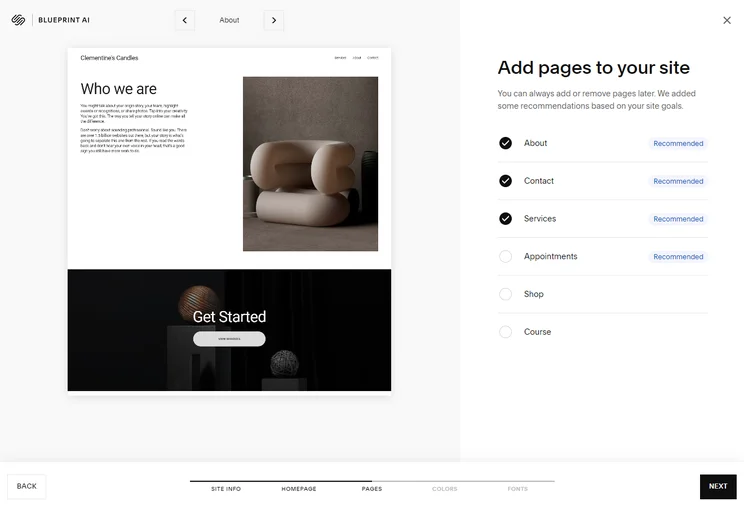
Squarespace Blueprint asked me seven questions before creating my AI site, including what pages I’d like to add to my site. Source: Tech.co testing
After your AI site has been created, you can use the platform to generate text from prompts or rewrite text you’ve already written. In addition to writing copy for your website, you can also create AI-generated blog posts, product descriptions, video descriptions, image captions, and more, all by clicking on the lightning bolt in the text toolbar.However, when we used Squarespace Blueprint, we found the site designs lacked variation compared to its normal builder. It also doesn’t let you build a site as quickly as website builders with more AI integrations, like Wix and Jimdo. Therefore, if you want an AI-focused builder to take up most of the legwork, we would recommend using these solutions instead.
See how the best AI website builders compare.
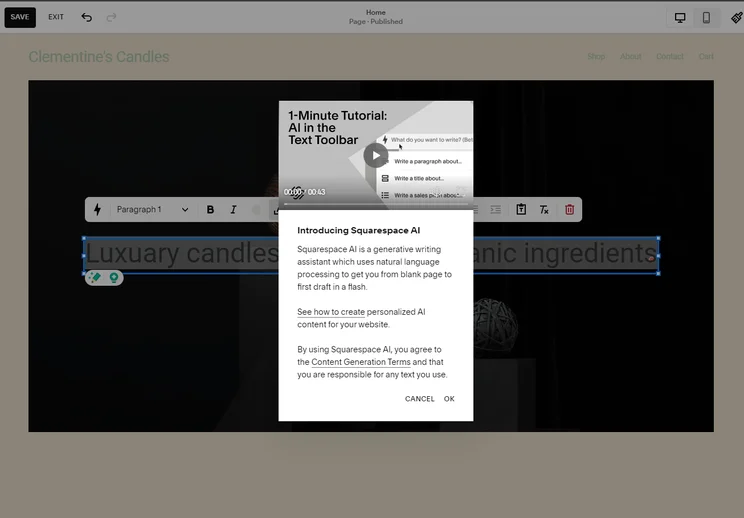
Squarespace Blueprint let me build a site quickly, and its AI text feature generates copy to get the ball rolling. Source: Tech.co testing
Sales features
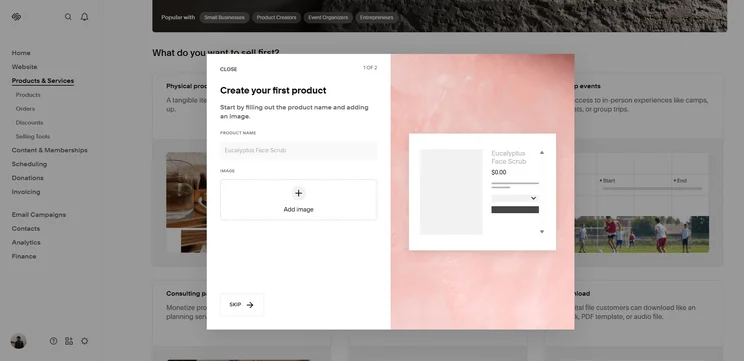
Businesses can sell with Squarespace through its Business plan, but if you want enhanced selling features and no transaction fees, you’d be better off going for Squarespace Commerce or Advanced. Squarespace Commerce offers excellent sales tools like styling email marketing templates, mobile analytics, and stock tracking, and zero product limits.
However, while its sales features have significantly improved since our last round of testing, largely due to the rollout of new subscription and checkout features, large online retailers will be better off going for platforms that support sizeable and more complex inventories, like Shopify.
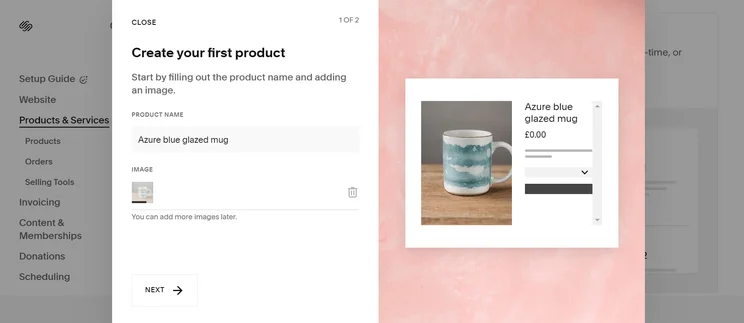
It was super easy to add products to my Squarespace website. Source: Tech.co testing
Help and support
Squarespace’s help and support options are solid, with the provider offering guidance through live chat Monday to Friday from 8am to 4pm, and via X and email 24/7. Unfortunately, Squarespace does not offer any phone support options, so you’re out of luck if that’s your preferred method.
For users who don’t need immediate help, Squarespace also offers support through its in-depth knowledge base and community forum.
If reliable support with phone options is a top priority for you, Wix may be a safer bet. Wix’s help center performed better than the provider in our research and testing, largely because of its 24/7 AI chatbot, and useful phone channels, which are open between 6 am and 5 pm PST.
Squarespace Website Builder Pricing
Squarespace offers four different pricing plans that are available on either an annual or monthly billing cycle. The annual pricing is a bit more affordable, while you’ll have to pay a bit extra if you want to be billed month-to-month. Here’s how Squarespace pricing shakes out for each plan when billed annually:
- Basic – $19 per month
- Core – $29 per month
- Plus – $49 per month
- Advanced – $99 per month
Squarespace pricing does increase pretty substantially when you opt for month-to-month pricing, though. The Basic plan, for example, jumps up to $25 per month, the Core plan becomes $39 per month, the Plus plan hits $65 per month, and the Advanced plan gets as high as $139 per month.
|
Plan
|
Special deal
|
Price (1-year contract)
The price per month you'll pay if you choose to be billed annually
|
Price (1-month contract)
The price per month you'll pay if you choose to be billed monthly
|
Ecommerce
|
|---|---|---|---|---|
|
Basic |
Core |
Plus |
Advanced |
|
|
$17.10/month with code TC10 |
$26.10/month with code TC10 |
$44.10/month with code TC10 |
$89.10/month with code TC10 |
|
|
$19/month |
$29/month |
$49/month |
$99/month |
|
|
$25/month |
$39/month |
$65/month |
$139/month |
|
|
Limited |
|
|
|
Squarespace pricing is slightly above the industry average, with four pricing plans that range from $19 to $99 per month. It’s slightly more expensive than options like GoDaddy (starts at $9.99 per month) and Hostinger (starts at $2.99 per month), two popular options that undercut Squarespace on pricing.
When it comes to value, though, Squarespace knocks it out of the park. You absolutely are getting what you pay for, with a hugely functional website builder that is still moderately priced compared to expensive solutions like Shopify (starts at $29 per month).
Check out our Squarespace pricing guide to learn more
Does Squarespace Have a Free Plan?
Unfortunately for users looking to forgo costs completely, Squarespace doesn’t offer a free-forever plan, unlike other website builder platforms like Wix and Hostinger. Squarespace does give users the option to test out its software for free with a 14-day free trial.
For those making passive income online alongside their studies, verified students are also able to bag a 50% discount on Squarespace for an entire year, as long as they agree to pay for the whole year in one installment.
Check out our guide to the best free website builders to learn more
How Does Squarespace Compare With Other Website Builders?
Squarespace is one of the best website builders across our research, performing particularly well when it comes to ease of use, making it the best choice for beginners. However, there are other website builders on the market that might be a better fit, depending on your particular needs.
Wix was the only website builder that scored higher than Squarespace, largely because of its vast website functionality. It provides more marketing features, AI tools, and blogging functionality, as well as a larger app store. All this functionality can be a bit intimidating, though, making it harder to use for beginners.
For those looking to sell online, Shopify is a hugely popular ecommerce website builder, with advanced tools like inventory management and member areas to monetize your site. Unlike Squarespace, though, it’s not very customizable and its templates are pretty basic, so design-focused businesses should probably look elsewhere.
Check out our guide to the best website builders for beginners and get a quick glance at how they compare with the table below.

|
Overall score
All Tech.co research categories, condensed into one score
|
Cheapest price
|
Special deal
|
Cheapest ecommerce plan
The cost for a plan that allows users to build and operate an online store
|
Free plan
|
Free trial
|
Templates
How many templates are available?
|
||
|---|---|---|---|---|---|---|---|---|
 |
 |
 |
 |
 |
||||
|
Wix |
Squarespace |
Shopify |
GoDaddy |
Hostinger |
||||
|
4.8
|
4.5
|
4.2
|
4.2
|
4.1
|
||||
|
$17/month |
$19/month |
$29/month |
$9.99/month |
$2.99/month |
||||
|
$15.30/month with code TAKE10 |
$17.10/month with code TC10 |
$1/month for first 3 months |
Save 54% with annual contract |
$2.69/month with code TECH |
||||
|
$29/month |
$19/month |
$29/month |
$20.99/month |
$3.99/month |
||||
|
|
|
|
|
|
||||
|
14-day free trial |
14-day free trial |
3-day free trial |
7-day free trial |
14-day free trial |
||||
|
2,000+ |
180+ |
900+ |
200+ |
400+ |
Our Methodology
We take our impartial research and analysis seriously, so you can have complete confidence that we’re giving you the clearest, most useful product recommendations.
After conducting an initial exploration to identify the most relevant, popular, and established tools in the market, we put them through their paces with hands-on testing to see their real strengths and weaknesses. In this case, we put 16 website builder products to the test across 398 areas of investigation.
Based on years of market and user needs research, we’ve established a website builder testing methodology that scores each product in six core categories of investigation and 33 subcategories. This covers everything, from customer feedback to design, ease of use, and more.
Our main testing categories for website builders are:
- Website features: The capabilities and functionalities offered by a website builder, e.g. blog functionality, SEO capability, and marketing capacity.
- Design functionality: The aesthetic appeal and visual layout of a website created using a website builder. It encompasses aspects such as page templates and customizable themes.
- Customer satisfaction: External customer opinion. This is the feedback and ratings given by customers who have used a particular website builder — the market position and reputation a website builder holds.
- User experience: How user-friendly and intuitive a website builder is for people with varying levels of technical expertise.
- Value for money: The balance between the cost of a website builder and the benefits it provides. It considers factors such as pricing plans, subscription models, and available features.
- Help and support: The assistance and resources available to users when they encounter issues or need guidance while using a website builder.
When it comes to calculating a product’s final score, not all testing areas are weighted evenly, as we know some aspects matter more to our readers than others, which are simply “nice to have”. After hundreds of hours, our process is complete, and the results should ensure you can find the best solution for your needs.
At Tech.co, we have a number of full-time in-house researchers, who re-run this testing process regularly, to ensure our results remain reflective of the present day.
Simply put, Squarespace is a clear and obvious choice for anyone looking to build a website. Its vast functionality provides the majority of website builder tools, as well as ecommerce options that can help you build an online store.
Additionally, we found Squarespace to be the easiest to use website builder across our research, so beginners and experts alike can take advantage.
Starting at $19 per month with plans as high as $99 per month, Squarespace is very slightly above the industry average for cost, but in terms of value, you’re getting a lot of functionality that makes it more than worth it.
Small downsides like no phone support and slow site speeds shouldn’t be dealbreakers for the majority of users, so we feel more than comfortable recommending the website builder to the majority of users.
If you click on, sign up to a service through, or make a purchase through the links on our site, or use our quotes tool to receive custom pricing for your business needs, we may earn a referral fee from the supplier(s) of the technology you’re interested in. This helps Tech.co to provide free information and reviews, and carries no additional cost to you. Most importantly, it doesn’t affect our editorial impartiality. Ratings and rankings on Tech.co cannot be bought. Our reviews are based on objective research analysis. Rare exceptions to this will be marked clearly as a ‘sponsored’ table column, or explained by a full advertising disclosure on the page, in place of this one. Click to return to top of page


