

We may receive a commission from our partners if you click on a link to review or purchase a product or service. Click to Learn More
Building a website can take anywhere from a few weeks to half a year, and we’ve found that this tends to vary depending on a variety of factors, including whether you decide to build the site yourself or pay someone else to do it for you.
Many businesses ask a developer to code them a website from scratch, which can take several months, while others simply use a website builder instead, which can end up being significantly quicker. The size and complexity of your site will also drastically affect timings, as will the content you plan to publish. If you’re considering your options, check out our guide to the best ways to make a website for tips on how to streamline the process.
In this guide, we’ll take a closer look at exactly how long it takes to build a website, what might impact your timing, and whether you should hire a professional to help you.
How Long Does It Take to Build a Website? Key Takeaways
There’s a lot of information in this guide about how long it takes to build a website. But before that, we want to go over some of the basics, so you know what you’re getting into. Here are some key takeaways in regard to how long it takes to build a website.
- Fast and affordable: Building a website yourself with a website builder is a lot faster and more affordable than hiring a website developer to do it for you.
- Planning: Whether you go with a website builder or a professional developer, you’ll need to spend time planning your site to get it right.
- Speed factors: A lot of factors can impact the speed of website building, from the size and purpose of the site to the technology required to keep it running.
- AI website builders: You can use AI tools to get a site up and running in minutes, but you’ll want to make sure you’re testing it out before it’s live.
As we’ve mentioned above, building a website can take anywhere from a few weeks to half a year, depending on the size of your site, the complexity of the content you plan to publish, and whether you pay a web developer or build it yourself.
We’ve split our timelines for how long it takes to build a website into two separate pathways – the do-it-yourself route and the developer route — as they differ quite significantly.
The route you choose to take will also significantly impact the costs associated with building your website.
Build Your Own Website
Generally, as you have more control over the process and the website building won’t be as “in-depth,” the DIY route is a lot quicker. Here are some rough timings for this process.
1. Nail down your concept & build an action plan (1-2 weeks)
First up, you’re going to need to decide on a concept – but if you’re already looking to build a website, you probably have one in mind. This could be anything from a blog to a news site or an ecommerce store.
Next, you’ll need to use that concept to inform the purpose of your site. What will your blog be about? What will your store sell? These are all questions that have to be answered before you move on to the next stage in the process. Starting without a proper plan in place is a recipe for disaster.
The core purpose of your site will affect things like your site structure, content, and other important aspects of your site architecture. It’ll also affect what plug-ins and add-ons you end up implementing on your pages, as well as possible revenue streams (such as advertisements) you might want to explore.

Want to Build a Website Quickly?
Try a website builder with an AI tool for setting up
2. Choose a website builder (1-3 days)
As you might have guessed, choosing a website builder is one of the most important parts of the process. Website builders like Wix have AI tools that can make the initial setup process really quick, whereas providers like Squarespace are focused more on design. All things considered, opting for an AI website builder will definitely speed things up.
You could also opt for a provider like Hostinger, which is a lot more affordable than the two mentioned above. We’d also recommend opting for a website builder with SEO prompts if you’re new to the world of optimizing content for search engines.
Whatever you need, there’ll be a website builder to suit your requirements. Just make sure you’re comparing its advantages and disadvantages before parting with any cash. Free trials can help you to test without strings and make the right final decision.
Check out our guide to the best website builders or peruse the table below for a quick look at your options
|
Cheapest price
|
Special deal
|
Free plan
|
Free trial
|
Pros
|
Cons
|
||
|---|---|---|---|---|---|---|---|
|
BEST OVERALL
 |
 |
 |
 |
 |
|||
|
Wix |
Squarespace |
Shopify |
GoDaddy |
Hostinger |
|||
|
$15.30/month with code TAKE10 |
$17.10/month with code TC10 |
$1/month for first 3 months |
Save 54% with annual contract |
$2.69/month with code TECH |
|||
|
|
|
|
|
|
|||
|
14-day free trial |
14-day free trial |
3-day free trial |
7-day free trial |
14-day free trial |
|||
|
|
|
|
|
|||
|
|
|
|
|
3. Create your content (1 hour to 1 week)
The timings for this stage will vary wildly depending on how big you plan to make your site, how many pages you plan to make in advance, and the components, copy, and media that you’d like to insert into these pages. In other words, the bigger your site, the longer the content creation stage will take.
If you’re looking to make a simple blog and you’re familiar with your topic area, then you’re going to be able to generate your content relatively swiftly. If you plan to prepare video content for every page on your site, you’ll need time to film, edit ,and render it.
The more content you prepare before publishing, the less you’ll have to do immediately after your site goes live. Putting an online store live without uploading half of your product descriptions, however, would lead to a poor user experience. Calmly working through your to-do list at this stage is crucial.
4. Design your site (1 hour to 1 week)
Many years ago, if you wanted to design a website yourself, you’d have to be fluent in at least one coding language in order to tackle building a lot of the back-end functionality on your own.
However, you can just use a no- or low-code website builder, such as Wix, which even has an AI tool that will complete much of the initial setup for you. Most website builders deploy a “drag-and-drop” technique, which effectively means you can just move components around on your screen however you like.
If you want to get up and running quickly, simply select a pre-designed website template made available by your website builder. If you opt for a design-focused provider like Squarespace, you’ll have a much wider choice than a provider like Hostinger, and you’ll probably be able to create what you had in mind a little quicker.
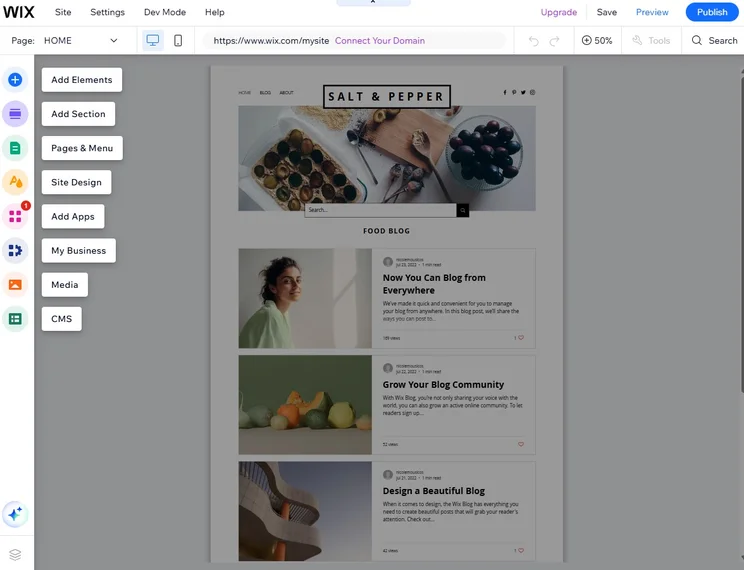
The Wix website editor offers a clear, comprehensive way to design your site. Source: Tech.co testing
5. Test it out (1-2 days)
It’s essential that you test your site before publishing, or you’ll just end up spending all your time mopping up your mistakes after it goes live.
What’s more, if you publish your site and something goes wrong that subsequently affects the experience of visitors to your site, that will send negative signals to Google, which is particularly bad if you’re primary goal is to rank highly in the search engine results.
6. Publish your site!
Finally, it’s time to publish and list your site! By this point, you should have rigorously tested it and have absolutely everything ready to go. If you don’t, it’s time to go back a step.
However, now you must turn your focus to maintaining and enriching your site with more content, as well as updating existing pages.
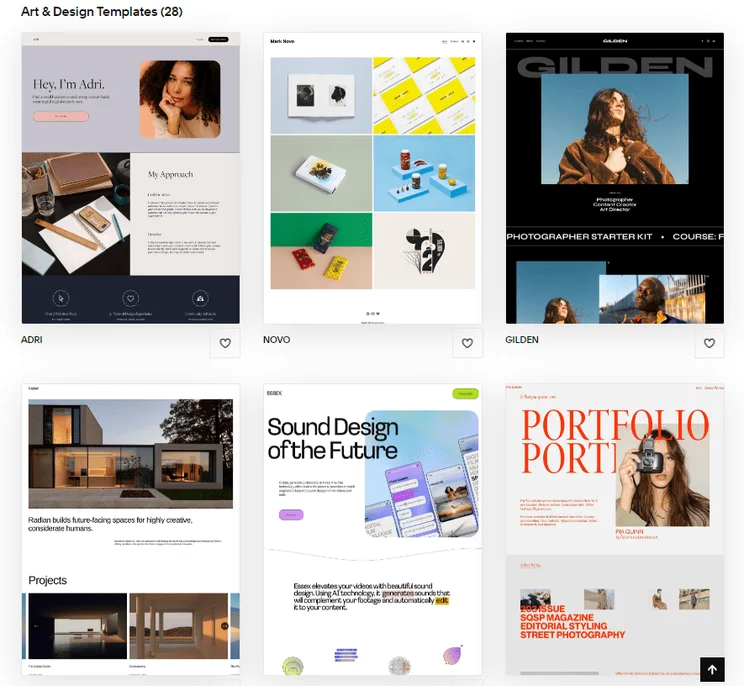
Getting your site live with a website builder like Squarespace is easy, particularly with all the beautiful templates to choose from. Source: Tech.co testing
Hiring a Website Developer
If you end up opting for a developer over building a website yourself, then this will change your timings and process. If you do choose this option, your process will look a little bit like the one below.
- Nail down your concept & build an action plan (3-4 weeks) – Mapping out your core website concept and goals will help you make design decisions that are consistent with your brand.
- Choose a web developer (2-3 weeks) – Review their previous work, analyze pricing options, and take your time, because this person or firm will have a lot of power over your end result.
- Agree on detailed designs (1-4 weeks) – Communicate clearly what functional features and visual elements you want and don’t want, especially with regard to your design, to make sure you get what you paid for.
- Review and refine your developer’s mockups (1-6 weeks) – Give careful feedback before you sign off on mockups, so the project can continue moving forward in the right direction.
- Website development (1-6 months) – Your developer may share previews or test pages as they go, to reassure you of their progress, but sometimes you’ll just have to wait until they’re done.
- Test your site out (2-4 weeks) – Make sure everything is up to standard and working as you expect, without any ‘bugs’, by stress testing a typical visitor journey.
- Publish your site (1 week) – Once your site is handed over, you’ll have time to input your unique copy and visual components. Then it’s just a matter of pressing Publish!
Can You Build a Website With AI?
AI tools have evolved substantially in recent years, making it even easier to build a website. For many website builders, all you have to do is answer a few questions, providing a little insight into what you want your site to look like, and the AI website builder will take it from there, building a fully functional site based on your recommendations in seconds.
That’s not all, though. A lot of website builders also have dedicated AI tools for when your site is already created. From content generators that can develop copy for your site to image generators that can make pictures to add a bit of flair to your page, you’ll be able to build a website with all the bells and whistles to attract new customers to your business.
All that to say, if you are intimidated by the idea of building a website, AI features are making the process more accessible than ever. To learn more, check out our AI website builder guide to get set up with a provider that will have your site up and running in minutes.
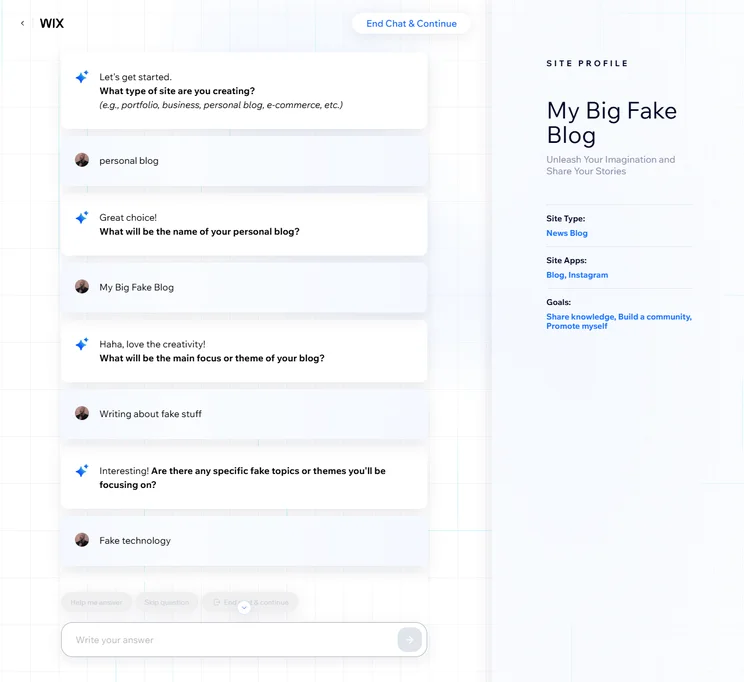
Like today’s AI chatbots, we just had a simple conversation with the Wix AI website builder about what we wanted in our website. Source: Tech.co testing
What Can Impact Website Building Time?
During the website building process, there are a myriad of factors that will affect how long it takes you to both build and publish your site, some of which we’ve alluded to already. These include:
- DIY vs developer: You can use a website builder to get a site up and running in a few days, whereas collaborating with a developer will take longer.
- The purpose of your site: A simple blog or portfolio for your personal work might only take 2-3 weeks to complete, but an online store with hundreds of products and more specific requirements overall will take a while.
- The size of your site: Naturally, creating hundreds of individual web pages takes time, whereas a one-page website will take significantly fewer hours to build.
- Technology stack: The tech you use to develop your website, as well as how familiar those working on the site are with it, can massively affect timings.
- Design and functionality: Complex, custom designs take time to plan out and create, so if you want something very unique or specific, it’ll take longer.
- The size of your team: If you’re a one-man band, then it’s going to take you a while to build your site, even with a developer’s help. A larger team will mean people can work on tasks at the same time.
Of course, testing different aspects of your site will also take some time, and the bigger your site is, the more components, integrations, and plug-ins you’ll have to test.
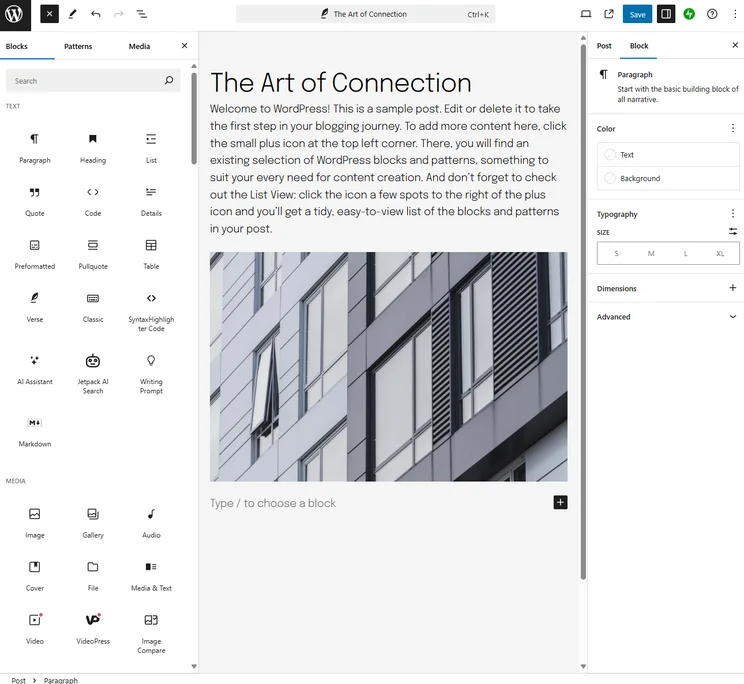
Website builders like WordPress will have features that focus on blogging, while others like Shopify may prioritize ecommerce tools. Source: Tech.co testing
Professionals vs Website Builders
Like anything, there are pros and cons to building a website yourself with a website builder and getting a professional web developer to do the job for you.
Pros and cons of do-it-yourself website building
The same can, of course, be said for using a website builder. Some pros include:
- Easier budgeting. You’ll pay upfront for a website builder, but after that, you’ll be unlikely to incur additional development costs that will drastically alter your budget.
- Maximum control. Building your site yourself will let you exert your personal, individual touch throughout the whole process.
- You don’t need to be an expert. Many website builders are built with beginners in mind and have a myriad of professional templates, as well as native SEO support.
Website builders like Squarespace have massive libraries of beautiful templates to choose from, so you don’t need to be a design expert to get started. Source: Tech.co testing
But there are also disadvantages:
- You’ll have less time. Even though you don’t need to be an expert to build a website, it may take you longer if you’re inexperienced, even if you pick a website builder for beginners.
- You might make mistakes. You’re more likely to make mistakes than a professional, so you may have to spend some time correcting errors.
If you do end up opting for a website builder, then the provider you choose will affect how long it takes you to build your website. Some providers are better for building online stores, such as Shopify, whereas Wix will give you more support during setup than a more basic web builder.
Pros and cons of a developer building your website
There are a number of advantages and disadvantages to hiring a professional website developer. Pros include:
- A professional touch. Web builders have made it easy for novices to create websites, but a developer will always be able to build a more complex website.
- Freeing up your time. If you pay a website developer, you’ll be able to get on with aspects of your website like content creation.
However, some cons are:
- Price. Unfortunately, paying a competent web developer for months of their time costs a significant amount of money.
- Minimal control. Delegating responsibility for designing your website does leave a lot in the hands of the developer, who may not deliver what you had in mind the first time around.
- Timing issues. You may have to be more flexible with your timings if your web developer’s schedule turns out not to match your own.
As you can probably tell from the timelines we’ve outlined in this article, it can take several weeks to build a fully-fledged website. However, the route you take will impact timings in a big way, as will the demands and purpose of your website. Larger, complex websites will take months to create.
If your website is going to be relatively small and you want to get up and running quickly, then go for a website builder. If you’re planning on building a huge online store with hundreds of products, then finding a developer to help you will be a wise choice.
There are some extremely capable website builders available at affordable prices, and you don’t need any coding knowledge to use them.
If you click on, sign up to a service through, or make a purchase through the links on our site, or use our quotes tool to receive custom pricing for your business needs, we may earn a referral fee from the supplier(s) of the technology you’re interested in. This helps Tech.co to provide free information and reviews, and carries no additional cost to you. Most importantly, it doesn’t affect our editorial impartiality. Ratings and rankings on Tech.co cannot be bought. Our reviews are based on objective research analysis. Rare exceptions to this will be marked clearly as a ‘sponsored’ table column, or explained by a full advertising disclosure on the page, in place of this one. Click to return to top of page


