


We may receive a commission from our partners if you click on a link to review or purchase a product or service. Click to Learn More
Hostinger is an excellent value for its cost, with the lowest starting price out of all the top small business website builders we’ve tested, starting at just $1.95 per month with the right deal (and $10.99 per month without the deal).
Beyond the low price, Hostinger also has impressive AI features to help speed up the setup process – you’ll be able to get your website live in just one minute with a few simple steps. However, it’s a little bit more basic than the likes of Wix, which has more templates, better design functionalities, and an expansive app marketplace.
That said, Hostinger will suit anyone looking to get their site up and running quickly while avoiding the high cost of a heavier-duty website builder. In this review, we take a closer look at the features we used when testing the platform, the price of its plans, and other competitors to consider.
Hostinger

In Short
-
Pros
- AI-generated site using a natural language prompt
- Drag-and-drop editor
- Language translations capabilities
-
Cons
- No app market for third-party integrations
- Bulk of AI tools aren’t available on cheapest plan
- No free plan (14-day free trial)
Pricing
-
 Premium: $2.99/month (48-month term)
-
Unlimited: $3.99/month (48-month term)
-
Cloud Startup: $7.99/month (48-month term)
-
Get 10% off with code TECH
Images

Hostinger Quick Fact File
Before we get into the nitty-gritty details of Hostinger, let’s start off with some basics that will give you a better idea of what you can expect from this website builder.
Pros
- Hostinger’s pricing is budget-friendly with a starting deal price of $2.99 per month.
- Hostinger provides a very basic, easy-to-use platform for all users.
- Hostinger can build a site for you in three steps, taking just a few minutes.
- Hostinger offers lots of AI features, like content generation, a chatbot, translation, and heatmap.
Cons
- You’ll pay a lot more once the initial deal is up – after four years, the $1.95-per-month fee turns into $10.99 per month.
- Hostinger does not offer any built-in marketing tools on the platform.
- Hostinger has no app market, so advanced functionality is out of the question.
- Hostinger has no free plan or ongoing free trial, so you’ll have to buy it to try it (unless they’re running a rare free trial promo).
Hostinger’s benefits are clear: it’s a fast, easy way to get a website up and running. The website builder guides users through the process, autogenerating color schemes, suggesting which elements can be added next, and including plenty of AI buttons for even more customization.
Plus, it’s cheap to get started for just a couple of bucks a month. It’s a great pick for someone who needs a simple website yesterday.
The downside is that Hostinger doesn’t have integrations with other tools, and doesn’t come with built-in marketing functions. If you need a website that will draw in new audiences and can last for decades, Hostinger may not have the broad functionality you’ll need.
Worse, once the initial four-year deal runs out, you’ll be paying more than four times as much in order to keep the site up.
Hostinger Pricing
Typically, a website builder will offer a wide range of pricing plans, with different features and functionality built into each one, so you can scale up your business and have flexible options when it comes to cost. It can make things pretty complicated.
That’s where Hostinger shines. The website builder offers two useful plans to choose from, and they’re both very affordable.
- Premium ($10.99 per month, or $1.95 with deal) – The starting plan from Hostinger that offers basic functionality for website building, as well as access to the AI site builder to get your site live fast.
- Business ($16.99 per month, or $2.75 with deal) – This plan unlocks ecommerce functionality for an online store, as well as more AI features, including image and content generators and SEO assistance.
It’s worth noting that starting prices will start low and jump up after the initial payment period is over: as of writing this (November 2025), the current deal is $1.95 per month or $2.75 per month (depending on your plan) for four years. When the four years are up, you’ll renew your plan at $10.99 per month or $16.99 per month, respectively.
|
Plan
|
Cheapest price
|
Special deal
|
Websites
How many websites can you build with this plan?
|
Mailboxes
|
Free domain
|
Ecommerce
|
AI credits
|
|
|---|---|---|---|---|---|---|---|---|
 |
|
|
||||||
|
Premium |
Unlimited |
Cloud Startup |
||||||
|
$2.69/month with code TECH |
$3.59/month with code TECH |
$7.19/month with code TECH |
||||||
|
3 |
Unlimited |
Unlimited |
||||||
|
2 per site |
Unlimited |
Unlimited |
||||||
|
|
|
|
||||||
|
|
|
|
||||||
|
|
|
Hostinger Features
Overall, our research found Hostinger has a lot of potential, largely due to its low price and commitment to ease of use. Its bounty of AI features makes it easy to get a site live fast, even if you’re brand new to the world of website building.
However, there are some notable downsides to Hostinger for those looking to build out a robust website. It offers far fewer templates than Wix and Squarespace and no email marketing to attract new visitors.
Worse, Hostinger offers no app market, so if you want to add and customize your site, you’re stuck with the basics.
We had a chance to get a hands-on look at how Hostinger works, including getting access to all the features available to users who purchase a subscription. Here are some of the highlights.
Drag-and-drop editor
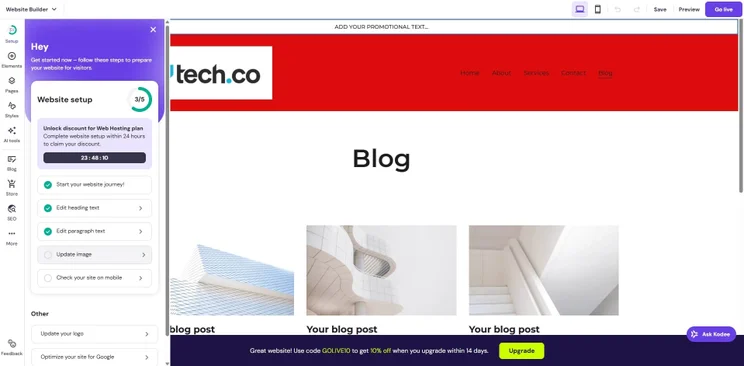
Thanks to this easy-to-use editor, we were able to easily design our website without using a lot of complicated templates that couldn’t handle basic adjustments.
Drag-and-drop editors are common across the website builder market: Wix and Squarespace both offer one, so it’s not a groundbreaking feature by any means. Still, the tool, when combined with a low price, makes Hostinger an excellent choice for beginners.
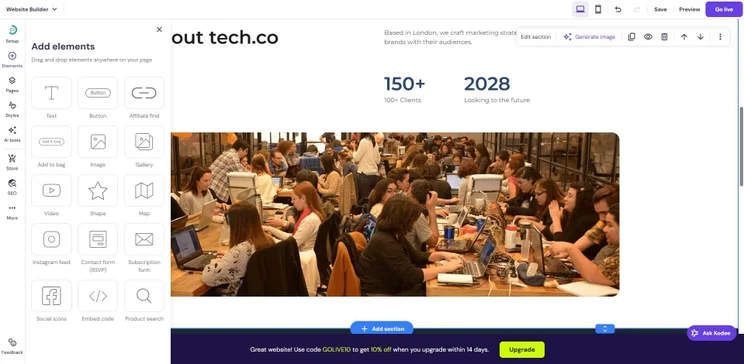
The drag-and-drop editor made it easy for us to make our site look exactly how we wanted. Source: Tech.co testing
AI Personal Assistant
Another reason Hostinger is a top choice for beginners is the helpful Personal Assistant feature that is powered by AI. We were able to ask simple questions and receive in-depth responses with actually helpful tips for building out our website.
It also provided us with step-by-step instructions for how to actually enact those tips, speeding up the overall website-building process.
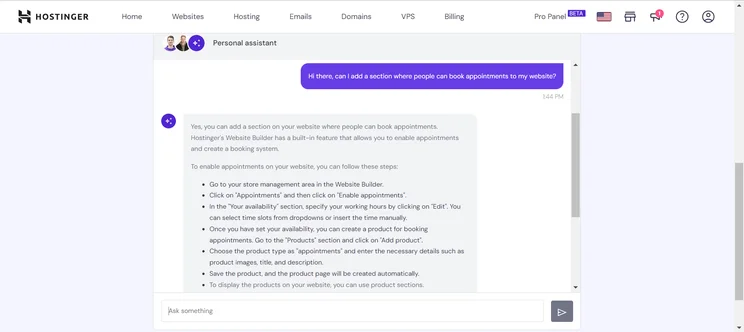
The AI chatbot from Hostinger gave us helpful insights for building our site better. Source: Tech.co testing
Speaking of speed, Hostinger delivered the fastest site loading speed out of all the website builders in our latest round of 2025 testing. If you prioritize fast-loading websites, Hostinger is for you.
Pre-designed templates
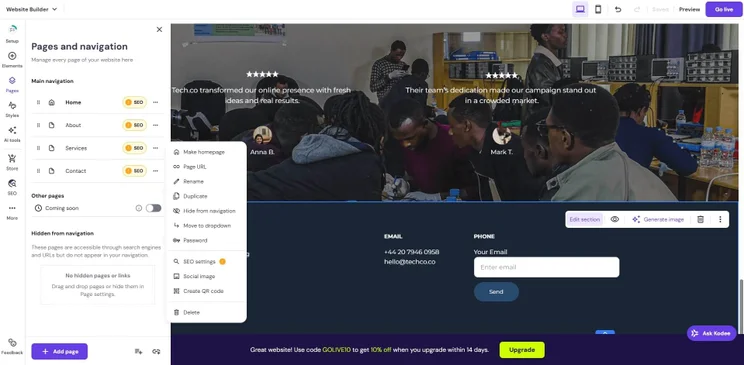
Alongside its AI features, Hostinger also boasts 150 designer-made templates optimized for mobile and web search engines alike. You can choose whether or not you want to generate your website from a few prompts or select one from a gallery.
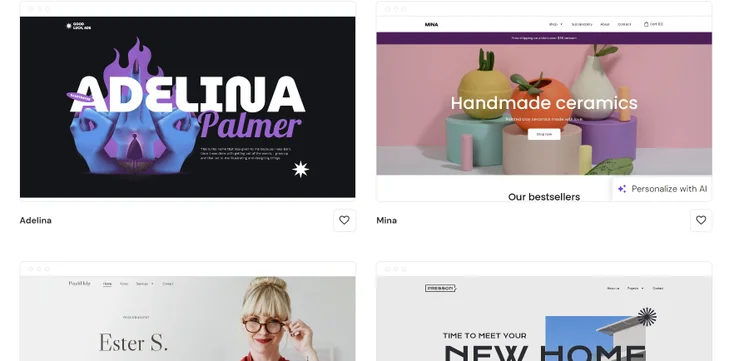
Hostinger includes a searchable gallery of available templates. Source: Hostinger website
Heatmap
Understanding how your users interact with your website is an easy way to quickly find out what works and what doesn’t. With the heatmap provided by Hostinger, we were able to see exactly where our visitors were clicking and scrolling through our website, logging problem areas or leads for future use.

Hostinger’s AI heatmapping feature lets us gain valuable insights into user engagement on our website. Source: Tech.co testing
Ecommerce functionality
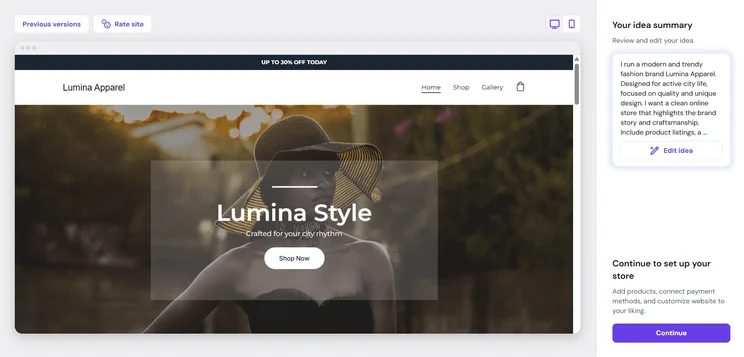
Even with the low price, Hostinger does allow you to set up an online store. Yes, you’ll have to pay for the more expensive of the two plans, but that still only costs $2.75 per month, well below the industry standard for such functionality.
The plan offers access to advanced features such as customizable checkout options and a variety of templates for different types of stores. You also enjoy no transaction fees, a big boon compared with Wix and Squarespace.
What’s more, users can optimize the experience for their customers with a product search functionality for ease of navigation, and can also let customers personalize their orders with special instructions.
Scaling ecommerce is a problem, however. Because of the lack of marketing tools, you’ll have a hard time attracting new customers. On top of that, it offers no POS integrations and no mobile app for managing your store on the go.
Plus, shipping options are limited to Baltic countries, so you’re out of luck if you want to spread your store around the world. This makes Hostinger an excellent option for local businesses, but not much else bigger than that. If you’re looking for a website builder designed for ecommerce at scale, we recommend looking elsewhere.
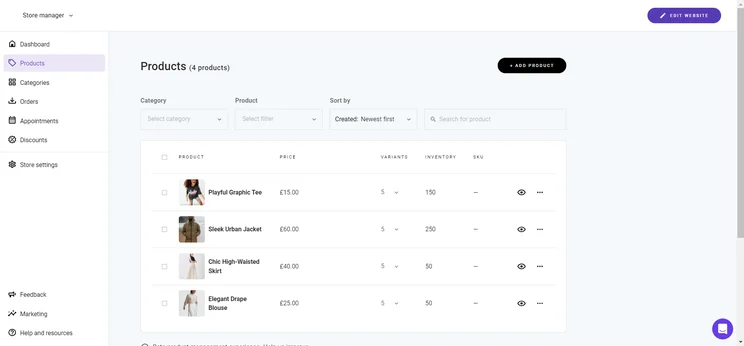
The Hostinger Store Manager made it easy for us to run an online store, but scaling is difficult due to a lack of marketing. Source: Tech.co testing
Other AI features
AI is all the rage right now, with most website builders using AI to improve their platforms. We found that Hostinger is no different, providing us with a wide range of AI-powered tools to make building and customizing our site that much easier.
Here are some of the AI features we loved that are available on Hostinger:
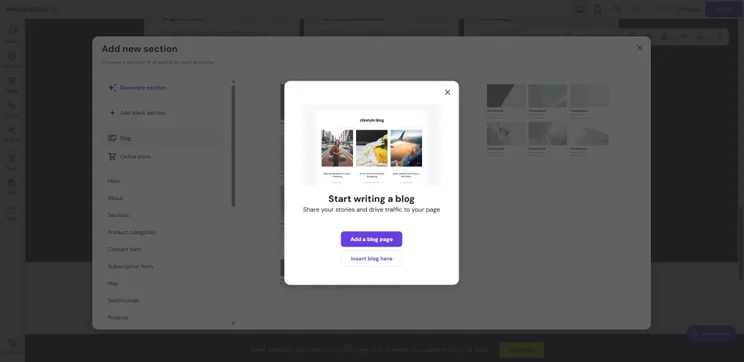
- Content generator – We were able to easily generate copy for everything from the “about” page to product descriptions with just the click of a button, and we were able to edit it afterwards, if we needed to. Users can even generate blog posts of up to 2,000 words.
- Logo maker – In just three steps, Hostinger provided us with a bespoke logo based on the brand name and a description of our ideal logo, saving us time and money on building our brand presence.
- SEO assistant – Hostinger gave us SEO best practice prompts throughout the content creation process, even guiding us on which headers to use to maximize our potential visitors.

Hostinger’s AI copy generator helped us craft content for SEO. Source: Tech.co testing
Hostinger web hosting
It’s worth noting that Hostinger didn’t start life as a website builder. In fact, the company is actually a dedicated web hosting provider, offering cloud and VPS web hosting services for those trying to get websites live from any builder online.
As a result, Hostinger websites are notoriously reliable when it comes to uptime. In fact, Hostinger guarantees 99.9% uptime, which means that your site will very rarely be down for a long period of time. This can translate to improved SEO and generally a better experience for your visitors.
Hostinger rolls out updates frequently. Most recently, the website builder has added the ability to gather a little extra customer data (with permission) at the checkout page, such as marketing consent, which can be toggled on or off from the store manager settings, and newsletter subscriber sign-ups, which can be synced with the AI-powered tool Hostinger Reach.
Other recent function upgrades include a search function for looking through past orders and a simplified mobile page for tracking orders on your phone.
Who Should Choose Hostinger?
Hostinger is a good fit for businesses that need something simple. Here’s who we think should choose Hostinger for their website building needs:
- Budget-conscious businesses – At such a low price with plenty of functionality, Hostinger is a clear choice for those in need of a budget-friendly website builder that can establish their online presence.
- Simple online stores – The Business plan from Hostinger unlocks ecommerce functionality at only $2.75 per month with no transaction fees, a great deal for solid functionality, as long as you don’t need advanced features such as marketplace integrations, email marketing, or revenue analytics. Hostinger has no automatic translation or region-specific tools, either, so international audiences won’t be well-served.
- AI users – Despite the lack of overall website builder functionality, Hostinger goes big on AI, offering an AI heat map, content generator, image creator, and SEO assistant to help your site get discovered.
- Blog and portfolio sites – Because of the limited functionality due to the lack of an app store, Hostinger is better geared for less feature-necessary websites such as blogs and portfolios. Other tools, including scheduling and booking, are quite basic, and there are no third-party integrations or analytical tools, unlike nearly every other website builder in our research.
- Complete beginners – With the AI website builder from Hostinger, you can literally get a website created and live with three steps. We found that it took under a minute to have our site fully developed and available online, which can be a huge help for those unfamiliar with website-building technology.
If all you need is a one-page website, though, you might want to check out Carrd, as it provides an even simpler process at a comparably low price.
Hostinger Alternatives
Hostinger is a great option for smaller businesses on a budget, but it certainly has its weaknesses. Due to its lack of marketing features and missing app store, Hostinger doesn’t offer the same customizability or scalability as other top providers, such as Wix or Squarespace.
While Hostinger offers a decent feature set for its price, it still lags behind a platform like Shopify, which offers an extensive library of integrations to boost its commerce functionality.
If you don’t think this affordable platform is for you, there are plenty of other solid alternatives available. In fact, some of the best website building platforms cost a bit extra, but offer a lot more. Take a look at some of them below:
|
Overall score
All Tech.co research categories, condensed into one score
|
Cheapest price
|
Special deal
|
Cheapest ecommerce plan
The cost for a plan that allows users to build and operate an online store
|
Free plan
|
Free trial
|
Templates
How many templates are available?
|
||
|---|---|---|---|---|---|---|---|---|
 |
 |
 |
 |
|
||||
|
Wix |
Squarespace |
Shopify |
GoDaddy |
Hostinger |
||||
|
4.8
|
4.5
|
4.2
|
4.2
|
4.1
|
||||
|
$17/month |
$19/month |
$29/month |
$9.99/month |
$2.99/month |
||||
|
$15.30/month with code TAKE10 |
$17.10/month with code TC10 |
$1/month for first 3 months |
Save 54% with annual contract |
$2.69/month with code TECH |
||||
|
$29/month |
$19/month |
$29/month |
$20.99/month |
$3.99/month |
||||
|
|
|
|
|
|
||||
|
14-day free trial |
14-day free trial |
3-day free trial |
7-day free trial |
14-day free trial |
||||
|
2,000+ |
180+ |
900+ |
200+ |
400+ |
Methodology – How We Test the Best Ecommerce Website Builders
We take our impartial research and analysis seriously, so you can have complete confidence that we’re giving you the clearest, most useful product recommendations.
After conducting an initial exploration to identify the most relevant, popular, and established tools in the market, we put them through their paces with hands-on testing to see their real strengths and weaknesses. In this case, we put 16 website builder products to the test across 398 areas of investigation.
Based on years of market and user needs research, we’ve established a website builder testing methodology that scores each product in six core categories of investigation and 33 subcategories. This covers everything, from customer feedback to design, ease of use, and more.
Our main testing categories for website builders are:
- Website features: The capabilities and functionalities offered by a website builder, e.g. blog functionality, SEO capability, and marketing capacity.
- Design functionality: The aesthetic appeal and visual layout of a website created using a website builder. It encompasses aspects such as page templates and customizable themes.
- Customer satisfaction: External customer opinion. This is the feedback and ratings given by customers who have used a particular website builder — the market position and reputation a website builder holds.
- User experience: How user-friendly and intuitive a website builder is for people with varying levels of technical expertise.
- Value for money: The balance between the cost of a website builder and the benefits it provides. It considers factors such as pricing plans, subscription models, and available features.
- Help and support: The assistance and resources available to users when they encounter issues or need guidance while using a website builder.
When it comes to calculating a product’s final score, not all testing areas are weighted evenly, as we know some aspects matter more to our readers than others, which are simply “nice to have”. After hundreds of hours, our process is complete, and the results should ensure you can find the best solution for your needs.
At Tech.co, we have a number of full-time in-house researchers, who re-run this testing process regularly, to ensure our results remain reflective of the present day.
Simply put, Hostinger is one of the most affordable website builders on the market today. Starting at a deal price of only $1.95 per month and two months free, it provides the cheapest plans across the board, while not sacrificing too much when it comes to features and, more importantly, security.
Still, you better be on a budget if you want Hostinger, as it’s definitely not the best option out there. Wix and Squarespace each offer relatively affordable options with more features and advanced functionalities.
If you’re on a tight budget, though, and need to get your site online soon, then Hostinger represents your most affordable option – and that is saying something.
Frequently Asked Questions
Hostinger and WordPress are quite comparable, but we’re actually going to give the edge to Hostinger, as it offers a lower price, easier interface, and more potential to turn into something very powerful for business owners.
Wix is our top-rated website builder, which means that Hostinger takes the loss on this one. Wix is just miles more robust than Hostinger, offering more features and customizability. Still, if you’re on a strict budget, Hostinger is a nice cheaper option.
If you’re a small business looking to get your digital presence established, Hostinger is a solid, affordable option that can get you online fast. If you’re a bigger business that needs a lot of features, you might want to try Wix or Squarespace instead.
Hostinger provides all the features you need for easy blogging. From metadata descriptions to other SEO help, you’ll be able to create the content you need to get your business recognized.
No, our research found that GoDaddy is slightly better than Hostinger, offering more features and customizability across the platform. Still, Hostinger is definitely more affordable, which could be enough to sway some beginner users.
If you click on, sign up to a service through, or make a purchase through the links on our site, or use our quotes tool to receive custom pricing for your business needs, we may earn a referral fee from the supplier(s) of the technology you’re interested in. This helps Tech.co to provide free information and reviews, and carries no additional cost to you. Most importantly, it doesn’t affect our editorial impartiality. Ratings and rankings on Tech.co cannot be bought. Our reviews are based on objective research analysis. Rare exceptions to this will be marked clearly as a ‘sponsored’ table column, or explained by a full advertising disclosure on the page, in place of this one. Click to return to top of page


