

We may receive a commission from our partners if you click on a link to review or purchase a product or service. Click to Learn More
Teamwork’s project management software comprises five tiers in total: the free tier (free), the Deliver tier ($10.99 per user, per month), the Grow tier ($19.99 per user, per month), the Scale tier ($54.99 per user, per month), and the Enterprise tier (custom pricing).
While free tiers typically fall short in certain areas, Teamwork’s free tier is very commendable – it does have a five-user limit, but you’ll find it more capable than free plans offered by Zoho Projects and monday work management. In fact, our testers ranked Teamwork’s free plan among the best free project management software available.
However, the free tier isn’t the only Teamwork pricing plan you should be considering. According to our most recent project management user testing series, Teamwork scores 4.6/5 overall, coming second only to monday work management, our top-rated provider. Read on to see the pros and cons of each Teamwork pricing plan, as well as other Teamwork products.
Teamwork Project Management Pricing Plans
|
Price (annually)
The amount you'll pay per month, when billed annually
|
Price (monthly)
The amount you'll pay per month, when paying on a rolling monthly basis with no 12-month commitment
|
Users
|
Projects/boards
|
Gantt chart
|
Resource management
|
Time tracking
|
Try Now
|
||
|---|---|---|---|---|---|---|---|---|---|

|
|
|

|
||||||
|
5 users |
Unlimited users |
Unlimited users |
Unlimited |
||||||
|
2 projects |
300 projects |
600 projects |
Unlimited |
||||||
|
|
|
|
|
||||||
|
|
|
|
|
||||||
|
|
|
|
|
||||||
There are five Teamwork plans available in total, starting with a free plan and ending with a Enterprise plan with no public pricing. The three paid plans with public pricing are:
- The Deliver Plan: $10.99 per user, per month when billed annually, totaling $131.88 per user, per year. It costs $13.99 per user, per month when billed monthly.
- The Grow Plan: $19.99 per user, per month when billed annually, totaling $239.88 per user, per year. It costs $25.99 per user, per month when billed monthly.
- The Scale Plan: $54.99 per user, per month when billed annually, totaling $659.88 per user, per year. It costs $69.99 per user, per month when billed monthly.
As the Enterprise plan has no public pricing, you’ll need to contact sales to get a quote for your business. Below, we explain the major differences between the four.
Free plan
The free plan is fairly limited, which is to be expected, as it only allows you to run two projects at a time between five users. The storage limit is quite small as well, only offering users 100 MB of storage. Free plan highlights include:
- Gantt chart and Kanban board
- Milestones and task dependencies
- Team calendar
- Preset data visualization charts and widgets
- Time tracking
- Knowledge base for troubleshooting issues
Even though there are only five available users, you’ll still be able to control their actions and what they can see with user permissions. As for the projects themselves, you’ll be able to view them on a Gantt chart or a Kanban board.
You’ll also be able to set up milestones and task dependencies, which can help you stay on top of the individual steps of your project.
When it comes to team collaboration, there are a fair amount of features that will assist you. You’ll get a calendar to view your team’s various tasks, and a task comments function you can use to leave notes on individual tasks.
From a data visualization angle, you’ll be given a pre-made dashboard that you can use to display up to ten widgets, so you can view your project progress and results in digestible formats. Finally, you’ll also get time tracking, which can show you how long each task is taking.
As far as customer support goes, you’ll be able to access a knowledge base, but no phone or email support. All in all, if you can accept the small limits, this is a rather generous free plan. In particular, the choice of both Kanban view and Gantt charts on the free plan is very creditable – that kind of functionality is pretty rare on free project management tools.
However, if a free tool is a necessity, there are better options out there that are worth looking in to.
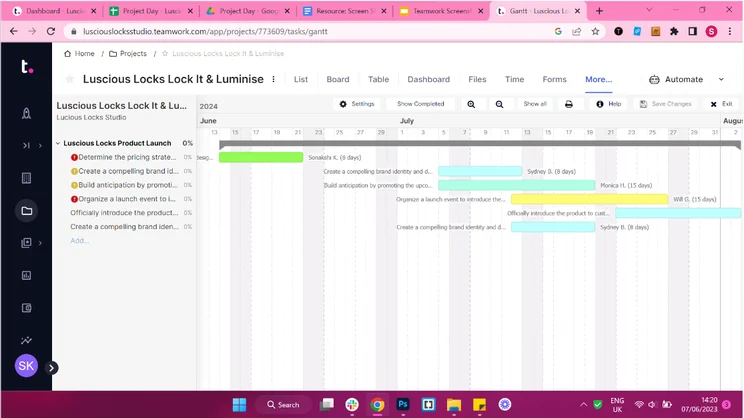
The Gantt view in Teamwork. Image: Tech.co’s testing process
Deliver plan
The first paid Teamwork pricing plan, the Deliver plan, costs $10.99 per user, per month. In addition to containing every feature from the free plan, it jumps up from a maximum of two projects to a very generous 300 projects.
It also allows for unlimited users and 100 GB of storage. Plus, there are integrations for Slack and Microsoft Teams, and guest access if you need it. Both of these integrations are really handy. As two of the biggest messaging platforms on the market, you can get notified instantly whenever somebody has made an update to one of your tasks. This way, you won’t miss any time-sensitive updates, which you can reply to from within the Slack interface.
When it comes to actual project management, you’ll be given a couple more features. If Excel is your happy place, you’ll be pleased to know that you’ll be given a spreadsheet-type view, which can be a helpful way to visualize your projects. You can also split tasks into sub-tasks, making them easier to tackle.
The broad range of task management features meant Teamwork was eventually awarded a 4.3/5 for that assessment area, a score bettered only by ClickUp and Wrike. It’s not quite as good when it comes to data visualization, however, only scoring 3.1/5 – Teamwork will let you create custom reports, but won’t let you use that data in a chart.
The biggest improvement from the free tier, outside of the massively increased limits, is the introduction of project templates. You can use Teamwork’s preset templates, or make 20 of your own custom templates.
This plan also comes with a team-based instant messenger, meaning you won’t have to wait for members to see comments in order to respond to them. Finally, you also get a lot of bonus features on this plan, like billing and invoicing, a form builder, and CRM functionality, which can save you a lot of money by forgoing the need for other software.
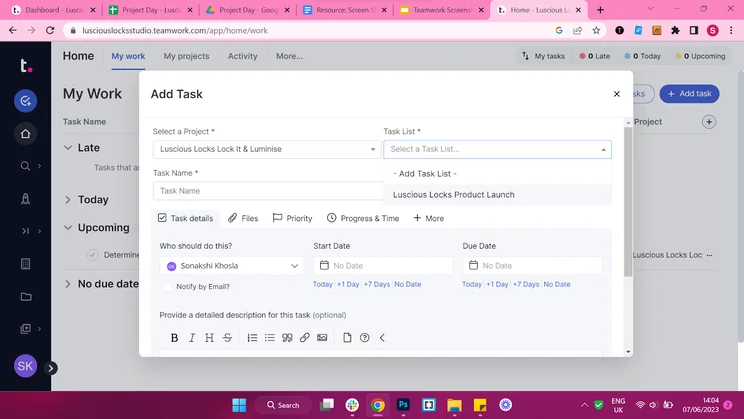
Adding Tasks in Teamwork. Image: Tech.co’s testing process
Grow plan
Teamwork’s next paid plan is the Grow plan, costing $19.99 per user per month, and including all previous features. This plan doubles the number of projects from the previous plan, going from 300 to 600.
Users remain unlimited, and storage increases from 100 GB to 250 GB. You’ll also now be able to set up two-factor authentication and integrate with an existing HubSpot CRM account.
As far as new tools and features, there’s only a handful. Firstly, you’ll get unlimited custom fields, which allow you to customize tasks and projects to specifically suit your workplace. On other Teamwork plans, the most you’ll get is three.
You’ll also be able to assign budgets to individual tasks, which you can’t do on the Deliver plan and is useful for project cost management. The number of custom project templates is also increased from 20 to 50.
You’ll get access to resource management, allowing you to log and tally any resources that your business is using for specific projects, and burndown charts, which visualize the amount of work left to do against the allotted remaining time.
All in all, this is the most usable Teamwork plan we’ve covered so far. It has more features than the Deliver plan, and you’ll be able to manage significantly more complex projects. Overall, Teamwork scores a commendable 4.3/5 on our ease of use testing, coming second to monday work management.
When I tested Teamwork, I found it much easier to get to grips with than a number of competitors. For instance, I loved the automation builder. There were a lot of good examples provided, but I found just building one myself was really simple too.
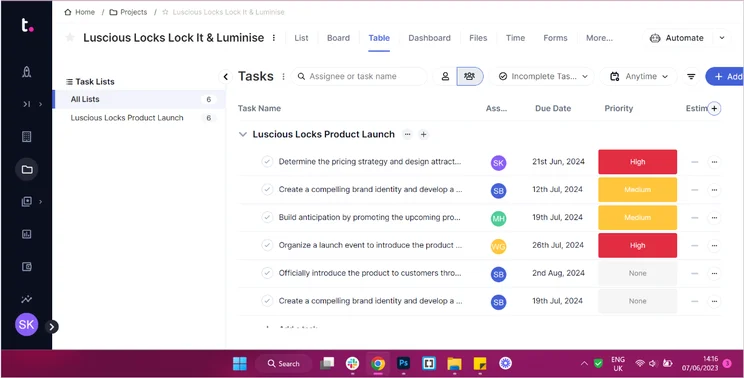
Teamwork’s Table view. Image: Tech.co’s testing process
Scale plan
Teamwork’s Scale plan will cost you $54.99 per user, per month. It’s geared towards medium-to-large businesses with complex client needs. In addition to everything in the Grow plan, you’ll also get unlimited access to Retainer Management, which allows you to reallocate surplus or deficit funds to make sure spending is evenly balanced.
This is a really neat tool for agencies that work on a billable basis. With it, you’ll be able to quickly and easily manage fluctuations in spend against income, ensuring that your projects are always delivered on-budget.
Not only this, but you’ll get unlimited access to several other features, including task list budgets, fixed fee project budgets, financial project budgets, custom reports, and more.
Part of what makes Teamwork such an excellent tool is in the insight that you can glean from the platform. At the Scale tier, this includes the option to set billable utilization targets, make use of unlimited shared an enterprise dashboards, and access financial and utilization insights.
With this vast wealth of information at your fingertips, you’ll have everything you need to get deep insight into your team workload, performance, and how you can iterate and improve to boost your bottom line.
Enterprise plan
Finally, the Enterprise plan features custom pricing, so you’ll have to get in touch with Teamwork if you’d like to find out more.
Alongside everything in the Scale plan, users will get advanced features and security. In particular, SSO, dedicated infrastructure, and 500 API requests a month.
It’ll be reassuring for large businesses to know that Teamwork scored 5/5 for security according to our most recent assessments. The provider offers IP restriction at an additional cost (a lot of providers don’t offer this at all), as well as user permissions and two-factor authentication on all paid plans.
These advanced security features will be warmly welcomed by large businesses, which will be keenly aware that data breaches are on the rise.
Finally, Enterprise plan subscribers will also benefit from a dedicated Customer Success Manager, premium support, and up to 10 hours of dedicated support for API work, data migration, and integrations.
Teamwork Desk Pricing
Teamwork Desk has four paid tiers. These are Starter ($9.50 per user, per month), Pro ($17 per user, per month), Premium ($33 per user, per month) and Enterprise (custom pricing).
There are some nice features locked behind the higher tiers, like customer satisfaction ratings and Mailchimp integration. However, even the lowest tier is still worth consideration, as it includes things like taggable tickets, mobile apps, database backups, and integration with all Teamwork software.
Teamwork Desk is a help desk platform that businesses can use to support their own customers. For example, if your business needed to set up a network through which your customers could call about problems or queries, this is the best way to do it.
Teamwork Chat Pricing
Teamwork Chat is included with every paid Teamwork Project Management tier (apart from the free plan). However, if you want to add unlimited video calls, this will cost extra. That cost used to be $4 per user, per month, but it is now calculated based on total user count, so will vary from customer to customer.
Teamwork Chat is exactly what it sounds like – a chatroom-esque service that allows teams and businesses to communicate with each other. This includes all the communication staples, like private and public channels, video calls, file sharing, and integration with all existing Teamwork products.
Please note that, from January 2025, Teamwork will be discontinuing its beta video feature, meaning that users will no longer be able to make video calls with Teamwork Chat.
Teamwork Spaces Pricing
Teamwork Spaces has two priced tiers and a bespoke tier. It no longer publicly lists its pricing, so you’ll have to get in touch with Teamwork for more information. The first tier used to cost a flat rate of $8 for up to five users, while the next level costed $4 per user per month. There isn’t a free version, but there is a 30-day free trial, and there is the ever-present bespoke option.
Teamwork Spaces is a document management software, allowing your business or team to store all relevant documents in a safe, accessible location. Highlight-worthy features of Teamwork Spaces include:
- Status markers
- Template and image galleries
- User permissions
- The ability to notify other users
- PDF exportability
- Internal links to other pages or spaces
Teamwork Spaces can also integrate with other appropriate Teamwork software.
Teamwork One Pricing
Now, you can buy Teamwork’s whole management suite – Teamwork, Teamwork Chat, Teamwork Desk, and Teamwork Spaces – in one package called Teamwork One.
As with a couple of its other products, you’ll have to get in touch to request pricing. The most recent figures that we have access to suggest that it costs $190 per month for five users – over $220 less than if you bought all of these products separately for the same number of employees.
Teamwork Hidden Costs
Almost all project management software tools have some “hidden costs” – features, functions, and integrations that aren’t already contained within the pricing plans on offer.
Teamwork is no different – there are a couple of things you’ll have to pay extra for. For example, enterprise-grade security features like the ability to restrict IP addresses demand an additional fee, as does the single sign-on feature.
Teamwork scores 3.1/5 for collaboration but would have scored much higher on our most recent testing series if it made its team instant messenger available for no extra charge – it has an additional cost attached if you’re on the Free Forever or Starter plan. A project message board is also only available at an additional cost.
Teamwork Alternatives
While Teamwork is both affordable and stocked with a good amount of features, it still has its shortcomings. Its biggest weakness is perhaps the fact that it can be a bit tricky to navigate. With those issues in mind, let’s have a look at some alternatives.
|
Price from
All prices listed as per user, per month (billed annually)
|
Free plan
|
Verdict
|
|||||||
|---|---|---|---|---|---|---|---|---|---|
|
Best Overall
 |
Best for Building Automations
 |
Best for Task Management and Collaboration
 |
FEATURED: Best for Spreadsheet Fans
 |
 |
 |
 |
 |
 |
 |
|
monday work management |
Teamwork |
ClickUp |
Smartsheet |
Asana |
Wrike |
Trello |
Jira |
Zoho Projects |
Basecamp |
|
$9/user/month |
$9.99/user/month |
$7/user/month |
$9/user/month |
$10.99/user/month |
$10/user/month |
$5/user/month |
$7.91/user/month (300 users) |
$4/user/month |
$15/user/month |
|
|
|
|
|
|
|
10 users |
|
|
|
|
Incredibly easy to use, great for small businesses, and our top-performing provider on test — and there’s a generous free trial period |
A great user experience all round, with an easy-to-use automation builder and great budget tracking capabilities |
Powerful, feature-rich software suitable for teams of all sizes, with an impressive free tier for individuals and a great value plans for teams |
A great tool for spreadsheet-natives, which can take your Excel-based task planning to the next level |
A simple task-list-based project management platform with an acceptable free tier |
A very capable yet pricey service with a huge number of useful integrations, plus a free tier option to try |
A fairly-priced, stripped-down option, best for small teams who need a central location for basic task management |
A great value piece of software that’s ideal for tech, software development, and engineering teams |
A solid project management solution with an attractive free tier for small teams and a very affordable premium plan |
A very basic, relatively limited software that’s a lot simpler than its competitors |
ClickUp – best for task management and collaboration
ClickUp is heavily customizable, very easy to use, packed with features, and offers a solid free tier that allows users to get to grips with all of the tools it comes with without spending a cent. However, we didn’t find it as easy to use as monday work management, Teamwork or Asana, which had tidier interfaces and a less overwhelming set of features.
ClickUp has one of the cheapest first paid plans in the game, the Unlimited plan, which goes for a very respectable $7 per user, per month.
For more information, visit our ClickUp pricing page.
Trello – best for customer support
Trello is basic platform without many of the more advanced features that Teamwork has. It does, however, provide a simple user interface that’s easy to get to grips with, and there’s an automation builder as well as custom project templates included in all Trello plans.
There are great customer support options available, with Trello scoring 5/5 overall in this assessment area. However, Teamwork still trumps it with phone support offered on all of its plans (Trello only provides this on the enterprise plan) – although you won’t have 24/7 live support, which Trello offers.
Trello’s paid plans start with the Premium plan ($5 per user, per month). This is cheaper than Teamwork’s first paid plan ($10.99 per user, per month) as well as most other Trello alternatives.
Smartsheet – Best for spreadsheet fans, with great security options
Smartsheet’s Pro plan is just $9 per user, per month, which is cheaper than Teamwork’s Deliver plan.
Smartsheet offers Enterprise users multiple ways to authenticate users, such as 2FA and Single sign-on. It also has a much larger range of compliance certifications than competitors like Basecamp.
However, Smartsheet scores just 3.2/5 for ease of use – we find it much less intuitive upon set up than Teamwork and monday work management, which both have more minimalistic interfaces that make it easier to find tools and menu items.
Find out more about Smartsheet Pricing.
About our Research
Here at Tech.co, we don’t just pluck our product rankings and provider scores out of thin air – we conduct our own, independent research, testing all of the products we write about in the process. We spend time speaking to small businesses and conducting market research so we know we’re testing the right tools for our readers.
When testing project management software, our researchers honed in on six key assessment areas: ease of use, integrations, functionality, pricing, security, and customer support. They subsequently broke down “functionality” into four sub-categories: task management, data visualization, collaboration, and workflow creation.
Tech.co does have commercial partnerships with some of the providers that feature on our site, but our research team allows us to remain editorially independent. All the conclusions we draw in our content are backed by the latest data we’ve collected from testing.
I found Teamwork really easy to use, especially compared to heavier-duty programs like Jira and Smartsheet. Setting up a basic project didn’t take too long at all, and actually managing tasks once you’re finished is a breeze too. When looking for a specific button, area, or feature, I didn’t really spend much time scrolling through menus or settings pages.
One of my favorite things about the platform is the automation builder. If you’ve never used one before, they can be quite overwhelming to the point where you start to question how much you’ll actually save using it – but Teamwork’s offered a lot of examples and clearer instructions than a lot of other competitors.
I’d recommend teamwork to small and medium-sized businesses looking for general-use project management software or a work management software app, rather than something industry-specific or designed for really large businesses with lots of different teams.

Teamwork’s project management software is a very solid product and scores a respectable 4.6/5 overall, coming second out of 10 providers we most recently tested. It has a high overall level of functionality, performed well on our ease-of-use tests, and contains a number of excellent task management tools that will bring clarity to complex tasks.
If you’re new to the world of project management, the help and support options are comprehensive even on the free tier, which is a great help. In fact, the free tier is brilliant overall, offering a wealth of features at zero cost. The only downside is the tight limits on projects and users, but it’s a great start for smaller businesses and teams.
If you’d like to check out the latest project management software deals, check out our comparison page for more information.
If you click on, sign up to a service through, or make a purchase through the links on our site, or use our quotes tool to receive custom pricing for your business needs, we may earn a referral fee from the supplier(s) of the technology you’re interested in. This helps Tech.co to provide free information and reviews, and carries no additional cost to you. Most importantly, it doesn’t affect our editorial impartiality. Ratings and rankings on Tech.co cannot be bought. Our reviews are based on objective research analysis. Rare exceptions to this will be marked clearly as a ‘sponsored’ table column, or explained by a full advertising disclosure on the page, in place of this one. Click to return to top of page


