
We may receive a commission from our partners if you click on a link to review or purchase a product or service. Click to Learn More
In an Asana versus Jira match-up, Asana will be the better choice for you if you’re looking for a classic or general project management software tool, while Jira will be the better option if you work in engineering or software development and are looking for an agile project management solution.
If you’re a total beginner when it comes to project management, Asana’s straightforward task lists and timeline view will make your transition over to the platform simple. While, Jira’s free plan is impressive, you’ll experience a steeper learning curve than you will with Asana.
In this Asana versus Jira head-to-head, we explain the merits and pitfalls of each software solution so you can decide which is the best tool for your own needs. Alternatively, you can use our free project management price comparison tool to see how they compare.
- Overall, we deemed Asana the better project management tool for almost all scenarios, with the all-important exception of software or web development teams, who should definitely stick with Jira.
- Asana starts at $10.99 per user, per month and Jira starts at $9.05 per user, per month for up to 100 users. Both providers also offer a free plan.
- While Jira is cheaper, Asana provides better value for money, because it offers more features in both its free plan and its first paid offering.
- Asana has a stronger set of features than Jira, particularly thanks to its data visualization tools and resource management tool for larger businesses, which Jira doesn’t offer.
- Asana is both easier to use and quicker to set up, causing minimal strain for our users during testing, especially when it came to completing the basics.
- Alternatives to Asana and Jira include monday work management, Teamwork, and ClickUp.
|
Price
All prices listed are per user, per month (billed annually)
|
Pros
|
Cons
|
Support
|
||
|---|---|---|---|---|---|
 |
 |
||||
|
Asana |
Jira |
||||
|
$10.99/user/month |
$9.05/user/month |
||||
|
|
||||
|
|
||||
|
|
Aside from monday work management and Teamwork, I haven’t tested a project management software tool that’s as easy to use as Asana.
I liked how accessible the task management features were and the fact the provider kept suggesting things I could do to make myself more organized, such as drawing dependencies between tasks.
The data dashboard auto-populated itself as I added tasks deadline dates etc., so I was instantly able to see how well my project was progressing.
Jira, on the other hand, is a bit of a trickier tool to get to grips with. It took longer to set up and, despite Jira’s Work Management software being geared toward the general user, there’s still a lot of terminology that may confuse you if you’re unfamiliar with the world of bug-tracking and software development.
I found setting up budgets quite difficult in Jira and had to read through more online guides and documentation than I did with Asana, as well as monday work management. Jira’s plans are incredible value for money and a lot cheaper than Asana’s, but I didn’t find the software as functional.

Asana summary
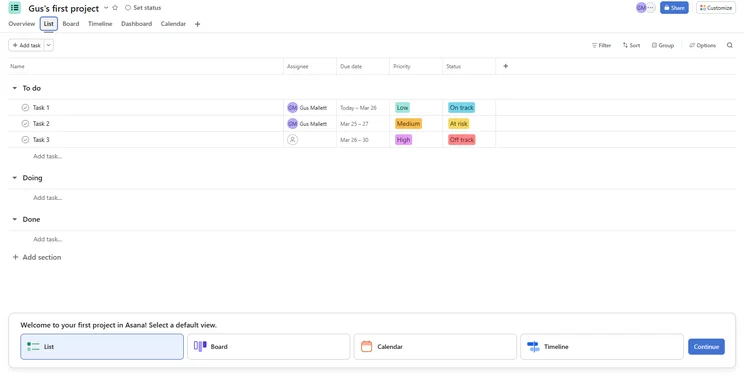
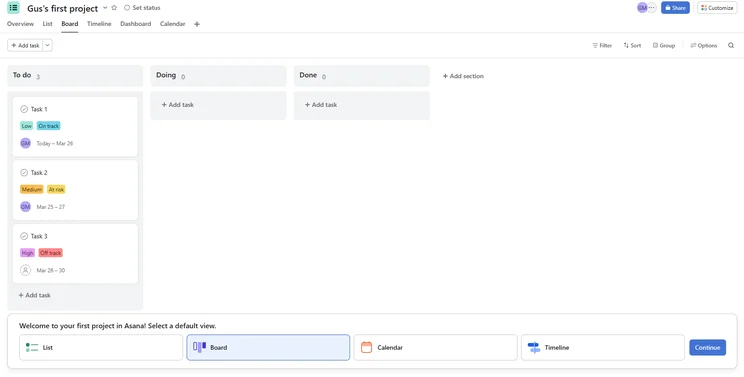
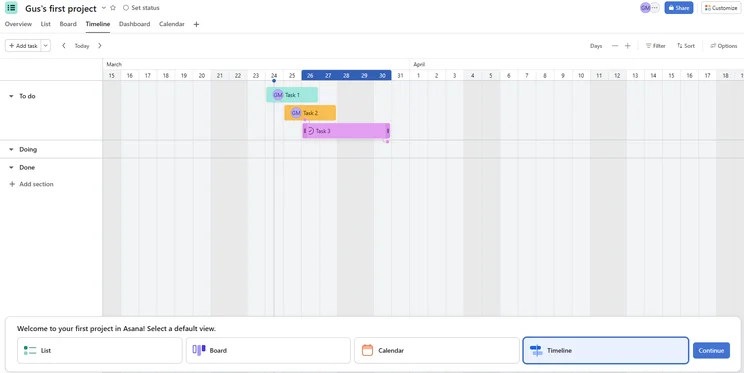
Asana’s interface is modern and easy to read, particularly helpful once you start loading up the platform with tasks for each team member.
Individual tasks support attachments, sub-tasks, dependencies, and tags. Team members can also mark certain tasks as milestones, and use Asana’s Portfolios feature to track the status of each project.
One downside of the platform is that many important features are locked behind higher pricing tiers — milestones, task dependencies, and timelines, for example, are restricted to the Starter plan ($10.99 per user, per month).
Milestones and dependencies are key components for managing an effective project. Still, as a free service, Asana is fairly capable — offering task basics, board and calendar views, among other features.
What’s new for Asana in 2025?
- Asana has released new AI features to help businesses maximize productivity. This includes AI Teammates, AI risk reports, and an AI search feature.
- Asana’s resource tracking features have been improved, with new features including exportable timesheets, billing rate cards for users and project budgets, and advanced planning reports.
- Views have become more flexible with custom fields and better subtask visibility.
Asana

In Short
-
Pros
- Unlimited storage
- Plenty of third-party integrations
- Incredibly clean and intuitive interface
- Easy-to-use dashboards and chart builder
-
Cons
- Most key features require the Advanced plan
- Very high prices for larger teams
- No phone-based support
Pricing
-
 Free plan available
-
Starter: $10.99/user/month
-
Advanced: $24.99/user/month
Images
Jira summary
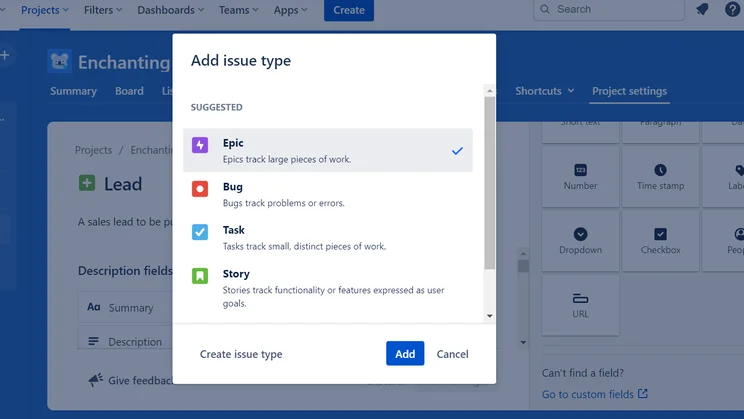
In Jira, each task is represented by a card, with these cards then placed under different categories — To Do, In Progress, and Done. Jira’s task cards support task titles, descriptions, attachments, checklists, linking between cards, and linking to Confluence Pages (documents).
If that’s all you need, then Jira’s project management solution is an excellent choice. However, if you need items such as calendar integrations, Gantt charts, or other common project management tools, then you’ll need to look at Jira’s add-on catalog.
Jira’s basic service is also paired with Confluence, which adds document creation for keeping meeting notes, marketing plans, blog posts, and anything else you might need a document for.
What’s new for Jira in 2025?
- Jira has added the currency symbol ($) and percentage symbol (%) to the number custom field in order to help teams track budgets and spending.
- Jira has improved is workflow editor, giving users the ability to set a name and rename new and existing transitions.
Jira

In Short
-
Pros
- Single sign-on available on all plans
- Excellent value for money
- Custom automation available on free plan
-
Cons
- Lots of tech/dev jargon
- Integrations can be confusing
- Not the best for collaborating
Pricing
-
 Free plan available
-
Standard: $9.05/user/month
-
Premium: $18.30/user/month
Images
Best for Value: Jira
Overall, Jira offers better value for money than Asana, as you can get more features for a cheaper price. This is also because Jira has a free plan that offers a lot more features than Asana’s free plan, but I’ll get more into both providers’ free tiers below.
Jira’s pricing works on a per-user basis and the price per plan will decrease the bigger your team. The prices given in this guide are based on a team of 10 members.
Its first paid plan is $9.05 per user, per month, while Asana’s initial paid tier is $10.99 per user, per month. Jira’s Premium plan ($18.30 per user, per month) is also a lot cheaper than Asana’s comparable Advanced plan ($24.99 per user, per month).
Both providers offer an impressive range of task management, workflow creation, and data display tools, but it’s Jira that will allow you to access more of these features for less money. While Asana has more collaboration tools and better customer support options, Jira has automation tools on every plan, whereas Asana only offers this on its Starter plan.
That’s why I would say Jira is better value. Only Zoho Projects comes close to Jira in this category, with its first paid plan available for just $4 per user, per month.
Does Jira or Asana have the better free plan?
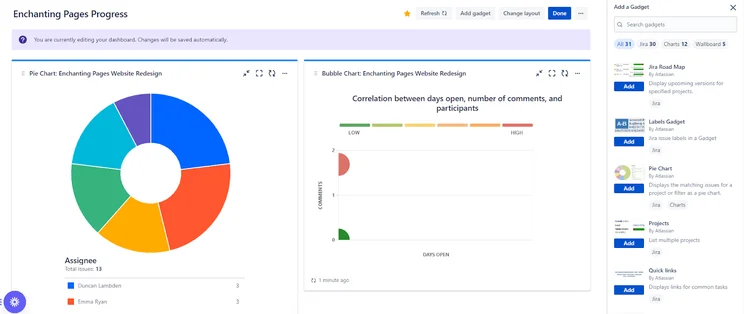
Ultimately, Jira’s free plan includes a lot more features than Asana’s free plan, such as custom charts and widgets for displaying data, making it the superior free choice.
Jira’s free tier is ideal for individual freelancers that have relatively simple needs for staying organized. It’s got a solid range of data display tools and includes a dashboard you can use to gain insights into the progress of your project, plus task management tools like custom fields and a Gantt chart, which aren’t available on Asana’s free plan.
Although both providers have a 10-person limit on their free plans, Asana’s free plan doesn’t include a lot of the features that make it useful, such as its automation builder, whereas Jira includes a surprising number of paid plan features on its free offering — unlike most project management software tools.
How Much Does Asana Cost?
You can get started with Asana for free, but here are the paid plans also on offer:
- Personal (free): Ideal for managing personal projects
- Starter ($10.99 per user, per month): Ideal for growing teams
- Advanced ($24.99 per user, per month): Ideal for small-to-medium-sized companies managing a bigger portfolio of work across departments
- Enterprise (custom pricing): Ideal for companies that need coordination and automation without limits
- Enterprise+ (custom pricing): Ideal for large-scale organizations
Which plan do I recommend?
While Asana’s free version is an excellent taster for individuals or very small team, it’s not exactly ideal for a growing small business. I would instead recommend Asana’s Starter plan, at $10.99 per user, per month, which is still excellent value, and will provide more in terms of features.
Check out our full guide to Asana pricing for more information.
|
Price (annually)
The amount you'll pay per month, when billed annually
|
Users
|
Projects/boards
|
Automations
|
Gantt chart
|
Resource management
|
Time tracking
|
||
|---|---|---|---|---|---|---|---|---|
|
TRY IT FOR FREE
 |
|
|
|
|
||||
|
Asana Personal |
Asana Starter |
Asana Advanced |
Asana Enterprise |
Asana Enterprise+ |
||||
|
Free |
$10.99/user/month |
$24.99/user/month |
Custom |
Custom |
||||
|
2 |
Unlimited |
Unlimited |
Unlimited |
Unlimited |
||||
|
Unlimited |
Unlimited |
Unlimited |
Unlimited |
Unlimited |
||||
|
N/A |
Unlimited |
Unlimited |
Unlimited |
Unlimited |
||||
|
|
|
|
|
|
||||
|
|
|
|
|
|
||||
|
|
|
|
|
|
How Much Does Jira Cost?
You can get started with Jira for free, but here are the paid plans also on offer. These prices are based on a team of 10 users.
- Free: Ideal for individuals or very small teams
- Standard ($9.05 per user, per month): Ideal for growing teams
- Premium ($18.30 per user, per month): Ideal for small-to-medium-sized businesses looking for a more robust feature set
- Enterprise (custom pricing): Ideal for large scale organizations
Which plan do I recommend?
As I said, Jira’s free plan is a perfectly commendable choice. However no free plan will ever be completely enough for a growing small business. Instead, I would recommend Jira’s Standard plan, at only $9.05 per user, per month, which offers that added functionality.
Check out our full guide to Jira pricing for more information.
|
Price (annually)
The amount you'll pay per month, when billed annually
|
Price (monthly)
The amount you'll pay per month, when paying on a rolling monthly basis with no 12-month commitment
|
Users
|
Storage
|
||
|---|---|---|---|---|---|
|
|
|
|
|
||
|
Jira Free |
Jira Premium |
||||
|
Free |
$9,050 (100 users) |
$18,300 (100 users) |
|||
|
Free |
$9.05/user/month (100 users) |
$14.54/user/month (300 users) |
Custom |
||
|
10 maximum |
50,000 |
50,000 maximum |
Contact sales |
||
|
2GB |
250GB |
Unlimited |
Unlimited |
Best for Features: Asana
Asana came out on top when it came to features, scoring higher for overall functionality compared with Jira in our latest round of project management testing. Here are the main differences between the two providers in terms of their overall feature set:
- Asana has better data visualization tools than Jira.
- Both providers have dashboards, but Asana’s custom chart builder allows you to pull through data from custom fields, while Jira doesn’t offer a custom chart builder.
- Both providers offer timeline views, and during testing, I particularly enjoyed Asana’s automatic dependency suggestions.
- Asana offers a resource management tool for larger businesses, whereas Jira doesn’t.
- Both providers offer rich task management tools, with multiple views on offer such as a Kanban board and spreadsheet-style view.
- Jira lacks collaboration features compared with Asana. When I tested Jira, I found its resource-management tool very difficult to find, and I was disappointed that communications could only be sent via comments on particular tasks.
- Asana offers a project message board and a calendar view on all its plans, neither of which Jira offers.
- I found it slightly easier to build automations on Asana, which also includes a form builder on all paid plans. This isn’t a feature on Jira.
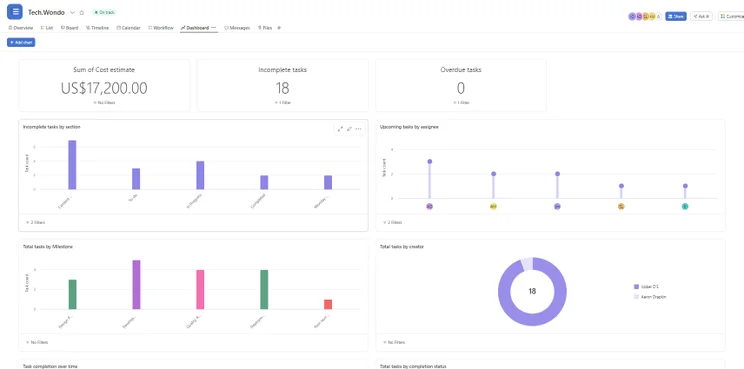
Charts and widgets I made myself in Asana, on display in the Asana dashboard. Image: Tech.co testing
Is Asana or Jira Easier to Use?
Overall, we found Asana easier to use compared with Jira. I found that a lot of tasks that can be completed swiftly with Asana took a lot of menu navigation to finish in Jira, which meant it was a lot more mentally taxing.
For example, in Asana, the left-hand menu has a number of useful shortcuts, including a “my tasks” area so you can see what’s in your pipeline and a dedicated space for adding team members — overall, things like this were easier to find than they were in Jira.
In Asana, the task box that pops up when you click on tasks, although packed full of information, ensures you won’t have to travel to other places in the interface to do things like change dates, draw dependencies, or re-assign team members.
However, some members of our testing group found this made the screen a little cramped. If you’re on the hunt for a more minimalistic layout, try out monday work management, which topped our ease-of-use tests.
That being said, Asana’s relatively cleaner interface made it slightly less overwhelming. It also had a lot of good suggestions for us. “Asana seemed to suggest what the best dependencies were,” remarked Ollie Simpson, one of Tech.co’s software researchers, who noticed that Asana was linking together tasks that needed to be completed one after another automatically.
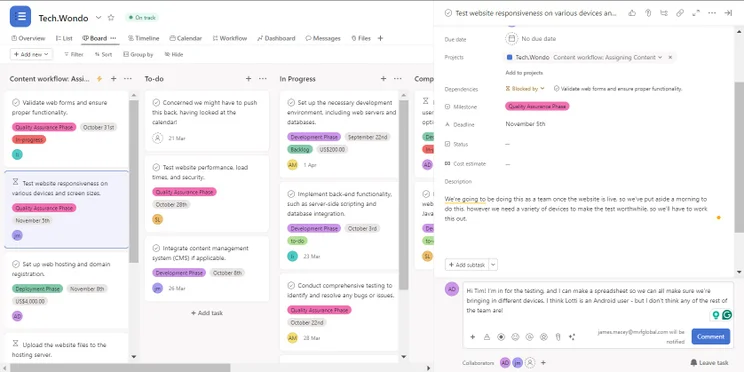
Commenting on a task in Asana to ensure my team is informed and up-to-date. Image: Tech.co testing
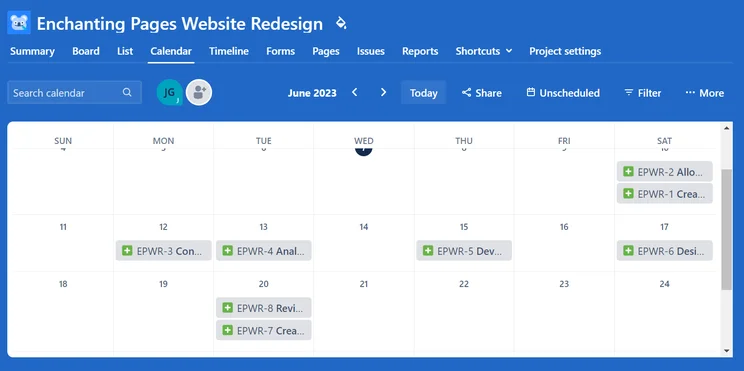
Due to Jira’s leaning toward the world of software development, some members of our testing group who hadn’t used the platform before found some of the terminology a little confusing. For example, ‘tasks’ are called ‘issues’.
This sort of thing makes Jira very usable for teams that spend their days fixing bugs in programs, but less so for teams that aren’t using an Agile framework.
“We find Jira’s Kanban board functionality particularly useful when it comes to team visibility and prioritization for our planned technical SEO projects. [In] most use cases, I probably wouldn’t champion [Jira] above other project management tools or software.”
– Cameron Blair, who heads up an SEO team that uses Jira
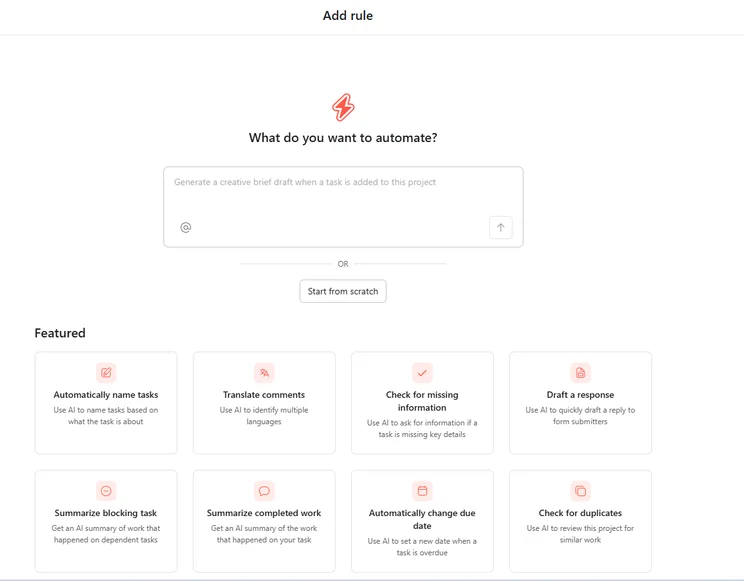
Indeed, while both have very capable automation builders, we found Jira’s to be trickier to use than Asana’s. What’s more, Asana’s “workflow bundles” let users apply combinations of automations, task templates, and custom fields across multiple projects at once.
The provider also updated its automation builder, to include variables like task assignee, task creator, due date, and custom field values.
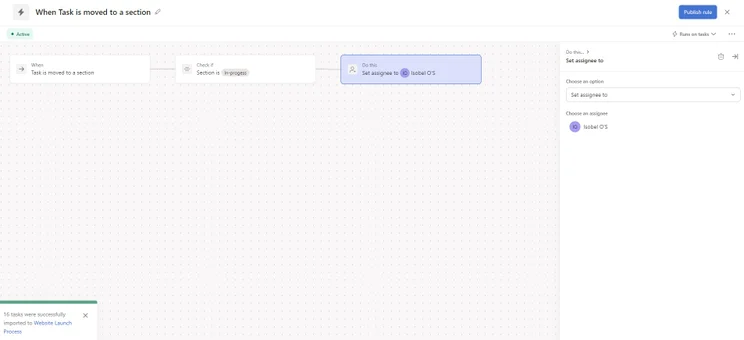
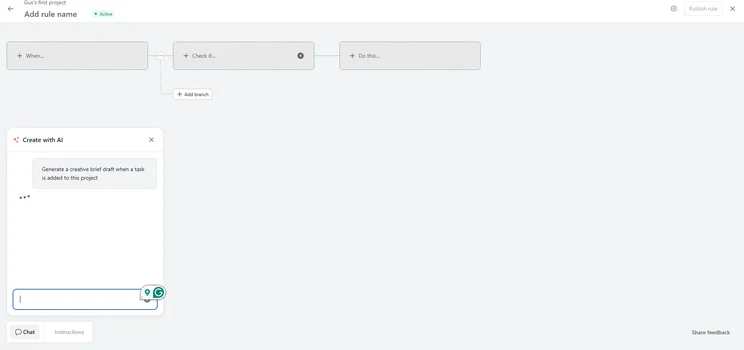
Building automations is simple with Asana. Image: Tech.co testing
Is Asana or Jira Quicker To Set Up?
For small teams that need to get up and running without much fanfare, Asana is the better choice. There’s a free plan that has some good basics, as we detailed above, but it’s pretty limited compared with Jira’s no-fee offering and monday work management’s free plan.
Asana’s Starter plan is also really easy to get started with. Once I entered some basic information and imported my mock tasks and project plan during testing, setting task deadlines, assigning work to team members, and creating sub-tasks didn’t take very long at all. Plus, different views, like Kanban style, were available the minute I logged in.
It only took me about an hour to configure all the basics with Asana, and this was a far easier process than getting started with Jira’s Premium plan, within which a lot of the setup process is geared toward tech and IT teams.
Some members of our testing group who’d never seen the Jira interface had to spend a lot of time looking for explanations of different terminology they ran into.
If you’d like to explore a provider in between the two — which still has a pretty quick setup — try Teamwork’s Deliver plan, which is better at handling complex tasks than both Jira and Asana.
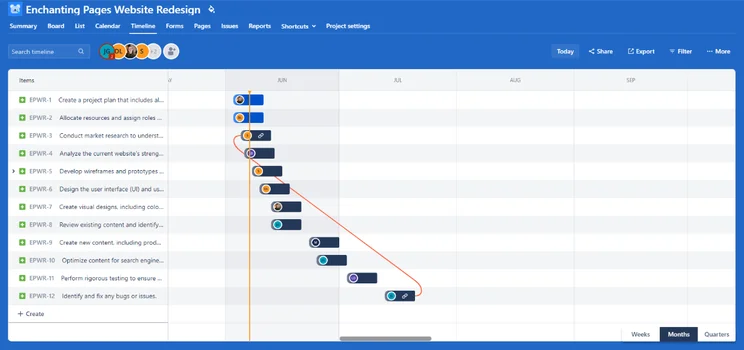
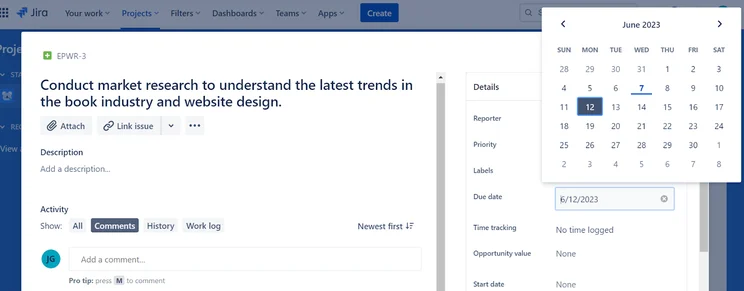
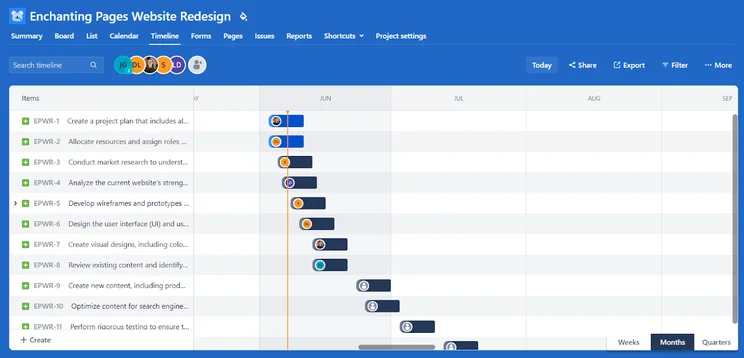
The timeline view in Jira. Image: Tech.co testing
Best for Managing Multiple Projects: Asana
Asana will be the better option for most large teams running multiple projects across multiple teams (of course, aside from those in the software development world). Asana’s Enterprise tiers include several key features that larger companies need, such as SAML, user provisioning, and custom branding.
Here are some of the main points we found between the two providers in this area of our research:
- Asana Advanced boasts Portfolios to get a top-level view of ongoing projects, as well as support for forms and proofing.
- Asana provides communication features such as comments and “at mentions” that would be useful for teams working across a number of different projects.
- Both providers offer integrations that can help in managing complex projects. Asana has Slack, Dropbox support, Microsoft 365, and Google Drive.Jira offers integrations like GitHub, ScriptRunner, and Miro. Asana has a better range of overall integrations, however.
How Do Asana and Jira Compare With Alternatives?
If these two platforms aren’t doing it for you, that’s ok! We’ve done the research and found a wide range of other tools that can help you keep track of your team’s productivity.
Our pick of the best project management software is monday work management, thanks to its intuitive and easy-to-use interface, and impressive set of features. While it doesn’t offer as many integrations as Asana, I found monday work management to be much more customizable, and is therefore a better option for businesses that want maximum control over their interface.
If you’re looking for a budget-friendly alternative, we would also recommend ClickUp. Not only does ClickUp also offer a robust free plan, but it’s first paid plan, at $7 per user, per month, is cheaper than both Jira and Asana’s, while still being packed with features.
For smaller teams, Teamwork is another great option, particularly if you’re missing the collaboration features that Jira doesn’t have. This makes it particularly beneficial for teams handling complex projects, without sacrificing ease-of-use. In fact, alongside monday work management and Asana, Teamwork was one of the easiest providers to use.
Here’s how Asana and Jira fully stack up against the competition:
|
Price from
All prices listed as per user, per month (billed annually)
|
Free plan
|
Verdict
|
|||||||
|---|---|---|---|---|---|---|---|---|---|
|
Best Overall
 |
Best for Building Automations
 |
Best for Task Management and Collaboration
 |
FEATURED: Best for Spreadsheet Fans
 |
|
 |
 |
|
 |
 |
|
monday work management |
Teamwork |
ClickUp |
Smartsheet |
Asana |
Wrike |
Trello |
Jira |
Zoho Projects |
Basecamp |
|
$9/user/month |
$9.99/user/month |
$7/user/month |
$9/user/month |
$10.99/user/month |
$10/user/month |
$5/user/month |
$7.91/user/month (300 users) |
$4/user/month |
$15/user/month |
|
|
|
|
|
|
|
10 users |
|
|
|
|
Incredibly easy to use, great for small businesses, and our top-performing provider on test — and there’s a generous free trial period |
A great user experience all round, with an easy-to-use automation builder and great budget tracking capabilities |
Powerful, feature-rich software suitable for teams of all sizes, with an impressive free tier for individuals and a great value plans for teams |
A great tool for spreadsheet-natives, which can take your Excel-based task planning to the next level |
A simple task-list-based project management platform with an acceptable free tier |
A very capable yet pricey service with a huge number of useful integrations, plus a free tier option to try |
A fairly-priced, stripped-down option, best for small teams who need a central location for basic task management |
A great value piece of software that’s ideal for tech, software development, and engineering teams |
A solid project management solution with an attractive free tier for small teams and a very affordable premium plan |
A very basic, relatively limited software that’s a lot simpler than its competitors |
Can You Connect Asana and Jira?
Yes — Jira and Asana both integrate with one another, which means you can transfer project data and other information between the two platforms quickly and efficiently. This can come in handy, for sure, but it won’t be useful for every single business.
If you haven’t purchased either project management software yet, we wouldn’t recommend downloading both and connecting them up. It’s highly unlikely you’ll need both of them, especially if you’re a small team.
But if your tech or development team already uses Jira and you’re choosing a project management software solution, Asana will have an advantage over a platform that doesn’t integrate with Jira.
Conversely, if you’re a software development team on the hunt for some new software, and people in your business already use Asana, Jira is a natural choice.
In fact, being able to integrate the two will come with some significant advantages, including increased visibility over workflows and the fact you won’t have to manually update both platforms when information is need-to-know for both teams.
How We Analyzed Asana vs Jira
Here at Tech. co, we conduct independent research into the products and services we write about. For this Jira versus Asana head-to-head, we drew on our findings from our latest project management research, which involved rigorous user testing of 10 providers.
When testing project management software solutions, we focused on five key areas: ease of use, pricing, security customer support, functionality, and integrations. Each provider’s overall “functions” score was determined by how well they fared when we attempted to set up a project, manage tasks, create projects and workflows, visualize data, and collaborate with other users.
Although we have commercial partnerships with some of the providers we review, they never influence our research procedures, practices, and results. Our independent research allows us to remain editorially independent.
Overall, Asana will suit more teams than Jira. It has a better range of task management features and more collaboration tools. Although it’s slightly pricier and has a more limited free plan, the paid tiers offer a neat, simple and ultimately traditional project management setup.
If you need the timeline feature, milestones, and task dependencies, then it’ll cost you — so if you’re feeling the pinch during these trying economic times, Jira might be your best bet. You’ll still be able to get a lot done, but it won’t be quite as straightforward as it would be with Asana.
When it comes to the interface and ease of use, there’s no question in our mind that Asana is the best choice. For an alternative, you can use our free comparison tool to find a project management system better tailored to your individual needs. Or click on the links below to check out some of Jira and Asana’s competitors.
If you click on, sign up to a service through, or make a purchase through the links on our site, or use our quotes tool to receive custom pricing for your business needs, we may earn a referral fee from the supplier(s) of the technology you’re interested in. This helps Tech.co to provide free information and reviews, and carries no additional cost to you. Most importantly, it doesn’t affect our editorial impartiality. Ratings and rankings on Tech.co cannot be bought. Our reviews are based on objective research analysis. Rare exceptions to this will be marked clearly as a ‘sponsored’ table column, or explained by a full advertising disclosure on the page, in place of this one. Click to return to top of page


