

We may receive a commission from our partners if you click on a link to review or purchase a product or service. Click to Learn More
Scoro has a somewhat unique pricing structure, with the basic plan costing $28 per user per month, and any subsequent plans being split into different paths. Their Work Hub plans cost $42 per user per month on the Standard tier, and $56 per user per month on the Pro tier. Then there’s the Sales Hub, split into Standard and Pro tiers with the same pricing structure. There’s also a bespoke tier, where pricing varies.
Compared to its contemporaries, Scoro is one of, if not the most expensive project management platform on the market. Outside of a 14 day free trial, there are no free plans, which means buyers will have to commit to a decent investment to use Scoro. Alternatively, you can check out our roundup of the best free project management software providers to see if they suit your business’ needs.
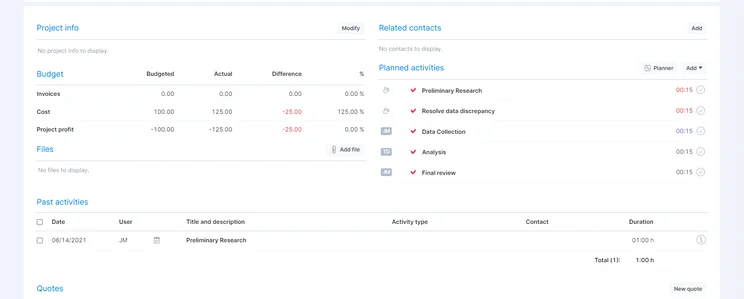
However, if your business has the big bucks to throw around, then you may just find Scoro to be worth your time. It has a lovely interface, and comes packaged with dedicated CRM features and financial tools that can help businesses set up complex budgets.
|
Price (annually)
The amount you'll pay per month, when billed annually
|
Users
|
Projects/boards
|
Storage
|
||
|---|---|---|---|---|---|

|
|
|
|
|
|
|
Essentials Plan |
Standard |
Work Hub: Pro |
Sales Hub: Standard |
Sales Hub: Pro |
|
|
$28 per user per month |
$37/user/month |
$56 per user per month |
$42 per user per month |
$56 per user per month |
|
|
Unlimited |
Unlimited |
Unlimited |
Unlimited |
Unlimited |
|
|
Unlimited |
Unlimited |
Unlimited |
Unlimited |
Unlimited |
|
|
2GB |
3GB |
10GB |
3GB |
10GB |
Scoro Pricing and Plans
Scoro is split into five plans. One is a basic starting plan, the Essentials Plan while the other four make up two hubs: the Work Hub and the Sales Hub, each containing two levels, Standard and Pro.
While these plans are definitely above average when it comes to pricing, it’s worth noting that every single plan comes with CRM features. CRM software is often bought by itself and can cost anywhere between $5 to $150 per user per month , so to have it bundled within project management can be a big plus.
Essential Plan – $28 per user per month
Scoro’s smallest plan still has a decent price tag, costing $28 per user per month. However, you will have unlimited projects, users, and integrations, as well as 2GB of storage.
As for task management features, this tier comes with a spreadsheet view, sub-tasks, and task dependencies, all of which can help users tweak the minutiae of their tasks. As far as the actual workflow, users can use preset project templates to speed up project creation, and budget management tools.
You won’t be able to integrate with any CRM software, but that’s because Scoro comes with its own fully-stocked CRM functionality. This will allow you to manage all your leads in a pipeline view, as well as getting an overview of each of your clients, which includes their details, communication history, and linked projects.
There are also some great data visualization tools, like dashboards, preset charts and widgets, and a custom widget builder, all of which can make your workflow easily visually accessible. Teams can also collaborate using a calendar, a project message board, and the ability to put comments on various tasks.
And as far as customer support goes, you’ll have access to phone support, email support, and a knowledge base. And if you have nine or more users, you’ll be able to get your hands on onboarding assistance.
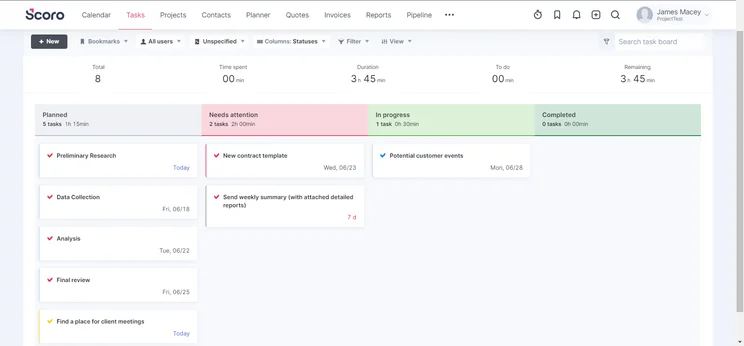
Work Hub: Standard Plan – $42 per user per month
This plan is the first plan on the Work Hub track, which is distinct from the Sales Hub. It costs $42 per user per month, and has the same unlimited users, projects, and integrations. Storage is also bumped from 2GB to 3GB.
This plan has every feature included in the Essentials plan, as well as a few other features that might make the upgrade worth it. For starters, you’ll be able to get an add-on that allows guest access. You’ll also be able to visualise your pipeline through Gantt charts and Kanban boards, which are both extremely popular project management formats.
As for features that were previously listed as add-ons, but have been elevated to bundled in tools, we have:
- Milestones, which let you mark off job progress
- Custom project templates, which let you tweak the specifics of any given project
- Resource management, which lets you gauge how many resources/hours your spending on individual projects
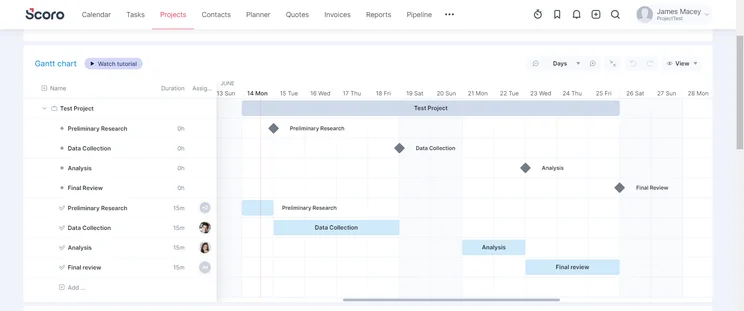
Work Hub: Pro Plan – $56 per user per month
This is the next level up – the top plan within the Work Hub. This plan costs $56 per user per month, and comes with all the previous features and limits (or lack thereof) of the previous tier. The storage has been bumped up from 3GB to 10GB.
The only other changes are the inclusion of time-tracking, which shows you how much time each team member is spending on each task, and unlimited custom fields, which allow you to modify your project management software fields.
Otherwise, this tier is largely the same as the previous tier.
Sales Hub: Standard Plan – $42 per user per month
The Sales Hub is the second track that a Scoro membership can get you. The Standard plan within this track costs $42 per user per month. It includes everything from the essentials plan, and bumps the 2GB storage up to 3GB, as well as allowing for a guest access add-on.
Other than that, this plan is largely similar to the Essentials plan, you’ll have to go for the Sales Hub’s Pro plan to get much use out of it.
Sales Hub: Pro Plan – $56 per user per month
The last stop on the Sales Hub is the Pro plan, which costs $56 per user per month. It has all the same limits and features of the Standard plan, but the storage is raised from 3GB to 10GB.
Users will also gain access to a Kanban board and milestones, both of which can help keep track of their tasks on a more focused level. You’ll also be able to see both resource management and time tracking, which both help you understand how to delegate and manage team members’ time and resources.
Ultimate Plan (Bespoke Option)
The Ultimate Plan is the final frontier of Scoro pricing. Most project management software offer a top tier bespoke plan, and Scoro is no different. Users will be able to pick and choose the features they want, which will dictate the pricing. Since this is the case, there is no real pricing or list of features that we can attach to the Ultimate Plan.
Does Scoro Have a Free Plan?
Unfortunately, Scoro does not offer a free plan. There is a 14-day free trial, but that’s as far as Scoro goes when considering free options.
Scoro Alternatives
Scoro isn’t perfect! You might be after a cheaper product, or maybe its lack of automations is a deal breaker. If you’re interested in a different product, here are some of our favorites.
monday work management – Great Automation Features
monday work management is our number one pick for project management software. Its customization options far outweigh Scoro, or any other competitor for that matter. However, its main advantage over Scoro is its automation features, which Scoro fails to include on any tier.
monday work management is also far more affordable than Scoro, as it’s one of the cheapest platforms out there. It has a (admittedly limited) free tier, but its first paid tier is only $8 per user per month, which is on the low side of project management cost.
Read through our monday work management review if you’d like more information about the features on offer, or check out our monday work management pricing page for more on monday work management’s costs.
ClickUp – Great Free Plan/Good for Small Teams
ClickUp isn’t the only project management software out there that offers a free tier, but its free tier is certainly one of the best on the market. It comes with unlimited projects, unlimited users, and key project management features, like task dependencies.
It doesn’t have everything, obviously. Features that some might consider crucial, like Gantt charts, are locked behind higher tiers, but even these tiers are far more affordable than Scoro’s lowest tier. If you’re a small team looking to save money, ClickUp is a great choice.
SmartSheet – Best for Spreadsheets
It’s quite rare that a business won’t end up using spreadsheets in some capacity. If your business is spreadsheet heavy, then SmartSheet is a great option. SmartSheet uses a somewhat unique spreadsheet interface for its project management, meaning that if you’re used to Excel or a similar program, it will be very easy to get to grips with.
It also includes some key project management features, like Gantt charts, sub-tasks, and task dependencies. SmartSheet is also considerably more affordable than Scoro, despite being one of the pricier project management platforms, with its lowest tier costing $14 per user per month.
|
Price from
All prices listed as per user, per month (billed annually)
|
Free plan
|
Verdict
|
|||||||
|---|---|---|---|---|---|---|---|---|---|
|
Best Overall
 |
Best for Building Automations
 |
Best for Task Management and Collaboration
 |
FEATURED: Best for Spreadsheet Fans
 |
 |
 |
 |
 |
 |
 |
|
monday work management |
Teamwork |
ClickUp |
Smartsheet |
Asana |
Wrike |
Trello |
Jira |
Zoho Projects |
Basecamp |
|
$9/user/month |
$9.99/user/month |
$7/user/month |
$9/user/month |
$10.99/user/month |
$10/user/month |
$5/user/month |
$7.91/user/month (300 users) |
$4/user/month |
$15/user/month |
|
|
|
|
|
|
|
10 users |
|
|
|
|
Incredibly easy to use, great for small businesses, and our top-performing provider on test — and there’s a generous free trial period |
A great user experience all round, with an easy-to-use automation builder and great budget tracking capabilities |
Powerful, feature-rich software suitable for teams of all sizes, with an impressive free tier for individuals and a great value plans for teams |
A great tool for spreadsheet-natives, which can take your Excel-based task planning to the next level |
A simple task-list-based project management platform with an acceptable free tier |
A very capable yet pricey service with a huge number of useful integrations, plus a free tier option to try |
A fairly-priced, stripped-down option, best for small teams who need a central location for basic task management |
A great value piece of software that’s ideal for tech, software development, and engineering teams |
A solid project management solution with an attractive free tier for small teams and a very affordable premium plan |
A very basic, relatively limited software that’s a lot simpler than its competitors |
Scoro is expensive, there’s no doubt there, but does it offer enough to offset this high price tag in the end? That will have to be decided by each individual, but we can tell you that Scoro definitely has some positives. The clean interface, built-in CRM features, and dedicated budget building tools are all great reasons to check Scoro out, at the very least.
While the price is high, the fact that you’re getting CRM software on top of project management software cannot be overstated. CRM software is often bought alongside project management software, so to have it bundled under one umbrella is a unique benefit for Scoro.
And checking it out is quite easy with their 14-day free trial. It’s a great, non-committal way of seeing if Scoro is the right project management software for you.
Frequently Asked Questions
Scoro is a project management software, which means it exists to help organizations stay on top of their ongoing tasks, with things like time tracking and task templates. However, that’s not all Scoro does, as it also comes with its own CRM functionality and billing and invoice tools.
Scoro is cloud-based, which means that your data will be stored on Scoro’s secure servers. You won’t have to rely on keeping enough room for your data to be stored on your own computers, which can save a lot of headaches.
Scoro is an independent company, so doesn’t belong to any larger body. The founder and current CEO of Scoro is named Fred Krieger, who founded the company in 2013.
monday work management wins the title of best project management software. It has one of the nicest interfaces, a robust set of features, an affordable price point, and an extremely generous free trial for anyone looking to try it out.
If you click on, sign up to a service through, or make a purchase through the links on our site, or use our quotes tool to receive custom pricing for your business needs, we may earn a referral fee from the supplier(s) of the technology you’re interested in. This helps Tech.co to provide free information and reviews, and carries no additional cost to you. Most importantly, it doesn’t affect our editorial impartiality. Ratings and rankings on Tech.co cannot be bought. Our reviews are based on objective research analysis. Rare exceptions to this will be marked clearly as a ‘sponsored’ table column, or explained by a full advertising disclosure on the page, in place of this one. Click to return to top of page


