
Starting a project can be daunting, especially if you need to input lots of data and information into a project management software tool. Luckily, there are lots of free project management templates for teams starting out on their journey, allowing you to save time when you’re setting up, and helping you allocate resources to more important priorities.
We decided to find out for ourselves which project management templates currently stand out from the crowd. Overall, our in-depth research and user testing narrowed down the top three contenders to monday work management, Wrike, and Teamwork.
We also found that each provider was best suited to different types of businesses – read on to find out which template would be the right choice for you.
- monday Work Management: Single Project Template (best for beginners)
- Wrike: Business Operations Template (best for large businesses)
- Teamwork: Marketing Plan Template (best for marketing teams)
- Smartsheet: Project Budget Template (best for tracking expenses)
- Asana: Sprint Planning Template (best for Agile teams)
- ClickUp: High-Level Project Management Template (best for complex projects)
- Trello: Kaban-Style Template (best for simple projects)
The Best Free Project Management Templates
In this section, we’ll look at some of the best project management templates you can currently access for free. The providers below will make you sign up for their free plans or free trials to access the templates, as you can’t just download the single template. To show you what they look like, we’ve signed up for their plans and downloaded their templates.
It’s important to remember that while we’ve selected a few of the top templates around, providers like Smartsheet offer a huge range of templates that relate to different business purposes, processes, teams, and departments. While starting with a template is all well and good, it’s also worth comparing project management software deals to see who’s offering the best prices.

Looking for a project template for your business's operations?
Wrike has 80+ templates geared towards specific teams, departments and industries.
1. monday Work Management: Single Project Template
- Best for: beginners and simple projects
- Paid plans from: $9/user/month
After testing monday work management firsthand in our project management testing series, we concluded that it’s the easiest-to-use provider currently available, and the best platform overall.
Specifically, we found that monday work management’s single project template is the best option for beginners who are completely new to the world of project management, due to its shallow learning curve and seamless customizability.
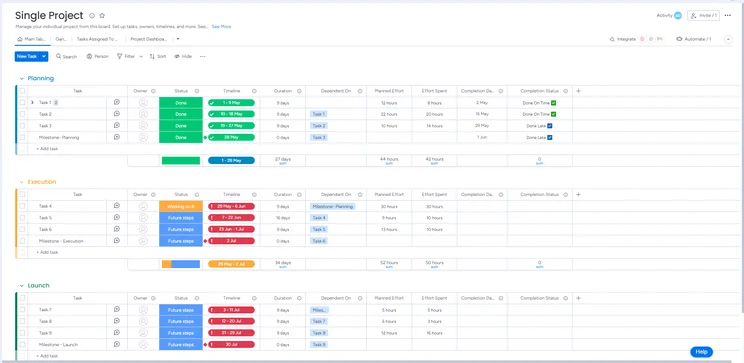
monday work management’s single project template. Image: Tech.co
This monday work management template focuses on the basic functions and features of project management, such as setting milestones and timelines, building groups for your tasks, and categorizing based on status and priority
Plus, if you end up needing more features or your team feels like their processes have outgrown the template, you can simply customize it to your heart’s content. This means there’s really no downside to using one – it’s just a handy headstart. And monday work management even offers AI templates, helping users leverage the power of AI in their workflows through pre-created templates.
While monday work management’s single project template is certainly simpler than the other templates included on this list, teams that simply want a central hub to organize their workday tasks will appreciate the no-frills approach that this template takes.

💻 monday.com has a 20% discount available for startups right now 👌 📈
2. Wrike: Business Operations Template
- Best for: Large Businesses
- Paid plans from: $10/user/month
Wrike is one of the best project management tools for large businesses, with two enterprise-level plans and some of the most powerful task management features on the market, helping it perform particularly well in our research and testing – specifically in the task management category.
Wrike’s tools and project templates make it perfect for large businesses that regularly deliver projects that involve lots of tasks, teams, processes, and reporting. Yet, this business operations template from Wrike will also be ideal for operations managers tasked with compiling information from various teams, individuals, and stakeholders.
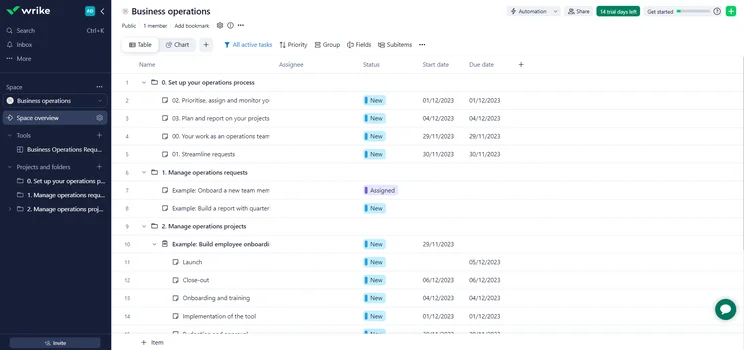
Wrike’s business operations template. Image: Tech.co
It’s set up to provide you with increased visibility over your entire company’s workflows and streamline requests, communications, and other key aspects of project management that can get out of hand at large businesses that aren’t well organized.
3. Teamwork: Marketing Plan Template
- Best for marketing teams
- Paid plans from: $10.99/user/month
Teamwork has a wide range of marketing templates for different types of teams, but we really like its general marketing template that can be used to organize email and social media marketing campaigns, as well as other kinds of digital marketing projects.
As you can see from the image below, the template has created different tasks that correspond to the stages of a standard marketing campaign, including the production of campaign assets and a paid media strategy.
Teamwork’s marketing plan template. Image: Tech.co
In this template, Teamwork provides commonly used columns that can be edited to denote task priority, assignee, estimate, and logged time. There’s quite a detailed data dashboard already built, too. If it wasn’t for the template, you’d have to add all of these things yourself.
Instead, all you have to do is replace the tasks you don’t need to complete and personalize the tasks that you do. This will make setting up significantly quicker, giving you more time to get creative and focus on the nuts and bolts of your campaign.
We’d recommend this for all marketing teams who value their creative time but feel like they’re bogged down with administrative tasks.
4. Smartsheet: Project Budget Template
- Best for tracking expenses
- Paid plans from: $9/user/month
If you’re finding it hard to budget in a spreadsheet, you might need a more powerful tool like Smartsheet, which has dedicated budgeting features, as well as a raft of other project-focused tools to help you stay financially organized.
Smartsheet’s project budget template will provide the perfect foundation for tracking and monitoring all of your team’s ins and outgoings, ensuring you’ve got a real grip on your business’s bottom line.
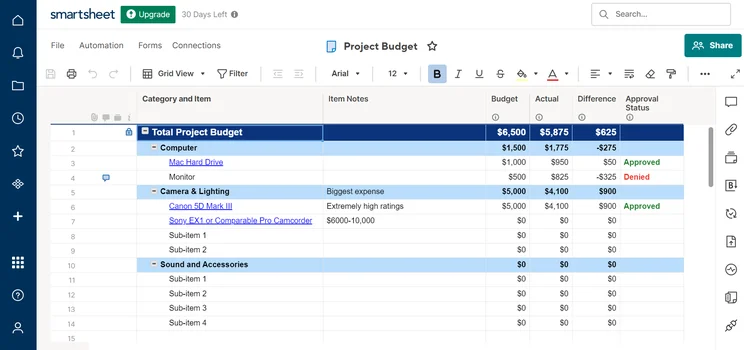
Smartsheet’s project budget template. Image: Tech.co
A large percentage of projects end up running over budget due to poor planning and a lack of oversight and direction regarding budgeting practices. The constant widening of a project’s scope can also have negative financial consequences, and when scope creep happens, keeping your budget in check is all the more important.
Project cost management isn’t easy, but Smartsheet’s project template will help your business mitigate these kinds of project risks – and you won’t even have to spend any time setting it up. When you think of it in that way, it’s a no-brainer.
Check out our guide to the best expense management software to learn more
5. ClickUp: High-Level Project Plan Template
- Best for complex projects
- Paid plans from: $7/user/month
ClickUp’s high-level project plan template is perfect for any team gearing up to deliver a complex, long-term project made up of a myriad of different tasks, sub-tasks, and overlapping deadlines.
ClickUp says the template is designed to help you get a grip on your team’s key performance indicators (KPIs), and ensure the long-term goals of your project are always in sight.
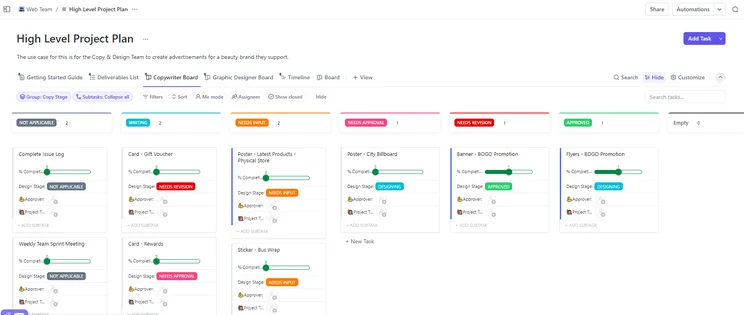
ClickUp’s high-level project plan template. Image: Tech.co
Custom fields utilized to demarcate the different project stages will reduce confusion, while custom status columns ensure that a detailed oversight is at your fingertips. ClickUp offers a total of five views in this template, but you can always add more if you feel like you need them.
Like Wrike, we found ClickUp to be excellent at task management in our user testing, but also shone when it came to other functions like adjusting and streamlining workflows and collaboration. This makes it perfect for high-level projects – whatever your work throws at you, and however complicated it gets, ClickUp will have the features to deal with it, and the most useful ones are contained within this template.
6. Asana: Sprint Planning Template
- Best for Agile teams
- Paid plans from: $10.99/user/month
Asana has a template that Agile teams can use to plan their sprints. Importantly, the template will help you quickly standardize things like items and tasks in your backlog and will provide you with multiple ways to visualize your sprints.
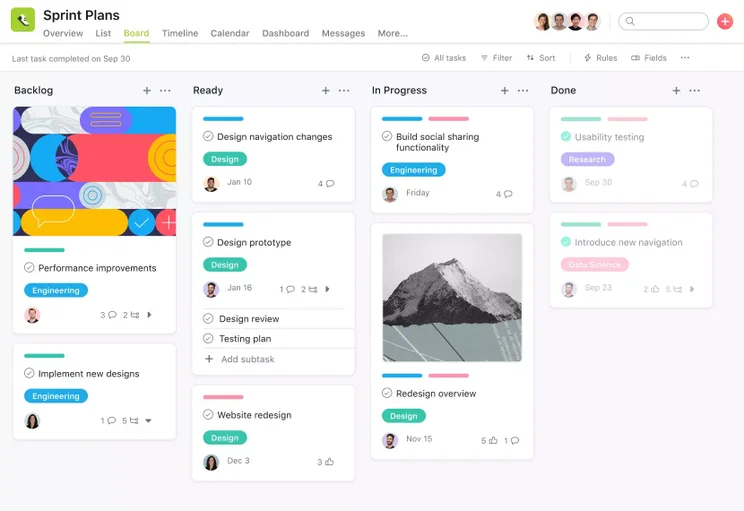
Asana’s sprint planning template. Image: Asana
Not everyone uses an Agile framework for their projects and Asana is far from an exclusively Agile program. In fact, there are lots of aspects of Asana’s software that won’t be that useful for sprint teams – but this will stop you from having to work out what is what.
Asana has recently given its Agile platform an AI makeover too, integrating a range of new features including a smart chat for quick information retrieval, smart summaries that give concise overviews, and smart statuses for slick AI-generated project updates.
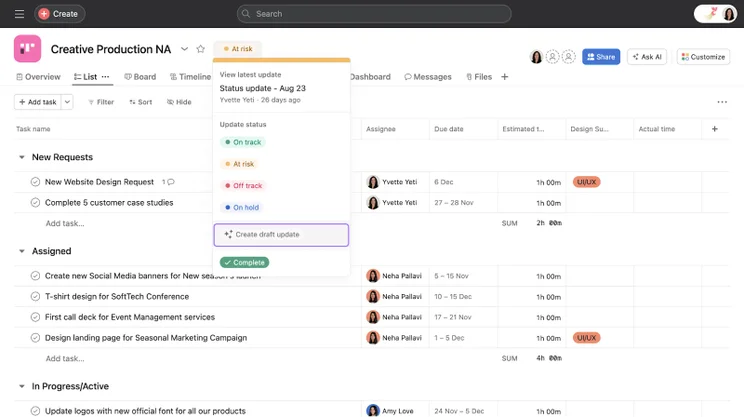
Asanas’ Smart Status feature lets you set statuses and draft updates with AI. Image: Asana
Although Asana has all the tools an Agile team could ask for and templates for teams working in sprints, most project management tools available today, like monday work management, will make Agile teams feel right at home too. What’s more, Asana’s pricing plans are a lot more expensive than the likes of Teamwork, making it a bigger investment for smaller teams.
7. Trello: Kaban Board Template
- Best for simple projects
- Paid plans from: $5/user/month
Trello lets you switch between a variety of views but is best known for its Kaban board structure, which allows users to organize tasks and workflows visually. The template uses columns to represent different stages of a project or task, from “To Do” to “Done”.
You’re also able to attach different files to the tasks, including images, links, and documents, to improve collaboration throughout your team.
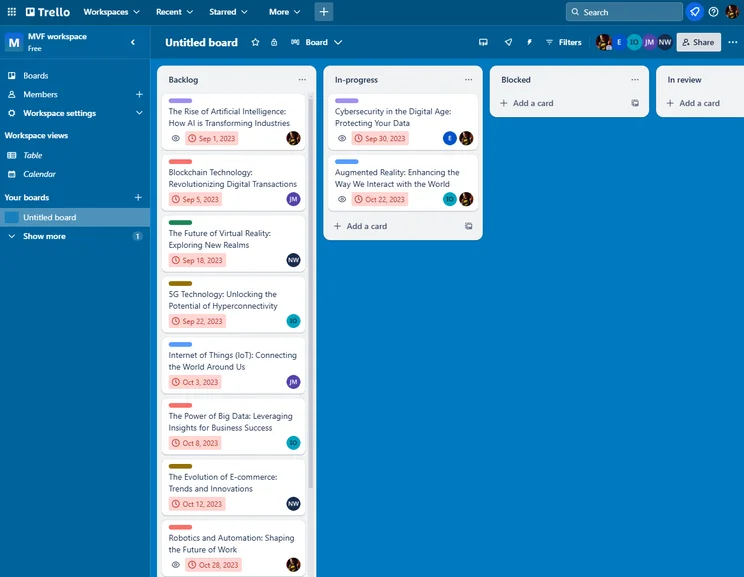
The Trello Kanban board interface was easy to use, even for those of us who had never used it before. Source: Tech.co testing
Trello’s Kaban board has a drag-and-drop functionality, making it easy for users to track tasks. The template is easy to set up, too. All you need to do is create a few lists and cards, depending on your business’s specific needs.
Unlike alternatives like monday work management, ClickUp, and Wrike, Trello lacks some advanced features like time tracking and comprehensive reporting, making it less suitable for businesses managing complex projects, especially those that require accurate cost analysis.
Why You Should Use Project Management Templates
The main reason to use a project management template is that it’ll save you time during setup, and leave you with more time to deal with the crucial parts of your project, run premortem sessions, and compile all of the data and documents you need.
For example, if you’re part of a marketing team, instead of customizing a project management tool to include the features, functions, and processes amenable to your team, you can simply pick a marketing team template that has consolidated all of these things anyway.
Another great thing about project management templates is that they’ll introduce you to new ways of organizing your work as well as all the features within any given project management software that apply directly to your team.
How to Use Project Management Templates
We’ve chosen a selection of project templates from a variety of top providers, leaning into their strengths as software. For example, according to our project management research results, Wrike is our top provider for large businesses, so it’s natural that its business operations template is one of the best of its kind.
Similarly, if you need a simple, single-project template, monday work management’s minimalistic, intuitive interface is the best place for it. However, all the providers on this list offer a myriad of project templates, all to save you time and ensure that you’re using their software to its full potential.
If you like the look of one of these project management templates, simply make an account (either purchase a plan or start with a free trial if you’re not quite ready to part with any hard-earned cash) and then choose from the template options provided by providers.
Gone are the days when setting up your project management software would put you out of action for days. Join the template revolution and start saving yourself time instead by taking one of monday work management, Smartsheet, or Wrike’s out for a spin.
There are lots of helpful project management templates out there that can help you keep your business organized, but for us, monday work management, Wrike, Teamwork, Smartsheet, Asana, clickUp, and Trello all stand out from the crowd.
Whether you’re after a beginner-friendly plan, or something suitable for complex projects, these providers have it covered.
Want to dig into some more of our research around project management? Check out our page on the 9 Best Project Management Software Tools to Use.


