
We may receive a commission from our partners if you click on a link to review or purchase a product or service. Click to Learn More
Basecamp pricing starts with an initial plan available for $15 per user, per month. It also offers a $299 per month flat-rate plan called Basecamp Pro Unlimited, which is a good choice if you’re on a budget, and a pretty limited free plan for managing solo projects. In comparison to rival tools, Basecamp’s pricing structure is really straightforward. However, if you’re still unsure about forking out for a tool, you can check out our roundup of the best free project management software to see if they suit your business’s needs.
Basecamp has decent collaboration tools, so it might be a good fit for your team if you’re looking for a central place to communicate and track tasks. However, it lacks several core features provided by the likes of monday work management, and during our tests, Basecamp scored poorly for task management (no Gantt charts or budget management tools) and wasn’t very easy to use. Overall, Basecamp is pretty poor value for money compared to competitors like Asana and Teamwork, which both have two plans available for less than $15 per user, per month.
In this Basecamp pricing review, we’ll break down Basecamp’s pricing plans and project management costs to help you decide whether it’s right for your team. However, Basecamp only scores 2.9/5 overall according to our testing framework, so we’d recommend finding out what other project management software deals are currently available.In this guide:

Don't think Basecamp is right for you?
If you're managing a complex project, competitors like monday work management and Smartsheet will better suited to your needs.
|
Price (annually)
The amount you'll pay per month, when billed annually
|
Users
|
Projects/boards
|
Automations
|
Gantt chart
|
Resource management
|
Time tracking
|
||
|---|---|---|---|---|---|---|---|---|

|
|
|
||||||
|
One |
Unlimited |
Unlimited |
||||||
|
One |
Unlimited |
Unlimited |
||||||
|
N/A |
N/A |
N/A |
||||||
|
|
|
|
||||||
|
|
|
|
||||||
|
|
|
|
What is Basecamp?
Basecamp is a software program for managing projects. However, it’s probably more accurately described as a “collaboration tool” or “task tracker,” as it’s a pretty simple, yet functional piece of kit that will be perfect for teams that want their communication to sit right alongside their workflows and tasks all in the same app.
Basecamp will be an attractive option for larger teams without much of a software budget, thanks to a $299 per-month flat-rate plan (Pro Unlimited), meaning you can add as many users as you want. In terms of customers, company currently lays claim to over 75,000 organizations.
Basecamp is not a fully-featured Work OS like monday work management, which is why it scores just 2.9/5 overall – the lowest score of the 14 project management software providers we tested. However, if you’d like to boost your team communication and have a bit more clarity over tasks within your project, then you’ll still get a lot out of Basecamp.
Pros and cons
Basecamp

In Short
-
Pros
- Great flat rate price for larger teams
- Simple interface that’s easy to understand
- Communication and collaboration-driven platform
-
Cons
- Limited customizability
- Key project management features (Gantt charts, automation) are missing
- Poor customer support options
- No tools for displaying project data
Paid plans:
-
 Standard plan: $15 per user, per month
-
 Pro Unlimited plan: $299 per month
Images
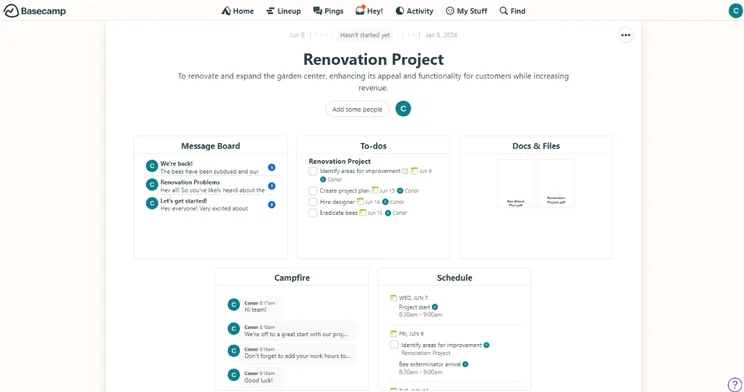
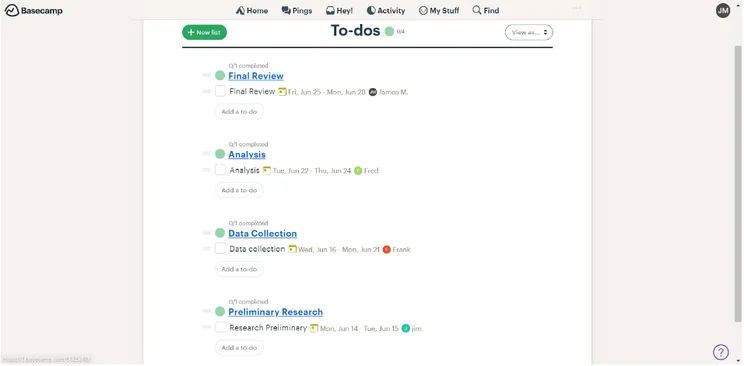
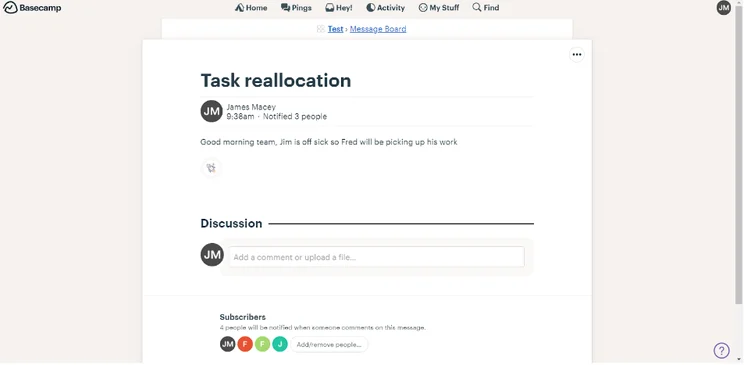
If I’m brutally honest, I actually found Basecamp rather tricky to use. That’s not because it’s overly complicated – it’s actually because it’s so limited in its features and functions that I struggled to perform some basic project management tasks. I don’t think you’ll mind if you just want a place to keep a few to-do lists and post updates on a project message board, but beyond that, you’ll run into dead ends.
I didn’t find an automation builder in Basecamp, for example, and even the most basic task management functions provided by monday work management, ClickUp, Teamwork etc. are just not there. When Basecamp does provide them – like the Kanban board – frustratingly, it didn’t sync up with information I’d inputted into other views/places. I also found the board relatively difficult to find compared to competitors.
Overall, Basecamp finished far behind all the other providers we tested for a reason. Without a live chat function, a Gantt chart, and only a single project template, it’s just not feature-rich enough to manage the complex projects that many businesses are completing in.

Basecamp Pricing: Paid Plans
Basecamp (2.9/5 overall) used to be a pretty unique provider in the project management space because there used to only be one paid plan, which at the time was called the Business Plan, and went for $11 per user, per month.
However, Basecamp has since caught up with the rest of the industry and now offers three plans – although this is still on the more minimalistic end of project management pricing. Basecamp’s standard plan, which is just called “Basecamp,” is available for $15 per user, per month. This actually makes it one of the more expensive starting plans on the market. There’s also a $299 per month Pro Unlimited plan with expanded storage, and a very limited free plan.
For context, Teamwork (4.6/5 overall) has an initial paid plan priced at $10.99 per user, per month, and Smartsheet’s Pro plan is $9 per user, per month. Similarly, monday work management (4.2/5 overall) has a cheaper first-paid plan than Basecamp, for just $9 per user, per month. Both monday work management and ClickUp also have free plans.
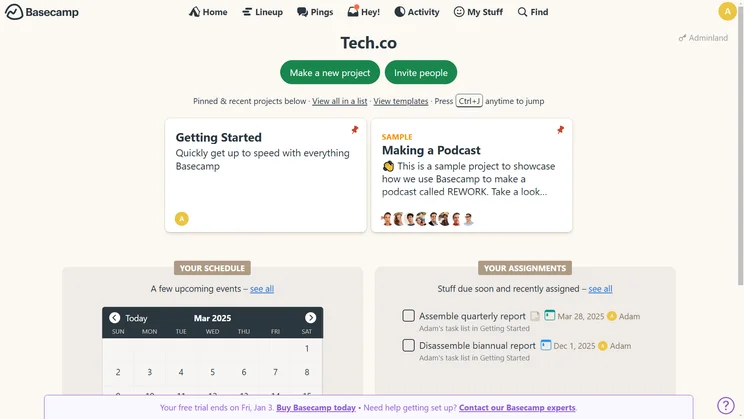
The Basecamp homepage includes a schedule calendar and upcoming assignments. Source: Tech.co testing
Basecamp pricing: “standard” plan
As we discussed above, this plan is just called “Basecamp” and has every core Basecamp feature included within it. It’s priced at $15 per user, per month, which is more expensive than most other project management software.
However, you’ll get all the classic Basecamp features, including Campfire (the team chat feature), To-do’s, Schedules, Automatic check-ins, and 500GB of storage that you can use for your most important documents and files.
However, this is pretty much your lot – Basecamp achieved a derisory 0.3/5 for workflow creation features, with no automation or customizable project templates. It’s not what you need if you want to streamline your workflows or make your team more efficient. By way of comparison, Teamwork scores 4.2/5 for workflow creation, and has an automation builder available on all plans, even its free plan.
The nice thing about this plan – and Basecamp’s pricing structure in general – is that there are not really any major features hidden in the Pro Unlimited plan, Basecamp’s only other plan. This means that, while Basecamp is more expensive out of the blocks, you won’t have to upgrade if your business or team expands.
There is a 30-day Basecamp free trial (no credit card needed) if you’d like to try before you buy, and there’s even a possibility to extend that. Basecamp also offers a 10% discount for nonprofits.
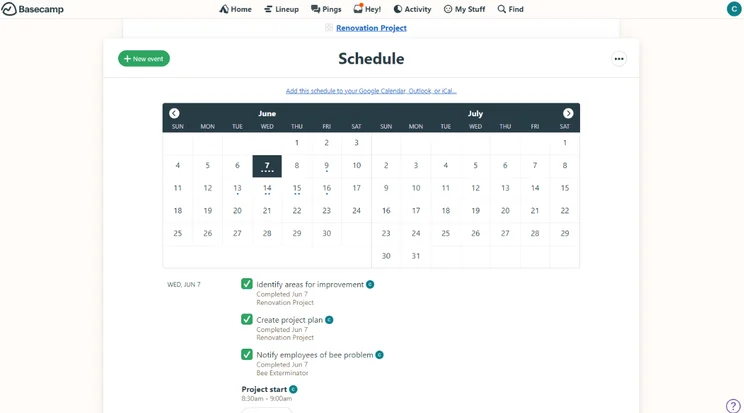
Basecamp’s Schedule view. Image: Tech.co’s testing process
Basecamp pricing: Pro Unlimited
After the standard plan, there’s the Basecamp Pro Unlimited plan, which is priced at a flat rate of $299 per month.
This actually makes Basecamp an attractive option for large teams that don’t have much of a software budget. If you have a team of over 30, for example, Basecamp Pro Unlimited works out as less than $10 per user, per month – putting it at the cheaper end of the market when it comes to premium plans.
Basecamp Pro Unlimited has everything that’s included in the standard Basecamp plan, plus 10x the storage space (5TB) you’d get on the standard Basecamp package (500GB), 24/7/365 priority support, and 1:1 onboarding with Basecamp’s team.
Does Basecamp Have a Free Plan?
Yes. As far as free project management plans go, it’s one of the more basic ones on the market. You’ll be limited to one project at a time and 1GB of storage space, so this is only really suitable for individuals looking to manage individual projects, such as a freelancer working on a contract basis at a specific company.
That said, you’ll get all the fundamental project management features you need, including to-do’s, scheduling, reports, and Basecamp’s version of a kanban board, known as a “Card Table.”
If you’re looking for a good free plan, check out a provider like ClickUp. On its free plan, ClickUp enforces no user limit and provides a full suite of task management features, an automation builder, and data visualization tools all for free. That’s why ClickUp scored 4.5/5 in our last round of testing, while Basecamp only scored 2.9/5.
Teamwork also has an excellent free plan with almost as many task management features as its more expensive paid plans. It’s got a very traditional, “classic” project management interface. Importantly, It’s miles ahead of Basecamp, with the provider actually scoring 4.6/5 overall. Our testing group also thought it was easier to use than the 9 other providers we tested, aside from monday work management.
What are Basecamp’s Features?
Compared to top project management software providers, Basecamp’s features are pretty limited. Some of its highlights include:
- “Card Table” – Basecamp’s unique take on the famous Kanban board
- “The Lineup” – a feature that gives you a top-level eye view of projects in play (new)
- Integrations – Google Drive, Zoom, Salesforce, and other top software
- Repeating To-do’s – for repetitive tasks that crop up on a regular basis (new)
- Campfire – Basecamp’s built-in team chat tool
- Reports – a tool for gaining quick insights into a team member’s work, across multiple projects
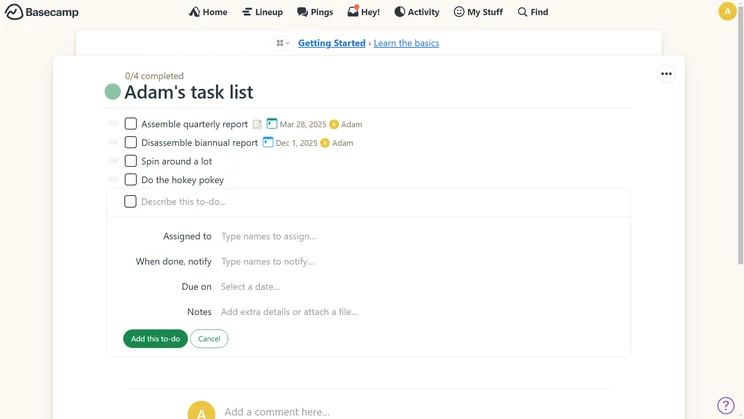
All Basecamp subtasks can be given unique due dates and assignees. Source: Tech.co testing
However, Basecamp received the worst functionality score (1.7/5) out of the 10 top project management providers we tested. Why? Well, Basecamp has some nice, useful features, but there are key things missing.
An automation builder, for instance, is excellent for streamlining the mundane tasks that crop up in your work day and most top project management software providers offer it – Basecamp, however, does not. The same goes for tools for displaying project data (Basecamp has very few) and Gantt charts, both of which are generally included in other plans.
Basecamp only achieved a 2.5/5 on our ease of use tests too – our testing group spent a lot of time looking for features that weren’t there. “It started off well so user-friendly. It’s got a very nice interface and it’s very casual,” explains Alice Martin, a member of Tech.co’s project management testing team. “But then I realized it’s just not very functional”.
“When it came to things that are simple like adding tags and adding statuses, there was no way for me to do it,” agrees Tech.co’s Isobel O’Sullivan. “It was even hard for me to view the tasks in a Kanban Board as well, which I thought made it hard to track progress.”
Does Basecamp Offer Discounts?
Yes! Basecamp offers discounts for teachers, students, and non-profits too. Basecamp is actually completely free for teachers and students at K-12 schools and universities. Not many project management tools offer their entire software to anyone for free, so this makes Basecamp a serious contender for teachers and students.
We would say, however, that the free plans offered by the likes of monday work management and Teamwork are much more capable when it comes to managing projects. Their free plans have more features in general and better Kanban boards.
Non-profits are eligible for 10% off a Basecamp subscription. All you need to do is sign up for Basecamp and then email the company a copy of your 501(c)(3) paperwork. Once your status as a non-profit is confirmed, the discount will be applied.
How Does Basecamp Compare to Other Project Management Software?
Although it has its merits, including a simple interface, there are better choices than Basecamp. In fact, there are several project management software tools that blows Basecamp out of the water. Here are the three most impressive:
Basecamp vs monday work management
It’s likely you’ve heard of project management giant monday work management. It should come as no surprise that it’s our top-rated project management software, and scores an overall 4.7/5. It’s a fantastically flexible piece of software that can be molded exactly to the exact needs of your business.
I find monday work management a lot easier to use than Basecamp, as well as the likes of ClickUp – it has a better customer score too (4.5/5) and also scored 5/5 for data visualization. In fact, when I encountered an issue while using monday work management, their support staff sent me a video recording of how to fix my specific problem – and all within around 10 minutes of me reporting that because I was able to use the live chat tool. This isn’t available in Basecamp.
In terms of pricing, monday work management has a free plan but it has a user limit of two, and there is a Basic Projects plan for just $9 per user, per month, on which the user limit is removed. Check out our monday work management pricing guide for more information on all of the plans.
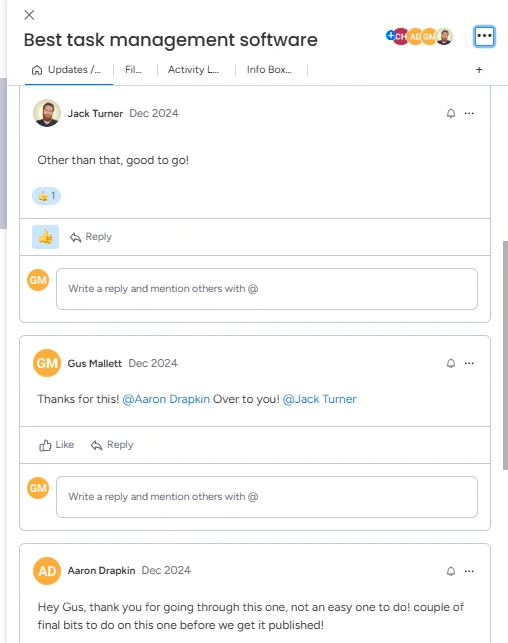
Commenting on a task card on monday work management. Source: Tech.co testing
Basecamp vs Teamwork
Runner-up to monday work management is Teamwork, which impressed our testing group for a number of different reasons, scoring 4.6/5. Teamwork is just a little bit more intuitive than the likes of Basecamp, and this cut down our setup time. This is the case with a lot of features in Teamwork – which is why it scored 4.3/5 on our ease of use tests, second only to monday work management.
However, it’s difficult to compare Teamwork and Basecamp because Basecamp doesn’t provide an automation builder, and can only deal with the simplest of tasks. None of the task management capabilities that Teamwork offers, such as a task dependency function and the ability to track task budgets, are included in Basecamp.
Teamwork is cheaper than ClickUp and monday work management with a first paid plan costing just $10.99 per user, per month. It’s also much better at complex task management than Basecamp. Teamwork scores 4.3/5 for task management and includes everything you’d expect from a project management tool on all of its plans (e.g. sub-tasks, a Gantt chart, a Kanban board) while Basecamp provides very, very little functionality.
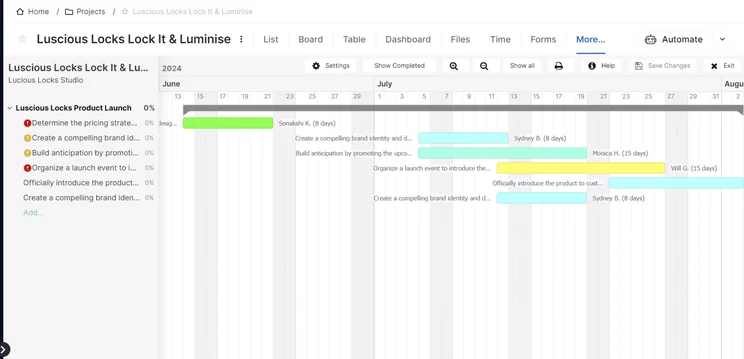
Teamwork’s Gantt chart is laid out simply, helping users check their workload in a glance. Source: Tech.co user testing
Basecamp vs ClickUp
ClickUp came joint-third in our most recent testing series (and why we’ve mentioned it so much in this article) with a score of 4.5/5. ClickUp has many ways to track task progress, like a Gantt Chart and Kanban board, as well as pre-built and custom automations for streamlining your workflows.
ClickUp scores 4.3/5 for workflow creation thanks to that automation builder that is packaged into all of its plans, and it got a test-high 4.7/5 for task management. By the time you get to the Unlimited plan ($7 per user, per month) you’ve got everything you need to manage the most complicated of tasks. Basecamp, for comparison, only scores 1.8/5 for task management.
There are plenty of collaboration features to be getting on with, such as a team chat feature, and it scored a perfect 5/5 for data visualization, whereas Basecamp has no real data tools worth mentioning and therefore scores 0/5. What’s more, ClickUp offers a generous library of third-party integrations, meaning that you can bolster your package as you see fit.
In terms of pricing, ClickUp also undercuts other project management software with an impressive free plan that still has a lot of features, no user limit, and a $7 per user, per month plan, the Unlimited plan, which is much better than Basecamp’s first paid plan. There are also ClickUp plans that cater to larger businesses.
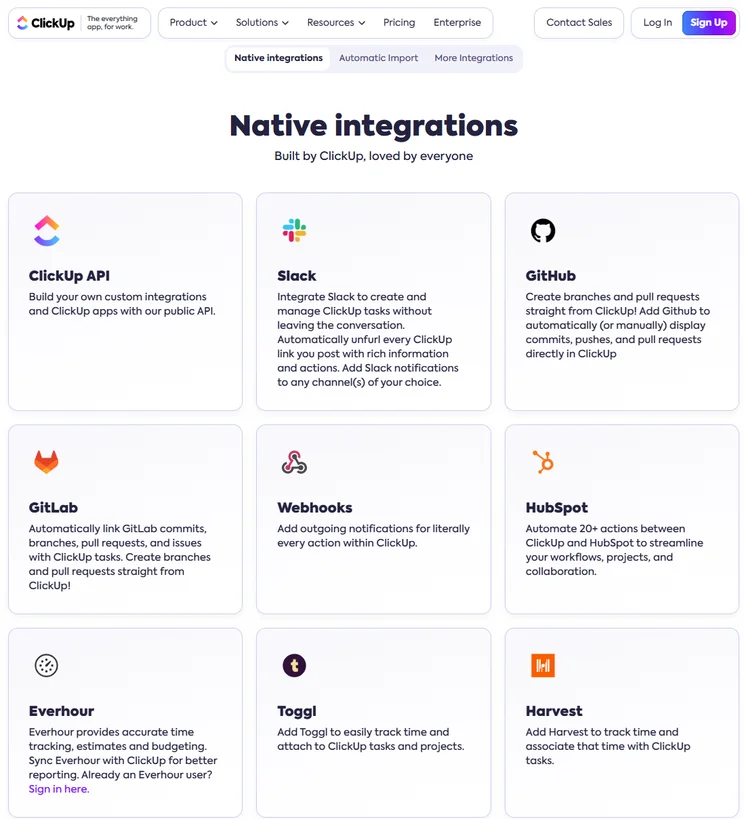
ClickUp offers a vast library of third-party integrations. Source: Tech.co testing
Basecamp vs Smartsheet
Smartsheet (available from $9 per user, per month) scores 4.2/5 overall. Importantly, it scores 4.4/5 for security and 4.5/5 for customer support, which is much higher than Basecamp. Smartsheet offers enterprise-grade security features like Single sign-on, which Basecamp doesn’t offer, and it has a wider variety of compliance certifications. It’s a much better option for large businesses that need a secure, centralized location for all of their project operations.
While Basecamp doesn’t feel similar to any other widely used software tools, it’s easy to transition from formats like a standard spreadsheet to Smartsheet, and the interface is pretty straightforward to navigate. Smartsheet is also great for post-project feedback thanks to an intuitive form builder – something Basecamp does not offer.
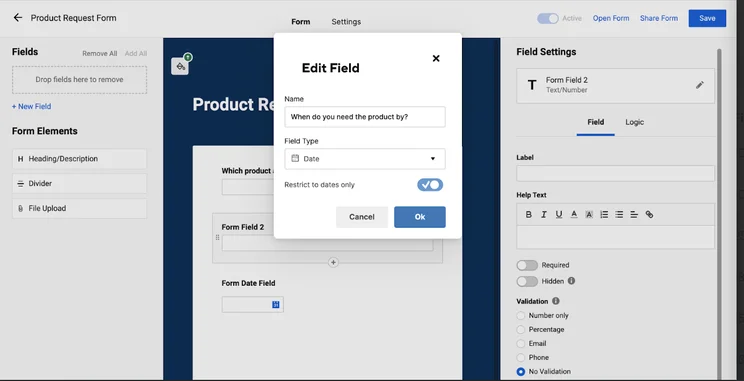
Users can create forms within the Smartsheet interface using the form builder. Source: Tech.co testing
Below, there’s a table showing all the project management tools we tested – so be sure to check it out if monday work management, ClickUp, or Smartsheet don’t feel like the right fit for your business.
|
Price from
All prices listed as per user, per month (billed annually)
|
Free plan
|
Verdict
|
|||||||
|---|---|---|---|---|---|---|---|---|---|
|
Best Overall
 |
Best for Building Automations
 |
Best for Task Management and Collaboration
 |
FEATURED: Best for Spreadsheet Fans
 |
 |
 |
 |
 |
 |
 |
|
monday work management |
Teamwork |
ClickUp |
Smartsheet |
Asana |
Wrike |
Trello |
Jira |
Zoho Projects |
Basecamp |
|
$9/user/month |
$9.99/user/month |
$7/user/month |
$9/user/month |
$10.99/user/month |
$10/user/month |
$5/user/month |
$7.91/user/month (300 users) |
$4/user/month |
$15/user/month |
|
|
|
|
|
|
|
10 users |
|
|
|
|
Incredibly easy to use, great for small businesses, and our top-performing provider on test — and there’s a generous free trial period |
A great user experience all round, with an easy-to-use automation builder and great budget tracking capabilities |
Powerful, feature-rich software suitable for teams of all sizes, with an impressive free tier for individuals and a great value plans for teams |
A great tool for spreadsheet-natives, which can take your Excel-based task planning to the next level |
A simple task-list-based project management platform with an acceptable free tier |
A very capable yet pricey service with a huge number of useful integrations, plus a free tier option to try |
A fairly-priced, stripped-down option, best for small teams who need a central location for basic task management |
A great value piece of software that’s ideal for tech, software development, and engineering teams |
A solid project management solution with an attractive free tier for small teams and a very affordable premium plan |
A very basic, relatively limited software that’s a lot simpler than its competitors |
How Did We Rate Basecamp? Our Research Explained
Here at Tech.co, we conduct extensive market research into and create testing frameworks for all the products and services we talk about. After we’ve created these frameworks, we take all of the top providers in a given industry out for a spin to see just how capable they are.
For this analysis of Basecamp’s pricing and project management in general, we focused on ease of use, pricing, features, customer support, security, functionality, and integrations. These criteria were chosen because small businesses – as well as members of Tech.co’s audience – identified them as key decision-making factors when buying software. The broad category “functionality” (i.e. features) was further broken down into four sub-categories: task management, data visualization, workflow creation, and collaboration.
All of our rankings, comparisons, and reviews are based solely on data extracted from our usability tests and other research conducted by our team. Although Tech.co does have some commercial partnerships with providers that we conduct research into and subsequently write about, we always have – and always will be – editorially independent.
You’ll be able to manage basic tasks and projects with Basecamp’s $15 per user, per month Business plan, but it just isn’t going to be feature-rich enough for most businesses and teams. Basecamp only scores 1.2/5 for overall features, the lowest score out of all the providers we’ve tested.
What’s more, it’s actually more expensive than other competitors like Smartsheet’s first paid plan ($9 per user, per month), which scores 4.1/5 and offers features like pre-built and custom automations, which aren’t available in Basecamp.
In fact, we’d even go as far as to say that providers like ClickUp and monday work management’s free plans are better than Basecamp’s paid plans. But so is ClickUp’s Unlimited plan ($7 per user, per month), which has even more features and is less than half the cost of Basecamp’s first plan. Overall, Basecamp just isn’t up to the standard of the best project management software on offer.
FAQs
Basecamp has very few data visualization tools, especially when compared with providers like ClickUp, which provides custom charts and widgets for users, and it didn’t excel in many other areas either. Task management, for example, is a lot harder to perform than it is with providers like Wrike or Smartsheet, which achieved better usability scores than the less capable Basecamp.
Yes – you can get a 30-day free trial of Basecamp Plus and a 75-day free trial of Pro Unlimited.
monday work management scores 4.7/5 in our testing, much higher than Basecamp’s 3.5/5. It has a better range of task management features, more project views and its first paid plan is $7 cheaper per user, per month than Basecamp’s.
Basecamp is like Jira in the sense that they’re both project management tools, but the comparison really ends there. Jira is a fully-fledged project management program with a wealth of different features, one of which is engineering. Tech, and development teams will find incredibly useful thanks to the way it facilitates agile approaches to working. Basecamp, on the other hand, is a simple task tracking program with a calendar and team messenger, designed for basic planning and workday management.


