
We may receive a commission from our partners if you click on a link to review or purchase a product or service. Click to Learn More
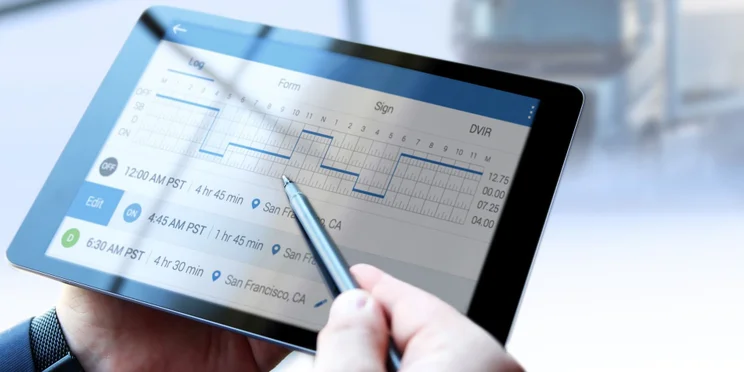
Electronic logging devices (ELDs) are a popular — and sometimes legally required — means of tracking the service hours of commercial vehicle motorists. The best ELD devices are a vital tool, which offer a wide range of functionalities to improve the overall commercial driving experience.
Considering there are more than three million commercial vehicle drivers on the road in the US alone, understanding how to use an ELD is quite important for a wide range of users. That’s where we come in.
With this guide, you’ll learn how to use and install an ELD, and we’ll also discuss exactly why these tools are so vital for commercial drivers, even if you aren’t required to use one.
How to Install an ELD
Before you can use your ELD, you’ll need to install it properly. While there are different installation instructions for different ELDs, there are a few steps that you’ll have to take, no matter which provider you go with.
Connecting your ELD to your engine
Because an ELD tracks engine status to help automate the hours-of-service monitoring, it obviously has to connect to the engine somehow. There are two options when it comes to doing so:
- Diagnostics port – This port can be found somewhere within your cab depending on the model, including under the steering wheel or below the driver’s seat.
- Wirelessly – Some devices, including smartphones, can use a wireless connection to integrate with the engine.
Mounting your ELD in your cab
Whether your device is connected to the diagnostics port or wirelessly in the cab, you still aren’t done installing the ELD. In fact, mounting the device is required by the ELD rule.
“A portable ELD must be mounted in a fixed position during commercial motor vehicle (CMV) operation and visible to the driver from a normal seated driving position.” – Federal Motor Carrier Safety Administration (FMCSA) website
The ELD isn’t just for tracking your hours. Most devices offer other features that can alert you when you’ve been driving too long or provide maintenance updates for your engine, so having it in plain sight is vital.
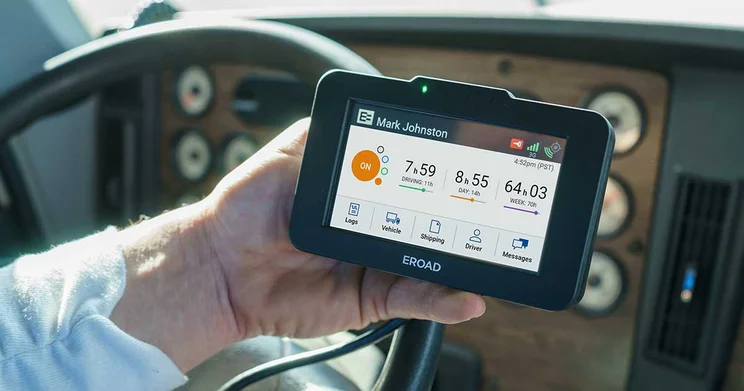
A driver holds an Electronic Logging Device (ELD) displaying details about their driving patterns.
How to Use an ELD
In the simplest of terms, using an ELD comes down to monitoring specific statuses — including Driving, Off Duty, and On Duty Not Driving — all of which relate to your driving.
These statuses are then tracked in a report that can be used to observe your driving habits, either by your fleet management company or the FMCSA — the government agency in charge of monitoring commercial motor vehicles.
Fortunately, an ELD is all about automation, so there isn’t much you’ll have to do once you’re all set up with the device connected to your engine, either wirelessly or through the diagnostics port. This allows the ELD to automatically track engine status, so you don’t have to do the manual work of tracking your hours with paper logs.
In most cases, you’ll have a unique ID number as well as a password to log in, but beyond that, many ELDs offer a wide range of functionality, with some even including dash cam integrations and navigation systems. Check out our best ELDs guide to learn more about the specific features you can find on these devices.
Who Needs to Use an ELD?
Now we know how to use an ELD, it’s important to understand exactly who is actually required by law to use one to track their hours of service because of the ELD rule.
As we mentioned, the ELD rule applies to the majority of commercial drivers, so it might be easier to explain who is exempt from the federal regulation. Here are the types of commercial drivers that aren’t legal required to use an ELD:
- Short haul drivers – Drivers that operate within a 150 air-mile.
- Drive-away-tow-away operations – Drivers hauling empty or unladen vehicles as commodities for delivery, like a motorhome.
- Old car drivers – Drivers with vehicle models that are before the year 2000.
- Paper log users – Drivers who are only legally required to use paper logs for eight or fewer days a month.
Just because you aren’t legally required to use an ELD, doesn’t mean you shouldn’t, particularly because there are so many benefits that can help you on the road.
Check out our ELD Exemptions guide to learn more
What is the ELD Rule?
The ELD rule — also known as the ELD mandate — is a federal regulation that requires commercial vehicle drivers in the US to track their hours with an ELD. The law aims to replace outdated paper logs and became a requirement in December 2019.
Check out our ELD Mandate guide for more information
What Are the Benefits of an ELD?
In addition to being a federal requirement for the majority of commercial drivers, ELDs are a beneficial tool for a wide range of reasons. Here are some of the benefits of using an ELD beyond government compliance:
- Better driver safety – Recording hours of service can prevent lengthy drives, which often result in an accident.
- Improved fuel efficiency – With route optimization and idle status updates, you can save money on gas in the long run.
- Effective reporting – All this data tracked by an ELD can be turned into helpful reports for government compliance and business improvement.
- Streamlined maintenance – With engine health updates, you can initiate maintenance before an issue gets worse.
As you can see, there are plenty of reasons why using an ELD can improve your commercial driving experience. Even better, if you integrate your ELD with a top fleet management software platform, you can take advantage of even more valuable features. Now, the real question is – should you actually get one?
Now that you know and understand how to use an ELD, as well as the benefits — even when not required by law — we’re sure you can see why an ELD is incredibly advantageous in the long term. Finding the right one for you, now that’s a different story.
Luckily, we’ve produced a wide range of guides to help you both understand precisely what ELDs do and who the top providers are, and remain in the know about changing trends in the industry.
If you click on, sign up to a service through, or make a purchase through the links on our site, or use our quotes tool to receive custom pricing for your business needs, we may earn a referral fee from the supplier(s) of the technology you’re interested in. This helps Tech.co to provide free information and reviews, and carries no additional cost to you. Most importantly, it doesn’t affect our editorial impartiality. Ratings and rankings on Tech.co cannot be bought. Our reviews are based on objective research analysis. Rare exceptions to this will be marked clearly as a ‘sponsored’ table column, or explained by a full advertising disclosure on the page, in place of this one. Click to return to top of page


