
We may receive a commission from our partners if you click on a link to review or purchase a product or service. Click to Learn More
Sprout social pricing starts from $89 per user, per month to manage five social media profiles on the Standard plan. It also offers a Professional plan, which costs $149 per user, per month and handles up to ten social profiles, and an Advanced plan costing $249 per user, per month for the most extensive features.
Before diving into Sprout Social, it’s worth exploring social media management pricing to understand how it compares with other tools in terms of value for money.
Sprout Social is a social media management service that is particularly good at organization, so it’s a good pick for a large team that’s scheduling a high volume of posts. Due to the lack of a free plan, it’s not software you’d want to spring for on a whim. However, you can sign up for a 30-day free trial to try any tier plan, before you buy.
Overall, Sprout Social is of average value, compared to competitors. We believe that the best social media management software is Hootsuite, as it offers almost everything that Sprout does, at a much lower price point. Below, we’ve put together a table so you can compare Sprout’s pricing plans, all of which are discussed in detail further down in this article.
|
Price
|
Users
How many individuals can access your account
|
Accounts
|
Posts
How many emails can be sent within a month
|
||
|---|---|---|---|---|---|
 |
|
|
|
||
|
Standard |
Professional |
Advanced |
Enterprise |
||
|
$199/month |
$299/month |
$399/month |
Custom |
||
|
1 (additional user +$199/month) |
1 (additional user +$299/month) |
1 (additional user +$349/month) |
Custom |
||
|
5 |
Unlimited |
Unlimited |
Unlimited |
||
|
Unlimited |
Unlimited |
Unlimited |
Unlimited |
Sprout Social pricing plans
Most social media management tools are made up of multiple pricing tiers. Sprout Social offers three tiered pricing plans: Standard, Professional, and Advanced. All plans are paid on a per user per month basis, and unlike some paid services, this rate is fixed – meaning that unfortunately, you won’t save money per person, if you register more users.
We recommend testing out Sprout Social via its free trial, available for all tiers. You won’t have to attach a card to gain access, so there’s zero commitment from your end.
We’ll go into the details of each Sprout Social pricing plan in this article.
But first, take a look below at how the general price points compare to those of other top social media management tools on the market. You can explore what these have to offer by clicking the ‘Click to Try’ buttons.
Standard pricing plan – $89 per user
Sprout Social’s lowest tier is admittedly still pretty pricey, sitting at $89 per user per month. Sprout claims that this tier includes “the essential tools for getting started,” and they’re not wrong. It’s a pretty comprehensive plan – and it would want to be, for that price.
But when compared to its competitors, such as Hootsuite, Sprout’s lower tier falls short in almost every way. Sprout allows for five profiles over Hootsuite’s three, but that level of Hootsuite is free, while its first paid tier gives you 10 profiles for only $49 per month.
It’s not hard to see that Sprout’s Standard plan is overpriced. However, this plan is still the software’s best entry point, and the best option for small businesses interested in Sprout (relative to the other tiers). Ultimately, due to its steep price point, there are better value options out there for small businesses.
Standard Plan Features
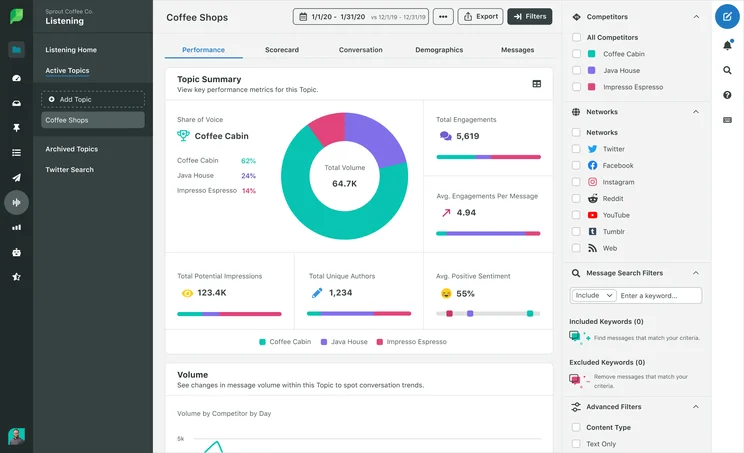
- 5 social profiles: Sprout Social lets you sign up five of your social accounts to its platform (but you can pay an undisclosed fee to add more profiles without joining a pricier plan)
- All-in-one social inbox: Any direct messages sent to your Facebook, Twitter, Instagram or LinkedIn accounts can be read and responded to through the Sprout Social dashboard
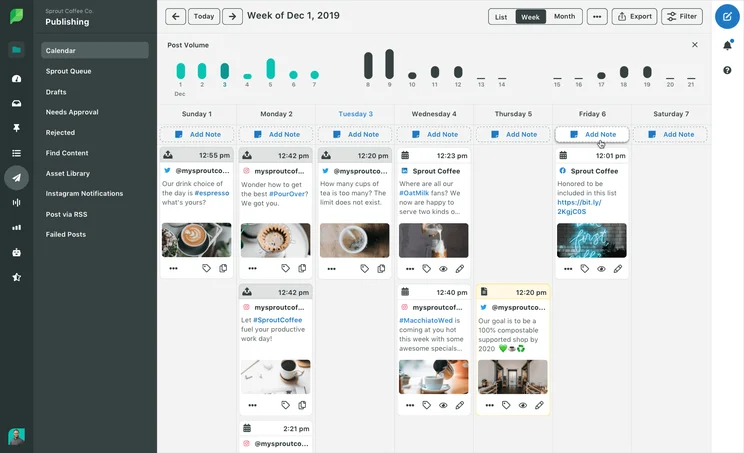
- Publish, schedule, draft, and queue posts: Create campaigns and posts in advance so that you can spend your time on your business itself, as your posts trickle out steadily
- Social content calendar: Get a bird’s-eye view of your upcoming posts and campaigns to see if you need to change or update any posts
- Review management: See how your business is faring on Facebook, Google My Business, and TripAdvisor
- Profiles, keywords, and locations monitoring: Look for trends on social media, and see if your business is being mentioned alongside any specific words or locations
- Tasking and CRM tools: These tools allow you to keep in touch with your audience, keeping track of customer profiles and history
- Group, profile, and post-level reporting: Get feedback from a broader or more granular level by consulting analytical reports
- Paid promotion tools to boost Facebook posts: Allows you to control paid posts through the platform
- iOS and Android mobile apps: Use the Sprout Social dashboards via its mobile apps
Professional pricing plan – $149 per user
Sprout Social claims that the Professional pricing plan is its best tier, and it’s not hard to see why. A monthly $50 increase from the Standard plan might seem a bit steep, but you get so many more functions that the extra cost would make it worth your while – if you’re a medium to large business.
Professional Plan Features
Everything in the Standard plan, plus:
- 10 social profiles: The amount of profiles you can use through Sprout Social increases from five to ten (although you can pay a fee to add even more profiles without joining a pricier plan)
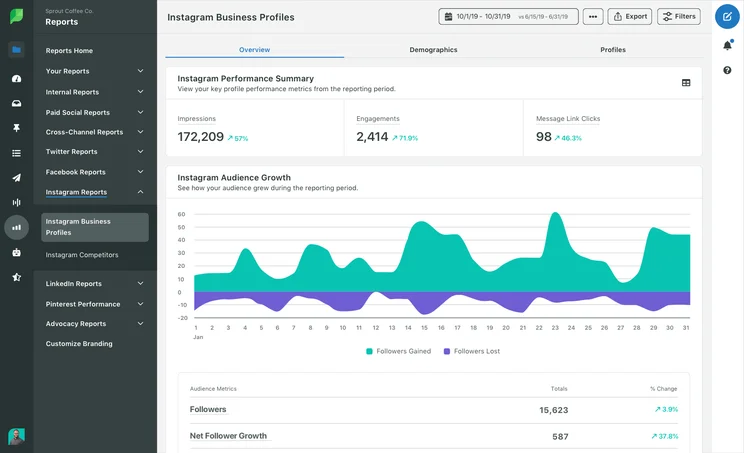
- Competitive reports for Instagram, Facebook and Twitter: Compare your posts across various social platforms
- Incoming and outgoing message content tagging: Allow different users to access different content by setting up tags on different posts that correspond to their relevant profiles
- Custom workflows for multiple approvers and steps: Give your team’s pipeline a sturdier structure by outlining a solid workflow between your different members
- Scheduling for optimal send times: Increase engagement by up to 60% by scheduling your posts for peak social media usage periods
- Response rate and time analysis reports: Analyze response rates and times to benchmark engagement goals and improve your responsiveness
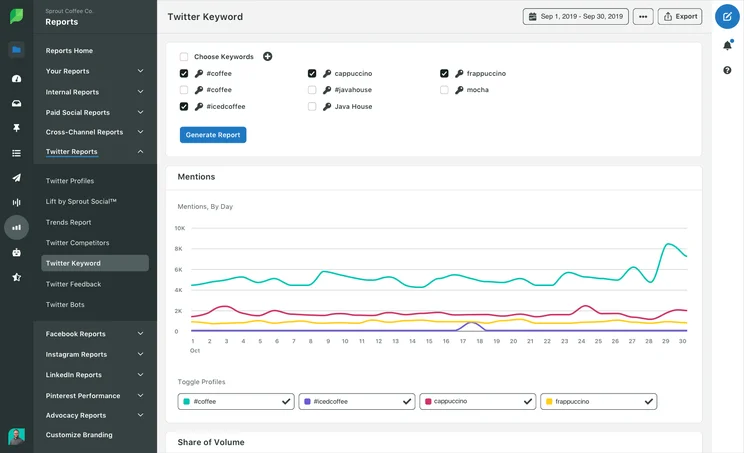
- Trend analysis for Twitter keywords and hashtags: Compile reports of what is trending or popular at the time, allowing you to take advantage of other posts
- Paid social reporting for Facebook, Instagram, Twitter and LinkedIn: If your businesses uses ads on social media, you can receive reports on how these ads are doing
- Helpdesk integration: Integrate your Zendesk or Hubspot account to create, track, and manage support issues
Advanced pricing plan – $249 per user
Sprout Social’s final and most costly plan is its Advanced pricing plan.
$249 per user per month is quite substantial, but there’s a lot to unpack with this plan. If you’re running a larger business that will get sufficient use out of the more advanced features, then this is the tier for you. However, its price tag might still turn some people away.
Advanced Plan Features
Everything in the Professional tier, plus:
- 10 social profiles: No increase from the prior tier, but again, you can purchase more profiles if you need them
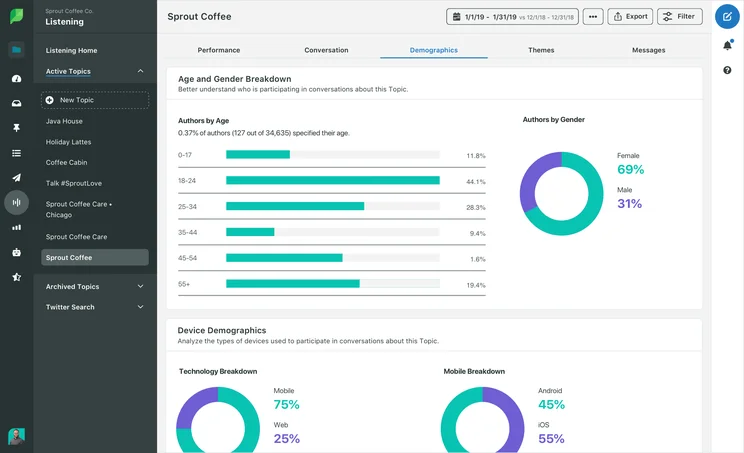
- Message Spike Alerts for increased message activity: Be notified if you suddenly receive an influx of messages – it might signify a problem with your campaign
- Digital asset and content library: Create your own library of brand content (like images or videos) for a more efficient campaign
- Chatbots with automation tools: Create a chatbot to help customers
- Saved and suggested replies: A machine learning algorithm will formulate suggested replies to comments and messages, which means you won’t have to spend time drafting them
- Inbox rule builder for automated actions: Create rules for your inbox, like directing people to your FAQs or homepage if certain keywords are used in the customer’s message
- Automated Link Tracking: Add link tracking to any links posted in Sprout, helping you identify where your social tracking is heading
Sprout Social

In Short
-
Pros
– Extensive publishing, engagement, analytical, and listening features
– Only platform to provide automated responses to incoming communications -
Cons
– Capped profiles on most expensive plans
– Extra users cost more
– Advanced listening and analytics features cost more
Images
What is Sprout Social?
Sprout social is a social media management tool used for managing the creation, scheduling and performance of posts across Twitter, Instagram, and more. Even the smallest business nowadays needs a social media presence. But there are so many social media platforms to work with that managing your accounts can be a handful, especially if you were to do it all manually.
This is why you’ll need a social media management platform, like Sprout Social. Rather than juggling various tabs and platforms, a service like Sprout Social lets you plug in all your social media information and oversee all your accounts through one easy-to-use dashboard.
If you’re looking for alternatives to Sprout Social, it’s one of many social media management tools included on our guide to the best social media management tools.
Sprout Social Landscape
Sprout Social Landscape is Sprout’s built-in image resizer. Rather than manually shifting an image’s pixel dimensions and hoping they fit into your social media posts, you can simply drag an image into this software, specify what kind of post you need to use it for, and let it crop the perfect image.
Sprout Social Reporting & Analytics
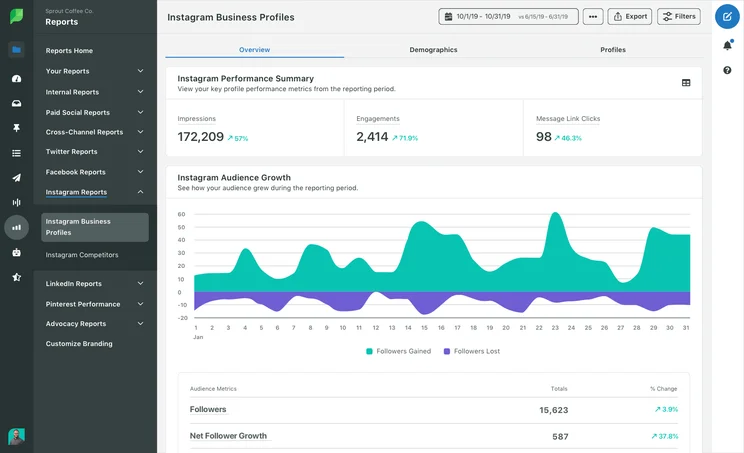
Creating posts is only half the battle! Reporting and analytics can help you get a grip on how your posts are received – who sees them, how they’re interacted with, and what you can do to potentially improve your campaigns. This is an extremely deep field, so it pays to have a robust set analytics in your software.
When it comes to Sprout’s reporting and analytics, the platform offers add-ons to provide additional functionality within these areas. It has both a Social Listening add-on and an Analytics add-on, which can be added after contacting a sales rep.
Sprout Social Setup & Support
Few software platforms and online services can function without a robust tech support network. Even though it’s often cited by the community as being easy to set up, even Sprout’s lowest tier allows you to contact its support team, helping you to fully grasp your plan’s potential. Every plan has access to the same email support lines.
Alternatives to Sprout Social
Sprout Social isn’t the only social media management software out there. Due to its steeper price, it’s possible that you’ll want to look elsewhere. Below, we list some of the best social media management tools to consider and you can keep scrolling for a little more detail on how Sprout Social compares to its rivals – namely Hootsuite and Sendible.
|
Core Benefit
|
Starting Price
|
Free Plan
Does this platform offer a free plan?
|
Unlimited Posting
Does this platform allow you to post as much as you like without imposing monthly limits?
|
Browser Extension
Is there an extension that allows you to use the software through a browser?
|
Facebook, Twitter, Instagram, LinkedIn
Does this platform support management on all four social media networks?
|
Other Platforms
What other platforms are supported by this platform?
|
||
|---|---|---|---|---|---|---|---|---|
|
SPONSORED
 |
BEST OVERALL
 |
 |
|
 |
 |
 |
 |
 |
|
Hootsuite |
Zoho Social |
HubSpot |
Sprout Social |
Sendible |
Loomly |
CoSchedule |
Constant Contact |
Buffer |
|
Best for publishing social media posts |
Best value for money |
Best for large businesses |
Best for providing customer service |
Best for affordable listening tools |
Best for managing multiple social profiles |
Best for collaboration |
Best for small business marketing |
Best for flexible pricing |
|
$99/month |
$10/month |
$800/month |
$249/user/month |
$29/month |
$26/month |
$19/user/month |
$9.99/month |
$5/month |
|
|
|
|
|
|
|
|
|
|
|
|
|
|
|
|
|
|
|
|
|
|
|
|
|
|
|
|
|
|
|
|
|
|
|
|
|
|
|
|
|
Pinterest, Tumblr, YouTube, TikTok |
Pinterest, TikTok, YouTube |
YouTube |
Pinterest, Reddit, YouTube, TikTok |
Pinterest, Tumblr, YouTube |
Pinterest, TikTok, YouTube |
Pinterest, Tumblr |
None |
|
Sprout Social vs Hootsuite
Hootsuite is one of the most popular social media management platforms, and it’s not hard to see why. It covers all the channels that Sprout covers (only replacing Reddit with Tumblr), while also being able to integrate with Shopify ecommerce and MailChimp email marketing.
When looking at the two companies’ pricing structures, it’s also clear that Hootsuite is a better deal for your money. While its top tier is far more expensive than Sprout Social’s, costing $739 a month, its lowest tier is only $49 per month. It also offers a free plan that you can use for as long as you like.
Hootsuite has no limit on scheduled posts, allows for more social profiles per tier, and has a price tag that doesn’t just cover a single user – paying $109 for Hootsuite’s Team Plan will automatically let you sign three people up.
When compared to Sprout, Hootsuite really only falls down when looking at its Organization options, which allow the user to plan their campaigns and keep on top of their tasks.
Check out our Sprout Social vs Hootsuite comparison guide for more information
|
Price
|
Users
How many individuals can access your account
|
Accounts
|
Posts
How many emails can be sent within a month
|
||
|---|---|---|---|---|---|
|
|
|
|
|||
|
Professional |
Team |
Enterprise |
|||
|
$99/month |
$249/month |
Price available on request |
|||
|
1 |
3 |
5+ |
|||
|
10 |
20 |
50+ |
|||
|
Unlimited |
Unlimited |
Unlimited |
Sprout Social vs Sendible
Sendible is the software with the most in common with Sprout Social. It covers the same social networks (Facebook, Twitter, Instagram, LinkedIn, Pinterest, and YouTube), but where Sprout covers Reddit, Sendible opts to support Tumblr.
Sendible’s more granular functions are also largely comparable to each other. The two platforms mostly cover the same features, but where one falters (like Sprout’s missing RSS autoposter or Sendible’s missing ad builder), the other picks up the slack.
The main difference between the two once again boils down to cost. Sendible’s lowest tier is only $25 a month, which, when compared to Sprout’s $99 monthly charge, paints Sendible in a much more preferable light – especially when its features are largely the same.
Deciding between the two, you’d only want to pick Sprout if you weren’t willing to compromise on very specific features, like an ad builder.
|
Price
|
Users
How many individuals can access your account
|
Posts
How many emails can be sent within a month
|
Support
What support options exist
|
||
|---|---|---|---|---|---|

|
BEST VALUE
|
|
|
||
|
Free |
Lite |
Premium |
Enterprise |
||
|
Free |
Starts at $25 per month |
Starts at $65 per month |
Custom quote |
||
|
1 |
1 |
3 |
Unlimited |
||
|
Up to 300 emails per day |
10K-100K emails, no daily limit |
20K-1M emails, no daily limit |
Custom |
||
|
|
|
Email, phone, and chat |
Email, phone, and chat |
Sprout Social is an interesting case. While the software has some very useful features and is reviewed well as a functional piece of software, the steep entry price is off putting.
Even the lowest tier costing $89 per month means that, outside of the free trial, you’re going to be making a pretty substantial commitment by signing up for a plan — especially if you’re a business with thinner profit margins.
If you have the money, you could do worse than springing for Sprout Social. It has great organizational features, which means you can effectively stay on top of your team. But if you don’t need advanced organization, then you should opt for Hootsuite, which is a lot cheaper and shares a lot of the same features.
Frequently asked questions: Sprout Social
Hashtags and trend analysis are tracked in Sprout Social’s Professional and Advanced tiers. However, this function is unavailable in the Standard tier.
Sprout Social offers tools and templates to help you craft your own posts, but they’re a bit limited, and not something you should stick with for more than a few weeks as you learn the ropes of social media.
Sprout Social offers an extensive list of compatible social media platforms. These include Facebook, Instagram, LinkedIn, Pinterest, Twitter, YouTube, and various review sites.
Sprout Social doesn’t offer a free plan, but each tier has a free trial option. These free trials each last for 30 days and give full access to your chosen tier, so they’re a great opportunity to try them out before making a decision.
Sprout Social’s automation services are only included in the highest tier, the Advanced plan, which costs $249 per user per month. These include automated link tracking, chatbots, and an inbox rule maker with automated responses.
If you click on, sign up to a service through, or make a purchase through the links on our site, or use our quotes tool to receive custom pricing for your business needs, we may earn a referral fee from the supplier(s) of the technology you’re interested in. This helps Tech.co to provide free information and reviews, and carries no additional cost to you. Most importantly, it doesn’t affect our editorial impartiality. Ratings and rankings on Tech.co cannot be bought. Our reviews are based on objective research analysis. Rare exceptions to this will be marked clearly as a ‘sponsored’ table column, or explained by a full advertising disclosure on the page, in place of this one. Click to return to top of page


