
We may receive a commission from our partners if you click on a link to review or purchase a product or service. Click to Learn More
Social media management pricing starts as low as $5 per month for basic functionality, but the price can get as high as $800 per month for access to multiple users and accounts, as well as integrations with other marketing platforms.
In this article, we’ve analyzed pricing packages and feature offerings to give you the most comprehensive look at exactly how much top social media management tools and services cost. On top of that, we explain what impacts social media management pricing, and how you can make the right decision for your business.
How Much Do Social Media Management Tools Cost?
We’ll be the first to admit that a range of $5 to $800 per month is pretty massive. However, there are quite a few factors to consider before making a decision on the right social media management tool for your business, so we’ll do our best to explain what you can expect to pay depending on your needs.
For starters, if you’re just looking for basic social media management functionality, your costs are going to be relatively low on that range. Cheaper social media management tools, like Zoho Social and Buffer, give you the power to schedule unlimited posts, edit images, and view analytics, but don’t offer integration with a wider marketing platform.
These kinds of services are decidedly more affordable, typically ranging in price from $5 per month to $100 per month depending on how much you need to post and what kind of features you need. On top of that, some providers offer free plans, so you can start building your social presences without a cost to your business. However, these plans can be quite basic, putting strict limits on the number of posts you can schedule, preventing access to analytics, and providing no team management functionality.
If you need more advanced functionality, though, the price starts going up. Managing multiple social profiles, for example, can increase the price substantially, with options like Hootsuite and Sprout Social costing around $250-300 per month for unlimited profiles.
Integration with a full-on marketing platform will also cost you a bit extra. HubSpot, for example, costs a minimum of $800 per month for its social media functionality, but that’s because it’s a part of the Marketing Hub, which allows for email, paid, and social marketing all on a single platform.
Suffice to say, understanding social media management pricing all comes down to what you need it for, so be sure to analyze your own needs before trying to find a platform for your business.
|
Core Benefit
|
Starting Price
|
Free Plan
Does this platform offer a free plan?
|
Unlimited Posting
Does this platform allow you to post as much as you like without imposing monthly limits?
|
Browser Extension
Is there an extension that allows you to use the software through a browser?
|
Facebook, Twitter, Instagram, LinkedIn
Does this platform support management on all four social media networks?
|
Other Platforms
What other platforms are supported by this platform?
|
||
|---|---|---|---|---|---|---|---|---|
|
SPONSORED
 |
BEST OVERALL
 |
 |
 |
 |
 |
 |
 |
 |
|
Hootsuite |
Zoho Social |
HubSpot |
Sprout Social |
Sendible |
Loomly |
CoSchedule |
Constant Contact |
Buffer |
|
Best for publishing social media posts |
Best value for money |
Best for large businesses |
Best for providing customer service |
Best for affordable listening tools |
Best for managing multiple social profiles |
Best for collaboration |
Best for small business marketing |
Best for flexible pricing |
|
$99/month |
$10/month |
$800/month |
$249/user/month |
$29/month |
$26/month |
$19/user/month |
$9.99/month |
$5/month |
|
|
|
|
|
|
|
|
|
|
|
|
|
|
|
|
|
|
|
|
|
|
|
|
|
|
|
|
|
|
|
|
|
|
|
|
|
|
|
|
|
Pinterest, Tumblr, YouTube, TikTok |
Pinterest, TikTok, YouTube |
YouTube |
Pinterest, Reddit, YouTube, TikTok |
Pinterest, Tumblr, YouTube |
Pinterest, TikTok, YouTube |
Pinterest, Tumblr |
None |
|
Zoho Social
Starting price: $10 per month
Free plan: No
Overall, Zoho Social offers excellent value for very little money, with robust social media management plans that retail at impressively low prices. With unlimited posting, strong engagement features, and a simple setup, you’ll be able to really improve your strategy without breaking the bank.
Even Zoho’s cheapest plan supports multi-channel publishing and content scheduling, while providing a publishing calendar, activity log, image editor, and summary reports.
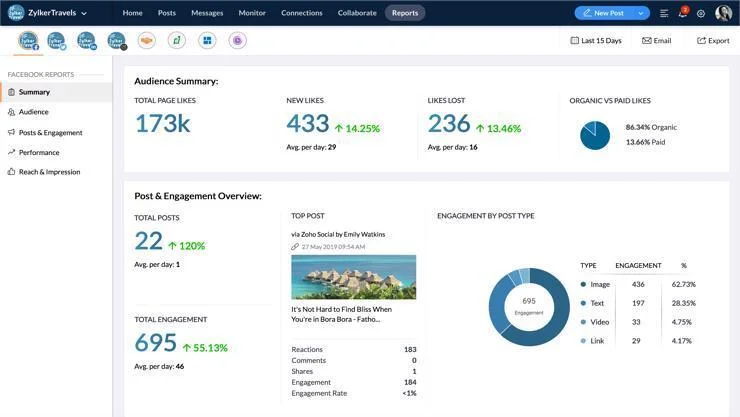
The reporting tools on Zoho Social make it easy to see how your strategy is going. Source: Zoho Social
The low pricing options for Zoho are the best value specifically, but they are missing some advanced features, such as a content library or an image editor. Still, at only $10 per month for 1 user and nine accounts, you can’t beat this deal when it comes to social media management tools.
Don’t worry – we discuss Zoho’s free plan further down in this article.
|
Price
|
Users
How many individuals can access your account
|
Accounts
|
Posts
How many emails can be sent within a month
|
||
|---|---|---|---|---|---|
|
|
|
|
|
|
|
|
Standard |
Professional |
Premium |
Agency |
Agency Plus |
|
|
$10/month |
$30/month |
$40/month |
$230/month |
$330/month |
|
|
1 |
1 |
3 |
5 |
5 |
|
|
9 |
9 |
10 |
100 |
200 |
|
|
Unlimited |
Unlimited |
Unlimited |
Unlimited |
Unlimited |
HubSpot
Starting price: $800 per month
Free plan: No
To be fair, HubSpot is a substantial outlier when it comes to social media management pricing, but we promise, it’s for a good reason.
The social media management portion of HubSpot is nestled within its full-on marketing platform, which is why the price is so high. It’s by far the most comprehensive and far-reaching plan on this list.
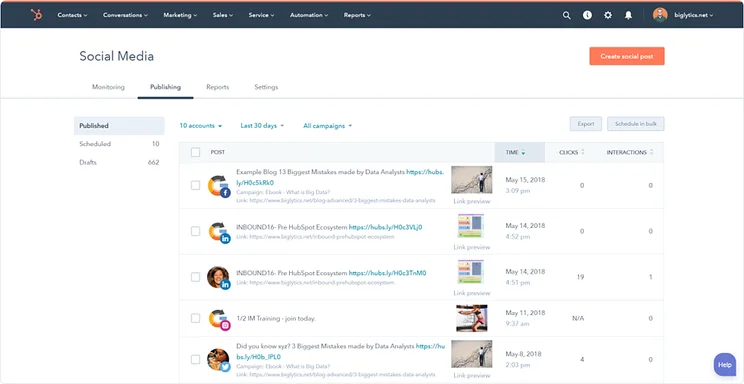
HubSpot allows you to monitor all your social media activity in one place. Source: HubSpot
If you’re a big company looking to revamp your entire marketing strategy, we cannot recommend HubSpot enough. It’s highly capable, thorough, and it’s very easy to use compared to some of the other competitors on this list.
Still, $800 per month (plus a significant onboarding fee) will scare off most people checking out this list, so only consider it if you actually need all that firepower. But when you consider that the average company spends between 6-13% of its budget on marketing, it doesn’t seem so expensive.
|
Price
|
Users
How many individuals can access your account
|
Accounts
|
||
|---|---|---|---|---|
|
|
|
|||
|
Professional |
Enterprise |
|||
|
$800/month |
$3,600/month |
|||
|
Unlimited |
Unlimited |
|||
|
50 |
300 |
Hootsuite
Starting price: $99 per month
Free plan: No
Hootsuite is an extremely capable social media management tool due to its robust publishing features.
In fact, Hootsuite offers more publishing features than any provider on this list. It also offers unmatched listening, engagement, and analytical tools, which can really improve your strategy.
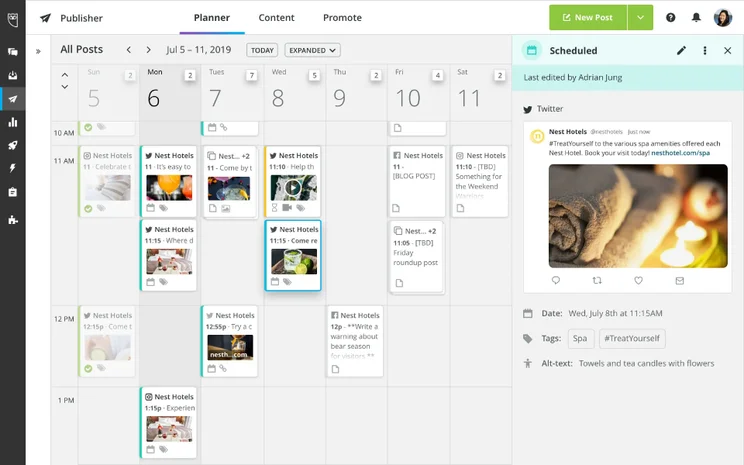
The Hootsuite calendar makes it easy to see when your posts are scheduled. Source: Hootsuite
As far as pricing is concerned, Hootsuite is admittedly on the expensive side with plans starting at $99 per month, but the feature catalog more than makes up for it.
Overall, Hootsuite is a pretty versatile social media tool, but if its features are too limited for your business – or the price is just too steep – you can check out our top Hootsuite alternatives here.
|
Price
|
Users
How many individuals can access your account
|
Accounts
|
Posts
How many emails can be sent within a month
|
||
|---|---|---|---|---|---|
|
|
|
|
|||
|
Professional |
Team |
Enterprise |
|||
|
$99/month |
$249/month |
Price available on request |
|||
|
1 |
3 |
5+ |
|||
|
10 |
20 |
50+ |
|||
|
Unlimited |
Unlimited |
Unlimited |
Sprout Social
Starting price: $199 per month
Free plan: No
Much like Hootsuite, Sprout Social offers a whole bunch of publishing features, along with listening, engagement, and analytical tools.
Where it stands out is that Sprout Social offers automated messages to customers, making it the perfect platform to use for customer service online.
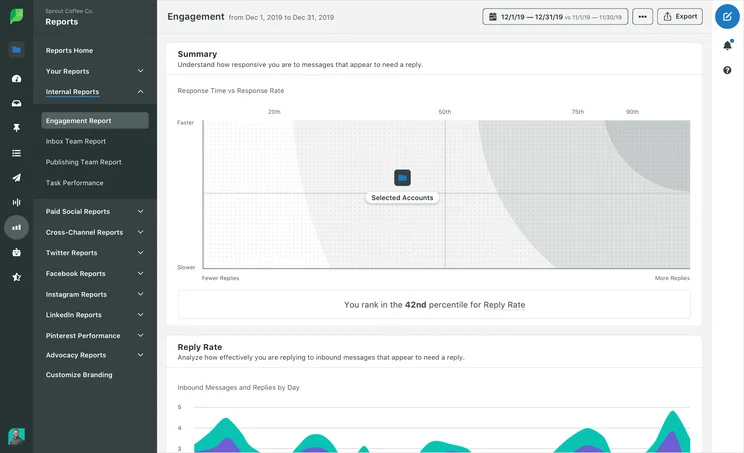
Engagement reports from Sprout Social help you see how potential customers interact with you on social. Source: Sprout Social
As far as pricing goes though, Sprout Social is expensive – there are no two ways about it. The cheapest price is available at an eye-watering $199 per month, but despite the hefty price tag, you can only manage five channels. If you want any more than that you’ll have to opt for the $299 per month Professional plan, which will allow you to manage unlimited profiles.
What’s more, there’s no free plan, so you’re going to need to watch your budget before committing to this one. Still, if you want to use social media for customer support, Sprout Social is certainly worth the cost.
|
Price
|
Users
How many individuals can access your account
|
Accounts
|
Posts
How many emails can be sent within a month
|
||
|---|---|---|---|---|---|
|
|
|
|
|
||
|
Standard |
Professional |
Advanced |
Enterprise |
||
|
$199/month |
$299/month |
$399/month |
Custom |
||
|
1 (additional user +$199/month) |
1 (additional user +$299/month) |
1 (additional user +$349/month) |
Custom |
||
|
5 |
Unlimited |
Unlimited |
Unlimited |
||
|
Unlimited |
Unlimited |
Unlimited |
Unlimited |
Sendible
Starting price: $25 per month
Free plan: No
Affordability cannot be overstated when it comes to social media management tools, and Sendible’s third-place position reflects its reasonably priced feature offerings.
For one, you’ll get access to 12 accounts on its lowest pricing tier – the most of any provider on this list. You’ll also get robust listening tools with this plan, so you can really save some money.

Use social listening tools on Sendible to see what people are talking about in regard to your business on social. Source: Sendible
Sendible is one of the few options that have a posting limit, and it’s between 100 and 300 posts per day.
Admittedly, that’s more than enough wiggle room for most, but if you’re looking to post a lot, Sendible could put a damper on your strategy.
|
Price
|
Users
How many individuals can access your account
|
Accounts
|
Posts
How many emails can be sent within a month
|
||
|---|---|---|---|---|---|
|
|
|
|
|
|
|
|
Creator |
Traction |
Scale |
Advanced |
Enterprise |
|
|
$25/month |
$76/month |
$170/month |
$204/month |
$638/month |
|
|
1 |
4 |
7 |
10 |
50 |
|
|
6 |
24 |
49 |
60 |
300 |
|
|
100 per day |
200 per day |
300 per day |
500 per day |
500 per day |
Loomly
Starting price: $32 per month
Free plan: No
Historically, most companies were happy to only post on the big four social media platforms: Facebook, Twitter, Instagram, and LinkedIn.
Loomly, on the other hand, was helping businesses engage with users on TikTok and Snapchat before it was cool.
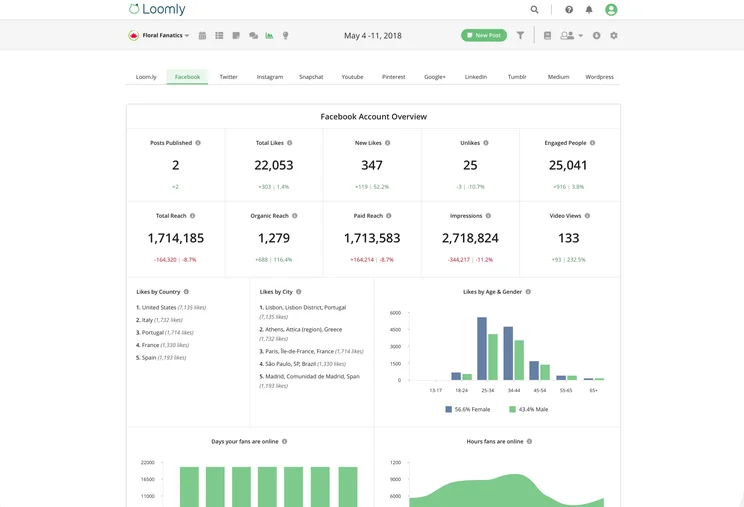
Loomly offers advanced analytics to really get a feel for how your strategy is panning out. Source: Loomly
Additionally, you’ll get access to lots of accounts – the second cheapest plan, available for $60 per month, will let you control 20 social accounts.
From a pricing standpoint, Loomly hovers right over the middle ground, with reasonably priced lower plans and kind of expensive higher plans. This means you’ll really have to look into what you need before making a decision.
|
Price
|
Users
How many individuals can access your account
|
Accounts
|
Posts
How many emails can be sent within a month
|
||
|---|---|---|---|---|---|
|
|
|
|
|
|
|
|
Base |
Standard |
Advanced |
Premium |
Enterprise |
|
|
$32/month |
$60/month |
$131/month |
$277/month |
Contact Sales |
|
|
2 |
6 |
14 |
26 |
31+ |
|
|
10 |
20 |
35 |
50 |
51+ |
|
|
Unlimited |
Unlimited |
Unlimited |
Unlimited |
Unlimited |
CoSchedule
Starting price: $19 per month
Free plan: Yes
If you’re hoping to turn your social media strategy into a group effort, CoSchedule is your best option.
This platform is built from the ground up for collaboration, so you can discuss strategy with all team members before getting anything online. Plus, with cool features like send time optimization, you can truly improve your impact on your customers.
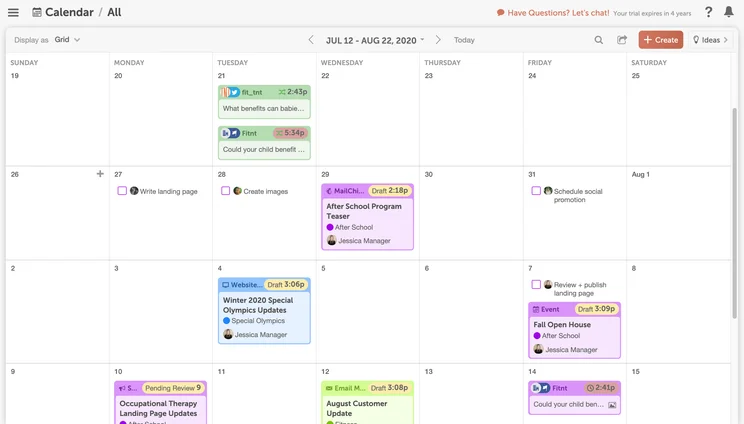
The calendar view from Coschedule allows you to see easily view your social planning. Source: Coschedule
As far as pricing goes, CoSchedule is quite affordable. You get social media management tools, as well as a collaboration hub for your team that can post directly to WordPress.
You do miss out on listening features, which could be a dealbreaker, but overall CoSchedule is great value.
|
Price
|
Users
How many individuals can access your account
|
Accounts
|
Posts
How many emails can be sent within a month
|
||
|---|---|---|---|---|---|
|
|
|
|
|
||
|
Free |
Social Calendar |
Agency Calendar |
Marketing Suite |
||
|
Free |
$19/user/month |
$39/user/month |
Custom |
||
|
1 |
3 |
3 |
Custom |
||
|
2 |
5 |
5 |
Custom |
||
|
Unlimited |
Unlimited |
Unlimited |
Unlimited |
Constant Contact
Starting price: $12 per month
Free plan: No
Much like HubSpot, Constant Contact is about more than just social media management. This platform also houses email marketing features, which will allow you to reach customers in a whole different way.
The price for Constant Contact can get pretty high based on your email contact list, though, so make sure you can afford it before you decide.
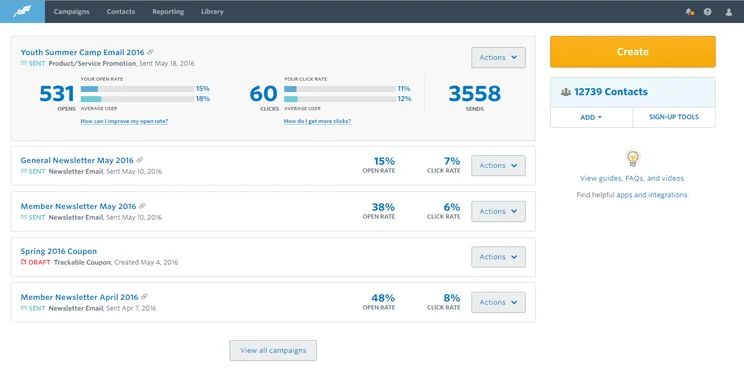
Manage all your contacts from one place with Constant Contact. Source: Constant Contact
From a social media management standpoint, Constant Contact is solid, but does fall short in some key areas. It offers no listening features, no team features, and a small number of social accounts to manage.
Still, if you’re looking for email marketing with a little social media on the side, Constant Contact can help.
|
Price
|
Users
How many individuals can access your account
|
Accounts
|
Posts
How many emails can be sent within a month
|
||
|---|---|---|---|---|---|
|
|
|
|
|||
|
Lite |
Standard |
Premium |
|||
|
$12/month |
$35/month |
$80/month |
|||
|
1 |
3 |
Unlimited |
|||
|
4 |
4 |
4 |
|||
|
Unlimited |
Unlimited |
Unlimited |
Buffer
Starting price: $5 per month
Free plan: Yes
Flexible pricing is the name of the game for Buffer. With plans broken up into different sections, so you only pay for what you need, you can really get the most out of the platform at a reasonable price.
However, if you’re planning to expand your business reach across 6, 7, or even 8 different social media channels – which is becoming increasingly common – then Buffer can end up being expensive.
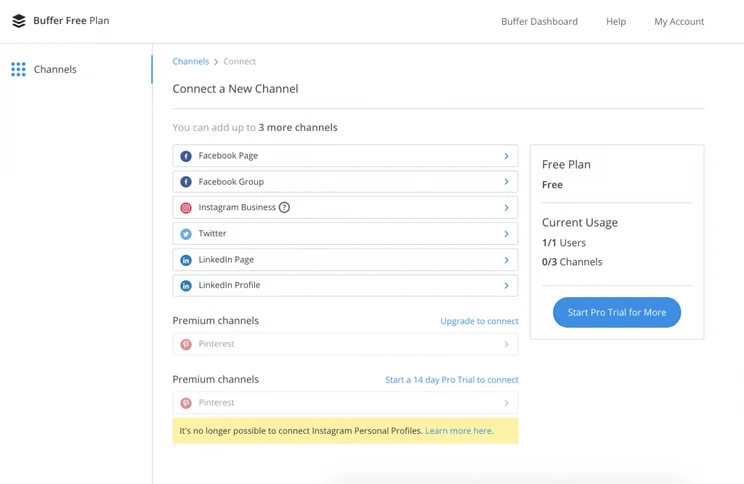
Buffer helps you get started easily with a clear show of platforms to choose from. Source: Buffer
What’s more, Buffer is lacking in some pretty significant spots feature-wise. Listening and engagement tools, for example, are completely missing, and the posting limits are stricter than most of the other providers on this list. It does have a great free plan to get started though, which makes it perfect for individuals and smaller businesses looking to test the waters of social media management.
What’s more, Buffer has AI assistant that can save you valuable time by generating responses without your help – and you’ll get at least 50 credits, regardless of the plan you end up purchasing.
|
Price
|
Posts
How many emails can be sent within a month
|
||
|---|---|---|---|
|
|
|
|
|
|
Free |
Essentials |
Team |
Agency |
|
Free |
$5/channel/month |
$10/channel/month |
$100/month for 10 channels |
|
10 |
Unlimited |
Unlimited |
Unlimited |
What Affects Social Media Management Pricing?
Once you know exactly what you’re looking for, understanding the cost will be a whole lot easier. There are a number of important factors that go into the cost of each service on this list. They’re all designed to be catered to your specific needs, with a wide range of price points for every added feature or extra platform. There are some free plans, but the biggest factors that will affect your total cost are likely to be the platforms and features you choose.
Posts
While social media management tools offer a wide range of helpful features, the core feature of all of them is the ability to post and schedule content through your accounts. However, each tool is different in terms of how many posts you’re allowed to schedule, which is valuable information when it comes to choosing your provider.
Some tools, like Hootsuite and Sprout Social, offer unlimited posting with their free plans, which gives you unlimited control in terms of how often you’d like to post. Remember, though – less is often more on social media, so don’t post every minute of every day just because you can.
Other tools, like Sendible and Buffer, have strict limits on how often you’re allowed to post. If you’re hoping to really inject some juice into your social strategy with a whole lot of posting, these tools could hinder your ability to really stretch your legs.
Accounts
Posting is obviously a significant metric when it comes to deciding on a social media management tool, but if you’re hoping to really branch out your strategy, you’ll have to consider the number of accounts you’ll get access to as well.
In most cases, these platforms will allow you to manage multiple accounts across multiple platforms, so you can coordinate your strategy no matter where you decide to post. Low tier plans typically allow for between one and five accounts, while high tier plans allow for access to as many as 300.
Users
You don’t have to improve your social media strategy on your own. That is, of course, as long as you sign up for a social media management tool that allows for multiple users. Most low tier plans only allow for a single user, so you won’t have any backup when it comes to what you post.
If you want more people involved in using the platform, make sure you sign up for a plan that allows for multiple users. This will allow for a bit of collaboration, and won’t cause any problems with handing off login information within your organization.
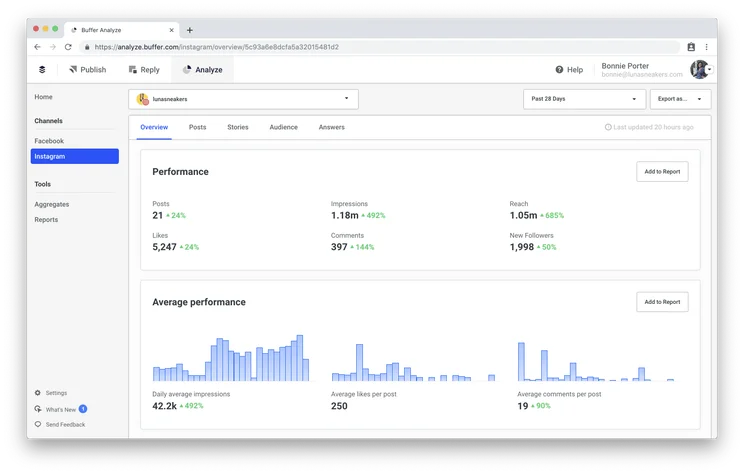
The Buffer analytics dashboard can help you see how your social strategy is panning out. Source: Buffer
Features
Social media management service features are just as varied as their prices, which means you’ll have to decide exactly what you’re trying to accomplish on social media before you make your choice. Most services provide some combination of marketing, monitoring, and analytics, and the cost of the service will reflect what you need.
For example, if you’re only interested in finding a social media service that will monitor your activity, the price will be decidedly lower. However, if you’re interested in a full-service digital marketing overhaul that includes scheduling, improving long-term strategy, and comprehensive analytics, you’re going to need to dig a little deeper into your budget to make it happen.
As we mentioned before, you’ll get what you pay for. Don’t expect to go viral with only minimal investment!
Social media platforms
Because Facebook is undeniably the most popular social media platform, most users believe it provides the biggest social media impact. However, it shouldn’t be the only platform you consider, as each social media platform has its own unique user base. Plus, certain industries naturally fit better with certain platforms – for example, wedding suppliers will have more luck with Pinterest or Instagram than LinkedIn.
Most digital marketing companies that offer social media management services are primed and prepped to manage accounts from a wide range of platforms, including Twitter, Instagram, Pinterest, and LinkedIn, among others. However, your ambition will cost you.
If you’re looking for a social media management service that is all-inclusive in regards to the number of platforms, the price is going to be understandably higher. Some services have specific add-on options if you want to branch out, while others exclusively deal with a particular platform, meaning you’ll have to shop around separately to find services for other platforms.
Social Media Management Services vs Tools
There’s a big difference between social media management services and social media management tools, and the price can change dramatically from one to the other.
Social media management tools are designed for do-it-yourself users that don’t want to spend a lot of money. They have the features you need to schedule posts, view analytics, and engage followers, but you don’t get a lot of expert insight into how you can truly improve your strategy. Examples of social media management tools include Hootsuite and Sprout Social.
Social media management services, on the other hand, are more hands-off from the user perspective. These teams or freelancers will come in and help you come up with content, retool your strategy, and notably improve your social media performance. Examples of social media management services include Hibu and Boostability.
As you can imagine, the rates for these freelance social media managers are a bit more expensive – often in the $2,000 range – but the benefits can be substantial, particularly if you don’t really know what you’re doing on social media in the first place.
Free Social Media Management Tools
While most of the plans listed in this article cost money, there are a few options out there that are available for free. Zoho Social and Buffer all offer free plans on their platform, allowing you to improve your social strategy without paying a cent.
However, it is worth noting that these free plans are quite limited. They either only allow you to monitor a single account, lack significant engagement tools, or don’t allow for any analytics.
Simply put, these free plans are glorified free trials that give you a taste of what the software can do, but won’t really allow you to significantly build out your social strategy in a meaningful way. Still, if you’re looking to dip your toes in the water, or simply use a social media management tool for your personal accounts, these free options can definitely help.
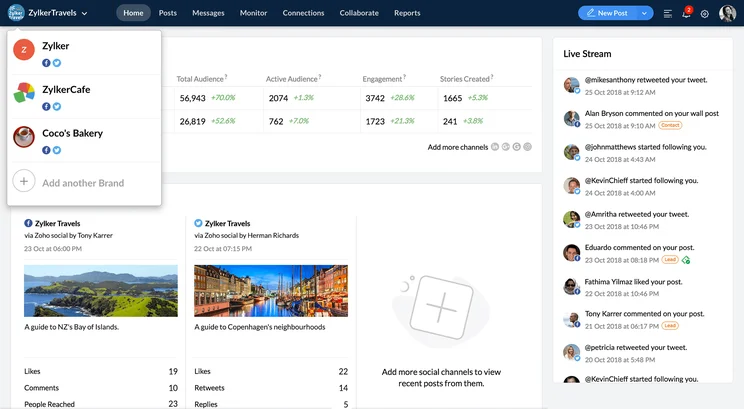
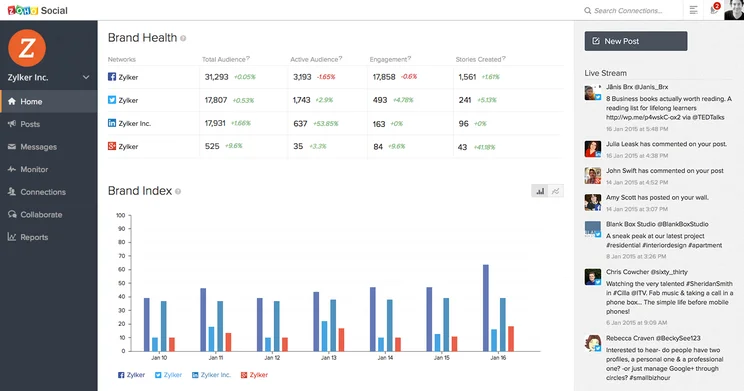
Zoho Social
Zoho Social is the best value-for-money provider when it comes to social media management tools. That’s in part due to its robust free plan, which gives one user the ability to manage seven social media accounts and share unlimited posts.
Zoho Social works a bit differently than others though. Those seven accounts have to be from different social media platforms – namely Facebook, Twitter, Instagram, and LinkedIn, in addition to a Facebook Group page and a LinkedIn company page. You’ll also miss out on advanced reporting and analytics features, as you do with most free plans in this space.
Zoho Social

In Short
-
Pros
– Affordable for wide functionality
– Offers a free plan
– Extensive organizational/team features -
Cons
– Not great for larger businesses
– No phone or live chat customer support
– No image editor or content library
Images
Buffer
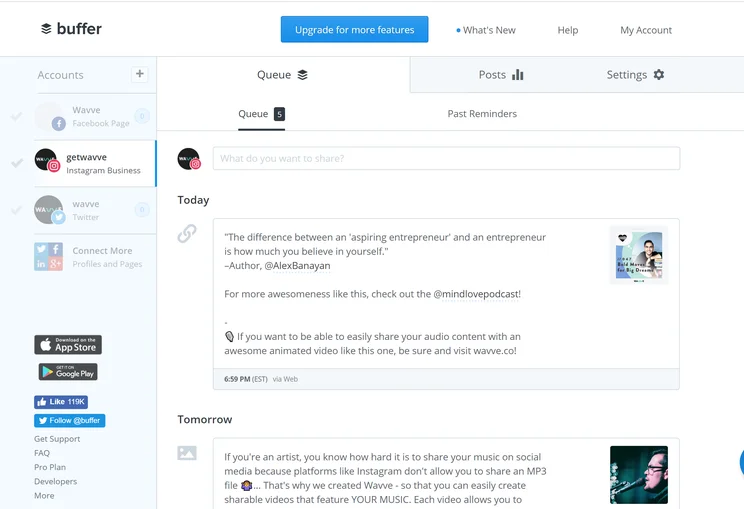
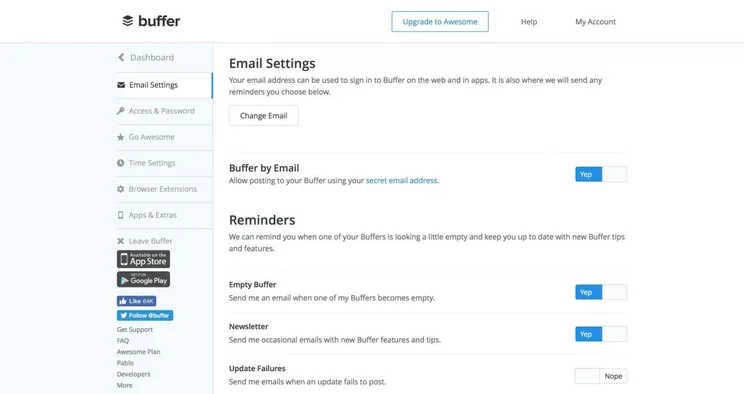
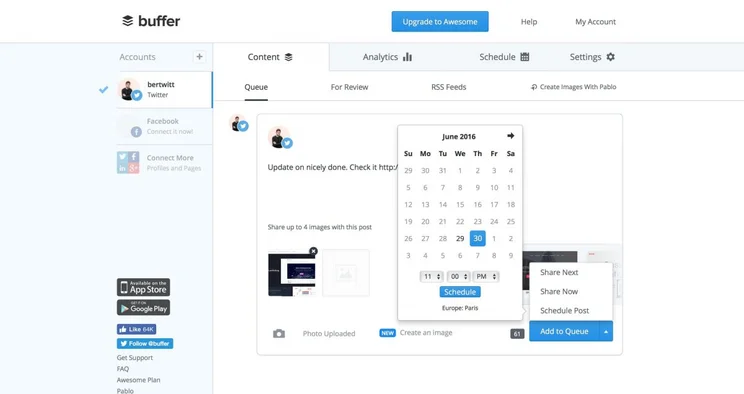
We’ll be the first to admit that Buffer isn’t great for larger businesses that want to retool their whole brand, but it’s a stellar option for small businesses and individuals thanks to its flexible pricing and solid free plan. You’ll be able to grant one user access to three social media accounts, and up to 10 posts per day.
Advanced features is where Buffer really loses out though, and that’s more true than ever in its free plan. Listening and engagement specifically will take a hit, as this plan doesn’t offer that kind of functionality. Still, if you’re just looking for something to help you get posting, Buffer’s simple interface is perfect.
Buffer

In Short
-
Pros
- Good range of publishing and analytical features
- Offer a Free plan
- Pay-for-what-you-use pricing model
-
Cons
- Lacks advanced publishing features
- No engagement or listening features
- Limited organizational/team features
- Impose scheduling limits
Images
How Much do Businesses Spend on Social Media Marketing?
According to findings from a collection of recent CMO surveys, around 6-13% of a company’s overall budget is typically spent on marketing, while companies that have been operational for less than five years old often spend up to 20% of their budget on marketing.
In recent years, the majority of this has been spent on social media, as well as other online channels such as paid search. Gartner’s 2022 CMO Spend and Strategy survey found that businesses were spending an average of 56% of their marketing budget on online channels such as social media, with the remaining 44% spent on offline channels.
Social media advertisements alone now take up around 25% of an average company’s marketing spend, the same business survey also revealed, with most companies now more willing than ever before to invest in platforms like TikTok and Snapchat while continuously spending on Facebook and LinkedIn.
The bottom line is this: if you really want to grow your business, investing in a social media management tool is absolutely worth it.
While free options are available, paid plans for social media management tools offer a wider range of additional features, like engagement, listening, and analytics, which provide valuable engagement-related insights and can help you improve your campaigns.
Zoho Social offers the best value when it comes to social media management tools, with a Standard plan available for just $10 per month, as well as a free plan that will let you manage accounts on 7 different platforms. Remember, however, that paid plans are infinitely more robust and offer the tools to really make an impact on social media, and Zoho Social is certainly no different.
Frequently Asked Questions
Almost every social media management tool allows you to schedule and post content in advance, so you can really bolster your strategy. Then, depending on which provider you go with, you can benefit from engagement features, listening tools, analytic reports, and a wide range of other functionality. But remember, you’ll probably have to pay extra.
A social media audit is when a service takes a look at your current online presence and lets you know what you’re doing right, and what you’re doing wrong. These services typically cost around $2,000, but the price will vary from service to service, particularly depending on the size of your business and how many accounts you have.
According to our in-depth research, social media management costs anywhere between $10 to $800 per month. The costs vary depending on the number of users, accounts, and posts you can use while signed in. Additionally, providers have varying pricing plans that can significantly change the cost, and those are typically based on the size of your company.
Advertising costs on social media are decidedly different from social media management tool pricing. This can range substantially, and there’s really no limit. It all depends on which platform you end up choosing, as well as how many people you’re trying to reach, and for how long you’d like the ad to run.
According to our research, Zoho Social is the best value when it comes to social media management tools. This is mostly attributed to Zoho Social’s robust free plan, which allows for seven different social media accounts and unlimited posting on all of them. Additionally, its paid plans aren’t too expensive, and offer a wide range of features that can help you improve your strategy.
If you click on, sign up to a service through, or make a purchase through the links on our site, or use our quotes tool to receive custom pricing for your business needs, we may earn a referral fee from the supplier(s) of the technology you’re interested in. This helps Tech.co to provide free information and reviews, and carries no additional cost to you. Most importantly, it doesn’t affect our editorial impartiality. Ratings and rankings on Tech.co cannot be bought. Our reviews are based on objective research analysis. Rare exceptions to this will be marked clearly as a ‘sponsored’ table column, or explained by a full advertising disclosure on the page, in place of this one. Click to return to top of page


