
We may receive a commission from our partners if you click on a link to review or purchase a product or service. Click to Learn More
Mailchimp pricing starts at $13 per month for the Essentials Plan, but the best Mailchimp plan for small businesses, the Standard Plan, is $20 per month, and the Premium Plan is $350 per month. There’s also a free Mailchimp plan and a pay-as-you-go option, which can be useful for infrequent mailing, or testing out a few sends before committing to a subscription.
Before diving into Mailchimp’s pricing options, it’s worth considering email marketing costs overall to ensure you understand what value your budget can deliver. Mailchimp is Tech.co’s best choice for ecommerce sites. It allows businesses to communicate with their customer base and drive repeat sales, through newsletters and discounts. That said, the CRM functionality isn’t the best we’ve tested, and there’s no A/B testing feature available. As always, the best choice for your business depends on your goals and needs. To see how Mailchimp pricing compares to competitors, take a look at the table below, or scroll down for more information on Mailchimp plans.
Alternatives to Mailchimp
The email marketing landscape has become more competitive through the years. While Mailchimp is still a strong contender, alternative email marketing options might fit your needs better. Tech.co’s top recommendation would be Omnisend, due to its strong automation features and affordable price. We’ve summarized some of the top alternatives below, with their pros and cons.
You can also visit Tech.co’s full list of the best email marketing platforms.
|
Best for
|
Starting price
|
Maximum contacts
|
Maximum monthly emails
|
Maximum users
|
||||||
|---|---|---|---|---|---|---|---|---|---|---|
|
SPONSORED

|

|

|

|

|

|

|

|

|

|

|
|
HubSpot |
Sendinblue |
Zoho Campaigns |
Moosend |
Mailchimp |
MailerLite |
GetResponse |
||||
|
Not yet rated |
Ecommerce automation |
Scalability |
Customization |
All-in-one marketing solution |
Overall value for money |
Pure email marketing platform |
Ecommerce |
Analytical features |
Small businesses |
Value for basic email marketing features |
|
$15/month |
$59/month |
$25/month |
$3/month |
$9/month |
$13/month |
$9/month |
$19/month |
|||
|
10,000 – 75,000 |
100,000 |
1 million |
100,000 |
Unlimited |
250,000 |
200,000 |
100,000 |
600,000 |
50,000 |
100,000 |
|
150,000 |
Unlimited |
20 million |
Unlimited |
1 million |
Unlimited |
Unlimited |
1.2 million |
7.2 million |
Unlimited |
Unlimited |
|
Unlimited |
Unlimited |
10 |
Unlimited |
10 |
5 (can be increased by contacting customer service) |
Unlimited |
5 |
Unlimited |
10 |
5 (can be increased to 10 on a bespoke plan) |
| Try Salesforce | Try Omnisend | Try Hubspot | Try Campaigner | Try Sendinblue | Try Zoho | Try Moosend | Try Mailchimp | Try Mailerlite | Visit Site | Try GetResponse |
Which Mailchimp Plan Should You Choose?
Mailchimp offers five different pricing options, which can be a bit overwhelming at first. But, with affordable entry-level tiers, and even a free plan, MailChimp has an option for anyone looking to get into the world of email marketing.
Even Mailchimp’s lower tiers have great features, with the main reason you’d opt for the pricier tiers being higher sending limits. Keep in mind, when Mailchimp uses the term “audience”, that refers to what other platforms call a “list,” which is basically a group of customers. For example, if you wanted to send a newsletter to all of your customers, but wanted to send a discount code to a select few, you’d need two “audiences.”
Read on to find out which Mailchimp pricing plan is the best deal for your business. Or, if you’re more of a visual learner, you can get started with MailChimp for free to get a feel for how the software works.
|
Starting price
|
Max contact size
|
Max email volume
How many emails you can send within a month
|
Users supported
How many separate people can use the software on one account
|
Templates supported
How many email templates are offered
|
||
|---|---|---|---|---|---|---|
|
|
|
|
|
|||
|
Free |
Essentials |
Standard |
Premium |
|||
|
Free |
$13/month |
$20/month |
$350/month |
|||
|
500 |
50,000 |
100,000 |
Custom |
|||
|
1,000 |
500,000 |
1.2 million |
Custom |
|||
|
1 |
3 |
5 |
Unlimited |
|||
|
Yes |
Yes |
Yes |
Yes |
Mailchimp Free Plan – Best for Side Hustles
Highlights:
- Free!
- MailChimp’s CRM services
- MailChimp website builder
Limits
As the name would suggest, this plan will cost you nothing at all. However, this lack of a price tag doesn’t mean you’re going to be left behind on features.
Mailchimp’s Free Plan affords you the ability to enroll 500 contacts, meaning that 500 people can sign up to your emails. It also allows you to send 1,000 emails per month.
This may not sound too restrictive, but let’s put together a scenario – if you have the max of 500 contacts and send two emails to each of them, you’ll have to wait until the end of the month to send more. However, if you have 100 contacts, you could send ten emails to each of them and reach the same limit. For startups, this plan could make sense – but growing companies will grow beyond the limits quickly. For those sticking with it longer term, it can pay to be discerning with your numbers.
The Mailchimp Free Plan offers only one audience too, which means you can’t break your customers down into different subsets. Either everyone gets the email, or no one does.
Features
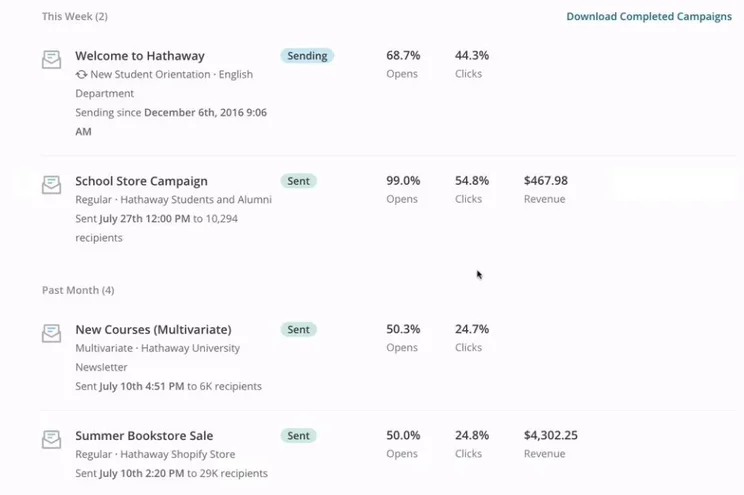
In terms of features, the free plan offers the basic Mailchimp CRM services. Mailchimp CRM isn’t the most comprehensive service found across email marketing platforms, but the fact that it’s included in the free plan is a great plus.
Probably the best feature of the Mailchimp CRM is it allows you to create contact profiles, which let you keep tabs on each of your customers. These profiles can also keep track of your customers’ interaction history, which is basically how they engage with your emails (who opens what, where they scroll to, and what they click on).
Mailchimp CRM isn’t the most comprehensive service found across email marketing platforms, but the fact that it’s included in the free plan is a great plus.
Finally, the free plan comes with the Mailchimp website builder. This website tool isn’t anything revolutionary, but comes with a creative assistant to help you whip up a site and get online. And when paired with the Mailchimp domain, you won’t have to worry about safety or hosting. While you don’t have to create your website with Mailchimp, it’s nice to have the option.
Other than the obviously lower limits than the paid plans, the major drawback of the free plan is the fact that your emails will be plastered with Mailchimp branding, not allowing you to establish your own company’s brand in your email marketing. You also won’t be able to add any transactional emails to your plan.
Should You Try MailChimp’s Free Plan?
MailChimp’s Free Plan is a great way to dip your toes into the world of email marketing with minimal commitment. However, it’s not the beefiest plan out there, so if you find your business growing beyond its slim limits, you might want to opt for a higher tier.
Mailchimp Essentials Plan – best for small businesses
Highlights:
- Very affordable
- Access to all of MailChimp’s templates
- A/B testing
Price and Limits
The Mailchimp Essentials Plan, the first paid tier, includes everything from the free tier but increases the limits on emails, contacts, and audiences.
It starts at only $13 per month for 500 contacts, although it can be gradually increased up to $350 per month for up to 50,000 contacts.
In terms of email volume, the Essentials plan will enable you to send up to 500,000 emails per month, and you’re also granted two more audiences – letting you split your emails into three receiving groups.
Features
When signing up for this plan, you’ll be given access to all of Mailchimp’s email templates, which let you craft emails using over 100 of their varied and creative molds. To improve on this freedom, you’re also unshackled from Mailchimp’s branding on your emails, as the Essentials Plan offers custom branding – allowing you to place your own logos and brand styling throughout.
Another reason to upgrade from the free plan to Essentials is the inclusion of a useful A/B testing feature, which allows you to test the effectiveness of two different emails against one another. You can send one email to half of your customers, and the second email to another half, then gauge which email got the better response, and keep that in mind for the future to optimize your marketing efforts.
You also get your hands on multi-step journeys. These allow you to send customers down a content path – rather than talking at the customer, it’s almost like you’re having a conversation, as their engagement with your content dictates how far they will go down this path. This can be useful if you want your customers to fill out a petition or form.
Another reason to upgrade from the free plan to Essentials is the inclusion of a useful A/B testing feature, which allows you to test the effectiveness of two different emails against one another.
Finally, something that’s always an afterthought until it isn’t: customer support. “Customer” refers to you, a user of Mailchimp, as the Essentials Plan gives you access to 24/7 email and chat support with the Mailchimp team.
A downside of this plan is that you aren’t able to purchase transactional emails, so you’ll need to upgrade to the Standard or Premium plans if you’re interested in these.
Should You Try MailChimp’s Essentials Plan?
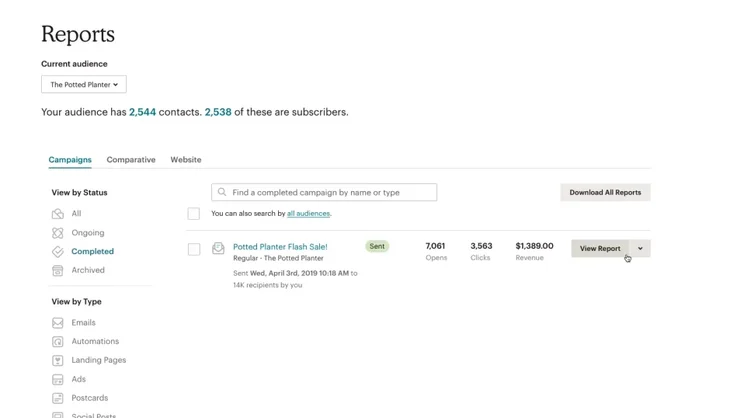
Even though it’s more expensive than the Free Plan (obviously), the Essentials Plan will still allow you to try MailChimp at a pretty low commitment. While the Free Plan allows you to experiment with the platform itself, spending a month on the Essentials Plan can let you play around with A/B testing and templates, and hopefully prove its worth.
Mailchimp Standard Plan – best for medium-sized businesses
Highlights:
- Over 1 million monthly emails
- Template builder
- Send time optimization
Price and Limits
The Mailchimp Standard Plan starts at $20 per month, with a max cost of $700 per month if you want to increase your amount of contacts from the baseline of 500 all the way up to 100,000. It will offer you the chance to send up to 1.2 million emails a month. You’ll also get five audiences – allowing you to make a lot of different customer groupings – and, of course, everything in both the Essentials and Free plans.
Features
Expanding on the multi-step journeys from the Essentials Plan, Standard users are given “branching points.” These allow you to include forks in the road of your user journey, to personalize the experience based on their behavior. For example, if your business is about altering cars, a branching point may be “Do you own or lease your car?” with each response leading to different pages about alterations.
You’ll also have all the Mailchimp email templates from the Essentials Plan, but now you’ll be able to customize or build your own templates as well. These can be tailored to your branding, allowing your company to assume its own identity and freedom throughout your emails.
Send time optimization is one of the most interesting Standard Plan features. It will analyze when each of your customers opens an email, then slowly learn their email routine and send emails to them at the perfect time to maximize their chance of opening the email.
And on the topic of analyzing your customers’ actions, the behavioral targeting feature allows you to go one step further than just looking at when they open their email. Based on information that Mailchimp gathers on your customers’ behaviors, you’ll be able to boost their engagement by analyzing what they tend to click on/read.
Send time optimization is one of the most interesting Standard Plan features.
Finally, the dynamic content options available with the Standard plan allow you to alter your content over time, based on user input. For example, based on what your users have clicked on or bought, you can choose to show them products within emails that would more effectively entice them to convert. Netflix uses a similar technique when they change the thumbnails showing recommended shows to be more appealing based on what each user has watched in the past.
Should You Try MailChimp’s Standard Plan?
MailChimp’s Standard Plan is the best choice for most businesses out there. You’d have to be a significantly large business to push up against its limits, and the array of features on offer will really allow a business to grow and maximize conversions.
Mailchimp Premium Plan – best for large businesses
Highlights:
- Unlimited email audiences
- Multivariate testing
- Phone support
Price and Limits
Mailchimp’s final plan is their Premium Plan, perfect for larger businesses and enterprises. For $350 per month, you’ll get room for 500 contacts, but if you want more contacts, you can pay up to $1,510 per month for up to 200,000 contacts. This plan allows you to send up to 1.2 million emails, and to break your customers up into an unlimited number of audiences.
This plan also allows you to add even more contacts and emails, but you’ll have to contact the sales team to get a tailored quote.
“Unlimited audiences” is a lot of audiences, which is where advanced segmentation comes into play. Rather than creating email lists of broader customers, like “standard members” and “gold members”, with the Premium plan you can send emails to people with more complex criteria – this could be people who have made purchases within the last week, or people who haven’t opened an email within the year.
Features
If you were interested in the A/B testing feature, you’ll love multivariate testing with the Premium plan. While A/B testing allows you to change the subject lines, content, and send times of two emails to compare performance, multivariate testing lets you take it one step further, so you can mix and match specific elements throughout a handful of different emails, really letting you see what works best for your campaign.
Larger businesses are often in the market for investors, and comparative reporting might be just the thing to land them. This Premium feature allows you to compile your email marketing information into a digestible report that you can present to someone, to show how well you’re performing.
If you were interested in the A/B testing feature, you’ll love multivariate testing with the Premium plan.
If you’re a bigger business, you might also have a few different employees who’ll need access to your emails. Unlimited seats and role-based access allows you to give regulated access to any employee who needs it.
Finally, as a nice little addition, you won’t have to rely on regular email support anymore – you’ll be able to call Mailchimp’s phone support lines to receive immediate personal support for your account, and answers to any questions you have.
Should You Try MailChimp’s Premium Plan?
While it’s certainly pricey, MailChimp’s Premium Plan is a great idea for any businesses that require its generous limits and multivariate testing feature. With the price point, you’ll want to make sure you stand to gain from these additions, but they’re extremely helpful for those who need them.

Does Mailchimp sound like the right fit?
Give the popular email marketing software a chance right now
Mailchimp Pay As You Go
This option operates a bit differently to Mailchimp’s subscription plans. The Mailchimp Pay As You Go system allows you to pay for exactly as many email sends as you want, without any add-ons you may not be interested in.
Like a pay-as-you-go phone plan, you basically buy a pack of credits beforehand, as you would texts or minutes. You then use these credits to send emails, with one credit affording you one email.
Since you’ll be sending these to a lot of people, you’ll buy these credits in bulk – and the more you buy, the less they cost. The lowest bundle of credits is 5,000 credits for $150 (working out to $0.03 per email). However, if you’re going to send that many emails frequently, you may benefit more from one of the higher tier subscription models – Mailchimp design their pay-as-you-go option for seasonal email-only senders, not consistent marketers.
It’s also worth noting that any unused credits will expire after 12 months. In the meantime, the Pay As You Go plan comes packaged with all the features in the Essentials Plan.
If you’re interested in looking through the Pay As You Go plan, have a free look at the system here.
Transactional emails – an add-on feature
Transactional emails are different from the regular marketing emails you’d be sending through your email marketing platform. They are individually-sent messages, such as welcome emails for when someone signs up to your mailing list, or order confirmation emails for when a customer buys a product.
Since these are unique, they’re not included in the emails you’re allowed to send through your platform to your standard audience list(s). This means you’ll have to buy transactional emails as extra, and attach them to your plan, if you want to send them too.
The cost for sending transactional emails is calculated in “blocks,” where one $20 block represents 25,000 transactional emails you can then send. The cost of blocks decreases if you buy in bulk. You must also be an existing subscriber to the Standard or Premium plan to add transactional emails.
Read more about how to optimize your transactional emails here.
Mailchimp has one of the widest arrays of pricing options available. Whether you’re running a business out of your garage in Wyoming or managing 500 people in an office in New York City, there is a Mailchimp plan that will work for you.
While its higher tiers can certainly be pricey, a small business typically won’t look at those until it’s on the verge of rapid expansion. Up until that point, MailChimp can accommodate any business with their selection of features and generous limits.
Mailchimp’s most flexible and best value for money plan is their Standard Plan. At only $13 per month, it’s mercifully cheap, while still offering you A/B testing, a fair number of customers and emails, and multi-step journeys. And don’t forget, the email marketing software provider also has a free forever plan to get you started at no cost.
Frequently Asked Questions
Yes, Mailchimp does offer a free plan. This plan allows you up to 2,000 contacts and 10,000 email sends a month, plus use of Mailchimp’s CRM, as well as their website builder. This is not a free trial, so you won’t have to worry about time running out and needing to upgrade. However, your emails will be Mailchimp-branded.
On Mailchimp’s free plan, you can send up to 10,000 emails a month. You can boost this by enrolling in their Essentials plan, which offers you 500,000 emails a month; their Standard Plan, which offers you 1.2 million a month; or their Premium Plan, which offers you 3 million.
Mailchimp costs nothing with the Free Plan, but starts at $9.99/month for email marketing without Mailchimp’s own branding on it. The Essentials Plan ranges from $9.99 to $270 depending on how many emails and contacts you want to add on. The Standard Plan is $14.99-$540/month, and the Premium Plan is $299–$1,190/month, again depending on how many extra contacts you’d like to send to. You may also elect to spend $20 on 25,000 transactional emails as extra to the Standard or Premium plans, or opt out of the subscription model altogether and build your own bespoke plan through their Pay As You Go system, at $150 per 50,000 email credits. But this may end up costing you more in the long run.
On paper, the Premium Plan is the most expensive plan offered by Mailchimp, as it costs from $299 to $1,190 a month. However, the Pay As You Go plan might cost more than this depending on how many emails you purchase.


