

We may receive a commission from our partners if you click on a link to review or purchase a product or service. Click to Learn More
If you’ve ever worked in an office, you’re likely familiar with the human resources department. It deals with benefits, compensation, onboarding, and a wide range of other functions related to employee wellbeing. HR software, in turn, is the digital resource used by these professionals to better manage and optimize the operations associated with the human resources (HR) team.
As with any business tool, HR software can streamline and organize your operations, saving you time, money, and headaches when it comes to managing your employees. However, understanding HR software pricing is just as important as finding the right features, as costs can vary widely depending on the platform and your business’s specific needs.
In this guide, you’ll learn about what HR software is, how it can help your business, what kind of features you can expect, and how to choose the right option for your business.
What Is HR Software?
Human Resources (HR) software is an online tool used by businesses to track, manage, and optimize employee benefits, time-off requests, compensation, and other human resources tasks. It’s typically used by HR professionals, as well as employees, so that everyone has a comprehensive way to stay up to date on all of these important employee management needs.
The HR industry has not always been so lucky as to have these kinds of platforms available to businesses. Vacation requests, compensation concerns, and other HR issues had to be handled in-person, or worse, over email with little to no organization to speak of. Some businesses still operate this way, which further demonstrates how valuable HR software can be.
Additionally, if using HR software is too labor-intensive for you and your team – for example, when you don’t yet have your own in-house HR manager – you can always outsource the department to a third-party HR company. EORs and PEOs, for instance, shoulder a lot of the administrative burden of hiring and onboarding employees. However, this is likely going to cost quite a bit more and won’t necessarily provide the same in-house control and functionality you’d get with HR software.
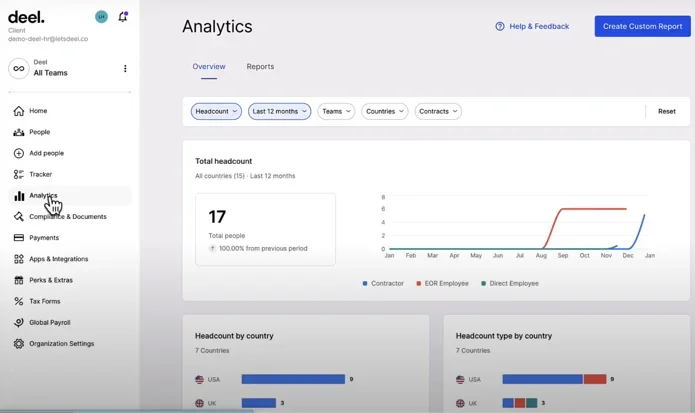
Deel HR software analytics in action
Source: deel.com
How popular is HR software?
Most companies have some kind of HR department, as the service is fairly vital for a company to succeed in the long run. But how many of them are actually using HR software to keep track of all that information?
According to a study from Business.com, approximately 50% of small businesses utilize HR software. Considering the same source found that there are around 6.5 million small businesses in the US, it’s safe to assume that around 3.2 million businesses use HR software.
What Are the Different Types of HR Software?
Given that humans are such a big part of your company, it’s safe to assume that there are a lot of different forms that HR software can take. Here are all the types of HR software you should consider before making the commitment for your business.
Human resources information system (HRIS)
Human resources information systems (HRIS) are the most basic and common version of HR software. This variety covers all the simplest elements of HR tasks, providing access to information about employees and their employment, but it doesn’t allow a lot of hands-on, self-service functionality.
Essentially, this kind of HR software is designed for informational reporting purposes, but won’t allow you, your team, or your employees a lot of functionality when it comes to taking action on HR tasks.
Human capital management (HCM)
Human capital management (HCM) systems are really just a more advanced version of HRIS software, as they offer many of the same features, but also add a little more advanced functionality to go along with them. Namely, you can actually track employee progress through the company, monitoring metrics like learning and development, performance, and engagement for employees.
Basically, this kind of HR software is designed to track how well your employees are doing at the company, and how they will improve over time.
Human resources management system (HRMS)
Human resources management systems (HRMS) are arguably the most advanced version of HR software, providing an all-in-one hub for functionality like compensation, benefits, time-off requests, and a wide range of other features to keep your employees and HR team involved and efficient in the process.
All in all, this is the kind the HR software that you’ll aim for, but with pricing being relatively higher for robust options like this, saving a bit of money with cheaper solutions could be a good option in the short term.
Payroll software
If you want to prioritize payroll when purchasing HR software, the best way to go is to simply get set up with one of the best payroll software solutions. These tools are designed specifically to ensure that your team is paid on time and in the correct way. You can automate compensation, streamline taxes, manage benefits, and track other aspects of employee payroll in real time.
It’s also worth noting that payroll software providers often offer HR software as an additional service, and you can typically integrate them into a single, all-in-one hub for both processes. All that to say, don’t rule out payroll software if you want a platform that can do it all.
Our research has found that Rippling is the best payroll software on the market, offering customizable packages and excellent reporting tools to keep you and your team in the know at all times.
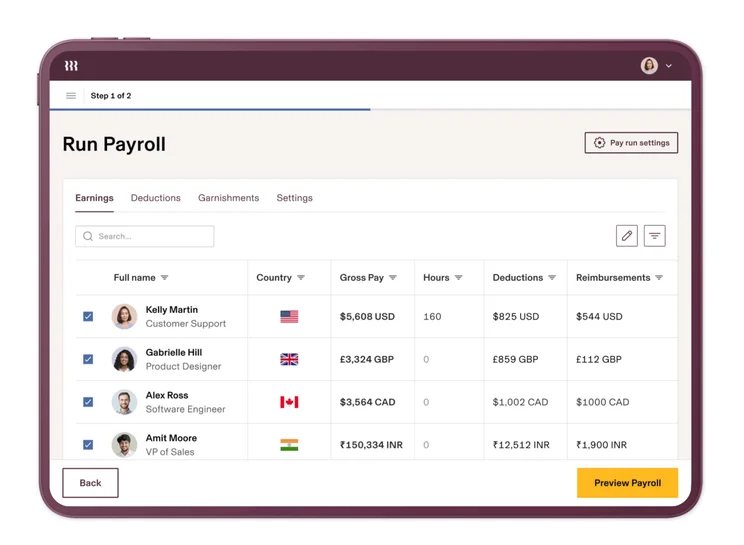
The QuickBooks Online dashboard offers lots of payroll data.
Source: QuickBooks
Applicant tracking system (ATS)
If you’re in the process of hiring, applicant tracking systems (ATS) are designed to make life a bit easier for you. It allows you to track where your applicants are in the hiring process, from submitting applications to final interviews to the full-on onboarding process.
Also, much like payroll software, ATS platforms can be paired and integrated with HR software, so you can have a full-on suite for your HR needs, rather than different platforms to manage your applicants and HR separately.
As you can imagine, this kind of HR software is a bit limited, missing out on some of the more important aspects of HR, like what happens after the employee is actually hired. Still, if this kind of software is all you need right now, it’s a great place to start to save a bit of money.
Employer of record (EOR)
Employer of record (EOR) systems are designed for companies that want to hire remote workers in countries where you don’t have a physical entity. In these countries, the best EOR systems will manage your employment responsibilities, including compensation, taxes, compliance, benefits, and everything else associated with HR functionalities.
EOR services can navigate the complicated laws surrounding this kind of arrangement and ensure that employees are onboarded correctly without you having to get too involved in the process yourself.
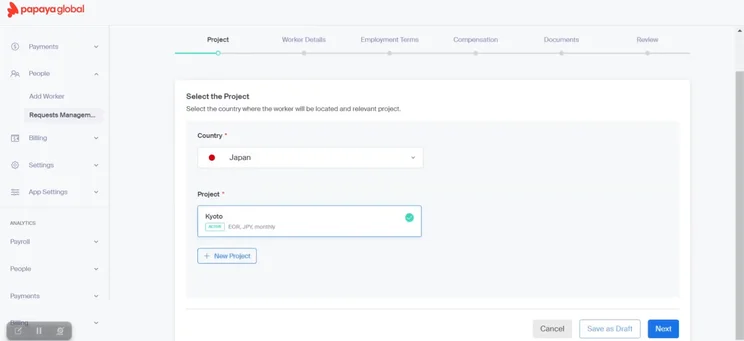
Papaya’s EOR software allows users to fill in fields when adding each new employee.
Source: Papaya
Typical HR Software Features
Now that you’re getting a bit more familiar with what HR software actually is, it’s time to get a bit more granular. Let’s take a look at some of the typical features you can find with these kinds of platforms.
- Payroll – The ability to track employee compensation and ensure that payment is delivered in an effective and timely manner.
- Time tracking – If your business involves employees clocking in and out, this feature will help you keep tabs on those times.
- Performance – While this is typically better on performance management platforms, HR software can usually track basic performance milestones as well.
- Vacation requests – Requesting time off should be common at any company, and HR software should be able to help your admin team manage requests.
- Applicant tracking – The hiring process is made easier with HR software, with this feature allowing you to track new applicants and their status within the hiring process.
- Onboarding – Keep track of all your new hires and their subsequent training with this HR software feature.
- Benefits management – From health insurance to dental and vision, this feature can help you manage all the benefits available to your employees.
- Employee self-service portal – The best aspect of most HR software is that it empowers employees to do a lot of their own HR management.
It’s worth noting that not all HR software will offer all of these features, particularly cheaper versions of a certain platform. If you want access to all the features listed above, you’ll likely have to pay a bit extra.
Check out our guide to HR KPIs to learn more
The Benefits of Using HR Software
The only reason any business is willing to shell out bucks for HR software — or any business software for that matter — is because it has a positive impact on the company. Here are some of the potential benefits of using HR software:
Improve morale
There is nothing more frustrating than when the company you work for is unable to manage your basic employee needs. Compensation, time off, and benefits are vital to the happiness of your workers, and creating any kind of friction around the reception and management of any of them is a recipe for disaster.
HR software can help you effectively manage all of those vital employee needs in a single hub, often allowing them to access and manage them on their own. Managing these essentials effectively will help keep your team happy and morale high, no matter how stressful work gets.
Increase productivity
There is no bigger time suck than an employee being concerned about their basic needs being met. After all, how well can you expect someone to work when they are worried about whether their next paycheck will actually get deposited, or whether their vacation request will go through?
This is where HR software comes in handy, offering a wide range of automation features that can streamline requests and improve productivity for your team. From simple vacation requests to complex compensation calculations, these platforms are designed to automate everything so your professionals can focus on bigger problems.
With HR software, you can not only ensure that your team quickly and effectively responds to requests, but also allows employees to check up on the status of requests on their own, so your team doesn’t even need to get involved. Talk about a productivity booster!
Reduce mistakes
While some business mistakes may have minor consequences, that is rarely the case with HR. Even the slightest error can cause serious problems for employees and managers alike, from miscalculated compensation to improper benefits.
That’s why HR software is so vital. It not only allows you to track all these important employee necessities, but also offers features that help you to track mistakes and correct them before any serious problems arise.
It can also help you address common hiring mistakes, so that you don’t get stuck with an employee that can’t do the job.
Comply with regulations
Speaking of mistakes, depending on the country you work in, HR errors can have dire consequences for your company as well. Across the world, many regulations demand that businesses prioritize protecting employee data, and weak HR practices can leave you open to some substantial fines.
HR software is built to ensure that you are always in compliance with these kinds of regulations, thoroughly protecting employee information and generally keeping track of all the things you need to do for your employees to keep those fines at bay.
How to Choose HR Software
If you think that HR software is something your company is likely to invest in, we don’t blame you. This kind of technology can save you a lot of headaches in the long run, so you should at least dig a bit deeper to find out if it’s a right fit.
Other than the features and types that we mentioned above, there are a few other things to consider when purchasing HR software for your business, including:
- Pricing – Understanding the cost of a software will be vital in deciding which platform best fits your business’s budget. Our complete guide to HR software prices can help.
- Integrations – HR software can work with a wide range of other services, so make sure the solutions you’re interested in are compatible with your other systems for an all-in-one hub.
- Ease of use – No one is going to use a software they can’t figure out, so make sure your employees and managers can grasp the new platform.
- Security – Lots of data is stored on HR software, so make sure the solutions you’re comparing have the right security measures in place to keep it all safe and secure.
Fortunately, we’ve done our due diligence at Tech.co, with plenty of in-depth research on all the best HR software platforms, so your business can make the right decision on the first try. Start by comparing our top-ranked options in the table below:
|
Starting price
|
Free plan
|
Performance management
|
Automatic tax filing
|
Background checks
|
IT management
|
Global hiring
|
|||
|---|---|---|---|---|---|---|---|---|---|
|
BEST OVERALL

|

|

|

|

|
|||||
|
|
|
|
|
|
|||||
|
|
|
|
|
|
|||||
|
|
|
|
|
|
|||||
|
|
|
|
|
|
|||||
|
|
|
|
|
|
|||||
|
|
|
|
|
|
|||||
| Try Rippling | Try monday.com | Try Deel | Try Paycor | Try Paychex |
Getting Started with HR Software
Now that you know HR software is a digital resource used by human resources departments to manage and optimize employee benefits, compensation, and other HR duties, it’s time to start looking into which kind of options are available to you in the real world.
Our research found that Rippling, monday.com, and Deel are the top HR software options on the market today, but honestly, it depends on your needs. Check out some of our other guides on HR software to learn more about what you can expect from these kinds of platforms.
If you click on, sign up to a service through, or make a purchase through the links on our site, or use our quotes tool to receive custom pricing for your business needs, we may earn a referral fee from the supplier(s) of the technology you’re interested in. This helps Tech.co to provide free information and reviews, and carries no additional cost to you. Most importantly, it doesn’t affect our editorial impartiality. Ratings and rankings on Tech.co cannot be bought. Our reviews are based on objective research analysis. Rare exceptions to this will be marked clearly as a ‘sponsored’ table column, or explained by a full advertising disclosure on the page, in place of this one. Click to return to top of page


