
We may receive a commission from our partners if you click on a link to review or purchase a product or service. Click to Learn More
The best free payroll software is Payroll4Free, because it offers an impressively large feature catalog for a cost-free platform, including payroll reports, 401(k) deductions and access to an employee portal for self-service functionality. This allows businesses to have access to the basics without spending a dime.
There are, however, plenty of other platforms that can perform payroll tasks without costing you a dime. But they do come with some caveats, which is why we’d recommend larger businesses check out the best paid payroll software options before you make a decision.
In this article, I’ll break down and evaluate the best free payroll software options for your small business, based on my experience researching the top free payroll providers. You can also take our free online payroll quiz to match your business to a suitable solution in minutes.
- I’ve chosen Payroll4Free as the top free payroll software provider for small businesses, because of its extensive feature set, including payroll reports and direct deposit functionality.
- For spreadsheet enthusiasts, I’d recommend ExcelPayroll, which provides an easy setup and installation process, as well as a much higher employee cap limit than Payroll4Free.
- International businesses may also want to consider HR.my, because of the platform’s ability to track pay across international borders and in 67 languages.
- Toast Payroll is the best option for hospitality businesses. However, users will have to be a customer of Toast’s POS solution to access the payroll platform for free.
- Free payroll software is a great starting point for small businesses that want to keep costs low while still reaping the benefits of payroll software. Although, if you’re planning on expanding in the near future, you might find a free solution limited.
- All of my reviews are based on in-depth research consisting of various key metrics, including a provider’s security, ease of use, features and any hidden fees.
Best Free Payroll Software: Comparison Table
|
Starting price
|
Employee limit
|
Best for
|
Pros
|
Cons
|
||
|---|---|---|---|---|---|---|

|
|

|

|
|||
|
Free |
Free |
Free |
Free (included with Toast POS) |
|||
|
10 |
50 |
Unlimited |
Unlimited |
|||
|
Payroll features |
Spreadsheet lovers |
International businesses |
Restaurants and bars |
|||
|
|
|
|
|||
|
|
|
|
Advertising Disclosure: We may receive a commission from our partners if you click on a link to review or purchase a product or service. All providers in the above table are free forever software plans.
What Is the Best Free Payroll Software?
Read our full list of contenders and their individual ‘best fors’ in the list below, and click the links for more information on payroll pricing.
- Payroll4Free – Best free payroll software for advanced features
- ExcelPayroll – Best for spreadsheet lovers
- HR.my – Best for international use
- Toast Payroll – Best for restaurants and bars
1. Payroll4Free: Best Free Payroll Software for Advanced Features
When it comes to overall functionality within a free platform, Payroll4Free is clearly the best option on the market, offering an extensive selection of payroll features at no cost to businesses. This wealth of features, such as vacation time tracking and an employee portal, has earned it the top spot in our roundup.
Payroll4Free

Overview
-
Pros
- Unmatched feature catalog for free payroll services
- Phone and email support for all free users
- Integrates with other top software, like QuickBooks
-
Cons
- Only free for 9 or fewer employees at your business
- No HR features built in, exclusively designed for payroll
- Windows-only functionality on desktop devices
Images
What I like about Payroll4Free
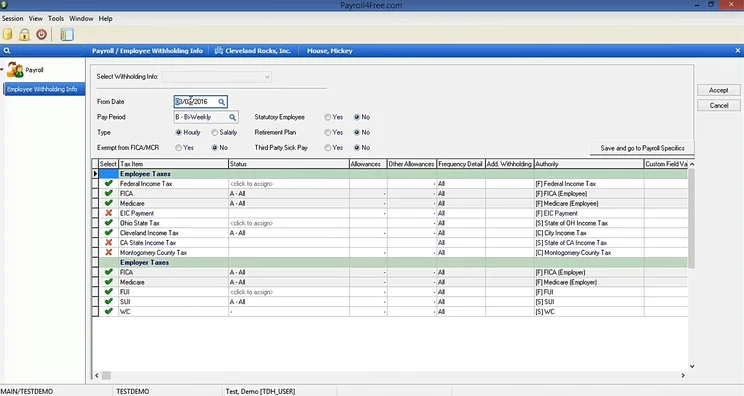
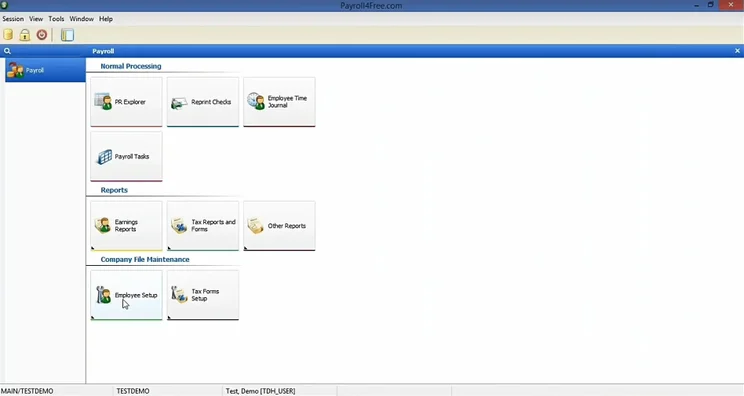
- Rich feature catalog: Users have access to vacation time tracking, direct deposit functionality, tax calculations and data import from third-party integrations. There is also a full-on employee portal.
- Simple interface: Particularly if your business is new to using payroll software, Payroll4Free offers a clean and easy-to-use interface that will not require a steep learning curve.
- 24/7 customer support: The provider offers unlimited support via both phone and email, and users can also access live support. For a free payroll platform, this is rare.
What I don’t like about Payroll4Free
- Employee cap: Payroll4Free limits the number of individuals on the payroll to 9, which will become limiting to a small business that is growing. In comparison, ExcelPayroll offers a much higher cap of up to 50 employees.
- Adverts: Big, targeted ads throughout the platform can be annoying and affect the ease at which you can navigate a platform.
- Can only be used with Windows: If you’re a Mac user, you’ll have to have Windows installed in order to use the platform.
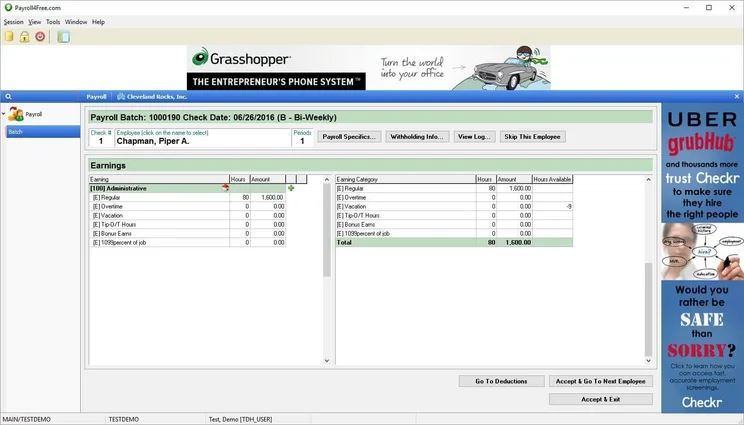
Payroll4Free comes with targeted ads, which is how it’s able to be free forever. Source: Payroll4Free
Payroll4Free features
Payroll4Free is at the top of our list in large part due to the wide range of features it offers. Here’s a quick list of the key abilities that it can handle for your business:
- Pays employees and contractors
- Determines federal, state and local taxes
- Supports paper checks and direct deposit
- Employee portal
- Vacation time calculation
- Generate reports
- Data export for accounting integrations
- Data import for time tracking integrations
- Phone and email support
The reporting ability tracks data that can be turned in a variety of reports — earnings, tax, benefit, accrued time and payroll journal reports.
Does Payroll4Free have any hidden fees?
Payroll4Free offers an impressive amount for free, but not everything. The provider offers two different services as paid add-ons that can help streamline some of your payroll needs. These are:
- Payroll tax service: The company will deposit and file all of your payroll taxes for you, so you don’t have to go through the trouble.
- Direct deposit service: Allows users to set up a direct deposit for your employees without going through your own bank.
Payroll4Free notes that you won’t pay more than $50 per month for these two services.
Additionally, if you go over the 9 employee limit, you can be subject to fines and other charges, so make sure that’s all you need before getting started with Payroll4Free.
2. ExcelPayroll: Best for Spreadsheet Lovers
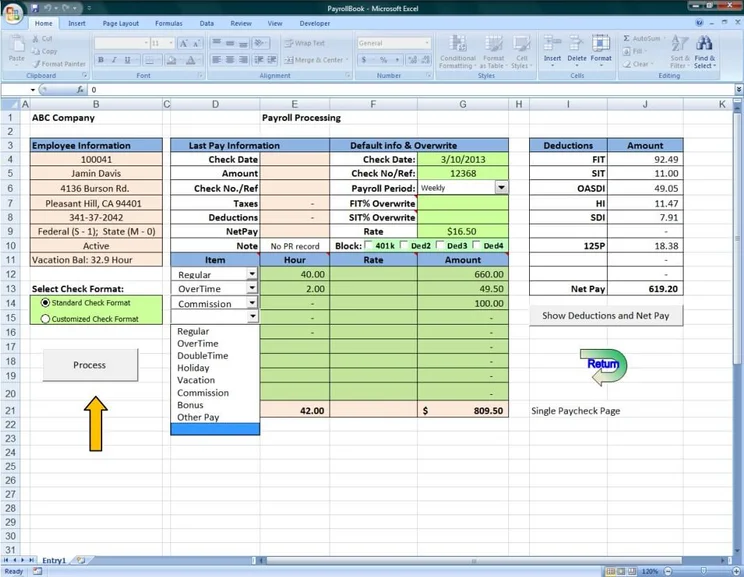
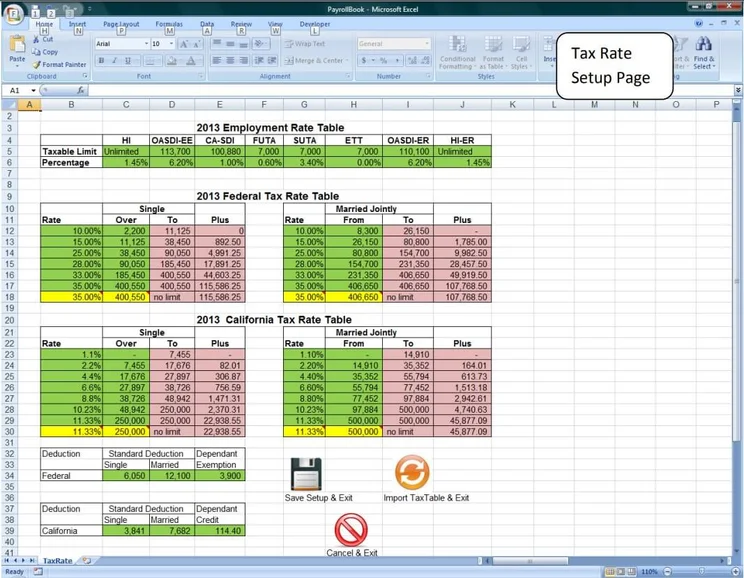
The ExcelPayroll software is an excellent free payroll software for DIY-loving small business owners or managers who enjoy tracking data through spreadsheets, as it’s more of an extension/template for Microsoft Excel than its own platform.
You’ll have to do a bit more manual entry and the learning curve is steep if you haven’t used Excel before, but for a free platform, there are far fewer capable alternatives at this price.
ExcelPayroll

Overview
-
Pros:
- Allows payroll functionality for up to 50 employees
- Runs on Microsoft Excel, so no installation required
- Generates in-depth payroll reports for your team
-
Cons:
- You need a Microsoft 365 or Excel subscription
- Difficult to use without Excel experience
- A lot more manual entry required than other providers
Images
What I like about ExcelPayroll
- Easy setup and installation: Because the platform runs on Microsoft Excel, you’ll just have to download and unzip a file to get started with this provider, perfect for businesses that want a quick and straightforward setup.
- Generous employee cap: Up to 50 employees can be paid at once using the software, which is a much greater number compared with our top choice, Payroll4Free, which has an employee cap limit of only 9.
What I don’t like about ExcelPayroll
- Limited feature offering: Compared with the other providers on this list, ExcelPayroll is a little thin in terms of features. For example, direct deposit is not supported, while it is in Payroll4Free.
- Learning curve: Unless you’re already familiar with Excel, you might struggle with the platform, particularly given the vast customizability of the spreadsheet system.
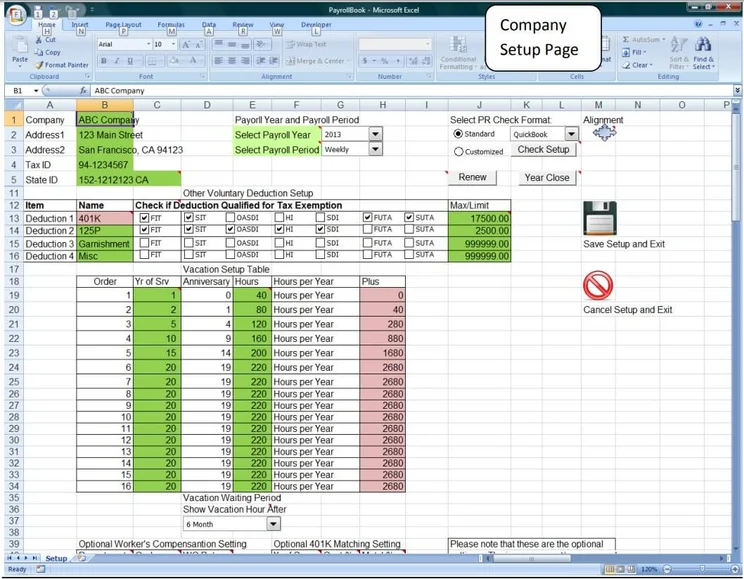
Setup is easy with ExcelPayroll, because it operates within Microsoft Excel. Source: ExcelPayroll
ExcelPayroll features
ExcelPayroll’s most important features are:
- Prints tax forms
- Tracks vacation days
- Generates workers’ compensation reports
- Calculates deductions
- Generates accounting entries
- Offers custom withholding and timecard options
- No live customer support
The deductions that the software is designed to automatically add when desired include 401(k), 125P, Health Savings Account (HSA) and garnishment.
Does ExcelPayroll have any hidden fees?
There are no extra fees whatsoever with ExcelPayroll, including no monthly fee, no payroll fee and no additional services such as tax filing. It’s a stripped-down service with no surprises.
3. HR.my: Best for International Use
Unlike most software on this list, HR.my supports an unlimited number of employees, across any location on the planet. Well, any location that speaks one of the 67 languages (in addition to English) that the payroll software supports.
As a result, HR.my works well as a way to track worker pay across international borders, making it perfect for managing multinational teams.
HR.my

Overview
-
Pros:
- Payroll for an unlimited number of employees
- Includes time tracking functionality for your team
- Ideal for global businesses with no location limits and multilingual support
-
Cons:
- No US tax compliance built into the platform
- No live customer support options for your team
- Very simple and outdated interface
Images
What I like about HR.my
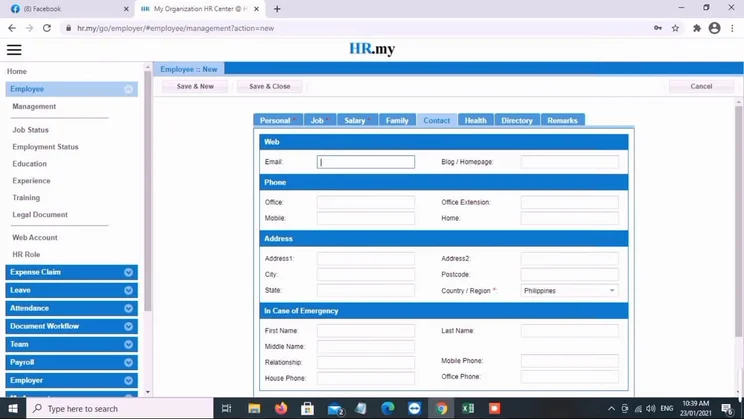
- International reach: HR.my allows you to pay employees across any area of the world, with 67 languages supported by the provider.
- Basics covered: The provider includes basic payroll support and time tracking functionality.
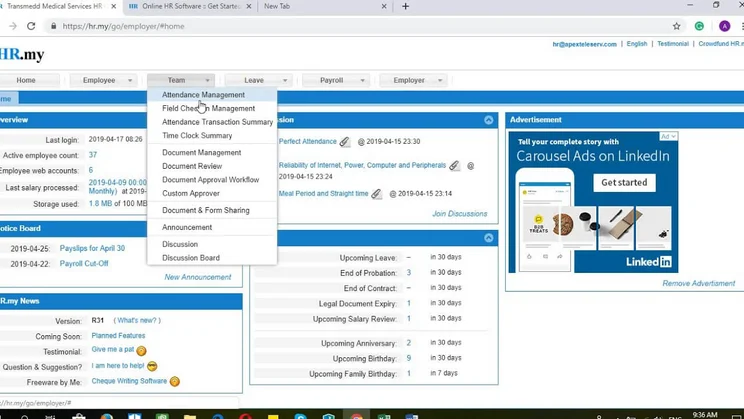
- Employee management tools: These help managers easily field expense claims and employee leave requests. It also lets a business operate a HR service, a benefit none of the other free providers in our guide can boast.
- Crowdfunded: The system has no paid plans planned for the future, so you can be sure that you’ll always enjoy the free price tag.
What I don’t like about HR.my
- Lack of compliance: HR.my doesn’t offer any US labor law compliance, so US users will likely need to look elsewhere for tax forms and filing.
- No live customer support: Businesses using the platform may have to wait for a response if they are having an issue.
- Limited salary processing periods: Overall, only four specific periods are supported: Monthly, Semi-Monthly, Weekly and Bi-Weekly. While this isn’t likely to be a problem for most businesses, it does fall short of the effectively unlimited amount of payroll cycles allowed per month by other options, like ExcelPayroll.
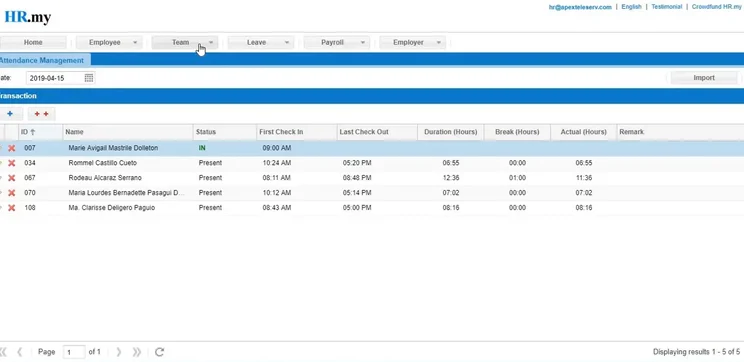
HR.my also offers attendance management features to understand your payroll more granularly. Source: HR.my
HR.my features
HR.my packs plenty of features into its software. Here are the highlights:
- Time tracking
- Employee portal
- Expense claim support
- HR management
- Leave management
- Supports 67 languages
- Live customer support: None
Users of the free service can suggest additional tools online and HR.my says its software is regularly updated for even more functionality.
Does HR.my have any hidden fees?
No, HR.my doesn’t have a fee or offer any tie-in services.
4. Toast Payroll: Best for Restaurants and Bars
Toast Payroll is a payroll software designed specifically for restaurants, bars and cafes. Due to its industry specialism, the payroll includes a range of hospitality sector-focused features like tip management and calculations, and a seamless integration with its POS system.
However, while Toast Payroll is free for businesses that already pay for Toast’s POS system, it’s not eligible for businesses that aren’t using the service.
Toast Payroll

Overview
-
Pros
- Payroll for an unlimited number of employees
- Access to Toast Pay Card and Toast PayOut functionality
- Offers digital onboarding to train new staff quickly
-
Cons:
- Only free for Toast POS users ($69/month)
- Exclusively limited to hospitality businesses
- No free trial available to test out before you buy
Images
What I like about Toast Payroll
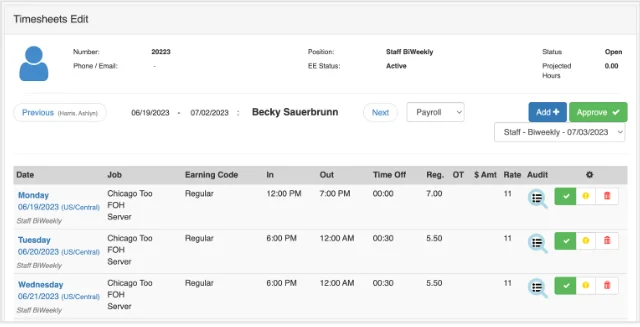
- Features tailored to hospitality businesses: Top features include Toast Tips Manager, an automated tip management platform that gathers, pools and distributes tips — and support for multiple pay rates, for employees on different wages. Toast Payroll is an extension of the provider’s POS product, so it’ll be a natural fit for hospitality businesses.
- Digital onboarding: New staff members can take advantage of Toast’s onboarding program, giving them a quick grounding in how to use the payroll software and solve problems on their own, without much hassle.
What I don’t like about Toast Payroll
- Only eligible for hospitality businesses: The platform is ultimately not as flexible as options such as Payroll4Free and ExcelPayroll because only hospitality businesses can use its services.
- Steep entry price: While Toast Payroll itself is free, users will first have to invest in Toast’s point-of-sale solution, which has an entry price of $69 per month. Compared with the other free options on this list, I’d only really recommend Toast Payroll to those already using Toast POS.
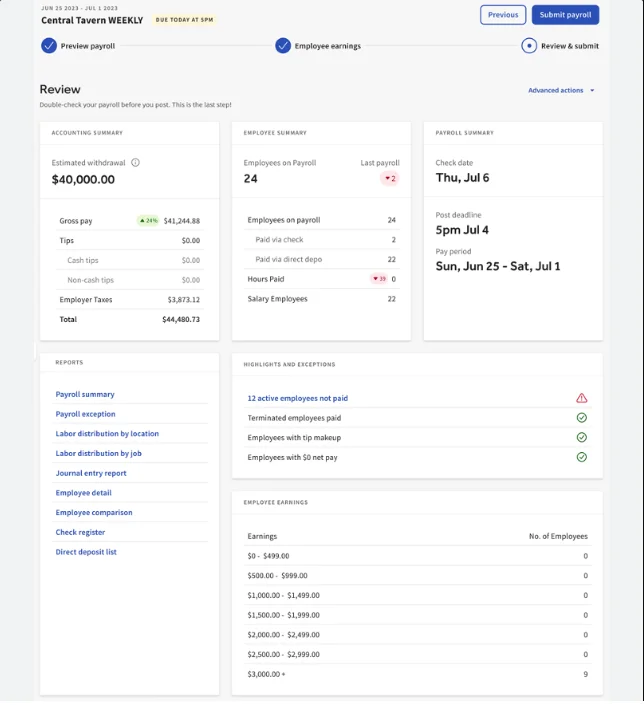
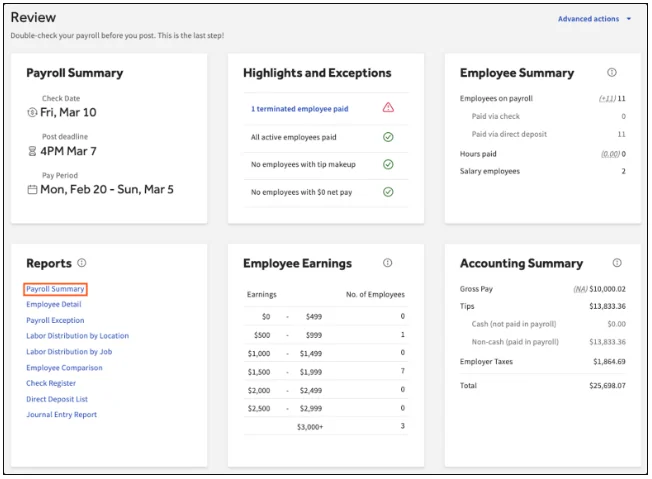
You can use Toast to preview payroll and employee earnings. Source: Toast
Toast Payroll features
Toast Payroll’s restaurant-specific packages distinguish it from the competition. Here are some highlights:
- Automated tip-sharing
- Seamless POS integration
- Integrated employee management
- Compliance tools
- Reporting and insights
- Automated tax calculations
- Support for multiple pay rates
Does Toast Payroll have any hidden fees?
While these costs aren’t particularly hidden, businesses will need to use Toast’s POS software to gain access to the payroll service for free.
Toast POS’s paid packages start from $69 per month, with more expensive enterprise options available as well.
Read our Toast POS review to learn more about the user-friendly point-of-sale system.
Why Do Businesses Need Payroll Software?
Payroll software provides greater efficiency and accuracy for generating paychecks while automatically calculating bonuses, expenses, overtime and holiday pay.
Many payroll software options will include integrations with accounting software, so business taxes can be easily calculated as well and the correct tax forms can be sent to employees.
The biggest benefit, though, is increased employee satisfaction: there’s no quicker way to undermine your employees’ confidence than failing to deliver their paycheck on time.
Is Free Payroll Software Worth It?
Ultimately, free payroll software is worth it for businesses with fewer than 10 employees that need basic automation without monthly fees.
Here’s how I weigh up the benefits and downsides:
Yes, free payroll is worth it if:
- You are starting small: A business just taking off with only around 10 employees would do fine with a free payroll option, provided there are no immediate plans to expand.
- You want the basics while keeping costs down: This will make lives easier for managers with more important tasks to do.
- You are keeping roughly the same employee base: As I mentioned, if you don’t have any plans for expansion and are keeping the same amount of people at your company, you’re not likely to hit the employee cap on options such as ExcelPayroll, which is 50.
No, free payroll isn’t worth it if:
- You want to take advantage of additional features and integrations: Often, paying for your payroll software will give you access to more tools that can benefit your business as a whole.
- You want a streamlined user experience: A lot of these free payroll providers offer basic and often outdated interfaces that pale in comparison with the modern experience offered by many software packages in 2026.
Is Free Payroll Software Secure?
Yes, the free payroll software providers listed here use industry-standard security measures. After all, payroll is not only filled with important employee information, but specifically requires compliance with regulatory bodies to keep that data secure.
These free payroll software providers are highly committed to security. HR.my, for example, uses protocols like AES-256 encryption and two-factor authentication to keep data secure.
Payroll4Free, on the other hand, uses 2048-bit SSL encryption for communication of information, which is actually a tier above the standard for the industry.
Users may also be concerned about the use of ads on platforms such as Payroll4Free, which can introduce more of a slight cybersecurity risk. However, due to the vast amount of security features present in these platforms, such as encryption and secure data storage, we wouldn’t worry about this too much.
Free payroll software is a lot more secure than you might think, if only because when they get it wrong, the consequences are a lot worse than your average security breach. That being said, I’d encourage users to exercise general online safety practices when using these platforms, such as not clicking on anything suspicious.
Does Free Payroll Software Handle Tax Filing?
While many free providers will calculate taxes for you, it’s most likely you’ll have to handle the paperwork yourself.
While some free payroll software providers will handle tax filing, this will more often come at an additional price. Payroll4Free, our top choice, for instance, charges $50 per month for this service.
If your business would like a provider that does this automatically, you should opt for a paid payroll software, rather than a free version. In this case, I’d recommend Gusto, which offers this service as part of its paid package.
How Do I Choose the Right Free Payroll Software?
Below, I’ve outlined the key points businesses should consider when choosing a free payroll software provider:
- Employee headcount: Most free payroll providers have a limit on the amount of people you can pay. It goes without saying that you’ll want to make sure that you choose a provider that covers everyone in your business.
- Scalability: If you are planning on growing your business, then choosing a free platform that does offer a paid upgrade is a good idea to avoid having to change payroll providers later down the line.
- Hidden fees: Not all free payroll providers end up being completely free. Some might hide essential features behind a paywall or charge your business for additional security measures. Make sure to read the fine print in regard to costs.
- Ease of use: Depending on your business’s experience with payroll tools, you might want to invest in software that keeps things simple with less functionality. That being said, there’s also no harm in prioritizing a platform that is a bit harder to use, but has more advanced features.
- Security: As I mentioned, free payroll providers are pretty secure. However, there are important checks you can do yourself to ensure your software is following best practices. I’d recommend finding out how your provider encrypts data, grants access to its platform, and stores and disposes of data. Providers should also adhere to federal and state-level compliance regulations.
Methodology: How We Test Free Payroll Software
While some publications will merely throw payroll software providers on a list and call it a day, we at Tech.co take our ratings and rankings seriously.
We put these tools through rigorous testing to decide which one is best, so that your business has the information it needs to make the best decision in the long run.
Here are some of the metrics we used to rate and rank each provider:
- Features: Payroll software comes with a lot of features, like time tracking and benefits access, and we wanted to be sure these free tools offered them for all businesses.
- Security: A free service could be cutting corners by skimping on security, which is why we evaluated how protected your data is with each of these available payroll tools.
- Ease of use: Limited functionality usually means it’s easier to use for beginners, but some tools have a higher learning curve, which is why we used this metric to gauge the best.
- Hidden fees: Free isn’t always free, which is why we looked into any potential hidden fees and costs that you could incur while using these free payroll software tools.
If you want to learn more about how we research business software like payroll, you can check out our in-depth research guide to get a look behind the scenes.
The best free payroll software is Payroll4Free, because of its extensive feature catalog of payroll features that costs nothing.
Yes, the targeted ads are somewhat distracting, but the overall functionality of the platform, combined with 24/7 support and third-party integrations for data export, make it an obvious choice for businesses that need payroll for 9 or fewer employees.
If you’re open to the feature-rich benefits of paid payroll software, we can help you there, too. You can take our free payroll quiz to find the best payroll software for your business in minutes, designed by our in-house team of payroll specialists.
See an error on this page? Contact our editorial team.
If you click on, sign up to a service through, or make a purchase through the links on our site, or use our quotes tool to receive custom pricing for your business needs, we may earn a referral fee from the supplier(s) of the technology you’re interested in. This helps Tech.co to provide free information and reviews, and carries no additional cost to you. Most importantly, it doesn’t affect our editorial impartiality. Ratings and rankings on Tech.co cannot be bought. Our reviews are based on objective research analysis. Rare exceptions to this will be marked clearly as a ‘sponsored’ table column, or explained by a full advertising disclosure on the page, in place of this one. Click to return to top of page


