
We may receive a commission from our partners if you click on a link to review or purchase a product or service. Click to Learn More
ADP’s payroll pricing operates on a case-by-case basis but, according to user reports, businesses can get started on ADP RUN’s Essential Plan for $79 per month, plus $4 per employee. ADP’s entry price is slightly higher than other payroll solutions’ cost but, due to its customizable packages and advanced tax and compliance features, its value for money is strong.
If you need advanced features such as state unemployment insurance (SUI) management or a HR helpdesk, you’ll have to opt for one of ADP RUN’s pricier packages — Enhanced, Complete or HR Pro — or bump up your plan with premium add-ons.
But whatever your payroll needs, our team of experts has analyzed each one of ADP RUN’s pricing packages to determine whether it’s a good fit for your business.
Read on to learn how much ADP payroll costs and how its pricing plans stack up against similar solutions. Alternatively, if you’re after quick, transparent pricing estimates, use our free quote-finding tool to receive custom quotes from the top payroll providers.In this guide:
ADP RUN — or RUN Powered by ADP, to use its official name — is the provider’s payroll management software, designed for businesses with up to 49 employees. The service includes four main packages: Essential, Enhanced, Complete and HR Pro. All prices are available on request.
ADP Workforce Now also offers tailored pricing, but is geared towards mid-sized businesses with 50-999 employees and offers three plans: Select, Plus, and Premium.
The provider also offers a chat-based service for microbusinesses with basic payroll needs, ADP Roll. This service includes standard payroll, tax filing and employee self-service features. It retails at $29 per month, plus $5 per employee.
How Much Is ADP Payroll?
While ADP doesn’t publicly list rates on its website, prices for its small business payroll offering, RUN Powered by ADP, start at $79 per month, plus an extra $4 per employee. Each RUN package is fully customizable, allowing businesses to create a payroll plan that’s capable of scaling alongside their needs.
See how the RUN plans compare side-by-side below, or scroll down for a granular breakdown of its packages.
|
Price
|
Highlights
|
Time tracking
|
Dedicated HR advisor
|
||
|---|---|---|---|---|---|

|
|
|
|
||
|
Essential |
Enhanced |
Complete |
HR Pro |
||
|
Custom pricing |
Custom pricing |
Custom pricing |
Custom pricing |
||
|
Everything in Essential, plus:
|
Everything in Enhanced, plus:
|
Everything in Complete, plus:
|
||
|
Available as add-on |
Available as add-on |
Available as add-on |
Available as add-on |
||
|
|
|
|
|
What Are the RUN Powered by ADP Pricing Plans?
RUN Powered by ADP offers four distinct pricing packages: Essential, Enhanced, Complete and HR Pro. Read on to learn how they compare.
Essential: Best for startups
RUN’s basic plan, Essential, is the provider’s cheapest package and, according to businesses using the service, its prices start from $79 per month, plus an extra $4 per employee.
However, truly tailored prices for Essential are only available on request and are determined by a variety of factors, including business size, frequency of paydays, the number of states you operate in and the type of payroll features you need.
Essential’s features include:
- Basic payroll and compliance capabilities
- Direct deposits
- Reporting tools
- General ledger interfaces
- Tax filing
- Payroll delivery
- Google Ads for stronger branding
- HR features like RUN employee access, onboarding tools, staff discounts and background checks
RUN’s Essential package is designed for startups and established companies with fairly standard payroll, tax and compliance needs.The provider charges businesses per payroll run and unlocking specific tools, like time and attendance features or health insurance, will cost extra.
RUN Powered by ADP’s entry price is definitely pricier than the base rate of $35, plus $8 per user, per month, offered by Rippling, our highest-ranked payroll software for small businesses. However, RUN’s feature offering matches that of its competition and its packages are much more scalable, making it the superior choice for businesses looking to expand.
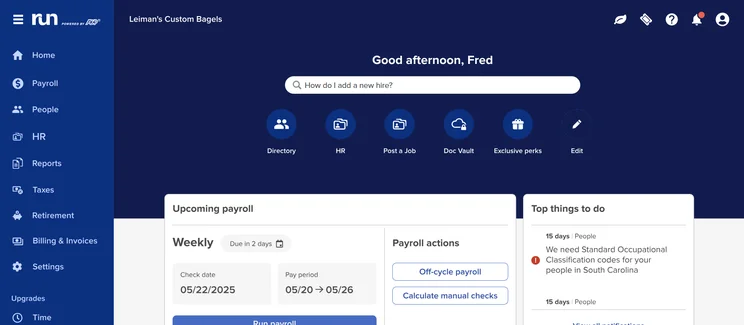
The ADP RUN dashboard gives users a sidebar menu and icons for all major software categories. Source: Tech.co testing
Enhanced: Best for compliance
The Enhanced plan builds on the Essential tier by adding four big functions:
- SUI tax management
- Additional check signing
- Labor law compliance
- An integration with job-search platform ZipRecruiter to help employers sort, review and rate potential candidates
Rivals like Paychex will reserve advanced features like SUI management and background checks for their premium plans, so Enhanced is a better deal when compared with similar packages of its kind, even if it costs more than an entry-level plan.
Due in large part to Enhanced’s check signing and SUI management, our testers recommend this plan for small businesses that are serious about keeping up with compliance regulations and reducing payroll errors.
Its integration with ZipRecruiter also makes it a safe bet for growing businesses that handle recruitment in-house.
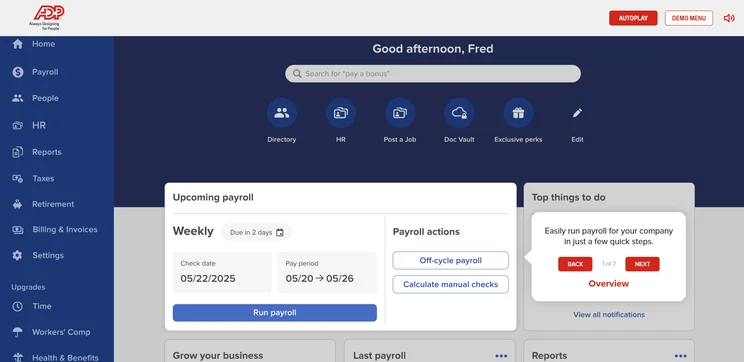
Prompts within the ADP RUN interface help to ensure that users don’t miss a key task. Source: Tech.co testing
Complete: Best for expanded HR tools
If you want to gain access to the platform’s impressive HR capabilities, Complete is the provider’s cheapest entry point.
You’ll get all the payroll and compliance features from RUN Enhanced, plus:
- Access to the provider’s HR HelpDesk — a dedicated team of HR professionals that helps businesses navigate and resolve complex HR issues
- HR training
- HR forms and documents
- Salary benchmarks
- Access to RUN’s “Employee Handbook Wizard” — a unique tool for creating and maintaining high-quality, customizable employee handbooks
The package is ideal for businesses looking to manage basic HR duties in-house, but that are able to do without the bells and whistles offered by RUN’s most comprehensive plan, HR Pro.
For more on the Handbook Wizard that this plan includes, check out RUN’s quick explainer video here:
HR Pro: Highest functionality
If you’re looking for a one-size-fits-all solution to manage your payroll and HR duties, ADP RUN HR Pro is just that.
This advanced package offers all the payroll and tax benefits featured in the RUN Powered by ADP Complete tier, while also including the provider’s full suite of powerful HR capabilities.
You’ll get:
- An applicant tracking system
- Enhanced employee handbook support
- Sexual harassment prevention training
- Learning management training to help managers assign and track development material
- Enhanced HR HelpDesk Support — you can schedule one-off or regular check-ins with a designated team of HR business advisors
- Marketing and business advice from the small business consulting service Upnetic
- Legal assistance from Upnetic Legal Services — useful for contract reviews, employment, and debt management
RUN Powered by ADP HR Pro is likely to shoulder a fairly hefty price tag, considering its powerful feature offering. However, since the software prevents businesses from needing to invest in a separate HR solution, the price may be worth it, for those looking to prioritize convenience.
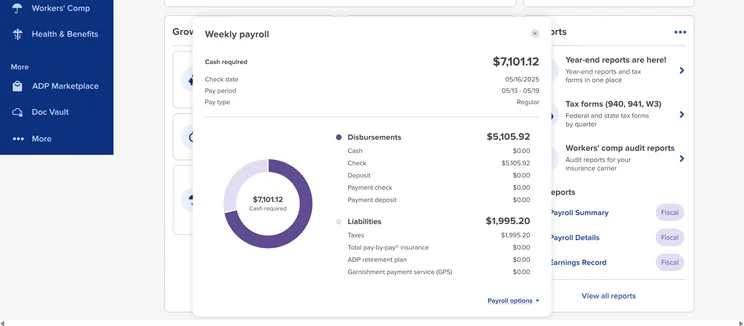
All ADP RUN plans include plenty of graphs to help visualize chores like the weekly payroll. Source: Tech.co testing
Pros:
- It’s highly scalable and customizable, so it can grow alongside your business, even offering international payments.
- It offers an extremely user-friendly experience to employees.
- It has advanced payroll and HR features — tax compliance, SUI management, an applicant tracking system and an open API for custom integrations.
- It connects you to professionals — users can access dedicated HR advisors through the HR HelpDesk, as well as training materials to get your team started.
Cons:
- ADP’s pricing lacks transparency, making it hard to compare its value with other payroll solutions.
- The provider charges businesses per payroll cycle, so it’s a pricier option for businesses that pay staff week-by-week.
- It offers no email-based support, even though many other payroll software providers do.
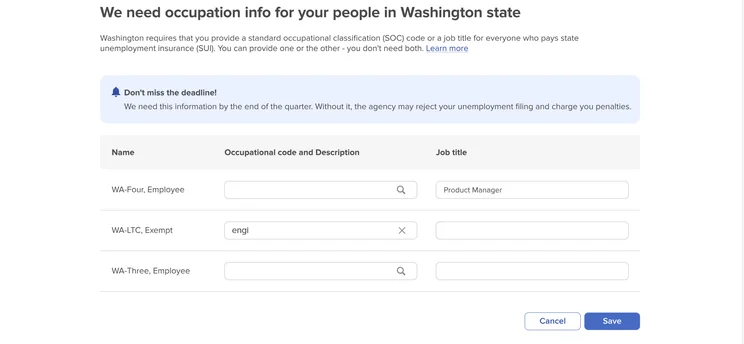
One benefit of the ADP RUN software is that it offers compliance tips localized to your state requirements. Source: Tech.co testing
How Does ADP RUN Compare With Other Payroll Software?
RUN stands out in our payroll management research due to its versatility and powerful scalability. However, after reviewing the leading payroll solutions, our team of experts also found Rippling, Paychex and Gusto to be worthy ADP competitors. Below, we compare the features and value they offer.
|
Starting price
|
Rating
|
Key features
|
||||
|---|---|---|---|---|---|---|
|
SPONSORED

|
BEST OVERALL

|
|

|

|

|
|
|
4.6
|
4.5
|
4.3
|
4.3
|
|||
|
|
|
|
|
|
|
| Try Homebase | Try Rippling | Compare Quotes | Try Paychex | Compare Quotes | Try Patriot | Compare Quotes |
Rippling — From $35 per month, plus $8 per employee
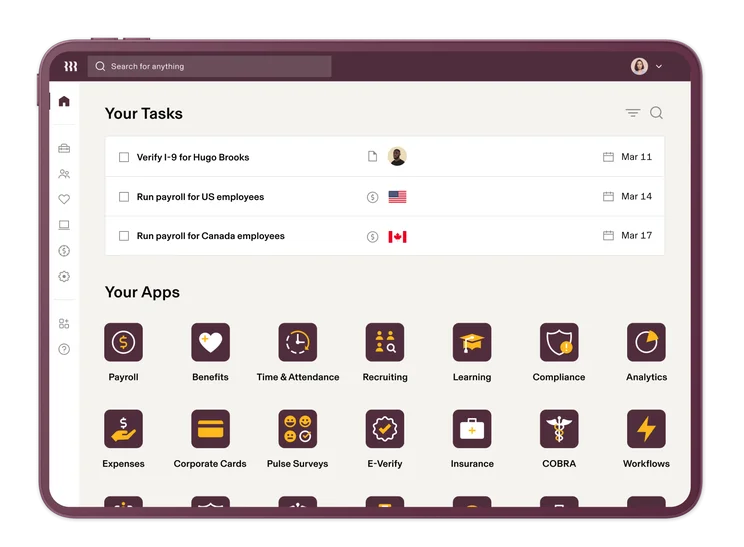
The Rippling home page gives users an upcoming task list alongside common sub-categories. Source: Rippling
Rippling, the best payroll software for small businesses we’ve reviewed, offers a number of customizable packages, but its pricing structure is slightly complicated.
Prices for Rippling Unity, its standard tier, start at $35 per month, plus an additional $8 per employee, per month. However, businesses can also create custom packages. Just like RUN’s plans, the cost is determined on a case-by-case basis.
Rippling’s Unity plan is priced similarly to ADP Roll. However, the provider’s basic chat-based payroll service offers a comprehensive list of features that includes 360° compliance and onboarding automation. This makes Rippling a better deal for micro-businesses with limited payroll needs.
Unlike ADP, Rippling doesn’t charge per payroll run and its basic package has tax filing, making the provider’s custom packages a slightly better deal than RUN Powered by ADP. However, both providers have customizable, scalable packages, so comparing their overall value comes down to splitting hairs.
Learn more about the provider in our Rippling payroll review.
Paychex — From $39 per month, plus $5 per employee
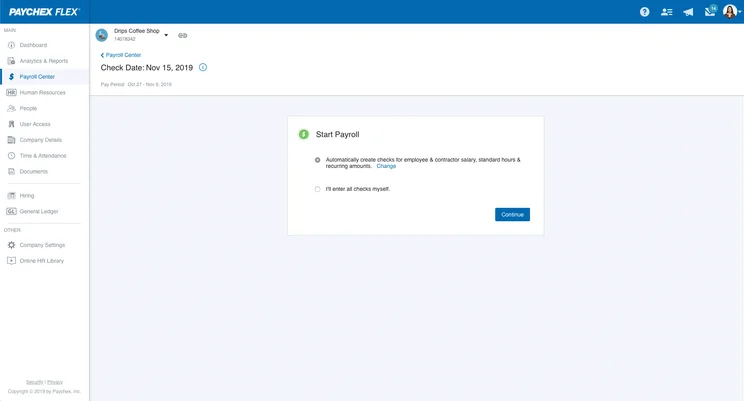
Paychex Flex gives users pop-ups to guide them through processes like starting payroll. Source: Paychex
Paychex is another competitive payroll management service, with prices from $39 per month plus $5 per employee for the provider’s Essentials plan. Paychex offers two other plans, Select and Pro, but the price for these services will depend from business to business.
With a much smaller entry price than ADP, and a lower price per user than our other payroll leaders Rippling and Gusto, Paychex is one of the best value options out there — especially for larger teams.
Paychex is the only provider we reviewed that facilitates instant payments, too. But if you’re looking for advanced capabilities, like tax and labor law compliance, ADP or Ripping are your safest bets.
Learn more about the provider’s fees in our Paychex pricing guide or check out our full ADP versus Paychex comparison.
Gusto — From $49 per month, plus $6 per employee
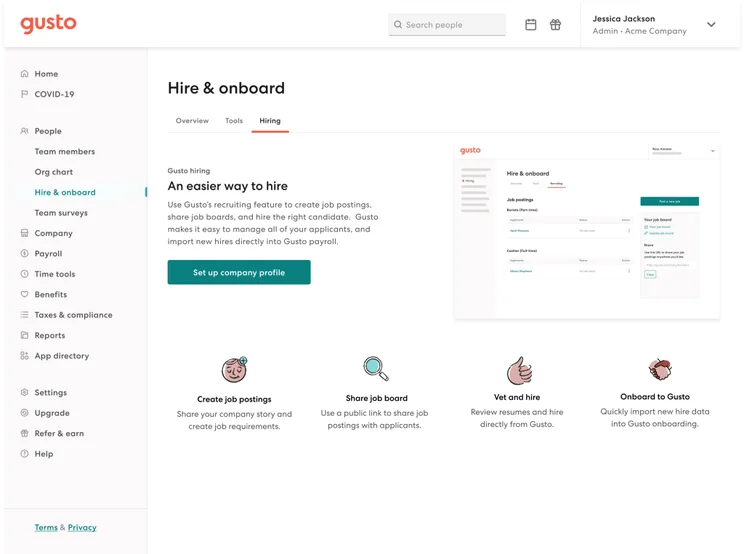
Gusto’s 401k feature ensures managers can support retirement savings for their employees. Source: Gusto
Gusto offers three distinct pricing packages: Gusto Simple ($49 per month, plus $6 per user), Gusto Plus ($80 per month, plus $12 per user), and Gusto Premium ($180 per month, plus $22 per user).
Gusto’s lack of global payroll features and large-scale HR integrations make it less suitable for larger, international businesses when compared to RUN Powered by ADP.
Gusto’s base price is also higher than Rippling’s and Paychex’s — but this doesn’t mean Gusto isn’t a good value. The provider’s Simple plan boasts a number of impressive features, from custom permissions to time-tracking integrations, making it ideal for small businesses that don’t want to fork out for custom packages.
Check out our ADP Payroll versus Gusto comparison guide for more information, or read our full guide to Gusto’s pricing.
How Did We Research and Review ADP Payroll?
We take our impartial research and analysis seriously, so you can have complete confidence that we’re giving you the clearest, most useful product recommendations.
After conducting an initial exploration to identify the most relevant, popular and established tools in the market, we put them through their paces to see their real strengths and weaknesses. In this case, we put eight payroll software platforms to the test across 56 areas of investigation.
Based on years of market and user needs research, we’ve established a payroll software research methodology that scores each product in five main categories of investigation and 10 subcategories; this covers everything from levels of data security and user control, to the customer support each provider offers, and much more.
Our main research categories for payroll software are:
- Control: The level of customization and flexibility provided by the payroll software in managing and processing payroll. It includes features such as the ability to define pay periods, customize earnings and deductions, set up tax withholding rules, and manage employee data.
- Data security: The measures and protocols implemented by the payroll software to ensure the confidentiality, integrity, and availability of sensitive payroll information. This includes encryption of data, secure data storage, access controls, backup and disaster recovery procedures, and compliance with data protection regulations.
- Expertise: The level of knowledge and guidance provided by the payroll software vendor or support team. This can include resources such as documentation, tutorials, training materials and access to payroll experts who can assist users with payroll-related questions.
- Scalability: The ability of the payroll software to accommodate the growth and changing needs of a business. It includes factors such as the capacity to handle an increasing number of employees, support multiple locations or entities, and adapt to evolving payroll requirements, including HR-related functionality and employee benefits.
- Customer support: The various channels and methods available for users to seek assistance and support from the payroll software vendor. This can include email or ticket-based support, phone support, live chat, community forums and self-help resources
When it comes to calculating a provider’s final score, not all research areas are weighted evenly, as we know some aspects matter more to our readers than others. After hundreds of hours, our process is complete and the results should ensure you can find the best solution for your needs.
At Tech.co, we have a number of full-time in-house researchers, who re-run this research process regularly, to ensure our results remain reflective of the present day.
RUN Powered by ADP pricing starts from $79 per month, plus $4 per employee, making it a fairly priced software option for businesses looking to manage their payroll and HR duties in-house — especially for those with larger teams.
RUN’s modular packages offer great value for businesses with custom needs because they only require you to pay for the features you need.
However, businesses that don’t require customizable packages or advanced capabilities, like compliance alerts and HR helpdesks, may be better off opting for alternatives with a smaller base rate, like Rippling, Paychex or the provider’s chat-based service, ADP Roll.
Our diligent research team has poured hundreds of hours of into ranking and reviewing the leading payroll solutions.
We found RUN Powered by ADP to be one of the most competitive options on the market, but if you’re looking for straightforward pricing estimates, our free quote finding tool will be able to match you with a trusted provider in minutes.
ADP Payroll Pricing: Frequently Asked Questions
Small businesses can start setting up ADP Payroll by applying for an Employer Identification Number (EIN) — they can receive a new EIN immediately if applying online, although a mailed application can take up to four weeks. After that, they’ll need to obtain a local state business ID, collect employee documents, select pay periods, buy workers’ compensation insurance and open a payroll bank account.
ADP doesn’t have a minimum user limit. This means it can be used by businesses of any size, including sole proprietorships, entrepreneurs and micro businesses.
The price of payroll software will depend on your business’s size, unique needs, and your chosen provider. However, the typical cost of payroll software tends to range from around $29 to $150 per month, plus an extra $5 to $10 per employee, per month.
If you click on, sign up to a service through, or make a purchase through the links on our site, or use our quotes tool to receive custom pricing for your business needs, we may earn a referral fee from the supplier(s) of the technology you’re interested in. This helps Tech.co to provide free information and reviews, and carries no additional cost to you. Most importantly, it doesn’t affect our editorial impartiality. Ratings and rankings on Tech.co cannot be bought. Our reviews are based on objective research analysis. Rare exceptions to this will be marked clearly as a ‘sponsored’ table column, or explained by a full advertising disclosure on the page, in place of this one. Click to return to top of page


