
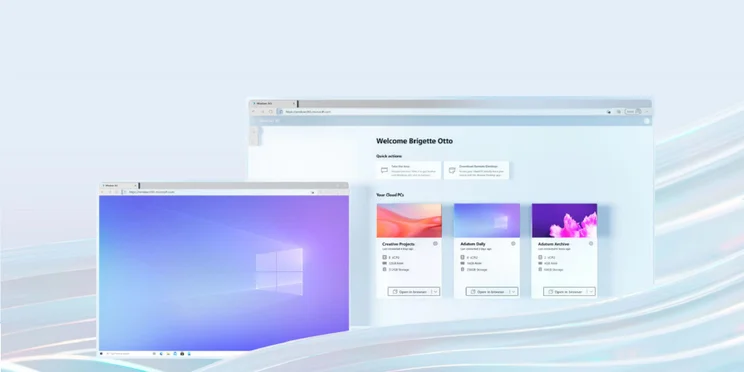
Microsoft has unveiled Windows 365, its cloud based solution for businesses that allows users to access a virtual desktop Windows PC.
The service will remove the need for users to have their own, dedicated PC, and will be accessible through a variety of devices, such as tablets, phones, and yes, other computers. Essentially, anything that can run a modern web browser.
The service is due to launch next month, with details, such as pricing, to follow.
What Windows 365 Will Offer
Microsoft revealed Windows 365 on its blog today, calling it a ‘new era of hybrid computing.” It’s not too hard to see why Microsoft has decided to go down this avenue, with the rise in Subscription as a Service becoming the new norm, at a time when many of us are working remotely, it makes perfect sense to make desktop computing a service too.
So what sort of features can you expect from Windows 365? The service is being pitched as a virtual replacement for the traditional office PC, and right now is only available to business customers.
Microsoft states that this virtual desktop will boot instantly, and be accessible from any device, including Mac, iPad, Linux, and Android. Users don’t even need to save their work between sessions – simply log back in and you’ll be able to pick up right where you left off.
Businesses will be able to purchase different setups depending on their own needs, from entry-level PCs for office-based tasks, to faster CPUs and larger RAM configurations for more heavy workloads. There will be twelve configurations available.
Initially users will be streaming Windows 10, although Microsoft have already said you an expect to be given the option of Windows 11 when it becomes available.
Is Windows 365 the Future?
From a business perspective, Windows 365 will likely be a tempting proposition. It reduces the need to buy every employee dedicated computers, it removes the security concerns about people working from home on unsecured devices, there’s no hardware complications, no compatibility issues, and downtime is pretty much eliminated. It’s also flexible, meaning that adding more virtual computers as the business grows, or removing them if needed, is all done at the click of a button.
Of course, it’s not entirely perfect. Sure, businesses will save money on furnishing their staff with laptops and PCs, but it also removed the autonomy that businesses have over their own kit. You’re also very reliant on Microsoft keeping the service up and running. As this is Microsoft we’re talking about, this is unlikely to be a major issue, but it’s not uncommon for huge tech services, such as Slack or Twitter, to go down. What happens when an outage removes the ability for staff to log into their PCs?
Of course, whether or not Windows 365 will work for a business could all come down to price. We don’t know what that will be yet, with Microsoft stating that it will be announced at a later date, but we can assume it will be a sliding scale, with simpler virtual PC configurations representing the entry-level price. The service will be available on August 2nd.
Alternatives to Windows 365
Many of the services that businesses use are already cloud-based, although Microsoft’s decisions to introduce an entire operating system to the cloud is something of a novelty, and does mean that it’s easier to tie all these other services together in one place.
Remote access software has existed for some time, and is very similar to what Microsoft is proposing with Windows 365, with one large difference — traditional remote access software depends on you accessing another computer in the real world, that you already own, rather than a virtual machine in the cloud. Many workers have been using this software to access their computers from home during the pandemic.
You’ve probably heard of some of the big names in this field, such as TeamViewer, LogMeIn and AnyDesk. At their cheapest, these services start from around $10 per month per users, so we’re interested to see how Windows 365 stacks up when its price is revealed. Of course, Windows 365 won’t be for everyone, and for those that want to access PCs remotely, while still retaining full ownership of their devices, remote access software is still the way to go.
|
Starting price
|
Licensed users
|
Maximum accessible devices
|
Pros
|
Cons
|
|||||
|---|---|---|---|---|---|---|---|---|---|
|
BEST REMOTE DESKTOP SOFTWARE

|

|
FEATURED PROVIDER

|

|

|

|

|

|

|

|
|
Pro by GoTo |
Anydesk |
GoToMyPC |
RemotePC |
ConnectWise |
SplashTop |
Iperius Remote |
Parallels |
||
|
$30/month |
$14.90/month |
$28.90/month |
$1.53/month |
$27/month |
$5/month |
$9.15/month |
$1.67 per month |
||
|
1-30+ |
Unlimited |
1 |
1-unlimited |
1-50 |
1-unlimited |
1 |
2-10 |
Unlimited |
1-unlimited |
|
200-500 |
2-10 |
25 |
1-unlimited |
Unlimited |
2-100 |
10-unlimited |
2-10 per user |
Unlimited, but 2-100 concurrent connections |
5 computers, unlimited mobile devices |
|
|
|
|
|
|
|
|
|
|
|
|
|
|
|
|
|
|
|
|
If you click on, sign up to a service through, or make a purchase through the links on our site, or use our quotes tool to receive custom pricing for your business needs, we may earn a referral fee from the supplier(s) of the technology you’re interested in. This helps Tech.co to provide free information and reviews, and carries no additional cost to you. Most importantly, it doesn’t affect our editorial impartiality. Ratings and rankings on Tech.co cannot be bought. Our reviews are based on objective research analysis. Rare exceptions to this will be marked clearly as a ‘sponsored’ table column, or explained by a full advertising disclosure on the page, in place of this one. Click to return to top of page


