

We may receive a commission from our partners if you click on a link to review or purchase a product or service. Click to Learn More
Microsoft has subtly begun to roll out its Microsoft Autofill password feature, meaning that the days of trying to juggle all those passwords could well be over for millions of users worldwide. It’s a warning shot, too, for third-party password managers such as LastPass.
It’s not currently available to everyone – in fact it’s restricted to just Microsoft’s Authenticator app at the moment, and is marked as being a beta option in the Chrome plugin store. This is very much a first foray for the company, but a sign of more to come.
Password managers already exist, of course, and browsers such as Chrome or Safari already offer to remember your logins. But, Microsoft’s Autofill option could be a great introduction for many into the world of password managers that work between different browsers and platforms.
What Does Microsoft Autofill Do?
As the name suggests, Microsoft Autofill automatically enters your password for various sites. It aims to reduce the need to remember numerous passwords – a bane for most web users.
The beauty of this new feature is that it syncs your passwords across Microsoft’s Edge browser, on your phone, and even on Google’s Chrome browser (with the help of a dedicated extension).
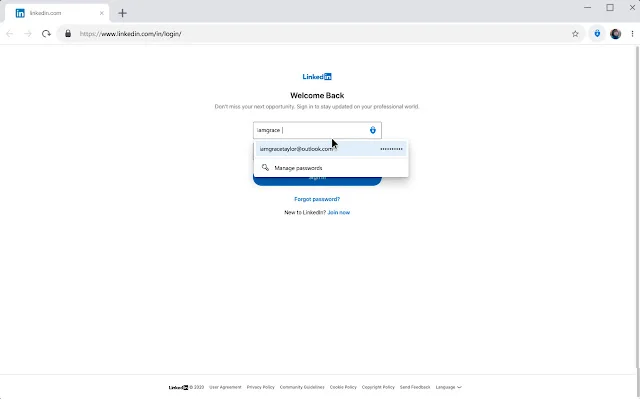
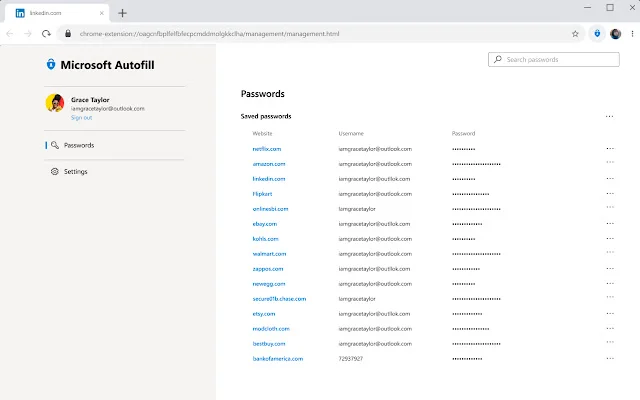
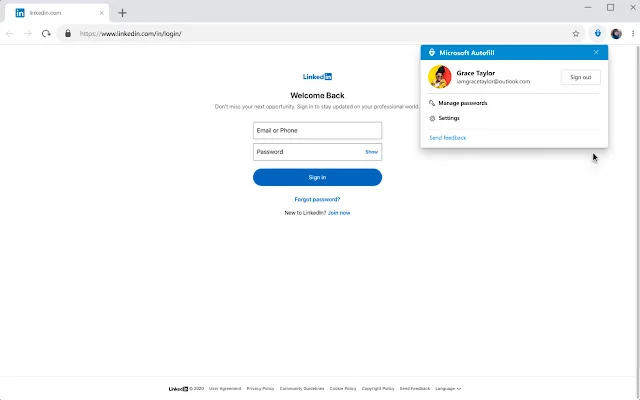
There are a few restrictions to be aware of. You need to create a Microsoft account – which can be done for free, if you don’t already have one. It’s not currently available for enterprise customers who use the app for phone sign in or multifactor authentication. However, exemptions can be made provided that businesses sign up to an Allow-list.
How to get Microsoft Autofill
To use the password autofill option, you’ll first need to download the Microsoft Authenticator app. If you’re not familiar with it, it’s an app that’s used for two-factor authentication, and is freely available on the Google Play and iOS stores.
Once downloaded, head to the settings and you’ll find an option marked Autofill. You’ll need to turn this on. It’s marked as a beta function at the moment, so it appears that Microsoft is treating first-wave Authenticator users as guinea pigs for the feature.
After this, head to the Passwords tab of the app, sign in, and make the Authenticator app your default autofill provider on your phone.
There are step by step instructions available on Microsoft’s site.
Should I Pay for a Password Manager?
Microsoft’s first steps here are positive, but they’re still behind others in the industry, such as Google. It’s still a positive move on their part, and the more of us that don’t need to remember our passwords in the first place, and cave to dubiously non-secure practices such as writing them down or using the same ones, the better.
At Tech.co we’re still big believers in signing up for a dedicated password manager, and Microsoft’s offering hasn’t changed our mind.
At Tech.co we’re still big believers in signing up for a dedicated password manager, and Microsoft’s offering hasn’t changed our mind.
The benefits you get from a paid-for password manager really can’t be topped, and we’ve yet to see a free offering that can compete. Tools such as password generators, breach alerts, and the ability to seamlessly log into various devices at the click of a button are the kind of things you get when you shell out a few dollars a month. Take it from us, it’s well worth it.
Read about the Password Managers of 2020
|
Test Score
Our scoring is based on independent tests and assessments of features, ease of use and value.
|
Local Storage Option
|
Two-Factor Authentication
|
Failsafe Function
|
Password Generator Function
A password manager can create secure, complex passwords for you. You won't need to remember them yourself.
|
Help Instructions
|
Email Support
|
Live Chat Support
|
Phone Support
|
Price
|
Click to Try
|
||
|---|---|---|---|---|---|---|---|---|---|---|---|---|

|

|

|

|

|
||||||||
|
Dashlane |
LastPass |
NordPass |
Sticky Password |
|||||||||
|
4.4
|
4.3
|
3.9
|
3.9
|
3.9
|
||||||||
|
|
|
|
|
|
||||||||
|
|
|
|
|
|
||||||||
|
|
|
|
|
|
||||||||
|
|
|
|
|
|
||||||||
|
|
|
|
|
|
||||||||
|
|
|
|
|
|
||||||||
|
|
|
|
|
|
||||||||
|
|
|
|
|
|
||||||||
|
$8 per user/month |
$2.40/month |
$1.69/month |
$19.99 per year |
|||||||||
| Try 1Password | Try Dashlane | Try LastPass | Try NordPass | Sticky Password |
If you click on, sign up to a service through, or make a purchase through the links on our site, or use our quotes tool to receive custom pricing for your business needs, we may earn a referral fee from the supplier(s) of the technology you’re interested in. This helps Tech.co to provide free information and reviews, and carries no additional cost to you. Most importantly, it doesn’t affect our editorial impartiality. Ratings and rankings on Tech.co cannot be bought. Our reviews are based on objective research analysis. Rare exceptions to this will be marked clearly as a ‘sponsored’ table column, or explained by a full advertising disclosure on the page, in place of this one. Click to return to top of page


