We may receive a commission from our partners if you click on a link to review or purchase a product or service. Click to Learn More
With cybersecurity threats on the rise and data breaches occurring almost every week, it’s natural to ask: What is the most secure operating system (OS)? Unfortunately, the answer isn’t straightforward.
A lot of people seem to think that Macs can’t get viruses, for instance, and that Windows computers are less secure than some other operating systems. ChromeOS, on the other hand, was built with security in mind and is considered more secure than both – but very few people use it.
No operating system is absolutely foolproof – and even if one was today, it might not be tomorrow, such is the nature of emerging cyber threats. So, investing in affordable antivirus packages like Surfshark One is always a good idea, no matter how secure your operating system appears to be.

Shield your devices from malware with Surfshark One
You'll get a VPN and an antivirus rolled into one
Plus, there's a 30-day money back guarantee
The Big 4 Operating Systems Ranked by Security
Below, we’ve delved into the security protocols and features available from the world’s most popular operating systems. Here’s what we cover:
Remember, although Windows has a reputation for being less secure than macOS, Linux and ChromeOS, that’s not because Microsoft isn’t spending enough money on its security infrastructure, or rolling out updates slowly.
The primary reason that Windows is generally considered the least secure is that it’s the most popular operating system in the world, so more malware gets made for Windows devices than any others.

ChromeOS – the most secure OS
Google’s ChromeOS is an ultra-secure OS that is generally considered more secure than the likes of Windows, macOS, and even Linux.
ChromeOS was designed with user safety in mind. It’s built on top of a Linux kernel (the most basic OS component that can properly interface with PC hardware) but has been hardened for security purposes, meaning it’s much more robust than other mainstream operating systems.
On ChromeOS, all updates are automatic, which means that you’re always using the most recent version of ChromeOS.
On top of this, Google protects ChromeOS users with a technique called “sandboxing” – running websites and apps as individual, isolated processes – to stop malware in its tracks. Even if you go to a malicious website, the malware won’t be able to travel outside of the application contained within that sandbox.
Chrome OS has specific parts of its architecture geared toward combatting ransomware. For instance, it’s a read-only operating system – everything is saved to the cloud rather than locally on a user’s device – which doesn’t make it a very welcome environment for ransomware to operate in. There’s also a “verified boot” mechanism that means the system won’t boot up if it’s been modified in some way.
Specific protection against phishing attacks and other online scams, such as malicious website warnings, are also included in ChromeOS.
Linux – historically considered the most secure operating system
Historically, Linux was considered to be the most secure operating system available. One aspect that’s always made it a more secure system than Windows is that root-level (administrator) access rights are not given to every user. If you want to run an executable program on Linux, you have to enter the root-level password.
This means that it’s harder for malware to cause system-wide damage if it manages to worm its way into a device running Linux. it’s easier to remove the virus if a user account, rather than a root-level account, is the only part of th system impacted.
Linux code is open-source and there’s a large community of knowledgeable developers and engineers hunting for vulnerabilities and patching software bugs.
Another advantage is the Linux distribution model. Linux distributions (distros) are operating systems compiled from components that have come out of open-source projects. This has allowed security-focused operating systems like Qubes OS to arise.
Of course, Linux has always had another advantage: it’s not a very popular operating system. Far fewer people use it than Windows. This means that cyber criminals haven’t made relatively little malware for it, at least compared to its widely-used rival.
However, this is slowly changing. Linux is more popular now than it’s ever has been before, which has likely led to an increased malware threat users should be aware of. In fact, some reports suggest that Linux malware reached an all-time high in 2022.
macOS – a secure OS with great built-in security features
As we mentioned in the introduction to this article, the idea that Apple products can’t get infected with malware is a myth – but there’s a good reason behind it.
For starters, Apple’s hardware and software are tightly integrated with one another. Virtually all physical devices running macOS will be an Apple product, whereas Windows can be – and regularly is – installed on a range of different devices that aren’t manufactured by Microsoft, such as computers from Dell, HP, ASUS, etc.
That means Apple can have tighter control over its security updates, focus its support better around a smaller collection of devices and secure its hardware perimeter in a more meaningful way.
macOS is also full of top-quality security features, such as Gatekeeper, which vets all apps you download from the App Store, and XProtect, which scans documents for malicious code. All in all, there are plenty of features to keep users safe, and macOS is by no means an unsecure system.
If you’re a Mac user, it’s important to remember that your OS is not impenetrable, and there’s quite a lot of Mac malware out there now. In 2020, for instance, cybersecurity researchers charted a surge in the amount of Mac malware being distributed – but as we’ve said, it still pales in comparison to the number of viruses created for Windows computers.
Windows – considered the least secure OS
As was mentioned earlier, the key reason that Windows appears more vulnerable than Mac, Chrome, and Linux products is simply that it’s used by a larger number of people. This incentivizes threat actors to create malware for Windows more so than any other operating system, and the threat level is simply higher due to this.
Although Windows offers multi-user systems now, historically, you’d always log in as an administrator. This meant that if you were compromised, the threat actor would have instant access to system-level privileges that could then be used to escalate the attack further. This is not the case with macOS or Linux, and never has been.
What’s more, Windows code is not open-source like Linux and Mac, so Microsoft has to rely on its engineering team to spot and patch vulnerabilities.

VPNs Enhance Your Privacy And Security Online
Find out more about the best providers on the market
The Most Secure Mobile Operating Systems
Due to the fact that Apple’s iOS for iPhone and Google’s Android OS hold a combined 98% of the global market share for mobile operating systems, we’re going to focus here on which one of the two is more secure. All things considered, iOS is more secure than Android OS.
Unfortunately, Android OS’s popularity – 68.61% of the world’s phones run Android OS – is a curse, much like the one that affects Windows.
Android is simply a more attractive proposition to cyber criminals than iOS, as whatever malware they’re distributing has the potential to affect more people.
Another key difference that affects security is source code status. Neither app developers nor users can edit iOS code, so it’s very hard for threat actors to uncover vulnerabilities, or for iPhone users tinkering with settings to inadvertently create vulnerabilities themselves.
Conversely, the Android operating system is open-source, so members of the public can play around with it. This does mean that, although you have an ecosystem of IT experts out there spotting bugs, anyone that wants to create malware for Android devices can ensure their insidious creation integrates smoothly into Android’s code architecture.
Open-sourcing software is considered by many to be good practice and a key reason why OS like Linux are secure. But in the case of iPhones, Apple’s closed code seems to have made it harder for cyber criminals to find flaws than Google’s more open, editable system.
Just like macOS products, iOS is integrated with Apple hardware on iPhones. This means it can’t be installed on other devices in the same way the Android OS can be, which has a myriad of security benefits relating to security updates and bug patches. According to one estimation, only 12% of Android users are running the latest OS, Android 13 – which is much, much lower than the proportion of iPhone users running the latest iOS.
Additionally, every OEM (device manufacturer) making devices running Android OS can, in theory, introduce its own vulnerabilities.
Another reason iOS is typically considered more secure than Android is that Apple has made it much harder for users to sideload apps from outside of the official store onto devices than Google has ever made it to do the same on Android. All in all, it’s probably easier to get an Android user to download a shady app than it is an iOS user, purely on this basis.
However, it must be noted that Apple – under pressure from the European Union in the name of fair competition – announced that sideloading will be coming to iPhones when iOS 17.2 was released in March 2024. However, the sideloading process will likely be heavily restricted.
Security-Focused Operating Systems
Beyond the mainstream operating systems we’ve been discussing in this article – such as Windows and Mac – there’s a small ecosystem of operating systems built specifically to be hyper-secure.
Qubes OS
One of the most talked-about security-focused operating systems is Qubes OS, which is an open-source OS built on top of Linux.
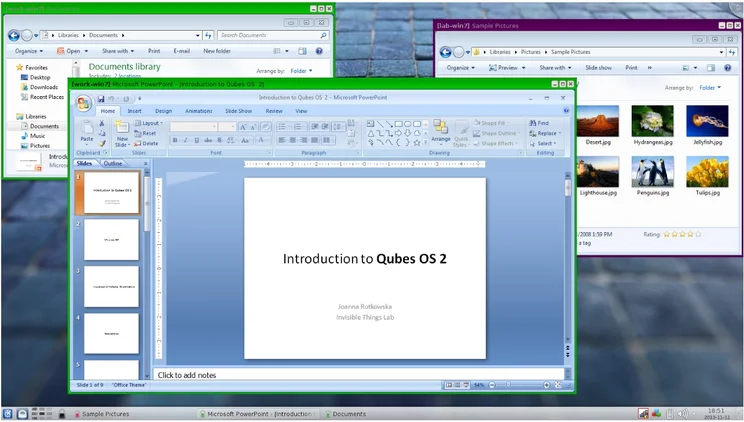
As Qubes OS puts it, the software “implements a security-by-isolation approach” giving users the ability to “create many security domains”. These domains are then implemented by virtual machines based on popular operating systems like Windows and Linux distros like Debian and Fedora. It’s not quite the same as ChromeOS’s sandboxing mechanism but achieves a similar effect.
Although Qubes OS encourages users to make donations, downloading and installing the software itself is completely free.
TAILS OS
Other security-focused operating systems go to great lengths to anonymize user activity, which is vital for people living under authoritarian regimes that enforce stringent censorship laws.
TAILS OS achieves this by exclusively connecting to the internet via the Tor network. What’s more, according to TAILS itself, “you don’t have to worry about the computer having viruses because Tails runs independently from the other operating system and never uses the hard disk.”
TAILS OS is a 1.3 GB download and takes around half an hour to install, according to the information available on its website. Interestingly, it’s actually compatible with mobile devices, which cannot be said for every security-focused operating system currently available.
Whonix OS
Whonix OS is another privacy-focused, security-hardened operating system, which has an excellent track record of defending its users against dangerous cyberattacks.
It effectively functions like an app on your device and will reroute all of your internet activity through the Tor network in the same way as TAILS does.
Whonix utilizes a Debian base which, like Qubes OS, is run inside multiple virtual machines (VMs). Whonix says that this architecture “provides a substantial layer of protection from malware and IP leaks”.
Secure OS vs Antivirus: Which One Should You Choose?
We’ll cut to the chase: No mainstream operating system is intrinsically “unsecure”, but some definitely take a security-first approach and offer more robust protection against cyberattacks than others.
Security won’t be your only priority when choosing an operating system though – your primary use case for your device will likely determine which one is the best fit.
Computers running Windows will be much better than Chromebooks if your core use case is gaming, as Chromebooks don’t have much local storage at all. Similarly, Linux wouldn’t be our recommendation for most general users or as a first PC, due to its barebones interface.
There’s no mainstream operating system that is inherently “unsecure” by design. It’s just that some are ultra-secure and built with security in mind.
You can secure any operating system you choose with a reliable antivirus program. You could opt for a major business-focused antivirus provider like BitDefender or Norton Antivirus, but there are other options out there too.
For example, Surfshark Antivirus – part of the provider’s Surfshark One security package, which also includes a secure VPN – is a lightweight antivirus solution that can scan all your files and downloads. It’s available on devices running Android, macOS, and Windows PCs. It may not have a firewall, but it’s significantly cheaper than traditional antivirus software, and great if you want instant protection for very little money.
Due to the prevalence of Windows malware, we’d highly recommend using Surfshark One or a similar antivirus program if you’re using a Windows PC. It should not, of course, be treated as a replacement for native security options that can be turned on and off.

Surfshark One: Antivirus, VPN and Safe Search
Available for Android, iOS, macOS, Windows and Linux.
All in all, ChromeOS is the most secure, mainstream operating system available on the market. Its clever sandboxing mechanism, plus features specifically designed to protect users against phishing and ransomware attacks, means it’s very tough for various types of malware to break through its defenses.
As we’ve said, however, antivirus software is a must-have, regardless of how secure your operating system is. New, dangerous cyber threats are emerging by the day, and there’s no operating system that claims to be completely and utterly impenetrable.
Antivirus software such as Surfshark One is a good place to start, especially if you’re running Windows on your device. But we’d also recommend reviewing antivirus software programs that come with firewalls, especially if you’re a business.
FAQs
ChromeOS is the most secure mainstream operating system and is the operating system used on all Chromebook laptops. However, Qubes OS – a lesser-known security-focused OS – is designed to be ultra-secure and is one of the safest operating systems you can currently download.
There’s no such thing as water tight operating system. All OS can be “breached” by some means. However, Google has done a pretty good job of making ChromeOS as secure as possible, and you’re extremely unlikely to have a device running ChromeOS compromised by an attack.
ChromeOS uses a technique called sandboxing which isolates device processes. If you’re using a Chromebook and you visit a malicious webpage, thanks to ChromeOS sandboxing, it won’t be able to access or affect any other part of the device. Furthermore, Chrome is a read-only OS, which makes it inhospitable for ransomware and other types of malicious programs.
Devices running Windows OS are likely to get the most viruses, but that’s in part because cyber criminals make more viruses and malware for Windows than any other device. The reason for this is simply the popularity of Windows – the overwhelming majority of computer users worldwide use Windows as their operating system.
Although all mainstream operating systems are “secure”, devices running Windows tend to get the most viruses. This is largely because Windows is the most popular operating system in the world, so cyber criminals target it the most. However, Windows is not open source, which is generally considered a good way to identify bugs and vulnerabilities, and historically Windows has deployed a less strict system privileges model than the likes of Linux.
If you click on, sign up to a service through, or make a purchase through the links on our site, or use our quotes tool to receive custom pricing for your business needs, we may earn a referral fee from the supplier(s) of the technology you’re interested in. This helps Tech.co to provide free information and reviews, and carries no additional cost to you. Most importantly, it doesn’t affect our editorial impartiality. Ratings and rankings on Tech.co cannot be bought. Our reviews are based on objective research analysis. Rare exceptions to this will be marked clearly as a ‘sponsored’ table column, or explained by a full advertising disclosure on the page, in place of this one. Click to return to top of page


